Key takeaways
- Our invented list of 7 loads needs 2.83 kW, 4.33 kW at surge and 10.64 kWh a day. Energy sets the unit count (3 units) and power does not.
- Whole-home backup changes the answer: the example whole-home list totals 18.33 kW and 56.14 kWh a day, against 2.83 kW and 10.64 kWh for the critical list.
- Battery only, 3 units (15 kWh usable) run this example’s list for 34.5 hours.
- Modelled solar on the lowest December day of a typical-year file stretches that to 47.4 hours. On the median day the run reaches the 168-hour stop.
- In the sources read, a grid-tied PV system with no battery stops in an outage. Solar helps only if the backup system lets it run.
To estimate backup duration in software, see best solar battery storage design software.
Backup power and critical loads at a glance
A critical-loads design backs up a chosen set of circuits. A whole-home design backs up everything. Tesla’s support page describes the same two choices, whole home and partial home backup.
| Item | Detail |
|---|---|
| Formulas | Running kW = sum of running watts. Surge kW = running kW + the largest (starting multiplier minus 1) x watts. Daily kWh = sum of watts x hours. Battery energy = daily kWh x hours promised / 24 / discharge efficiency. |
| Typical range | No sourced typical load list. Ours is example: 10.64 kWh a day. |
| Where it matters | Quotes, backup promises, panel design, battery count and plan review. |
| Standard or rule | Not covered here. Ask the manufacturer and the AHJ. |
| In software | Backup-duration estimates in some design tools. See the software table. |
Why do critical loads matter for installers?
The load list is the promise. A wrong list means a battery that runs out early or cannot start a pump. That is a callback, not a rounding error.
- Scope: Aurora’s backup-duration page sets the share of the load profile that is backed up. Tesla says partial backup lets you choose essential loads. It adds that heavy 240 V loads depend on the Powerwall count and backup type.
- Unknown outage length: an SMA author writes that most outages have no fixed duration (Solar Builder, July 2020). So say how many hours you design for.
- Load data: a metered profile beats a guess. See consumption load profile.
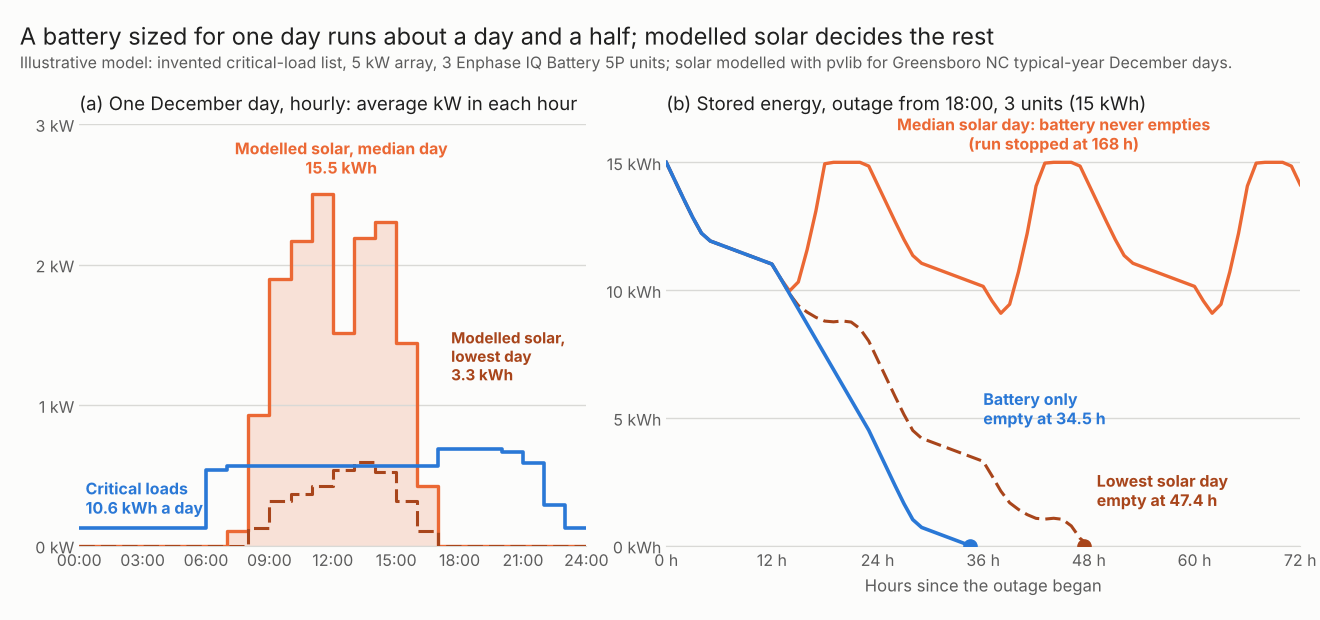
Figure 1. In an example, 3 battery units run the critical list for 34.5 hours alone. Modelled solar stretches that to 47.4 hours on the lowest December day and past 168 hours on the median day.
How do you size backup power?
List the loads, find kW and kWh, then check both against the battery’s sheet.
- List the loads on the backup panel. Record running watts and hours a day from a nameplate or a meter. Use a winter day if heating runs.
- Add the running watts. This is the cautious case, with everything on. A measured coincident peak may be lower.
- Find the surge. Start with the running total, then add the largest extra start. The multiplier is a guess until you read the motor’s label or the manufacturer’s start current.
- Find the energy. Multiply watts by hours for each load, then scale by the hours you promise. Divide by discharge efficiency and the usable share.
- Compare with the datasheet. Use usable kWh, continuous power and peak power. Check how the sheet measures each. See battery storage design.
- Add solar last. Count it only if the equipment lets solar run in an outage. See the solar section.
Worked example: seven critical loads and one battery
Every load, hour, window and multiplier below is an example, illustrative assumption. The battery is the Enphase IQ Battery 5P, model IQBATTERY-5P-1P-NA, data sheet DSH-00010-8.0 (August 2024). It lists 5.0 kWh usable and 3.84 kVA rated. Its peak is 7.68 kVA for three seconds. AC round trip is 90% at 50% power rating.
Table 1. The critical-load list (illustrative). Hours are spread evenly across the window.
| Load | Running W | Hours a day (window) | Start multiplier | kWh a day |
|---|---|---|---|---|
| Refrigerator-freezer | 150 | 10 (00:00 to 24:00) | 4 | 1.500 |
| Router, modem, chargers | 60 | 24 (00:00 to 24:00) | 1 | 1.440 |
| Gas-furnace blower | 600 | 8 (06:00 to 22:00) | 3 | 4.800 |
| Well pump | 750 | 1.5 (06:00 to 21:00) | 3 | 1.125 |
| LED lighting | 120 | 6 (06:00 to 23:00) | 1 | 0.720 |
| TV and laptop | 150 | 5 (17:00 to 23:00) | 1 | 0.750 |
| Microwave | 1,000 | 0.3 (07:00 to 20:00) | 1 | 0.300 |
| Total | 2,830 | 10.635 |
Running load is 2.83 kW. The largest extra start is the well pump or furnace blower, whichever is larger: 750 W x (3 minus 1) = 1.50 kW. That gives 4.33 kW at surge. The sheet gives kVA, not kW, so we treat 1 kVA as 1 kW. The sheet does not say which side the 5.0 kWh is measured on. We assume DC battery energy. We also assume the 90% AC round trip splits equally between charge and discharge (square root of 0.90 each way). So energy delivered per unit is 5.0 x sqrt(0.90) = 4.74 kWh. The sheet also lists a 96% DC round trip and Power Start of up to 48 A LRA ("may vary"). We use neither.
Table 2. Load totals for each case (illustrative).
| Case | Daily kWh | Running kW | Surge kW |
|---|---|---|---|
| Critical list | 10.64 | 2.83 | 4.33 |
| Whole home | 56.14 | 18.33 | 21.33 |
The critical-list totals are the same for the 24-hour and 72-hour cases. The whole-home case adds a water heater, heat pump, dryer and range.
Table 3. Battery units needed for each case (illustrative). The sheet states no rule for combining units, so counts add arithmetically.
| Case | Units by energy | By running kW | By surge kW | Units |
|---|---|---|---|---|
| Critical list, 24 h | 3 | 1 | 1 | 3 |
| Critical list, 72 h | 7 | 1 | 1 | 7 |
| Whole home, 24 h | 12 | 5 | 3 | 12 |
For 24 hours the critical list needs 11.21 kWh on the battery side, so 3 units. One unit covers the power. The result stays at 3 units if usable energy is read as AC delivered, or if the round trip is 85%. A 2 or 5 times motor-start multiplier does not change the single-unit surge check either. The whole-home case needs 12 units by energy. It needs 5 by running kW if everything runs together.
Table 4. Runtime in hours from a full battery, outage starting 18:00, the same day repeated (illustrative load, solar modelled). The run stops at 168 hours.
| Units | Usable kWh and continuous kW | Battery only | With solar, median day | With solar, lowest day |
|---|---|---|---|---|
| 1 | 5 kWh and 3.84 kW | 13.8 | 13.9 | 13.8 |
| 2 | 10 kWh and 7.68 kW | 22.2 | 168+ (stopped) | 27.2 |
| 3 | 15 kWh and 11.52 kW | 34.5 | 168+ (stopped) | 47.4 |
| 4 | 20 kWh and 15.36 kW | 44.1 | 168+ (stopped) | 61.0 |
Runtime uses hourly average power only, so use the running kW and surge kW columns in Table 2 for the power check. A load above the unit’s continuous rating can hide in an hourly average.
Solar is modelled with pvlib, not measured. The array is an assumed 5 kW DC, 25 degree tilt, facing south, 14% losses. Weather is the typical-year file for Greensboro, NC. Output on the median December day is 15.5 kWh and on the lowest day 3.3 kWh. Because it is a typical year, real bad weather can be worse. Solar counts as available in the outage, which depends on the equipment. A simple average-power estimate gives 32.1 hours for 3 units. The hourly run gives 34.5, because the load varies by hour.
Backup power calculator
Enter your own load list, battery unit and solar day. The preset buttons give the same results as Tables 1 to 4 and the whole-home case.
What can solar add in an outage, and why does grid-tied PV stop?
A grid-tied inverter must stop sending power when the grid fails, so PV-only systems go dark. Solar can return in an outage only if a battery system forms the local AC supply and the equipment allows it.
- Why it stops: an NLR (formerly NREL) slide deck (Kroposki, August 2016) says IEEE 1547-2003 requires the system to detect an island. It must then cease to energize within two seconds. A 2019 NREL overview report says IEEE 1547-2018 kept this two-second (or less) trip time unchanged from the original standard, though the full 2018 text is paywalled, so check your inverter’s own anti-islanding listing against the edition your utility has adopted. Penn State’s course page says grid-bound inverters must detect outages and block power transfer to meet UL 1741.
- How it can return: an SMA author writes that in backup mode the storage inverter forms the AC waveform. That lets the PV inverter resume and possibly recharge the batteries (Solar Builder, July 2020). He adds that with no grid to take excess power, a PV inverter needs a frequency-watt response to cut output.
- A company limit: Tesla’s design guide (modified 11 September 2025) allows up to 7.68 kW AC of solar per Powerwall in the backup circuit. For PV above the 5 kW charge rate per Powerwall, it says the system may shift frequency to cut PV. It may also shut it down. It says damage from excess PV in an outage is out of warranty. That is one product’s rule, so read each maker’s.
The solar columns in Table 4 assume the system lets PV run and discards surplus. See AC coupling vs DC coupling for the layouts and rapid shutdown for roof wiring. For sites with no grid, see off-grid system design.
How solar software handles backup power
Aurora and REopt model duration or survival with solar. Neither page mentions surge power, so check it by hand. Ratings reflect only what each page states.
| Software | Estimates backup duration or outage survival? | Method | Notes |
|---|---|---|---|
| Aurora Solar | Yes (duration) | Modelled, hourly | Page stamp 13 September 2026. Surge and critical loads are not mentioned. A 7 November 2025 page covers a backup toggle and reserve. |
| NLR (formerly NREL) REopt (Lite tutorial) | Yes (survival) | Modelled | Page source updated 12 February 2025. Research tool, no profile page. Surge is not covered on the page. |
| Enphase estimator (estimator.enphaseenergy.com) | Partly | Indicative | Undated page. Says it is a preliminary estimate. Not a design tool. |
| Sol-Ark battery and hybrid inverter sizing tool | Not stated | Not stated | Page last modified 17 February 2026 (as the page prints it). |
Not stated, in any column including Method, means the company page we cite does not say. Partly means the page gives only a rough estimate. How each tool works, as its page describes it:
- Aurora Solar. The "Backup Duration Calculations" page lists five inputs: hourly load profile, hourly production, the share of the load profile backed up, usable capacity and round-trip efficiency. Excess PV charges the battery. The result is a P90 value.
- NREL REopt. It takes a critical load as a share of typical load and an outage start and length. It meets the load from PV and storage during the outage.
- Enphase estimator. Choose appliances for an outage and set backup hours. Capacity comes from backup energy, backup power and surge factors.
- Sol-Ark sizing tool. The page says it helps find battery bank, hybrid inverter and panel size from sun hours and the devices you want to power. The input form is an embedded spreadsheet that the page read does not show.
Ranked options are in best solar battery storage design software.
Common mistakes with backup power
FAQs
Why does my solar system shut down in a power cut?
A grid-tied inverter must stop energizing when the grid fails. An NLR (formerly NREL) deck quotes IEEE 1547-2003 as requiring this within two seconds. A later NREL report says IEEE 1547-2018 kept this trip time unchanged, but the standard’s own text is paywalled, so check your inverter’s listing against the edition your utility requires. Solar can run again only with a battery system that forms its own AC supply.
What is the difference between a critical loads panel and whole-home backup?
A critical loads panel carries only chosen circuits. Whole-home backup carries everything. In our example the whole home needs 12 units by energy against 3 for the critical list.
How long will a battery run my critical loads?
Hours = usable kWh divided by average kW, then check the hourly profile. Your own list sets the answer. For 3 units and this example’s list, the hourly run gives 34.5 hours.
Can solar recharge the battery during an outage?
Only if the equipment lets PV run in backup mode and the sun is out. On the modelled lowest December day, solar added 12.9 hours for 3 units. On the median day it kept the battery going past 168 hours.
Related terms
- Battery storage design: choosing battery kWh and kW for a goal.
- AC coupling vs DC coupling: where a battery joins solar.
- Self-consumption: using your own solar on site.
- Microgrid design: picking equipment for loads that can run off grid.
Next step: check your own backup hours with the calculator above. Then use the best solar battery storage design software list to find a tool that models duration.
Sources
- Enphase IQ Battery 5P data sheet, DSH-00010-8.0-EN-2024-08-27 (checked October 2026).
- NREL, Prevention of Unintentional Islands in Power Systems with Distributed Resources, NREL/PR-5D00-67185, 24 August 2016 (checked October 2026).
- NREL, An Overview of Distributed Energy Resource (DER) Interconnection: Current Practices and Emerging Solutions, NREL/TP-6A20-72102, April 2019 (checked November 2026).
- Penn State AE 868, Interconnection Codes and Technical Issues (undated, checked October 2026).
- Solar Builder, Optimizing solar + storage for backup operation, Michael Mahon (SMA America), 28 July 2020 (checked October 2026).
- Tesla Powerwall 3 System Design Guide, AC-Coupled Solar System Sizing, modified 11 September 2025 (checked October 2026).
- Tesla support, What does Powerwall back up (undated, checked October 2026).
- Aurora help, Backup Duration Calculations and Simplified Battery Backup Configuration (checked October 2026).
- NREL, REopt Lite tutorial module 6 and Resilience Outputs, NREL/FS-7A40-76678, May 2020 (checked October 2026).
- Enphase estimator and Sol-Ark sizing tool page (checked October 2026).
- Solar model: pvlib 0.16.1 with the NREL TMY3 file for station 723170 (Greensboro, NC) shipped with pvlib.
Last updated 30 October 2026. Next scheduled review: 30 January 2027.