Key takeaways
- On Aurora, a link has a life. Web proposal links expire 60 days after sending. A design or financing change after sending needs a new link.
- In the invented example below, a link sent on 3 November 2026 expires on 2 January 2027. A customer back on 10 January 2027 needs the link sent on 23 November.
- Only Aurora documents view tracking. OpenSolar and Pylon document e-signature, and Arka lists a signature section.
- The "interactive" part varies. Aurora lets the customer switch between two financing options. OpenSolar’s Swipe Proposal is a swipe-through flow of chapters.
- The evaluation table below holds seven questions to put to a company before you rely on a web link.
To send and track web proposals from software, see the best solar proposal software.
Interactive web proposal at a glance
| Item | Detail |
|---|---|
| What it is | A proposal opened through a web link. It has on-screen controls such as charts, a design view or a financing switch. |
| Versus a PDF | A PDF is a fixed file. Aurora’s API reference says a proposal can be "sent digitally via a shared link, or shared as a PDF document", both from the same design. |
| Link lifetime | Aurora: 60 days from sending. The pages read for the other companies do not state one. |
| Where it matters | The sales follow-up, the financing choice and the signature. |
| Standard or rule | No standard. Each company decides what "interactive" means. |
Why interactive web proposals matter for installers
A web link lets the customer look at the proposal again when you are not in the room. It also adds a task. On Aurora, the link can expire. It can also show an out-of-date error.
Some tools tell the rep when the link was opened. Aurora’s page lists the send date and the expiry. It lists the last viewed time and whether a follow-up was requested. It also says the rep gets an email when a follow-up is requested. So the next call is a reply, not a guess.
The risk is a mismatch. On Aurora, the rep may edit the design after sending. The customer may then see an out-of-date error page. Treat the link as part of the sales record.
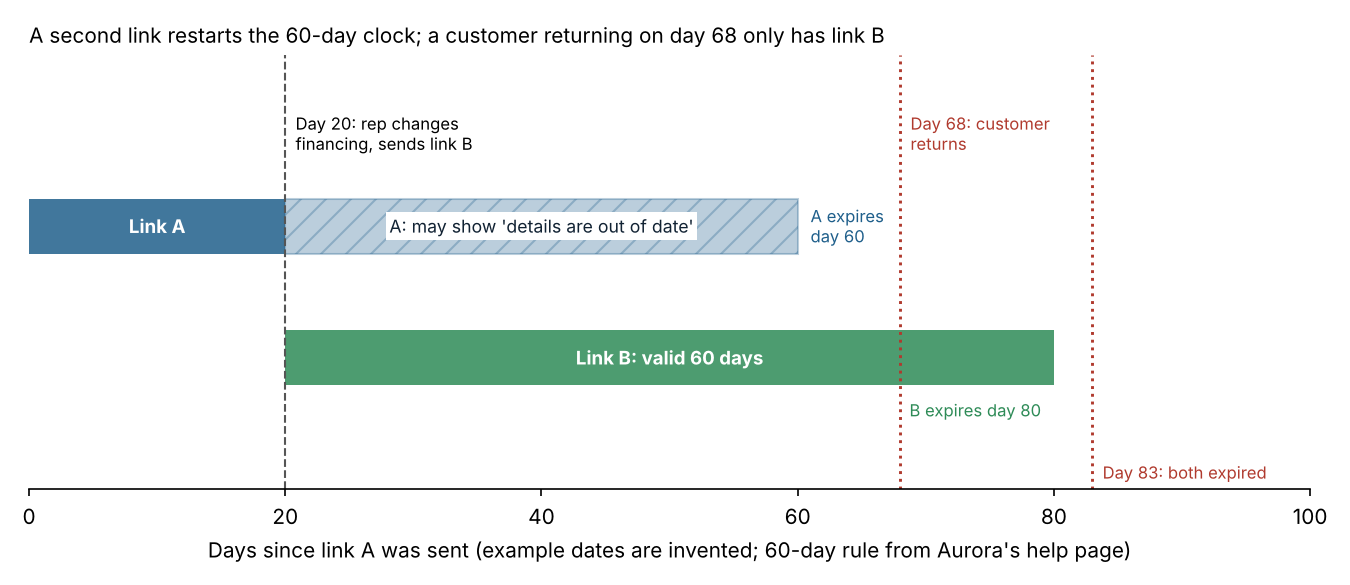
Figure 1. In this example, a day-20 financing edit needs link B. A customer who returns on day 68 can only use link B.
How does an interactive web proposal work?
The tool takes the finished design, production estimate and financing choice. It posts them at a unique URL. The customer opens it in a browser. The steps below follow Aurora’s help pages, which document the flow best. Other tools differ in detail.
- The rep finishes the design and financing in the sales tool.
- The rep shares the proposal. Aurora makes "a unique URL for each design" created in Sales Mode.
- The customer opens the link. On Aurora’s page they can pan, zoom and view the home with solar. Shading tools show the sun’s path. They do not change the design.
- The customer reviews savings and the chosen financing option. They can ask for a follow-up.
- The rep sees the status. If the design or financing changes, Aurora says to make a new link with Share.
What the customer can change differs by tool. On Aurora, the customer can switch between two financing options. The page says "Incentives will change to reflect the eligibility with the selected financing." It names no other editable inputs. OpenSolar’s Swipe Proposal moves through chapters. They are Home, Energy, Savings and Go.
Worked example: a link sent too early
A rep sends a web proposal on 3 November 2026, then changes the financing on 23 November. This example uses Aurora’s 60-day expiry. The dates are example.
| Event | Date | Day | Link A (sent 3 Nov) | Link B (sent 23 Nov) |
|---|---|---|---|---|
| Link A sent | 3 Nov 2026 | 0 | Valid until 2 Jan 2027 | Not yet made |
| Financing changed, link B sent | 23 Nov 2026 | 20 | May show "details are out of date". Generate a new link | Valid until 22 Jan 2027 |
| Customer returns | 10 Jan 2027 | 68 | Expired (60-day limit passed on day 60) | Valid, 48 days old |
| Customer returns again | 25 Jan 2027 | 83 | Expired | Expired, 63 days old |
Only the second send gave the customer a current page. Aurora’s page does not say whether link A stops working once link B exists. The company can confirm that. A long sales cycle can outlast a 60-day link. Put a refresh in your diary before day 60.
How to evaluate a web proposal tool
Put these questions to each company. Write down each answer and its source. The word "interactive" in sales copy answers none of them.
| Question | Why it matters |
|---|---|
| How long does a link last? | Aurora states 60 days. A long sales cycle needs a refresh plan. |
| What happens after I edit the design? | Aurora can show "details are out of date" until you share again. |
| What can the customer change? | A financing switch and a design explorer are different features. |
| Can I see when it was opened? | Documented on Aurora’s page. Not stated for the other four companies on the pages read. |
| Can the customer sign on the page? | OpenSolar and Pylon document it. Arka 360 lists a signature section. |
| Is there a PDF from the same design? | Some customers still want a file to keep or print. |
| Can my CRM or another tool create the link? | Aurora’s API reference lists endpoints to make and fetch a web proposal URL. |
How solar software handles interactive web proposals
Aurora’s help pages are the fullest, so link life and tracking below are Aurora facts, not a general rule. Among the five companies read, only Aurora documents view tracking, and only OpenSolar and Pylon document e-signature. The table shows what each company’s own pages said in October 2026.
| Software | Web or interactive proposal | What the customer can do | E-signature | View tracking |
|---|---|---|---|---|
| Aurora Solar | Yes. Help page, 14 April 2026: a "dynamic Web Proposal" opened through a link. | Pan, zoom, shading tools, savings, financing option. Request a follow-up. | Not stated. | Yes. Sent, expiry, last viewed and follow-up requested. |
| OpenSolar | Yes. Support page, undated: Swipe Proposal is an "interactive proposal experience". | Swipe or use arrows through Home, Energy, Savings and Go. Compare financing options (Sell page, July 2026). | Yes. Sell page: "Collect electronic signatures within the checkout flow." | Not stated. |
| Solargraf | Yes. Help centre, 23 December 2024: "web-based proposals and printable PDFs". | Hover over graphs, toggle monthly and annual charts, explore design and financing options. | Partly. A December 2022 page covers signature settings, not signing on a web link. | Not stated. |
| Arka 360 | Yes. Release page, 20 June 2025: "fully interactive, and mobile-friendly". | 3D roof model, irradiance map, animated simulations, payment options. | Listed as a proposal section ("a digital signature and contact form"). Signing flow not described. | Not stated. The page does not describe sharing. |
| Pylon | Partly. Features page, undated, names "Web and PDF proposals" and does not describe view tracking. | Not stated. | Yes. "Accept eSignatures right from the proposal." | Not stated. |
The table lists what each page said. It is not a ranking. Not stated: the company page we cite does not say, which does not mean the tool lacks the feature. Partly: the page names the feature but gives little detail. Ranked options are in our guide to the best solar proposal software.
Common mistakes with interactive web proposals
FAQs
Is an interactive web proposal the same as a PDF proposal?
No. A PDF is a fixed file. A web proposal is a page the customer opens by link. Aurora’s API reference says one proposal can be "sent digitally via a shared link, or shared as a PDF document".
Can the customer change the numbers?
Only the inputs the company allows. On Aurora, the customer can switch between two financing options. Incentives change to match. The page describes no other editable inputs. Each tool’s own page shows what its customer can change.
Do links expire, and can I see when they were opened?
On Aurora, links expire 60 days after sending, and its page lists view tracking too. The pages read for the other companies state neither a lifetime nor view tracking.
Can I create web proposal links from my own system?
Yes, on Aurora. The API reference lists a Generate Web Proposal URL endpoint and a Retrieve Web Proposal endpoint. See our guide to the API for how these work.
Can customers sign a web proposal?
Yes, in some tools. OpenSolar and Pylon document e-signature on their pages. Arka lists a signature section, but its page does not describe the signing flow. Solargraf documents signature settings, not signing on a web link.
Related terms
- Solar proposal software: tools that turn a design and prices into a customer proposal.
- White-label branded proposals: proposals that carry the installer’s brand, not the company’s.
- E-signature: a signature collected electronically on a proposal or contract.
- Customer portal: a logged-in space where customers see proposals, documents and project status.
- API: a way for one tool to create or fetch data in another, such as a web proposal link.
Next step: diary a refresh before each link expires, then compare web proposal tools in the best solar proposal software list.
Sources
- Aurora Solar help: Web Proposal (page shows 14 April 2026, checked October 2026).
- Aurora Solar help: How to Compare Financing Options in the Web Proposal (page shows 14 April 2026, checked October 2026).
- Aurora Solar API reference: Proposals (checked October 2026).
- OpenSolar support: Swipe Proposal user guide (undated, checked October 2026).
- OpenSolar: Sell (checked October 2026).
- Solargraf help centre: new proposal experience (published 23 December 2024, checked October 2026).
- Solargraf help centre: manage signatures (published 15 December 2022, checked October 2026).
- Arka 360: new web proposal (20 June 2025, checked October 2026).
- Pylon: proposals (undated, checked October 2026).
Last updated 30 October 2026. Next scheduled review: 30 January 2027.