Key takeaways
- Logo and colours are the best covered. 4 of the 7 tools have a help page that shows the setting. The other 3 only name it.
- Only 1 of the 7 shows how to add a partner logo to the same proposal. That tool is SolarPlus.
- 2 of the 7 name "white label" as a feature. None of the pages read says how to use your own domain. None says how to remove the company mark.
- Plan limits for branding are rarely stated. Aurora lists "Proposal template customization" as a paid add-on, under its support section rather than a named plan (pricing page, checked November 2026).
- A test proposal sent to yourself shows the footer, the link and the email sender before you commit.
To shortlist proposal tools you can test for logo, colour and partner-logo settings, see the best solar proposal software.
White-label and branded proposals at a glance
A branded proposal carries your identity. A white-label proposal also hides or replaces the company’s name. The table shows what you can change.
| Item | Detail |
|---|---|
| Layers you can brand | Logo, colours, template layout, company details, partner logo, company mark, link domain. |
| Typical setting | A logo upload and a colour picker in company settings, then a template. |
| Where it matters | First impression, trust with the buyer, and dealer or reseller programmes. |
| Standard or rule | None. Each company defines its own terms. |
| Related term | See white-labelling for the general idea beyond proposals. |
Why branded proposals matter for installers
A Solar Nerds article (page dated 14 July 2026) says a "powered by Pylon" line at the page foot is "a dead giveaway". The article adds that colours may differ "to match the installers branding".
Dealer programmes need more than a logo upload: a dealer network, lender or maker may want its own name on quotes.
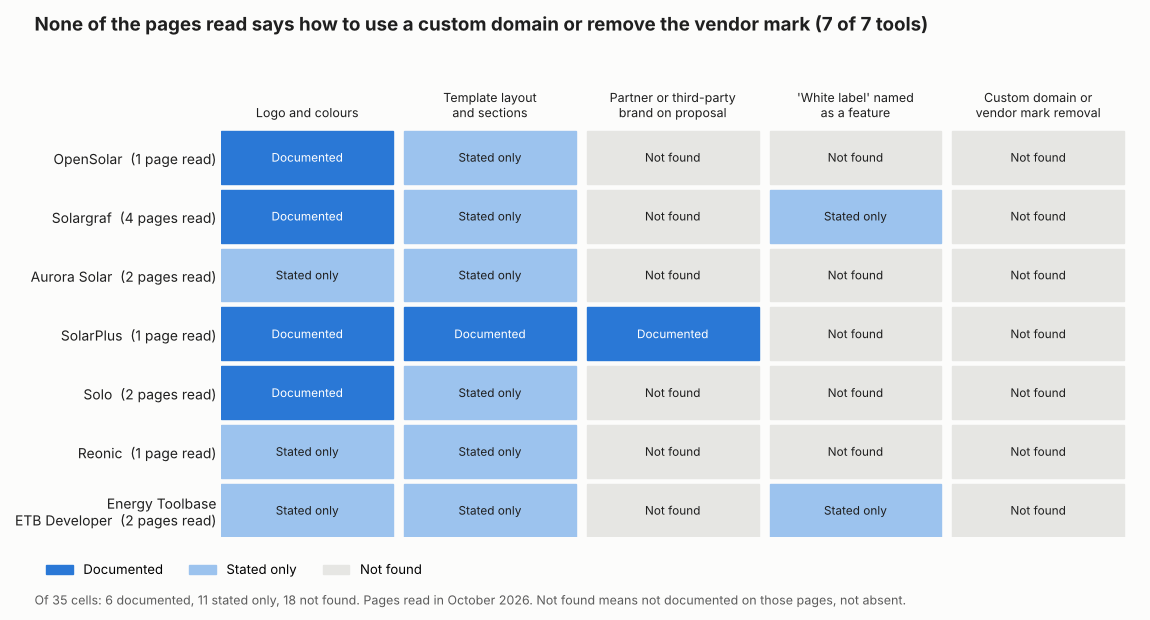
Figure 1. Logo and colours are documented for four of the 7 tools and named for the other three. No page read covers a custom domain or company-mark removal. A cell with nothing documented means the pages read do not say, not that the feature is absent.
What are the three levels of proposal branding?
The levels run from light to deep. First comes your logo and colours. Next is a partner brand beside yours. Last is a white label. Each level needs more from the company and may sit in a different plan.
| Level | What changes | Who needs it | What the pages read say |
|---|---|---|---|
| 1. Branded | Your logo, colours, company details and template on the company’s proposal. | Any installer. | Described for OpenSolar, Solargraf, SolarPlus and Solo. Only named for Aurora, Reonic and Energy Toolbase. |
| 2. Co-branded | A supplier, lender or dealer logo shown with, or instead of, yours. | Dealer networks and channel programmes. | SolarPlus describes it. The other six pages do not say. |
| 3. White label | The company’s name is hidden or replaced, in the proposal and possibly the link and emails. | Resellers, manufacturers, lenders and large dealer groups. | Solargraf and Energy Toolbase name it. Neither says what it changes. |
Installers use the term loosely, so these levels are our grouping, not a standard. Level 1 changes the look only. Levels 2 and 3 change who the buyer thinks is selling. Your buyer sees the proposal, not the settings screen, so test that.
How solar software handles branded proposals
Most companies describe a logo and colour setting. Few say which plan has it or who can change it. The table covers seven companies as read in October 2026. Yes means the page describes the setting.
| Software | Branding documented? | Partner logo? |
|---|---|---|
| OpenSolar | Yes | Not stated |
| Solargraf | Yes | Partly |
| Aurora Solar | Partly | Not stated |
| SolarPlus | Yes | Yes |
| Solo | Yes | Not stated |
| Reonic | Partly | Not stated |
| Energy Toolbase | Partly | Not stated |
Not stated: the company page we cite does not say. Partly: the page covers only part of the question. Only Aurora names a priced add-on at all, and even that is not tied to a stated plan. The other six pages name no plan for branding.
- OpenSolar: The logo appears "in the header of your proposals". A highlight colour is used in online proposals. An About section and header image can be added. Source: OpenSolar support article (no update date shown on the page we read).
- Solargraf: Logo upload (500 x 500 px recommended). Company details sit in the proposal footer. A "Primary color on proposal" setting. A separate white-label edition lets dealers choose which brands appear on proposals. It says "Book a demo" and gives no price. Sources: help article dated 10 December 2021. White-label page and quote-customisation blog undated.
- Aurora Solar: The pricing page lists "Custom branding" and "Customizable proposal templates" as features, with no detail. "Proposal template customization" is listed as a paid add-on under the support section, not under Enterprise, and no plan label sits beside it or beside "Custom branding". Sources: pricing page, metadata modified 29 October 2026, checked November 2026. Help section with 8 article titles, bodies not read.
- SolarPlus: A supplier’s logo and contact details can be added "in addition to or instead of" your own branding, if the template carries the supplier-logo tag. No plan mentioned. Source: SolarPlus V5 help centre, updated 26 November 2023.
- Solo: Name and logo are set under Company Info. Primary and Secondary colours are required on the proposal. Tertiary is not. Only users with the SAAS Owner role can open the portal. Sources: Solo help articles dated 7 August 2026 and 2 July 2026.
- Reonic: "Your logo, your layout, your colours, ready to send." Separate templates for residential and commercial. The page says nothing on white label or domains. Source: Reonic proposal software page, no date printed.
- Energy Toolbase: ETB Developer is marked as offering "Customized, white-labeled designs", with a "personalization and branding interface" and a "Fully custom template builder". No tiers named, and the pricing page does not mention white label. Sources: ETB Developer page, metadata modified 27 August 2026. Pricing page modified 6 October 2026.
Solar Nerds is a trade article, not company help, so it sets no rating. For a wider comparison of tools, see the best solar proposal software list.
What should you ask a company about white-label proposals?
Six questions cover the gaps, and a real proposal tests each answer. The pages read answer few of them, as Figure 1 shows.
| Question | Why it matters |
|---|---|
| 1. Which plan includes branding, and which does not? | Aurora lists a template-customisation add-on with no plan named. Most other pages read state no plan either. |
| 2. Does the customer see the company’s name anywhere? | A footer line such as "powered by" can reveal the tool. |
| 3. Can the proposal link use my own domain? | None of the seven pages read covers it. |
| 4. Can I add a partner or lender logo? | Only SolarPlus describes it, and its supplier logo shows only if the template carries the logo tag. |
| 5. Who can change the branding? | Solo limits its proposal theme to the SAAS Owner role. Wider edit rights risk off-brand quotes. |
| 6. Do emails and PDF downloads carry the same branding? | No page read says. A proposal sent to yourself shows it. |
Branding fees are a pricing question too. See per-seat pricing for how plan tiers change the real cost per user.
Common mistakes with white-label proposals
FAQs
Can I put a supplier or lender logo on my proposal?
Yes, in at least one tool. SolarPlus lets a supplier logo and contact details appear with, or instead of, your branding. The other six pages do not describe it.
Can customers tell which software made my proposal?
Sometimes, yes. A trade article says Pylon proposals have their own visual style and that a "powered by Pylon" line at the foot is "a dead giveaway". View your own proposals as the buyer sees them.
What should a branded proposal include besides a logo?
It should show company details and a short company description. Solargraf puts company profile details in the footer. OpenSolar lets you add an About section and a header image.
Can I use my own domain on a solar proposal?
Not confirmed: no company page we read documents a custom link domain, so ask each company in writing. Open the share link of a test proposal. If it loads on the company’s domain, it is not branded to you.
What is the difference between branded and white-label proposals?
A branded proposal carries your logo and colours. A white-label proposal also hides or replaces the company’s name. Co-branded sits between the two, with a partner logo beside yours.
Related terms
- White-labelling: selling a company’s product under another company’s name.
- Interactive web proposal: an online proposal the buyer can open and explore.
- Customer portal: a login area where buyers follow their project.
Next step: Send a test proposal to yourself, check the footer, link and sender, then shortlist tools in the best solar proposal software list.
Sources
- OpenSolar: Add your Logo and Business Details (checked October 2026).
- Solargraf help centre: tailor your account, quote customisation blog, white-label page and white-label edition post (checked October 2026).
- Aurora Solar pricing and Proposal Customization help section (checked October 2026).
- SolarPlus: 3rd Party Branded Proposals (checked October 2026).
- Solo: adjusting the proposal theme and company colours (checked October 2026).
- Reonic: solar proposal software (checked October 2026).
- Energy Toolbase: ETB Developer and pricing (checked October 2026).
- Solar Nerds: Why all your solar proposals look the same, 14 July 2026 (checked October 2026).
Last updated 30 October 2026. Next scheduled review: 30 January 2027.