Key takeaways
- All six company pages read list project status and documents. Only three list two-way messages. Two list online payment and two list production data.
- Three pages describe reminders or alerts sent to the customer with no way to reply. A one-way notice is not a message channel.
- The seven-stage table below follows one rule: a stage shows as confirmed only when the project record says so.
To compare portals you can buy, see the best solar customer portal software list.
Customer portal at a glance
A customer portal is the customer’s window onto your project record. It usually shows part of what the office already tracks. Some tools keep a synced copy instead.
| Item | Detail |
|---|---|
| Core jobs | Show project status, hold documents, carry messages. Add-ons seen on the pages read: online payment, signing or approval, service requests or booking, production data. |
| Who uses it | The customer (read, sign, ask) and the office (update, release, reply). |
| Standard or rule | No standard defines a solar customer portal. Each company’s documentation is the specification. |
| Not the same as | A monitoring app, which shows device data. A CRM, which is the office’s own record. A handover pack, which is a set of files. |
| In software | A module in a project or field-service tool, or a stand-alone customer app. See the table below. |
Why does a customer portal matter for installers?
A portal gives each job one place for documents. It also keeps a dated record of what the customer saw. An older Coperniq home page (undated) says its portal aims to "Reduce ‘what’s my status?’ calls". That is a company claim, not a tested result.
A poor portal has an easy-to-see cost. A permit shown as approved too early brings the call you wanted to avoid. So does a message nobody answers.
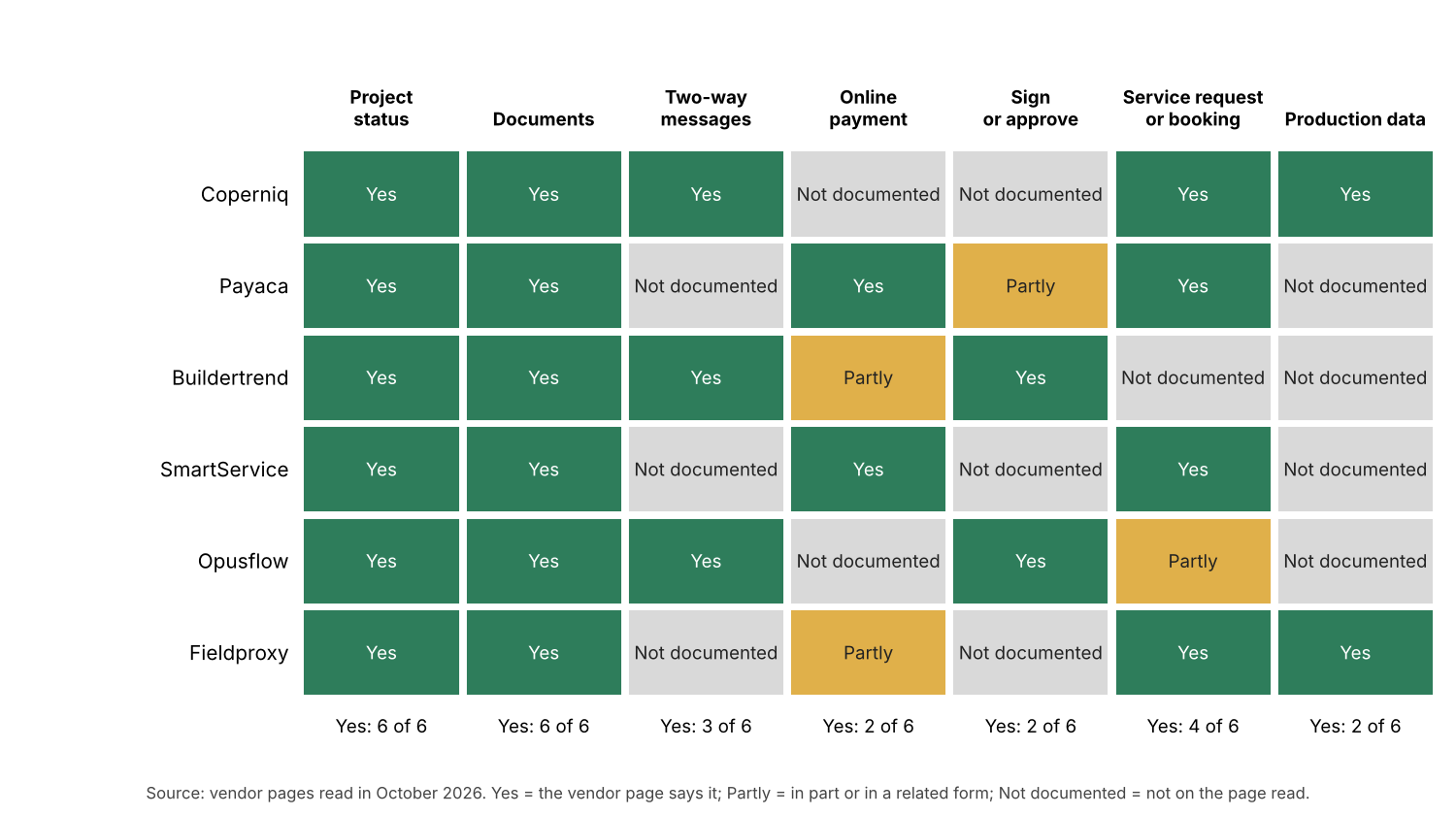
Figure 1. Status and documents are listed on all six company pages, two-way messages on three, and production data on two.
What should a customer portal show at each project stage?
Show a stage as confirmed only when the project record confirms it. Show forecasts as forecasts. The table is our design view for a residential job, not a standard.
| Stage | Customer can see | Show as confirmed when | Keep internal |
|---|---|---|---|
| 1. Contract signed | Next steps, a named contact. | The signed contract is on the record. | Margin, commission, finance notes. |
| 2. Survey | Visit date, then the outcome in plain words. | The visit is logged as done. See site survey. | Raw crew notes, measurements in dispute. |
| 3. Design and permit | Design summary for approval, permit "submitted" or "approved". | The AHJ response is on the record. See permit plan set. | Reviewer comments, draft revisions. |
| 4. Install | Planned dates, then "installed". | The install checks are signed off on the work order. | Labour hours, parts cost, rework notes. |
| 5. Inspection | Booked date, then the result. | The result is entered, not assumed. | Punch-list detail still open. |
| 6. PTO | Waiting for the utility, then the permission letter. | The utility’s letter is on the record. | Utility queue chasing. |
| 7. Handover | Handover pack, warranties, service contact. | The pack is complete and checked. | Internal QA scores. |
Seven stages is our grouping, not a standard.
How does a customer portal get its data and control access?
A portal reads from three places. The project record gives status. A document store holds files. A message inbox gets watched by the team. If a portal keeps a synced copy, the project record should stay the source of truth for status.
Stacksync’s blog (18 September 2026) describes a HubSpot-to-Supabase build. It says the portal needs its own permission model. In its words, CRM association alone does not authorise a user to see every project. It also says customer-facing wording should have no internal workflow labels. This is one engineering view, not a rule.
The company pages say less. Fieldproxy’s page says its portal assigns role-based permissions at setup. Opusflow’s page says access is password protected. Neither page says how it keeps apart a customer with several sites. For feeds between tools, see API and webhooks.
How solar software handles the customer portal
All six pages list status and documents, but only three list two-way messages. The table rates each tool on whether its own page documents status, documents and customer messages together.
| Software | Status, documents and messages documented? | Not on the page read | Page read (October 2026, all undated) |
|---|---|---|---|
| Coperniq | Yes | Online payment, signing. | Older home page (URL ends old-home-3, undated) and products page. Both returned a 404 when re-checked in November 2026. The current home page names only a white-labeled client portal. |
| Opusflow | Yes | Online payment, production data. Appointment confirmation appears in a heading and service requests only in the FAQ. | Customer portal module page, with FAQ. |
| Buildertrend (non-solar reference) | Yes | Service requests, production data. Construction article. | Library article on construction client portals. |
| Payaca | Partly | Customer messages. | Customer experience features page. |
| SmartService | Partly | Customer messages in the portal. Texts and notifications are described outside the portal section. | Solar installation software page. |
| Fieldproxy | Partly | Customer messages. Payment is for monitoring subscriptions. | Solar customer portal blueprint page. |
Partly means the page documents some of the three jobs but not all of them.
- Coperniq. Client portal "under your brand". Shares "updates, documents, appointments, and messages". That quote and the real-time production, document repository and live service tracking details came from the products page, which also returned a 404 when re-checked in November 2026. The old-home-3 page that named "messages" is gone too, and the current home page lists only a "White-labeled Client Portal" with no feature detail. Confirm two-way messaging and these other features with Coperniq before relying on them.
- Opusflow. Quotes, invoices and project status. Signing quotes digitally. "a communication thread with your team". Branding. Password-protected access.
- Buildertrend. Messages tied to the project, documents, approvals, milestones and photos. Invoices "depending on the platform".
- Payaca. Track progress, view documents, pay by card or bank transfer. Sends automated email and SMS reminders for appointments, quote follow-ups and status updates.
- SmartService. Project status and service history, closeout documents, invoices and payment, service requests, booking.
- Fieldproxy. Real-time status and technician ETA, a searchable document library, role-based permissions, alerts, categorised service requests, booking from technician slots, a production dashboard.
The counts in Figure 1 come from this reading of six pages. They show what the pages say, not how well each tool works. No tool was tested. For tools that document a portal, see the best solar customer portal software list.
What should you check before you choose a customer portal?
Check who controls what the customer sees, and where their replies land. Five questions cover most of it.
- Where do customer messages land, and who gets told? A thread on the project record beats a separate inbox.
- What moves a stage to confirmed: a person, or a change in the project record?
- Can you hold back a stage or a document until it is ready?
- Is access set per project and per user, including customers with more than one site?
- What does the customer still see after handover, and who owns it then?
Also ask how the portal is priced: per office user, per customer or per system. The pages read state no price.
Common mistakes with a customer portal
FAQs
Is a customer portal the same as a solar monitoring app?
No. A monitoring app shows device data, such as production. A portal shows the project: stage, documents and messages. Some portals add production. 2 of the 6 pages read list it as a portal feature. See fleet monitoring for the installer-side view.
Can customers message the installer in a portal?
On 3 of the 6 pages read, yes. Coperniq, Opusflow and Buildertrend list messages. Payaca, SmartService and Fieldproxy describe reminders or alerts. The pages read do not describe a customer reply.
What features should a solar customer portal have?
A portal should show project status and hold documents. Of the six company pages read, all six list both, three list two-way messages, two list online payment and two list production data. Add-ons seen include signing or approval and service requests or booking.
Is a customer portal the same as a CRM?
No. A CRM is the office’s record of leads and customers. A portal is a controlled view for the customer. If a tool has both, the portal should read from the CRM record and not hold a copy.
Should the customer see every status change?
No. Show the confirmed stages from the seven-stage table and hold the rest. Internal task states, costs and reviewer comments help the team. They can confuse a customer. They can also read as a promise.
Related terms
- Handover pack: the set of records given to the owner when a job ends.
- Solar project management software: the tools that hold the project record a portal reads.
- Work order: the record of one job, whose sign-off can confirm a stage.
- Review management: asking for, collecting and answering customer reviews.
Next step: decide who owns customer replies, then compare portals in the best solar customer portal software list.
Sources
- Coperniq home page (old-home-3), checked 30 October 2026, undated. This page returned a 404 when re-checked in November 2026, so its "messages" claim could not be re-confirmed. Coperniq products page (checked 30 October 2026) also returned a 404 when re-checked in November 2026, so its production, document repository and live service tracking claims could not be re-confirmed either. The current home page lists only a white-labeled client portal, with no feature detail (checked November 2026).
- Opusflow customer portal module (checked October 2026).
- Buildertrend, what is a construction client portal (checked October 2026).
- Payaca customer experience features (checked October 2026).
- Smart Service solar installation software (checked October 2026).
- Fieldproxy solar customer portal blueprint (checked October 2026).
- Stacksync blog on solar customer portals, 18 September 2026 (checked October 2026).
Last updated 30 October 2026. Next scheduled review: 30 January 2027.