Key takeaways
- In our invented example, removing 2 of 18 modules cuts system size by 11.1%. Gross price drops only 10.2%, because the 1,800 USD of adders stays.
- All 7 headline numbers change. Retyping only the price leaves 5 of 7 out of date, and scaling the old price by size under-prices the job by 200 USD.
- All 5 companies checked describe a customer signature step, in 4 different places.
- Four show finance options in the proposal, and two document how they fill contracts with project data.
- Test a tool by changing the design after you build the proposal. The evaluation table has 6 checks.
To compare proposal tools in software, see the best solar proposal software.
Solar proposal software at a glance
It sits between design and contract. It takes the design, the production estimate and your prices. Then it builds the document the customer reads and signs.
| Item | Detail |
|---|---|
| What it takes in | Design and module count, production estimate, price book, tariff and usage, incentives, finance options. |
| What it puts out | A branded proposal as a web link or PDF, a signature step, and data for the contract or project. |
| Not the same as | Design software (builds the layout), an instant estimate (a ballpark before design), a CRM (tracks the deal), a contract (the binding terms). |
| Standard or rule | No published standard found. Each company decides what a proposal holds and what a signature locks. |
| In software | Often a module inside a design tool or CRM. See the solar design and proposal software list. |
Why does solar proposal software matter for installers?
Design, price and finance meet in the proposal. An error there can carry into the contract. Software ties those numbers to one design, so nobody retypes them by hand.
Prices also depend on basis choices, such as DC watts and gross or net. See price per watt. If the scope changes later, it becomes a change order.
What does a solar proposal contain?
Our checklist has 8 core sections. It is our own editorial list, not a standard. Each section needs a source and a check before the proposal goes out.
| Section | Where the number comes from | Check before sending |
|---|---|---|
| 1. Design summary | Design tool: module count, kW, layout. See solar panel layout. | Module count matches the survey. |
| 2. Production estimate | Simulation of that design. See energy yield simulation and shade report. | Same design version as section 1. |
| 3. Price build-up | Price book: rate times watts, plus adders. | States DC watts and gross or net. |
| 4. Bill savings | Tariff and usage. See utility bill analysis. | Tariff source and date shown. |
| 5. Incentives | Incentive data. See incentives and rebates. | Each one named, with its eligibility. |
| 6. Finance options | Cash, loan, lease or PPA terms. | Payment follows the lender’s or owner’s terms, not a typed guess. |
| 7. Terms and scope | Contract templates: warranty, exclusions, change handling. | Wording agreed with your own advisers. |
| 8. Signature and next steps | An e-signature step. | The signed copy shows the numbers the customer saw. |
Worked example: one design change, seven numbers
When the module count changes, the 7 headline numbers move by different amounts. All inputs here are example, including the price, incentive, yield and tariff.
A rep builds a proposal for 18 modules of 400 W. A vent setback found at the survey removes 2 modules, which leaves 16.
| Number (example inputs) | 18 modules | 16 modules | Change (relative) |
|---|---|---|---|
| System size | 7.20 kW | 6.40 kW | -11.1% |
| Gross price | 22,680 USD | 20,360 USD | -10.2% |
| Net price after incentive | 18,144 USD | 16,288 USD | -10.2% |
| Annual production | 9,000 kWh | 8,000 kWh | -11.1% |
| Share of use covered | 90% | 80% | -10 points (-11.1%) |
| Year-1 bill saving | 1,980 USD | 1,760 USD | -11.1% |
| Simple payback | 9.16 years | 9.25 years | +1.0% |
Inputs: 2.90 USD per watt and 1,800 USD adders. The incentive is 20% of gross price. Yield is 1,250 kWh per kW a year. Annual use is 10,000 kWh and the tariff is 0.22 USD per kWh. Saved kWh are valued at the tariff, which is a simplification.
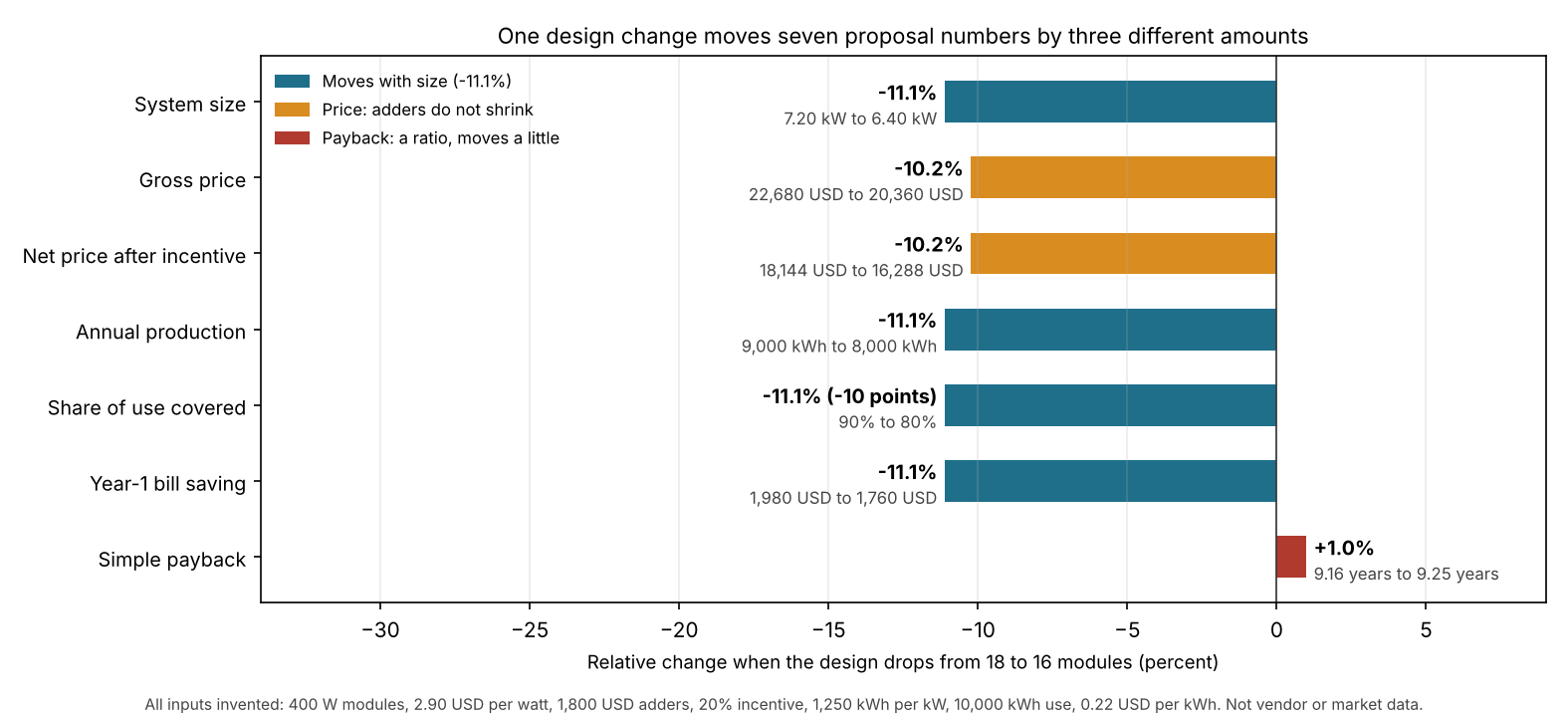
Figure 1. In this example, four numbers fall 11.1%, the two prices fall 10.2%, and payback rises 1.0%.
The price falls less than the size because the adders do not shrink. A rep who scales the old gross price by size gets 20,160 USD. The rebuilt price is 20,360 USD, so the shortcut is 200 USD too low.
A rep who retypes only the price leaves 5 of 7 numbers out of date: size, production, share covered, saving and payback. Payback then pairs the new price with the old saving. If the customer has already signed, the signed copy holds the 18-module numbers. That needs a change order.
Calculator: check a design change
Enter the module counts and prices from your own job. The tool shows the 7 numbers before and after, plus the shortcut error. It starts with the example inputs above.
How do you evaluate solar proposal software?
Run a trial job and try to break it. These 6 checks test how design, price, finance and signature link up.
| Check | What to do in a trial |
|---|---|
| 1. Change test | Remove two modules after building the proposal. Confirm all 7 numbers in the example update, not only the price. |
| 2. Data sources | Ask where production, tariff and incentive data come from, and whether each is dated on the proposal. |
| 3. Finance options | Switch between options. Check that payment and incentives change together, and that a lender’s own terms are not just typed in. |
| 4. Signature and lock | Sign a test copy. Then edit the design. Check what the signed copy shows and what the tool does next. |
| 5. Data passed on | Check which fields reach the contract, CRM or project, and whether you map them by hand. |
| 6. Price basis | Check the proposal states DC watts, gross or net, and what the adders include. |
How solar software handles proposals
All five tools describe a customer signature step. Four show finance options in the proposal, and only two document how they fill contracts with project data. The table shows what each company’s own page said in October 2026.
| Software | Proposal format | Finance options shown | Customer signature | Data passed on |
|---|---|---|---|---|
| Aurora Solar | Web link or PDF | Yes | Yes (Contract Manager) | Yes (Contract Manager) |
| OpenSolar | Swipe Proposal | Yes | Yes | Partly |
| Solargraf | Proposal with Express Editor | Yes | Yes | Yes |
| Pylon | Not stated | Not stated | Yes | Not stated |
| Reonic | Offer configurator, PDF | Yes | Yes | Partly |
What each page says, by product:
- Aurora Solar (web proposal): The proposal goes out as a web link through Share, or as a PDF download. The recipient can "toggle between their financing options" and incentives update. Both help pages are undated, and neither mentions signing.
- Aurora Contract Manager (a separate Aurora product): its product page lists "integrated e-signature" via a "direct Docusign integration". It will "Automatically populate documents with project details". Contracts and other documents are uploaded and configured in Aurora. The page was modified 30 July 2026.
- OpenSolar: Swipe Proposal runs in chapters: Home, Energy, Savings, Go (support page, undated). Customers can "compare financing options within the proposal" (Sell page, modified 20 July 2026). They can "Collect electronic signatures within the checkout flow" (Sell page). Signing status and documents stay "connected to every project in OpenSolar". Contract fields are not described.
- Solargraf: The proposal has an Express Editor to change usage, layout, batteries, pricing and financing during a presentation (help page, 4 February 2025). The homeowner "can sign the proposal directly". Documents can go by Solargraf or DocuSign (help post, 15 April 2024). Placeholders set at company and project level fill project-specific documents (15 April 2024). It has Cash, Loan and Lease sections, with an "Open with" selector (4 February 2025).
- Pylon: the features/proposals page cited in October 2026 is gone. Pylon’s current homepage describes a "proposal builder" with customisable templates, finance options and "Digital Signatures": it lets you "collect signatures from your clients digitally". It does not state whether a proposal goes out as PDF. Re-checked November 2026.
- Reonic: An offer configurator with a ready-to-send PDF (product page, undated). It lists payment options (purchase, lease or financing) and an amortisation forecast (product page). The page offers "Electronic signature directly from the customer portal" (product page). An integrated CRM and digital handover checklists are named. Contract fields are not described.
The table is not a ranking. "Not stated" means the page read did not say, not that the tool lacks the feature. "Partly" means the page describes only part of it. For scored company comparisons, see the best solar proposal software list.
Common mistakes with solar proposal software
FAQs
What is the difference between a solar proposal and a solar quote?
No standard fixes the words. On this site, a quote is a priced offer. A proposal adds the design, production, savings and finance options. An instant estimate comes before both.
Is solar proposal software the same as solar design software?
No. Design software builds the layout and production estimate. Proposal software turns those outputs into the customer document. Some tools in the table do both. For design tools, see the best solar design software list and the term page on solar design software.
Can the customer sign inside the proposal?
Yes, in all 5 tools we checked, but the signature sits in a different place in each. It is in the proposal for Solargraf and Pylon, and in checkout for OpenSolar. For Aurora it is a contract product, and for Reonic a portal. See e-signature. This is not legal advice.
Does proposal software approve the loan?
No, the pages read describe how they show finance options, not how they approve credit. The lender or owner sets the terms. See solar loan for the payment maths.
Related terms
- Interactive web proposal: a proposal the customer opens through a link.
- White-label (branded) proposals: proposals that carry your brand, not the company’s.
- Solar CRM: software that tracks leads, deals and projects.
Next step: run the change test above on a trial job, then compare e-signature, finance options and contract data-out in the best solar proposal software list.
Sources
- Aurora Solar: Contract Manager (page metadata modified 30 July 2026, checked October 2026).
- Aurora help: Generate and Send a Web Proposal or PDF, compare financing options and sending documents with Contract Manager (undated, checked October 2026).
- OpenSolar: Sell (page modified 20 July 2026, checked October 2026) and Swipe Proposal user guide (undated, checked October 2026).
- Solargraf help: new proposal experience how-tos (published 4 February 2025) and document management post (15 April 2024). Checked October 2026.
- Pylon: home page (undated, checked November 2026, the October 2026 features/proposals citation no longer resolves).
- Reonic: product page (undated, checked October 2026).
Last updated 3 November 2026. Next scheduled review: 30 January 2027.