Key takeaways
- Solo’s help page gives two formulas. Energy offset is yearly production divided by annual usage. Bill offset is the bill saving divided by the current bill.
- In our example home, 100% energy offset removes 88.4% of the bill under net metering. Under net billing it removes 63.6%.
- Fixed charges set a ceiling. Here they are 168 of 2,040 USD a year (example). So bill offset cannot pass 91.8%.
- Tiers remove the dearest kWh first, so a 50% energy offset gives 51.9% bill offset. At 100%, fixed charges and credit timing pull it to 88.4%.
- Of the four tools in the table, only Solo’s pages give both offset formulas. Aurora and Solargraf let you set a target offset.
To run bill analysis and offset in software, see the best solar proposal software.
Utility bill analysis and bill offset at a glance
The analysis sets the system size. The offset figures show how well that system fits the bill.
| Item | Detail |
|---|---|
| What you read | Twelve months of kWh, the rate plan name, fixed charges, energy prices (flat, tiered or time-of-use), any demand charge |
| Energy offset | Yearly solar kWh divided by annual use in kWh, times 100 |
| Bill offset | (Bill before solar minus bill after solar) divided by bill before solar, times 100 |
| Standard or rule | No single standard. Each tool sets its own basis, so read how it computes the figure |
| In software | Proposal and design tools take usage and a tariff, model the after-solar bill and show offset or savings |
Why bill analysis matters for installers
The bill sets the system size and the savings you promise. For tools that build a proposal from a bill, see the best solar proposal software list. A proposal that says "100% offset" can still leave a monthly bill. The customer sees that on the first statement.
Annual kWh drives size. The tariff drives value. Use this page with consumption (load) profiles for timing and payback period for the money. Website widgets start from a bill too. See instant estimates.
What do you read on a utility bill for solar?
Read these items: annual kWh, the rate plan, fixed charges, the energy price type, any demand charge and riders. Each one changes how much of the bill solar can remove.
- Annual kWh: use 12 months, not one. Aurora’s guide says some utilities show a 30-day average. One utility example shows usage every two months. It also warns that gas or water on the same bill skews the figure.
- Fixed charges: OpenSolar lists Customer, Supply and Basic Charge as common names. Energy Toolbase says these are "usually flat rate fees that cannot be offset with solar or storage".
- Energy price type: OpenSolar describes flat, tiered (block), time-of-use and tiered time-of-use tariffs. A flat price is the same at every hour and volume.
- Demand charge: Energy Toolbase says it comes from the highest power draw in a billing period, often a 15-minute window. It is more common for commercial customers. See demand charge management.
- Riders: Energy Toolbase says utilities bill riders and adjustments for programmes as fixed, energy or demand charges.
- Rate plan name: you need it for a database lookup. See utility rate databases.
Why is a 100% energy offset not a 100% bill offset?
Some charges do not depend on kWh, and some kWh earn less credit than they cost. A bill can stay above zero even when yearly production matches yearly use.
A Solo help article, dated 16 January 2026, gives four reasons. They are monthly minimums and time-of-use rates that credit daytime exports below evening purchases. They also include credits below the retail price, and demand charges that solar may cut but not remove. A second Solo article, dated 30 July 2025, says the "new utility bill" is an average across the year. So a customer can have 100% offset and a bill that is not 0.
Utilities agree on the principle. Southern California Edison’s solar bill guide says credits help lower eligible charges, but some charges may still apply each month. NREL’s 2015 slides say minimum bills mainly affect solar customers where solar offsets load for most months of the year. See net metering for the crediting rules.
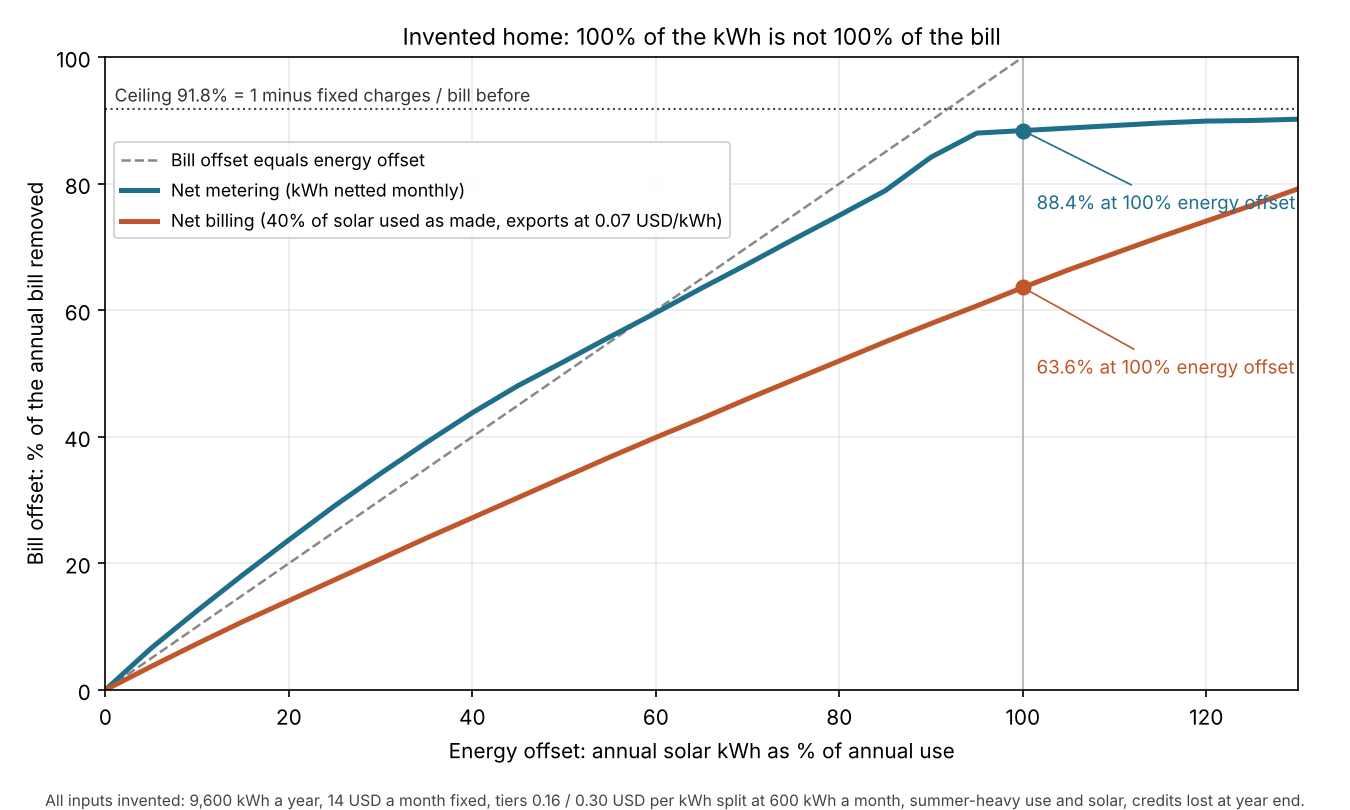
Figure 1. In this example home, a 100% energy offset removes 88.4% of the bill under net metering and 63.6% under net billing. Neither reaches 100%.
How do tools compute bill offset?
They price the bill twice, before and after solar. Then they divide the saving by the bill before. Energy offset needs only production and use.
- Enter annual use in kWh, by month if you can.
- Estimate production by month from the design.
- Price the bill before solar: fixed charges plus energy by tier or period.
- Price the bill after solar, using the crediting rule for exports.
- Bill offset = (before − after) ÷ before. Energy offset = production ÷ use.
OpenSolar’s help describes the same approach. It adds up each charge per bill period for the proposed and current bills. The difference is the savings. Always state which basis you use. In the example net metering case below, January’s bill offset is 57.9% against 88.4% for the year.
Worked example: one example home, two billing modes
Every input here is example. The home uses 9,600 kWh a year, with summer-heavy use and solar. The tariff has a fixed charge of 14 USD a month. The first tier is up to 600 kWh a month at 0.16 USD per kWh. Above that the price is 0.30.
Net metering nets kWh each month and carries surplus kWh forward within the year. Net billing assumes 40% of solar is used as it is made. Exports earn 0.07 USD per kWh. In both, credit left at year end is lost. These are example rules, not any utility’s.
| Case (example) | Energy offset | Bill after solar (USD a year) | Bill offset |
|---|---|---|---|
| No solar | 0% | 2,040.00 | 0.0% |
| Net metering | 50% | 980.80 | 51.9% |
| Net metering | 100% | 237.12 | 88.4% |
| Net billing | 50% | 1,355.14 | 33.6% |
| Net billing | 100% | 742.74 | 63.6% |
The bill before solar is 2,040.00 USD: 168.00 of fixed charges and 1,872.00 of energy. The 2,400 kWh bought above the tier allowance is 25% of use but 35.3% of the bill.
At 100% under net metering, 168.00 of the 237.12 USD left is fixed charges (8.2% of the bill before). The other 69.12 is January and February energy, bought before spring credits existed (3.4%). Together they explain the 11.6 points missing. The surplus credit of 432 kWh is lost at year end.
Tiers explain why 50% gives 51.9%. Solar removes the dearest kWh first. With flat pricing at 0.16 USD per kWh and no fixed charge, the same case gives exactly 50.0%. Add the fixed charge to flat pricing at 0.16 USD per kWh and it gives 45.1%.
Calculator
The calculator below prices an example bill before and after solar and shows both offsets. If the frame does not load, open the bill offset calculator on its own page.
Change the tariff, the billing mode or the offset. The three presets reproduce the table above. Replace the example values with the customer’s own. Taxes, riders and demand charges are not modelled.
How solar software handles bill analysis and offset
Three of the four tools below document how usage is entered, and only Solo’s pages give both offset formulas. Before you trust a proposal, find out which offset it shows and which tariff and period it uses.
| Software | Reads usage from a bill or entry? | Offset documented? |
|---|---|---|
| Aurora Solar | Yes | Partly |
| OpenSolar | Yes | Not stated |
| Solargraf | Yes | Partly |
| Solo | Not stated | Yes |
- Aurora Solar
- What the page says: Bill upload fills monthly usage and cost, US only, and models the year from that month. The pre-solar rate is not set from the bill. Energy Optimizations items can offset consumption. The AutoDesigner API takes a target energy offset percentage. No bill offset formula found.
- Source: Aurora help, bill upload (no date shown) and Energy Optimizations (25 May 2026). Aurora API changelog (3 September 2026).
- OpenSolar
- What the page says: Annual kWh and a usage profile are inputs. "Solar offset" appears only inside the after-solar bill formula "(Monthly usage – solar offset) × rate + fixed charges". No offset percentage found.
- Source: OpenSolar support, 16 July 2025 and undated.
- Solargraf
- What the page says: Smart Designer takes a target bill offset (%) and a consumption offset (%) and shows Utility Bill Offset (%). No formula found. Manual custom bills or usage in kWh or USD when no automatic rate is set.
- Source: Solargraf help, Smart Designer guide (8 February 2024), custom bills (20 August 2026). Solargraf blog (no date shown).
- Solo
- What the page says: Solar offset and Utility Bill Offset formulas on a proposal. Its pages do not say how usage is entered. The new bill averages monthly estimates across the year.
- Source: Solo help (23 October 2025 and 30 July 2025).
Ratings are for the pages read in October 2026. "Yes" means the page gives the formula. "Partly" means offset is named or set as a target, but not defined. "Not stated" means the company page we cite does not say.
To compare more tools, read the list of best solar proposal software.
Common mistakes with bill analysis
FAQs
Should I size for a full energy offset?
Not by default. A full energy offset still leaves part of the bill in the worked example, under both billing modes, because of fixed charges and credit rules. Size from the customer’s goal and show both offsets.
Why do I still get a bill with solar?
Because some charges do not depend on kWh, and surplus credit can expire. In the worked example, fixed charges are 168 of 2,040 USD a year, and 432 kWh of surplus credit is lost at year end. Time-of-use credit rules and demand charges can also leave a bill.
How many months of bills do I need?
Aim for twelve. Aurora says its tool estimates a full year from one month, and that more months give better accuracy. Solargraf’s FAQ also asks for as many months as possible.
What if the bill includes gas or water?
Separate the electricity. Aurora’s guide warns that combined bills throw usage estimates well off unless you split out the other services.
Do demand charges change bill offset?
Yes, for customers billed on kW. Solar often cuts energy charges but may leave the demand charge. Solo’s help article lists this as a reason a bill stays above zero. Model the interval peak before you quote.
Which offset should a proposal show?
Show both, with the basis. Energy offset sizes the system. Bill offset tells the customer what is left to pay. Label the period, the tariff date and whether taxes are in.
Related terms
- Net metering: a billing rule that credits exported solar against imports.
- Tariff / rate database: a library of utility rate schedules.
- Self-consumption: the share of solar used on site.
- Time-of-use optimisation: shifting use or storage to cheap hours.
Next step: test your next quote by showing both offsets, using a tool from the best solar proposal software list.
Sources
All sources opened October 2026. Dates are as each page prints them.
- Solo help. How the proposal’s offset is calculated (23 October 2025). How the new utility bill is calculated (30 July 2025). Why the post-solar bill is not 0 at 100% offset (16 January 2026).
- Aurora. Utility bill upload. Entering energy consumption (15 April 2026). Energy Optimizations (25 May 2026). AutoDesigner target offset percent (changelog, 3 September 2026). What contractors should know about utility bills (blog, 2019, modified 2022).
- OpenSolar. How OpenSolar calculates financial savings (16 July 2025). Utility bill savings.
- Solargraf. Custom bills or usage (20 August 2026). Utility settings FAQ (10 December 2021). Smart Designer guide (8 February 2024). Smart Designer blog (no date shown).
- Bill components. Energy Toolbase, breaking down the bill (23 April 2025). NREL slides, alternative rate structures (September 2015). Southern California Edison solar bill guide (no date shown).
Last updated 30 October 2026. Next scheduled review: 30 January 2027.