Key takeaways
- The developer page lists PSM v4.0.0 products. They include 30-minute data at 4 km from 1998 and 5-minute data at 2 km from 2018. A typical year is hourly.
- The version is in the file: our 2017 sample says v3.2.2 and our 2023 sample 4.0.1, for the same cell. Read the header version before you compare sites.
- Annual kWh/m² is the sum of W/m² readings times the step in hours, divided by 1,000. At 30 minutes, skipping the step doubles the answer.
- NSRDB is NREL satellite data, free with an API key. About 13% of rows in each sample carry a fill flag, and the header labels only flags 1 to 5.
PVWatts, SAM and pvlib document NSRDB use. To compare the rest, see the best solar simulation software list.
NSRDB at a glance
The NSRDB is a gridded, satellite-based record of sunlight and weather, not a set of ground measurements. Its PSM v4 aggregated series starts in 1998 at 4 km. Our weather and solar resource data page covers how it compares with other sources.
| Item | Detail |
|---|---|
| Publisher | NREL on the data.gov record and the PVWatts and SAM pages. The US Department of Energy renamed NREL the National Laboratory of the Rockies (NLR) on 1 December 2025, which is why newer pages print "NLR". |
| Contents | GHI, DNI and DHI, plus clear-sky values, cloud type, zenith angle and weather fields such as temperature, pressure, humidity and wind. |
| Coverage | "The United States and a growing subset of international locations" (NSRDB home page). It differs by product. |
| Resolution | By product, from 2 km and 5 minutes to 4 km and one hour. See the product table below. |
| Access | Web viewer, developer API with a free key, and bulk files. |
| In software | PVWatts, SAM and pvlib document NSRDB use. See the software table. |
Why does the NSRDB matter for installers?
US simulation tools lean on it, so its version and product set the sunlight behind your kWh figure. PVWatts version 6 says it "uses the newest data from the NREL National Solar Radiation Database (NSRDB)".
Two files for one site can differ because of the year, the version or the time step. Know which you loaded before you compare designs, sign off a guarantee or check output. See TMY and expected vs actual production.
What is inside an NSRDB file?
A file starts with a metadata block, then one row per time step. The block gives the source, Location ID, latitude, longitude, time zone, elevation, units, flag labels and version.
Both sample files give irradiance in W/m², temperature in degrees C, pressure in mbar and wind in m/s. The time zone is -7, so stamps are in local standard time. A 2017 NREL slide deck describes the method as a physics-based model that reads cloud and aerosol data from satellite images. See satellite-derived solar data.
Which NSRDB versions and products exist?
The version is a field in each file, and it changes with the model. The NSRDB code README says to check "each NSRDB file" for its version attribute. The table shows selected rows. Dates and years are as each source prints them.
| Version | Printed date | Years as printed | Note from the README |
|---|---|---|---|
| 2.0.0 | 2016 | 1998 to 2015 | First PSM v2 release. |
| 3.0.0 | 2018 | 1998 to 2017 | First PSM v3 release. |
| 3.2.2 | 25 Feb 2022 | 1998 to 2021 | Added a snowy albedo model. |
| 4.0.0 | 1 May 2023 | 1998 to 2024 (README) or 2023 (PyPI) | Added the FARMS-DNI beam model. |
For 4.0.0 the README prints GOES 1998 to 2024 and the PyPI page prints 1998 to 2023, so we give no single end year. The PyPI page says the years column shows what was updated at release. A data.gov record last updated 11 January 2023 gives 1998 to 2021, so catalogue records lag.
The developer product list (undated) says v3.2.2 is "replaced by" GOES Aggregated v4.0.0. Its current products are below.
| Product | Version | Years | Resolution |
|---|---|---|---|
| GOES Aggregated | PSM v4.0.0 | 1998 onward | 4 km, 30 minutes |
| GOES Conus | PSM v4.0.0 | 2018 onward | 2 km, 5 minutes |
| GOES Full Disc | PSM v4.0.0 | 2018 onward | 2 km, 10 minutes |
| GOES TMY | PSM v4.0.0 | Built from 1998 onward | 4 km, hourly |
| Himawari 2016 to 2020 | PSM v3 | 2016 to 2020 | 2 km, 10 minutes |
| NSRDB Polar | PSM v4.0.0 | 2013 onward | 4 km, 1 hour |
How do you get NSRDB data?
You can use the web viewer, the API or bulk files. For design work the API or the viewer is the usual route.
- Web viewer: a 2017 NREL slide deck lists the NSRDB Viewer and data download. A 2018 SAM webinar says files can come from the NSRDB Data Viewer. The viewer page itself is not among the sources read.
- API: the NREL developer page describes the API as free to use. The pvlib 0.16.1 documentation says the key is free, and that the shared DEMO_KEY is "severely rate limited". pvlib documents 60 or 30 minutes for GOES Aggregated, and 60 minutes only for typical years.
- Bulk: a Microsoft dataset page (undated) describes HDF (.h5) files on Azure Blob Storage. They hold 30-minute data on 0.038 degree cells for 1998 to 2020. It is a third-party host, so check NREL’s current bulk route.
Worked example: how do you check an NSRDB file?
Read the metadata first, then confirm rows, units and time stamps, then sum the energy. We used two NSRDB-format sample files bundled with pvlib 0.16.1 test data. Both are for one Colorado cell (Location ID 401182, 40.53, -108.54, elevation 2,168 m).
- Read each file with pvlib’s read_nsrdb_psm4, which returns the data and a metadata dictionary.
- Check the version, Location ID, time zone and units in the metadata.
- Count rows: 365 days at 48 half-hours is 17,520.
- Annual kWh/m² = sum of W/m² × 0.5 h ÷ 1,000.
- Test GHI against DNI × cos(zenith) + DHI, and the time stamp against the sun’s position from pvlib.
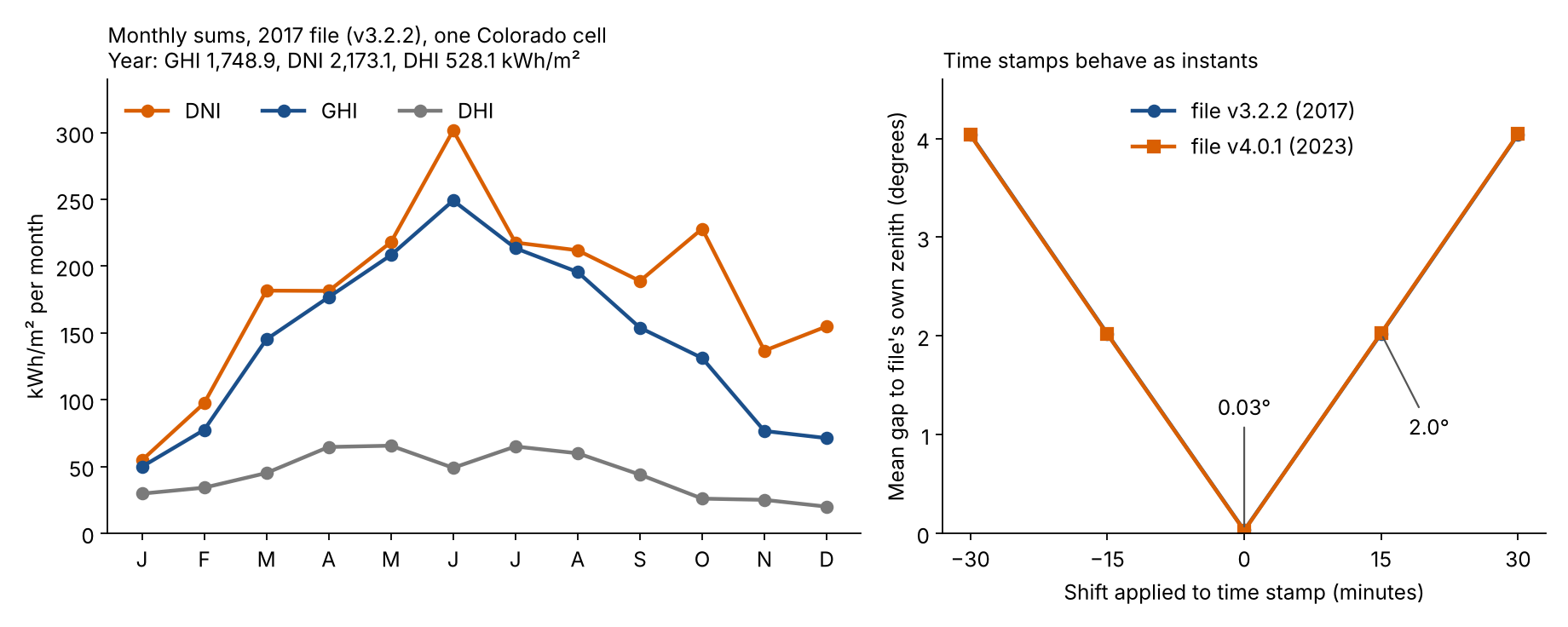
Figure 1. Both sample files treat time stamps as instants: the zenith matches at zero shift (0.03°) and is 2.0° off at 15 minutes.
| Check | 2017 file | 2023 file |
|---|---|---|
| Version in the header | v3.2.2 | 4.0.1 |
| Rows and step | 17,520 at 30 min | 17,520 at 30 min |
| GHI, kWh/m² a year | 1,748.9 | 1,827.4 |
| DNI, kWh/m² a year | 2,173.1 | 2,268.3 |
| DHI, kWh/m² a year | 528.1 | 567.9 |
The sums agree with the cosine test in both files. Now the quality checks.
| Check | 2017 file | 2023 file |
|---|---|---|
| DNI × cos(zenith) + DHI against GHI | -0.0004% | +0.0022% |
| Rows with a non-zero fill flag | 2,321 (13.2%) | 2,374 (13.6%) |
| Night rows with GHI above 0 | 0 | 185 (up to 8 W/m², 0.26 kWh/m²) |
| Columns only in this version | none | Alpha, AOD, Asymmetry, Cloud Fill Flag, Ozone, SSA |
The files are different years and different versions, so the sums mix weather with model changes. They cannot isolate a version effect. The bundled data holds no same-year pair in two versions. The GHI sums are 4.5% apart, and our TMY page compares them with two typical-year files.
The night rows all sit where the file’s zenith is between 90.01° and 92.17°. Neither file has a missing or negative value in the three sunlight columns. The two typical-year sample files have no metadata block, so their cell is assumed from pvlib’s tests.
NSRDB time-step and unit checker
Enter the sum of a column of W/m² readings and the step. The checker returns kWh/m², the expected row count and a warning if the rows do not cover a full year. The buttons load the sums in the table above.
What should designers check before using an NSRDB file?
Check these in order. Each one can move the result more than a model tweak.
- Version: read the header, not the file name. The version sets the model and the years updated.
- Vintage: note the year or years. A real year differs from a typical year. See weather and solar resource data.
- Typical year or full series: the GOES TMY is hourly and has no spread, so P90 needs many years. See P50, P90 and P99.
- Plane: GHI, DNI and DHI are not tilted values. The array plane needs a transposition model and your tilt. The NSRDB home page also names a spectral on-demand service for inclined PV panels.
- Missing and filled data: count flagged rows and find the company’s flag key. The sources read give no key for values above 5.
How solar software handles the NSRDB
On the pages we read in October 2026, PVWatts, SAM and pvlib document NSRDB use, two more tools do so in part, and two do not say.
| Software | Uses or imports NSRDB? | Source read |
|---|---|---|
| PVWatts | Yes | PVWatts version 6 page (undated) |
| SAM | Yes | SAM weather page (undated). Webinar of 13 Sep 2018 |
| pvlib python | Yes | pvlib 0.16.1 documentation |
| PVsyst | Not stated | None |
| HelioScope | Partly | Help pages updated 21 Jul 2026 |
| Aurora Solar | Partly | Help pages updated 15 Apr 2026 and 11 Dec 2024 |
| OpenSolar | Not stated | None |
Not stated means the company pages we read do not say. Partly means the pages cover NSRDB or NREL data only in part. Notes by tool:
- PVWatts: version 6 "uses the newest data from the NREL National Solar Radiation Database (NSRDB)". Legacy data can still be chosen.
- SAM: "You can use the Download buttons on SAM’s Location and Resource input page to download NSRDB data directly from SAM."
- pvlib python: one reader (read_nsrdb_psm4) and six PSM4 downloaders. A free API key is needed.
- PVsyst: the sources read do not state NSRDB use. A product list names NSRDB TMY import, but no company page confirms it.
- HelioScope: names NSRDB as a free external source "with coverage in India and the Americas". Its built-in list prints "Physical Solar Mode (v3)". You upload NSRDB files.
- Aurora Solar: lists "National Renewable Energy Laboratory - TMY3, PSM V3" as a weather source. Another page ranks "NREL PSM > TMY3 > IWEC". Neither names NSRDB.
- OpenSolar: the sources read do not state NSRDB use.
For tools that load weather files, see the best solar simulation software and the best solar design software.
Common mistakes with NSRDB data
FAQs
Is the NSRDB free to use?
Yes, access through the developer API is free, but it needs a key. The pvlib 0.16.1 documentation says the key is free to register, and the shared DEMO_KEY is rate limited. The NSRDB home page states no data-use terms, so check NREL’s current terms before you redistribute data.
Does the NSRDB cover places outside the US?
Yes, for some places, and coverage differs by product. PVWatts version 6 names the Americas, the Indian subcontinent and parts of Central Asia. The developer list also has Himawari and Meteosat products. The pvlib documentation warns that a request works only for locations the NSRDB holds.
What is the difference between the NSRDB TMY and the full series?
The GOES TMY is an hourly typical year built from 1998 onward. The full series is 30-minute data for each year. Use the typical year to compare designs, and many years for P90. See our TMY page.
Does 30-minute or hourly data change the annual total?
Not if you average each pair of half-hours. In our 2017 file both routes gave 1,748.9 kWh/m².
Why does a file show sunlight at night?
The 2023 file shows small values when the sun is just below the horizon. 185 rows with a zenith from 90.01° to 92.17° show 1 to 8 W/m². That is 0.26 kWh/m² a year, about 0.01% of GHI.
Related terms
- Weather and solar resource data: the sunlight and weather record a simulation reads.
- TMY: a one-year file built from 12 typical months.
- Satellite-derived solar data: sunlight estimated from satellite images.
- pvlib: an open Python library that reads NSRDB files.
- Irradiation (insolation): irradiance summed over time, in kWh/m².
Next step: pick a tool that can import NSRDB files, starting with the best solar simulation software or the best solar design software.
Sources
- NSRDB home page and NSRDB developer product list (both undated, re-checked 30 October 2026).
- NSRDB code repository README and PyPI page, version table (checked October 2026, PyPI lists release 4.1.2 of 25 March 2025).
- data.gov NSRDB record (last updated 11 January 2023, catalogue checked 10 September 2026).
- NREL slides, 12 December 2017 and NREL webinar, 24 June 2020.
- PVWatts version 6 page (undated), SAM weather page (undated) and SAM webinar, 13 September 2018.
- pvlib 0.16.1 documentation and test data from the pvlib 0.16.1 source distribution (checked October 2026).
- HelioScope Weather Data Sources and External Weather File Data Sources (both updated 21 July 2026).
- Aurora data sources (updated 15 April 2026) and Aurora weather defaults (updated 11 December 2024).
- US Department of Energy: NREL renamed National Laboratory of the Rockies, announced 1 December 2025 (checked 30 October 2026).
- Microsoft dataset page for the NSRDB (undated, checked October 2026).
Last updated 30 October 2026. Next scheduled review: 30 January 2027.