Key takeaways
- Staff time is part of the price. In our example, a self-serve go-live costs USD 17,600 and a guided one costs USD 11,700, with a USD 2,500 fee.
- The ramp length decides it. In the same example, a guided path that still needs 6 weeks costs USD 1,300 more than self-serve.
- Companies package it differently. JobNimbus says no required setup or onboarding fees and sells optional Professional Services. Aurora lists a launch and training plan as a paid add-on, not tied to one plan.
- Two sources order the words differently: Planhat puts implementation inside onboarding, Coordinate says it usually comes before. A quote should say which it covers.
Once you know which go-live path you can afford, shortlist tools in the best solar design and proposal software list. Then compare their onboarding offers in the software table below.
Onboarding and implementation at a glance
Onboarding is the path from signing to results. Implementation is the set-up work on that path. Two sources disagree on which contains which.
| Item | Detail |
|---|---|
| Formula | First go-live cost = company fee + set-up hours × labour rate + output lost while ramping × labour rate. |
| Measure | Time to value: days from contract signature to first value delivered (Planhat). |
| Where it matters | Choosing a design, proposal, CRM or project tool, and planning staff time before a busy season. |
| Standard or rule | None. Each company sets its own packages, and sources use the two words in different orders. |
| In software | Pricing and help pages list training, support and add-ons. See the table below. |
Why does onboarding matter for installers?
In our view, a tool pays back only once the team uses it on real jobs. The weeks between signing and normal output cost staff time, even when the company charges no fee.
Planhat defines onboarding as "the process new customers go through between signing a contract and getting value from what they bought". Planhat also warns that a customer can be fully implemented and badly onboarded. For an installer, an account that is set up but unused is still a failed launch.
In our view, sales and design staff feel the cost first, because they build the proposals. A slow go-live delays proposals, and a rushed one leaves wrong prices in the tool. See adders for how a wrong price list reaches a quote.
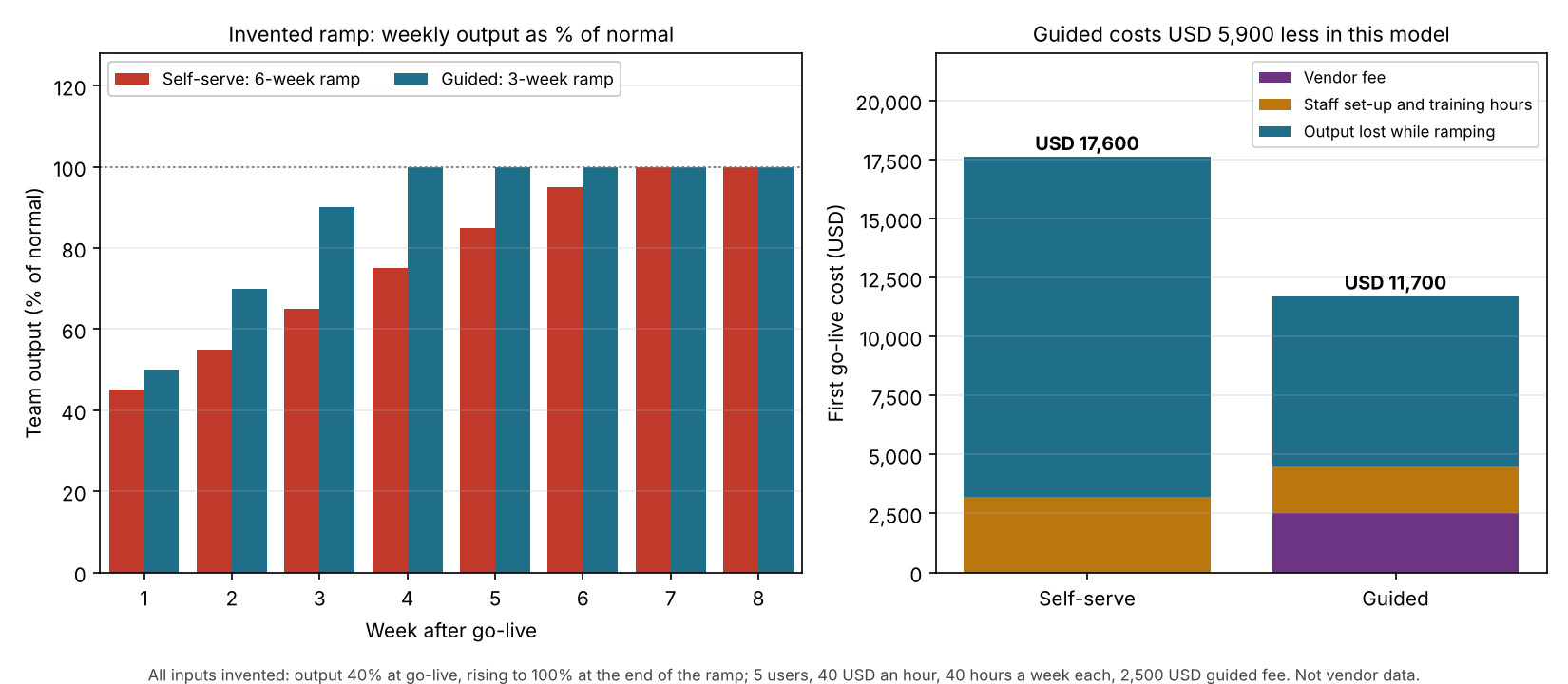
Figure 1. On example inputs, cutting the ramp from 6 weeks to 3 saves USD 5,900 after a USD 2,500 fee. Most of the cost is lost output, not the fee.
What do onboarding and implementation include?
For a solar team, the work falls into six checks. This grouping is ours, not a company list. Planhat lists eight stages for services-led enterprise projects.
- Accounts and roles: add users and decide what each can see. See user roles and permissions.
- Prices and equipment: load the module, inverter and adder lists so proposals match your quotes.
- Templates: set up proposal, contract and branding templates.
- Data: move existing leads and projects across, and decide what stays in the old tool.
- Connections: link the CRM, accounting and design tools through an API or webhooks.
- Training and a first live project: teach each role, then run one real job end to end.
The two words are not fixed. Planhat says: "Implementation is the technical and operational delivery work inside that journey". Coordinate says: "Implementation typically occurs before onboarding". It adds that implementation "can be a longer process, sometimes taking months". That suits broad organisational projects more than a small installer. Both pages are undated general-software explainers.
How do you calculate the cost of a go-live?
Add three things: the company fee, the staff hours spent on set-up and training, and the output lost while the team is slower than normal. Convert hours to money with your loaded labour rate.
- List the company fee from a written quote. Use 0 if there is none.
- Add set-up hours: admin hours plus training hours per user times users.
- Estimate the ramp: weeks until the team reaches normal output, and output at go-live.
- Assume output rises in a straight line. Lost hours are users × weekly hours × the shortfall in each week.
- Multiply all hours by the labour rate and add the fee.
- Repeat for each path and compare. The break-even ramp is the ramp length at which the two totals match.
Worked example: five users, two paths
All inputs here are example. The team has 5 users at 40 hours a week. Loaded labour costs 40 USD an hour. Output is 40% at go-live and rises in a straight line to 100% at the end of the ramp. Week 1 therefore averages 45% on the 6-week ramp and 50% on the 3-week ramp.
| Item (example) | Self-serve | Guided |
|---|---|---|
| Company fee | USD 0 | USD 2,500 |
| Admin set-up hours | 30 | 20 |
| Training hours per user | 10 | 6 |
| Set-up hours in total | 80 | 50 |
| Weeks to normal output | 6 | 3 |
| Average output while ramping | 70% | 70% |
| Output lost | 360 hours | 180 hours |
| Set-up cost | USD 3,200 | USD 2,000 |
| Lost-output cost | USD 14,400 | USD 7,200 |
| First go-live cost | USD 17,600 | USD 11,700 |
Both paths average 70% output while ramping, so the ramp length, not the average, drives the gap. Guided costs USD 5,900 less. The fee is only 21% of the guided total (2,500 of 11,700). It pays back if it buys enough weeks. This table varies only the guided ramp.
| Guided ramp (weeks) | Guided total | Guided against self-serve |
|---|---|---|
| 6 | USD 18,900 | Guided costs USD 1,300 more |
| 5 | USD 16,500 | Guided saves USD 1,100 |
| 4 | USD 14,100 | Guided saves USD 3,500 |
| 3 | USD 11,700 | Guided saves USD 5,900 |
On these inputs the guided path breaks even at a ramp of 5.46 weeks. Each ramp week costs USD 2,400 in lost output. The result depends on the example hours and rates, so replace them with your own in the calculator.
Go-live cost calculator
Enter your own users, rate, hours, quote and ramp estimates. The calculator returns each path’s cost, the difference and the break-even ramp.
How solar software handles onboarding and implementation
Of the four solar tools we read in October 2026, only JobNimbus states a fee position, yet all four describe training or support. We also read Salesforce Sales Cloud as a non-solar comparison, listed below the table. Packages differ: free webinars, add-on launch plans or paid professional services. The table shows what is published, not how good the service is.
| Software | Onboarding fee shown | Page read |
|---|---|---|
| OpenSolar | Not stated | Support page, last modified 13 January 2026. Webinars page, undated. |
| Aurora Solar | Not stated | Pricing page, undated. |
| JobNimbus | "No required setup or onboarding fees" | Pricing page, undated. |
| Solargraf | Not stated | Help article, published 18 May 2023. |
Not stated: the page we read shows no fee. Here is what each page says is included, and what is extra or missing.
- OpenSolar: live weekly training webinars, such as Account Setup Training (1 hour) and Software Overview (45 minutes). Live support or 24/7 ticket support with a free account. Webinar and 1-2-1 session prices not stated. The page mentions "onboarding help" with no detail.
- Aurora Solar: rows for customer support, training videos and documentation, and Aurora Academy. Paid add-ons, not shown as tied to one plan: premium support, "Personalized launch and training plan", technical consultation, proposal template customization. Add-on prices not shown. The page text does not show which plans tick the other rows.
- JobNimbus: "All plans include implementation guidance and ongoing support." Implementation is "Standard" on Essentials and Pro, and "Premium" on Premium and Enterprise. Paid Professional Services are an add-on on Essentials, Pro and Premium, with the price not shown. Enterprise says "Contact sales". 14-day free trial.
- Solargraf: webinar training, which needs registration, and 1-on-1 sessions booked with the trainers by email. Cost, session length and topics not stated.
- Salesforce Sales Cloud: a general CRM, not a solar tool, so it is left out of the table. A Standard Success Plan is included in all licences, with self-guided resources. A Premier plan comes with Core, Advanced and Max licences. Signature plan: contact the account executive. Premier Support is an add-on for Pro Suite.
Pages differ in date and region. A missing fee on a page is not proof of no fee, so confirm it with the company. To compare the tools themselves, see the best solar design and proposal software.
Common mistakes with onboarding and implementation
FAQs
What is the difference between onboarding and implementation?
The two words overlap, and sources order them differently. Planhat calls implementation the delivery work inside onboarding: configuration, integration, data migration and deployment. Coordinate says implementation usually comes before onboarding and covers wider organisational change. Settle the meaning in the quote.
Is software onboarding free?
Sometimes, and it varies by company. JobNimbus says it has no required setup or onboarding fees and sells paid Professional Services separately. Aurora lists a launch and training plan as a paid add-on, not tied to one plan, without a price. Your own staff time is never free.
How long does implementation take?
OpenSolar’s account setup webinar is 1 hour and its software overview is 45 minutes. Coordinate says implementation can sometimes take months, in broad organisational projects. The company pages we read state no typical go-live time, so get a ramp estimate from each company and test it in the calculator above.
What should I ask a company before I sign?
Ask what is included, what the fee is and whether it is one-off. Ask who trains your team and how long each session is. Find out whether a trial is available and whether support continues after go-live. Record the plan name beside each answer.
Does a free trial replace onboarding?
No. A trial lets you test the tool. Onboarding is the work that gets your team using it on real jobs. JobNimbus lists a 14-day trial alongside its implementation guidance. See free plan vs free trial.
Related terms
- Free plan vs free trial: two ways to test a tool before paying.
- Per-seat pricing: a fee for each user, whatever the project count.
- Solar project management software: tools that track jobs from sale to handover.
Next step: price your own go-live in the calculator above, then shortlist tools from the best solar design and proposal software list.
Sources
- Planhat: The Complete Guide to Customer Onboarding and Implementation (undated, checked October 2026).
- Coordinate: Implementation vs Onboarding (undated, checked October 2026).
- JobNimbus pricing page (undated, checked October 2026).
- Aurora Solar pricing page (undated, checked October 2026).
- OpenSolar support page (last modified 13 January 2026) and OpenSolar webinars page (undated, both checked October 2026).
- Solargraf: How to book a training session (published 18 May 2023, checked October 2026).
- Salesforce CRM pricing page, US (undated, checked October 2026).
Last updated 30 October 2026. Next scheduled review: 30 January 2027.