Key takeaways
- The unit of work is the project, not the lead, the job or the asset. A work order is one job inside a project stage.
- No standard defines the stages. Our 7-stage model runs from Handoff to PTO, with an exit gate for each stage.
- On an invented pipeline of 12 projects, 7 were over their example stage target (58.3%).
- The 5 projects in the permit, inspection and PTO stages held 25 of the 36 days over target (69.4%).
- Of 5 company pages read, Sunbase now names a Days in Stage field (re-checked November 2026). Enerflo and Sitemark still rate Partly on a stuck or ageing view.
To test these stages in a real tool, see the best solar project management software.
Solar project management software at a glance
It is the record that moves a sold system through survey, design, permit, install and approval. It shows who owes the next step.
| Item | Detail |
|---|---|
| Unit of work | One project, from signed contract to handover. |
| Stages in this page | 7: Handoff, Survey, Design, Permit, Install, Inspection, PTO. Our model, not a standard. |
| Core measures | Days in stage, tasks overdue, who the project waits on, projects past target. |
| Standard or rule | None. Each AHJ and utility sets its own steps. |
| In software | A project module in a solar CRM, a field service tool, a construction tool or a general project tool. |
Why does it matter for installers?
Many waits sit outside your crew. A project that nobody owns between stages sits in a queue, and the cash for that job sits with it.
A page from NLR (formerly NREL), last updated 21 January 2026, describes SolarTRACE data. It has "median cycle times for over 1,500 jurisdictions with at least 10 installs". Cycle times differ by place, so one target for every town will not work. The permit rules are on permit plan set and the utility step is on PTO.
What does a project move through?
This page uses seven stages, each with a gate that must be true before the project leaves it. The gates below are our own design. Adapt them to your process.
| Stage | Gate to leave the stage (our suggestion) | Detail page |
|---|---|---|
| 1 Handoff | Signed contract and bill copy pass to operations. | Starts the schedule. See crew management |
| 2 Survey | Site data and photos are filed. | Site survey, site photos |
| 3 Design | Layout, equipment list and diagrams agree. | Bill of materials, single line diagram |
| 4 Permit | Permit issued. Utility application filed. | Permit plan set, interconnection application |
| 5 Install | Crew has finished and logged the work. | Work order, crew management |
| 6 Inspection | Inspection passed. Test records filed. | Commissioning |
| 7 PTO | Utility permission received. Handover pack sent. | PTO, handover pack |
Equipment ordering and crew booking run alongside these stages. See scheduling and dispatch. Keep each project in one stage at a time.
How is it different from a CRM, a work order tool or a CMMS?
A CRM tracks a deal, project software tracks the project, a work order tool tracks a job, and a CMMS tracks an asset. Suites often bundle two or more.
| Tool type | Object it tracks | Ends when |
|---|---|---|
| CRM | Lead and deal. | Contract signed. |
| Project management | Project through 7 stages. | PTO received and pack handed over. |
| Work order or field service | One job and its crew visit. | Job closed. |
| CMMS or asset management | Plant, parts and service history. | Asset retired. See asset management. |
Service after handover is covered on O&M. Sales commission rules sit in sales commission tracking.
Worked example: a stage-ageing check on 12 projects
All inputs are example: the report date (27 October 2026), the 7 stage targets and the 12 projects. Days in stage are calendar days from the date the project entered its stage. A project is over target if its days exceed the target.
| Project | Stage | Entered | Days in stage | Target | Days over | Waiting on |
|---|---|---|---|---|---|---|
| P-201 | Handoff | 23 Oct | 4 | 2 | 2 | Customer |
| P-202 | Survey | 20 Oct | 7 | 5 | 2 | Customer |
| P-203 | Survey | 24 Oct | 3 | 5 | 0 | None |
| P-204 | Design | 22 Oct | 5 | 4 | 1 | Internal |
| P-205 | Design | 26 Oct | 1 | 4 | 0 | None |
| P-206 | Permit | 9 Oct | 18 | 14 | 4 | AHJ |
| P-207 | Permit | 18 Oct | 9 | 14 | 0 | None |
| P-208 | Permit | 28 Sep | 29 | 14 | 15 | AHJ |
| P-209 | Install | 23 Oct | 4 | 6 | 0 | None |
| P-210 | Install | 15 Oct | 12 | 6 | 6 | Supplier |
| P-211 | Inspection | 22 Oct | 5 | 7 | 0 | None |
| P-212 | PTO | 30 Sep | 27 | 21 | 6 | Utility |
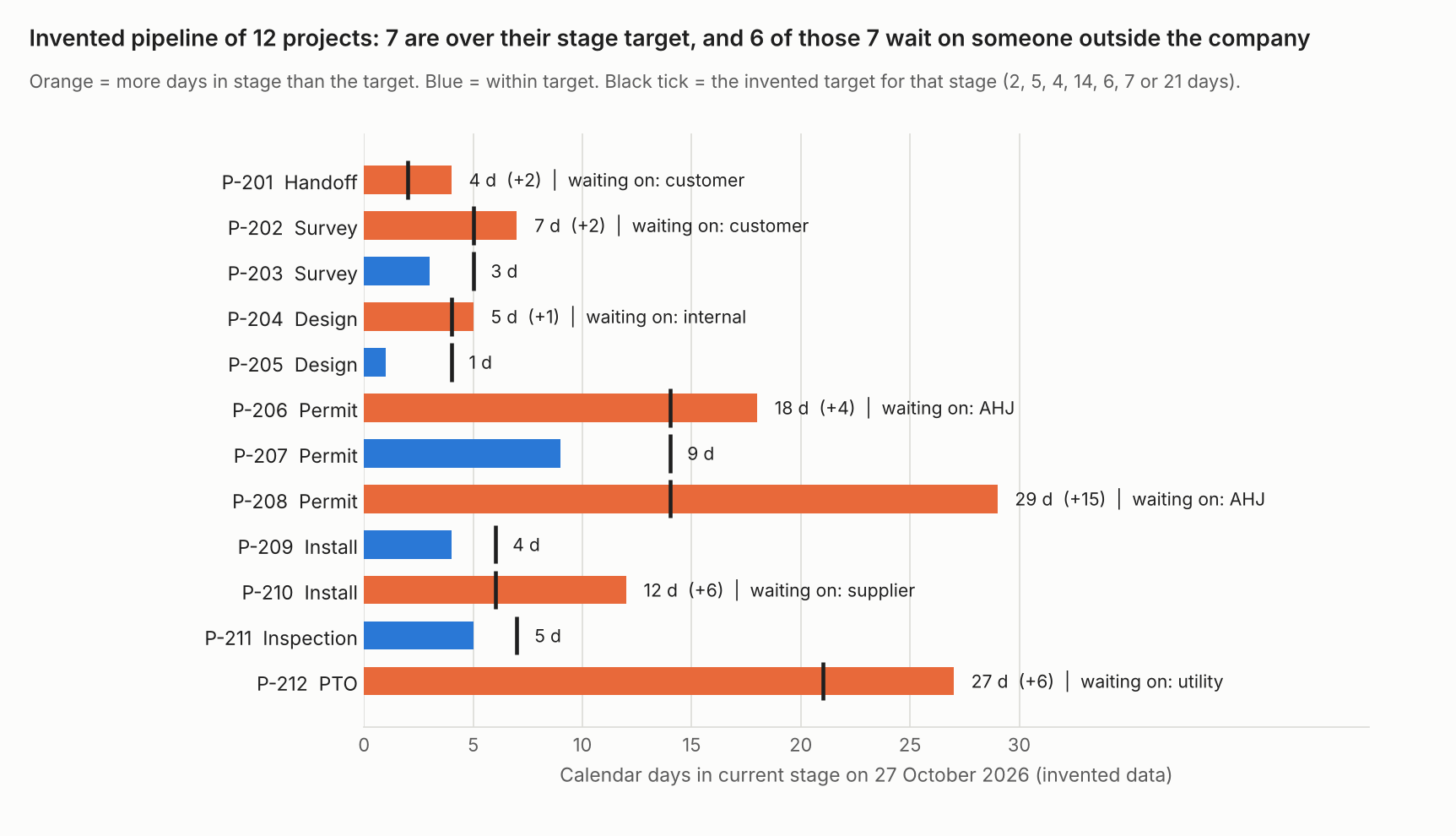
Figure 1. On an example pipeline of 12 projects, 7 are over their stage target and 6 of those 7 wait on someone outside the company.
Seven of 12 projects are over target (58.3%), carrying 36 days over in total. The median is 6.0 days in stage. Grouped by who holds the project: AHJ 2 projects (19 days over), customer 2 (4), supplier 1 (6), utility 1 (6) and internal 1 (1). The 5 projects in Permit, Inspection and PTO hold 3 of the 7 late projects and 25 of the 36 days (69.4%).
A stage list alone shows 12 projects in 7 columns. The days and the "waiting on" field show where to phone first: P-208, P-210, P-212 and P-206 hold 31 of the 36 days. The sample is small and example, so treat it as a method, not a benchmark.
Check your own pipeline
Paste one open project per line. Add its stage, the date it entered the stage and, if you want, who it waits on. Set your own targets. The calculator loads the example pipeline first. If it does not load, open the stage ageing calculator on its own page.
How solar software handles project management
Sunbase’s page, re-checked in November 2026, now names a Days in Stage field, so its rating moved up from the October reading. Enerflo and Sitemark still show something close to a stuck or ageing view, without naming days in stage directly. Sitemark tracks solar construction progress with drone data and mobile workflows, a different job from a home install, so compare its row with care. The ratings come from company pages read in October 2026, with Sunbase re-checked in November 2026.
| Software | Stages or milestones | Tasks and owners | Permit and utility status. Documents | Stuck or ageing view |
|---|---|---|---|---|
| Sunbase | Yes | Yes | Permit: Yes. Documents: Yes. | Yes |
| Coperniq | Yes | Partly | Permit: Not stated. Documents: Partly. | Not stated |
| Enerflo | Yes | Partly | Permit: Partly. Documents: Not stated. | Partly |
| Sitetracker | Not stated | Partly | Permit: Partly. Documents: Not stated. | Not stated |
| Sitemark | Yes | Not stated | Permit: Not stated. Documents: Partly. | Partly |
What each page says, by product:
- Sunbase: "Define and track each stage of the project". "Assign tasks to the right team members, set due dates". "Track permit submissions, approval status, required documents". "Store contracts, engineering files, permits, inspection records, photos". Each project can show "Current Stage, Assigned Owner, Next Action, Due Date, Days in Stage, Blocker, Overall Status", and the page says it can "surface stalled projects and unresolved blockers". Re-checked November 2026.
- Coperniq: Project workflows have stages and start after a proposal and contract are signed. Tasks are handled through work orders. Assignees and due dates are not mentioned. "forms collect all necessary information, such as contracts and utility bills".
- Enerflo: Milestone names are set per company, so the "Site Survey Complete, Permit Recieved [sic], Install Completed, PTO" example read in October 2026 no longer appears on the help pages, which moved from intercom.help to help.enerflo.io. The Install Tracker highlights a row red once "the current milestone has passed its estimated completion date" and yellow within 48 hours of it. The permit status is a milestone only. Re-checked November 2026.
- Sitemark: "Monitor work completion against planned milestones". "Maintain a complete digital record of all tracked milestones". "Generate automated progress reports for teams and investors".
- Sitetracker: The page does not mention milestones. "Execute projects with schedule and cost control". One line on permits: "Align sites, permits, and capital for handoff". "Reporting & Analytics" is a product name only.
Quotes are from each company’s own pages. None prints a usable page date, so each was checked in October 2026, Sunbase and Enerflo re-checked in November 2026, and details may have changed again since. "Not stated" means the pages read do not say. "Partly" means the page mentions a related feature without full detail. For scored company comparisons, see the best solar project management software list.
How do you evaluate a tool?
Test each tool on your last 10 projects, not on its demo data. The one metric to ask any company for is days in stage, from a stage-entry date. These questions tell a stage board from a working project system.
- Can I edit the stages and the exit gate for each, such as "permit issued" before Install?
- Does each stage record the date a project entered it, so days in stage can be read without a spreadsheet?
- Can I mark who a project waits on (AHJ, utility, supplier, customer, internal) and filter by it?
- Does a sold deal arrive with its documents, or must someone retype it? Ask about the API and webhooks.
- Can the field crew update a task offline, with photos? See mobile app offline mode.
- Can I export every project with its stage history?
- How is it priced: per seat, per project or by module? See per-seat pricing, and ask for the company’s current price page.
Run the calculator above on a real export. If the tool cannot give you a start date per stage, you cannot measure ageing at all. For dashboards built on these measures, see KPI dashboard.
Common mistakes with project management software
FAQs
Is solar project management software the same as a solar CRM?
No, they track different objects. A CRM tracks the lead to signature. Project software tracks the job from handoff to PTO. Suites often bundle both, but each still answers a different question.
Do small installers need it?
In our view, yes, once you cannot name every project stuck in permit or utility queues today. With several projects waiting there, you need a record of who is waiting on whom. A very small pipeline may manage with a simple list.
What should I measure first?
Days in the current stage and who the project waits on. They need only a stage-entry date per project. In our example, they found 7 late projects out of 12.
What are the stages of a solar project?
Our model uses seven stages: Handoff, Survey, Design, Permit, Install, Inspection and PTO. It is not a standard, so each AHJ and utility sets its own steps. Adapt the exit gate for each stage to your own process.
Related terms
- Work order: the record of one job inside a project stage.
- Permit plan set: the drawings and data that clear the Permit stage.
- PTO: the utility approval that ends the last stage.
- Handover pack: the records given to the owner at close.
- CMMS: the system that takes over once the plant is running.
Next step: export your last 10 projects with stage-entry dates, then check which tools in the best solar project management software list show stage, owner and blockers.
Sources
- NLR (formerly NREL): Solar permitting, inspection and interconnection timelines, last updated 21 January 2026 (checked October 2026).
- Sunbase: Solar project management software, no page date (checked October 2026, re-checked November 2026: now documents a Days in Stage field).
- Coperniq support: Request and project workflows, no date shown (checked October 2026).
- Enerflo help: Admins, how to create or update your milestones, dated 15 July 2026, and Customer highlighted red or yellow in the Install Tracker (checked November 2026, the October 2026 citation at intercom.help no longer resolves, the help centre has moved to help.enerflo.io).
- Sitemark: Solar progress tracking, copyright 2026, no page date (checked October 2026).
- Sitetracker: Renewable energy, no page date (checked October 2026).
Last updated 3 November 2026. Next scheduled review: 30 January 2027.