Key takeaways
- Of 5 solar tools reviewed, 4 document sale-price controls and 2 document cost or margin controls. OpenSolar is in both groups, and Zuper names custom roles only.
- Export and billing controls appear on 2 tools (Solargraf and JobNimbus).
- The pages we read for the 5 solar tools do not mention an audit log. Companies may document one elsewhere. ServiceTitan documents one for its pricebook only.
- JobNimbus describes a Subcontractor role that cannot see contacts, jobs, pricing, reports, financials or settings.
- In an invented 16-person example, seat types by role cut a bill from USD 1,600 to USD 1,010 a month (36.9%).
For CRMs that offer the role controls described here, see the best solar CRM.
User roles and permissions at a glance
A permission is one allowed action on one area. A role is a named bundle of permissions. The table shows the terms we use.
| Item | Detail |
|---|---|
| Model | User, then role, then permissions. Areas include pricing, contacts, exports and billing. |
| Roles named on pages read | By tool (Aurora 3 standard roles, Solargraf and JobNimbus 4 each, OpenSolar 7). Zuper’s page names custom roles only. |
| Where it matters | Margin privacy, customer data, subcontractor access, seat cost and staff who leave. |
| Standard or rule | No solar standard. NIST describes the general RBAC model. |
| Not the same as | Single sign-on, which controls how people log in, not what they can do. |
How does role-based access control work?
Each user gets one or more roles. Each role gets a set of permissions. You manage access by job, not by person.
NIST’s RBAC project page says: "Each user is assigned one or more roles, and each role is assigned one or more privileges ...".
It adds: "With RBAC, security is managed at a level that corresponds closely to the organization’s structure." The page was updated 4 March 2026. NIST marks it as an archived project.
For an installer, that structure is the six jobs in the matrix below. A new hire gets the role for the job. You skip ticking each permission box by hand.
Why do roles and permissions matter for installers?
Roles protect margin, customer data and project files. They also set seat cost. A rep who sees your cost price can quote it back to a customer.
Subcontractors add risk. They are off your payroll. Yet they open your jobs. A role that shows only assigned work orders limits what leaves with them. See subcontractor management for the wider process.
Some tools price by seat type, so a rarely used login on a full seat wastes money. See per-seat pricing.
What should each role see? A permission matrix
Give each role the least it needs for its job. The matrix is our design view for an installer firm, not a standard. Edit means change. View means read only. None means hidden. The first table covers admin, sales rep and designer.
| Item | Admin | Sales rep | Designer |
|---|---|---|---|
| Sale price | Edit | Edit | View |
| Cost and margin | Edit | None | None |
| Customer contact data | All | Own | Assigned |
| Design | Edit | View | Edit |
| Upload job files | Edit | Edit | Edit |
| Export | Edit | None | None |
| Billing and subscription | Edit | None | None |
| Users, roles and settings | Edit | None | None |
The same items for the other three roles follow.
| Item | Installer | Subcontractor | Read-only |
|---|---|---|---|
| Sale price | None | None | View |
| Cost and margin | None | None | View |
| Customer contact data | Assigned | Assigned jobs | View |
| Design | View | View | View |
| Upload job files | Edit | Edit | None |
| Export | None | None | None |
| Billing and subscription | None | None | None |
| Users, roles and settings | None | None | None |
| Role or control | Tool | What the page says |
|---|---|---|
| Subcontractor | JobNimbus | Lists "External crew access for assigned Work Orders only (mobile only)". Subcontractors cannot see contacts, jobs, pricing, reports, financials or settings. |
| Subcontractor | OpenSolar | Its Subcontractor role is "Similar to the contractor, but with even fewer permissions." |
| Cost and margin | OpenSolar | The General Manager role "Has permissions to view pricing and costing, but cannot edit them". That matches our Read-only row. |
| Cost and margin | JobNimbus | The Hide Cost toggle means users "won’t see material costs, labor costs, or margin/markup information". |
| Design and files | OpenSolar | The Contractor role can view project details and upload files. It cannot edit the design or see costing. |
| Role or control | Tool | What the page says |
|---|---|---|
| Customer data | Aurora | The Limited Team Member "Can only see, modify, and delete their own projects." |
| Customer data | OpenSolar | Default Designer, Salesperson and Sales Manager roles see assigned projects and can view all contacts. So "Own" is not an OpenSolar default. |
| Settings and billing | Aurora | "Only administrators are allowed to change a user’s permissions". |
| Settings and billing | JobNimbus | The Sales role has "no access to Settings or Subscription". |
| Export | Solargraf and JobNimbus | Both have export permissions ("Export projects as CSV" and "Export reports"). |
| Cost for designers | OpenSolar | The permission table gives Cost information to Admin and General Manager only. So Designer and Salesperson see none by default. No other page confirms this for designers. |
| Sale price | OpenSolar | The table gives Pricing to Admin (all access) and General Manager (view) only. Designer and Salesperson have No Access. Our Sale price cells for those roles are a design choice, not a company default. |
What are seat types, and how do they change the cost?
A seat type is the licence class of a login. The role sets what the user may do. The seat type sets what you pay. Monthly cost is the number of people times the price of their seat type, added up.
The company pages differ. HubSpot’s product catalog (a general CRM, not a solar tool) lists Core, Sales, Service, Revenue, View-Only and Partner seats. JobNimbus counts seats as users assigned to a role. It shows a "Total Seats Used" figure. The Aurora articles describe roles and link to a Users and Licenses page. They define no seat types.
The example below uses example prices per person per month. A full seat is USD 100, a field seat is USD 30 and a view-only seat is USD 0. These are not company prices.
| Role (example headcount) | People | Seat type | A: all full | B: by role |
|---|---|---|---|---|
| Admin and office | 2 | Full | USD 200 | USD 200 |
| Sales reps | 4 | Full | USD 400 | USD 400 |
| Designers | 2 | Full | USD 200 | USD 200 |
| In-house installers | 3 | Field | USD 300 | USD 90 |
| Subcontractor crew leads | 4 | Field | USD 400 | USD 120 |
| Read-only (finance) | 1 | View-only | USD 100 | USD 0 |
| Total | 16 | USD 1,600 | USD 1,010 |
Policy B saves USD 590 a month (36.9%), or USD 7,080 a year. That holds only if the company sells cheaper seat types. Your field staff must also be able to use them.
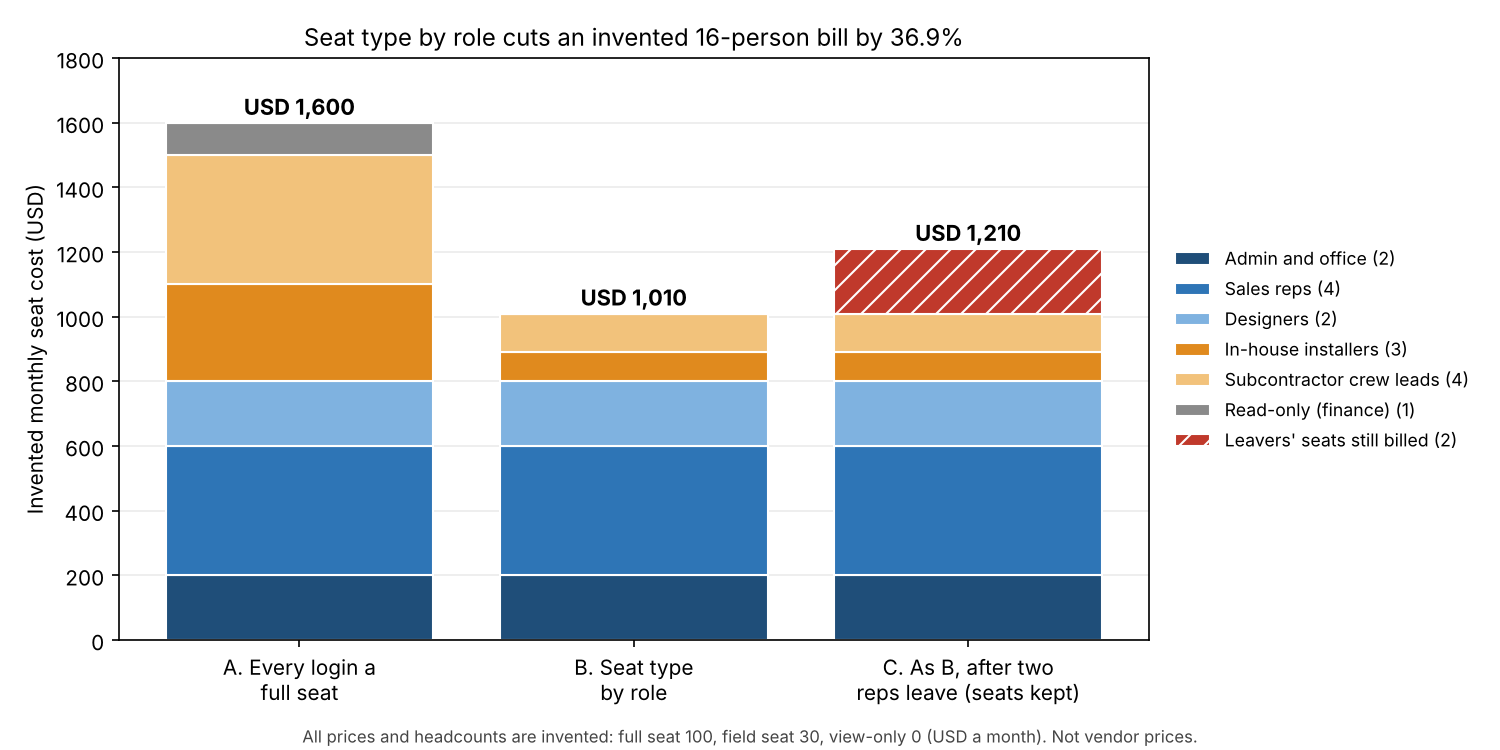
Figure 1. With example prices, seat types by role cut a 16-person bill by 36.9%. Two leavers’ seats add USD 200 a month.
Bar C shows a leaver trap. JobNimbus says deactivating a team member does not reduce paid seats. Seats are removed through your account executive. Suppose two sales reps leave and their full seats stay for 3 months. The extra cost is 2 x USD 100 x 3 = USD 600 (example prices). Aurora and the other pages do not say how seats are released.
Seat cost by role calculator
Enter your own seat prices, headcount and seat type for each role. The starting numbers are the example above.
If the frame does not load, open the seat cost by role calculator on its own page.
Where do the audit log and SSO fit?
An audit log records who changed what and when. Single sign-on (SSO) controls how people log in. Neither decides what a role can do. But both matter once several people can edit prices.
ServiceTitan’s Pricebook audit trail is a documented example (published 27 September 2026, updated 15 October 2026). Each entry records the user account and the action (create, update or delete). It records the entity and the field changed. It also holds the before and after values, plus a timestamp. It sits in Enterprise Hub and needs an Enterprise Hub network. It covers the centralized pricebook only.
The pages we read for the five solar tools do not mention an audit log. JobNimbus can hide its Activity tab per profile. Its page does not call that tab an audit log. No page mentions SSO. See audit trail and single sign-on for each topic. See data security and SOC 2 for assurance reports.
How solar software handles user roles and permissions
All 5 tools in the table document a pricing or cost control by role. Four cover sale price and two cover cost or margin, and OpenSolar covers both. The table rates only what each help page says, and all pages were read in October 2026.
| Software | Roles named? | Pricing and cost controls? | Export and billing controls? |
|---|---|---|---|
| OpenSolar | Yes | Yes | Not stated |
| Aurora Solar | Yes | Yes | Not stated |
| Solargraf | Yes | Yes | Yes |
| JobNimbus | Yes | Yes, cost and margin | Yes |
| Zuper | Partly | Yes | Not stated |
Not stated: the company page we cite does not say. Partly: the page names custom roles but no predefined ones. The pages we read do not state an audit log. The details and pages read follow.
- OpenSolar
- Roles: Seven pre-created roles: Admin, General Manager, Sales Manager, Designer, Salesperson, Contractor, Subcontractor. Custom roles set View, Create, Edit and Delete per area.
- Pricing and cost: Permission names include "Pricing", "Cost information" and "Design - Costing override". Contractor cannot see costing.
- Export and billing: Not stated on these pages. Lists "Integrations and API keys". See data export.
- Pages read: Control Zone articles 4408433950233 and 12299933220111. No dates printed.
- Aurora Solar
- Roles: Admin, Team Member, Limited Team Member (Enterprise only). Advanced Roles allow up to 10 custom roles.
- Pricing and cost: A Pricing setting gives a read-only experience. Financing and Design Mode can also be restricted.
- Export and billing: Not stated. Access to the Users and Licenses page can be controlled.
- Pages read: Roles article, updated 10 June 2026. Advanced Roles, 15 June 2026. Partner Admins, 15 April 2026.
- Solargraf
- Roles: Account Owner (locked, all permissions), Team Leader, Project Manager, Salesperson, custom roles.
- Pricing and cost: "Edit solar price table within a project" and "Change dealer fee toggle on adders". No cost visibility control is described.
- Export and billing: "Export projects as CSV", "View company billing information", "Manage company subscriptions".
- Pages read: Help article "Roles & permissions", published 3 July 2024.
- JobNimbus
- Roles: Admin, Sales, Field, Subcontractor, plus Access Profiles.
- Pricing and cost: Yes for cost and margin ("Hide Cost"). No sale-price toggle is described, though estimate and invoice record access can be restricted.
- Export and billing: Toggles for "Export reports" and "Account Subscription".
- Pages read: Three support articles. No dates printed (copyright 2025).
- Zuper
- Roles: Partly. Custom roles. No predefined roles named.
- Pricing and cost: "Show Selling Price", "Update Line Item Price", "Add Discount".
- Export and billing: Not stated. No export permission is listed. "Make Payment" is an invoice permission.
- Pages read: Two Zuper care articles. No dates printed.
Aurora’s two articles word plan availability in different ways. One says Advanced Roles are on all Enterprise plans and the Self-Serve Build plan. The other says Build, Grow and Scale tiers. Confirm your plan. To compare more tools, read the list of best solar CRM.
Common mistakes with user roles and permissions
FAQs
What is the difference between a role and a permission?
A permission is one allowed action on one area, such as editing "Pricing". A role is the bundle you give a user. OpenSolar sets View, Create, Edit and Delete for each area. It then saves the set as a custom role.
Can I hide cost and margin from sales reps?
Sometimes. OpenSolar and JobNimbus document cost controls. OpenSolar lists cost permissions. JobNimbus has a Hide Cost toggle. Aurora, Solargraf and Zuper pages describe price controls but not cost or margin. Ask the company before you rely on it.
Does a subcontractor need a paid seat?
JobNimbus has a mobile-only Subcontractor role for assigned work orders, but none of the five pages say whether it uses a paid seat. Ask the company in writing before you add crews.
What should a sales rep be able to see?
In our matrix, a rep edits sale price, sees only their own customer data, and has no access to cost, margin, export or billing. That is a design view, not a company default. OpenSolar’s default Sales roles can view all contacts. For seat cost, see per-seat pricing.
Related terms
- Per-seat pricing: a fee for each person with a login, plus the break-even maths.
- Subcontractor management: how you vet, assign and pay outside crews.
- Customer portal: the customer-facing login, with its own permission model.
Next step: shortlist tools whose roles fit your matrix in the best solar CRM list, or see the best solar project management software.
Sources
- NIST: Role Based Access Control project page (updated 4 March 2026, checked October 2026).
- OpenSolar support article 4408433950233 and article 12299933220111 (no dates printed, checked October 2026).
- Aurora Solar help: Roles (updated 10 June 2026), Advanced Roles (15 June 2026) and Partner Admins (15 April 2026). Checked October 2026.
- Solargraf: Roles & permissions (published 3 July 2024, checked October 2026).
- JobNimbus: What are user roles and seats, different access permissions and Profit Tracker access (no dates printed, checked October 2026).
- Zuper: manage roles and permissions and permission settings by role (no dates printed, checked October 2026).
- HubSpot product and services catalog, seats section (no date printed, checked October 2026).
- ServiceTitan: Centralized Pricebook Audit Trail in Enterprise Hub (published 27 September 2026, updated 15 October 2026, checked October 2026).
Last updated 30 October 2026. Next scheduled review: 30 January 2027.