Key takeaways
- If a town has adopted SolarAPP+, qualifying jobs need no site plan or electrical diagram. A compliant entry gets a permit after payment. A failing one gets reasons at once.
- NREL counted 256 AHJs in 13 states and over 65,000 permits at 31 December 2024. Undated SolarAPP+ site pages show higher counts, so check the date on any figure.
- You enter data and upload some documents. The software then works out string voltage, overcurrent protection, wire size and busbar checks.
- Only OpenSolar, of the design tools in our table, documents a permit you can start and track from a project (support page, 5 March 2026).
- Our invented example cuts the wait by 9.5 business days per eligible job. Averaged over all 50 jobs, that is 4.6 days. Every input is made up.
First check whether your AHJ has adopted SolarAPP+ (see FAQ 1), then compare permit tools in the best solar permitting software list.
SolarAPP+ at a glance
SolarAPP+ moves plan review from a person to software. It works only where a jurisdiction has adopted it. It works only for jobs that fit its limits.
| Item | Detail |
|---|---|
| What it is and who runs it | An online portal for residential rooftop PV and battery storage permits. The SolarAPP Foundation, an independent non-profit, manages it. DOE funded it. NREL (now the National Laboratory of the Rockies) managed it first. |
| Who can use it | Licensed contractors only. The platform checks business and city licences before you can apply. |
| Submit and receive | You enter system details and pay. You get a permit if the design passes, plus an inspection checklist. |
| Scale | 256 AHJs in 13 states and over 65,000 permits at 31 December 2024 (NREL final report, July 2025). |
| In software | The portal has an API. OpenSolar documents a link from its projects. Aurora Solar, Scanifly and Solargraf: no link documented. |
Why does SolarAPP+ matter for installers?
It can cut the plan-review wait and the correction loop. That holds only for qualifying jobs in adopting towns.
DOE said on 20 December 2023 that permitting can add weeks or months to residential solar. Its survey of PV installers suggests "many installers either avoid communities with burdensome permitting requirements or charge a 10%-20% price premium". NREL found that a typical SolarAPP+ project in 2023 was permitted and inspected a median 14.5 business days sooner. That covers permit and inspection together. See permit plan set for how it differs from review time.
The saving applies to the permit step only. Utility approval is a separate step. See interconnection application and PTO.
How does automated permitting differ from manual plan review?
In manual review, a person checks your drawings. In SolarAPP+, software checks the data you enter. The permit issues when you pay.
| Step | Manual plan review | SolarAPP+ |
|---|---|---|
| What you submit | A plan set with a site plan and an electrical plan. | System data entered in the portal. No site plan or electrical diagram. |
| Who checks | Plan check staff at the jurisdiction. | Software checks code compliance as you enter data. |
| Time to permit | 5 to 10 business days on average, much longer in some areas. | Instant after payment, if compliant (SolarAPP+ statement). |
| If it fails | Corrections. A change after issue can restart review. | Immediate notice explaining why. |
| Scope | Whatever your AHJ accepts. | Residential rooftop PV and storage. Complex jobs, such as commercial or multi-family, stay on the traditional route. |
SolarAPP+ replaces the plan-review step. It does not replace the AHJ. Its help centre (14 May 2024) pairs automated checks with streamlined field inspections. These replace human plan review. A town can run it alone, or the town can link it to its own permit software. In a linked town, you upload the approval document, approval ID and spec sheets there (help article, 7 February 2025). See AHJ.
What do installers submit to SolarAPP+?
You verify your licences once. Then you enter each design in the portal. The technical FAQ lists what it asks for. The right column shows where each value sits in your files.
| Group | What the portal asks for | Where it sits in your files |
|---|---|---|
| Account | Business and city licences, checked before you apply. | Licence copies. |
| Equipment | Module, inverter, battery and ESS choices, matched to CEC databases. Converter data comes from a SolarAPP+ database. Cut sheets for all equipment are still uploaded (see permit plan set). | Your bill of materials. |
| Electrical | Overcurrent sizing for backup loads, microinverter maximum Voc and Isc, and ratings for combiners, load centres and busbars, by attestation and upload. | Your single line diagram and string sizing. |
| Roof and fire | Total roof area, plan-view array coverage, whether sprinklers are present, and fire-rating attestations. | Your roof measurement and panel layout. |
| Racking | UL 2703 listing, with the manufacturer’s installation manual uploaded. | Racking datasheets. |
| Result | An approval document and ID, and an inspection checklist. | The job file, for handover. |
From these entries the software works out string voltage, overcurrent protection and wire size. It also sizes the grounding conductor. It also runs the 100% and 120% busbar checks. The technical FAQ gave eligibility limits and 2021-era code references when we last read it. As of November 2026 that page no longer loads, so check the current SolarAPP+ help centre before relying on either.
How solar software handles SolarAPP+
Only OpenSolar documents a link that starts and tracks a SolarAPP+ permit from a project. The other three design tools do not mention SolarAPP+ on the pages read.
| Software | Starts or tracks a SolarAPP+ permit? |
|---|---|
| SolarAPP+ | It is the platform |
| OpenSolar | Yes |
| Aurora Solar | Not stated |
| Scanifly | Not stated |
| Solargraf | Not stated |
"Not stated" means the pages read do not mention SolarAPP+. What each page says, with source and date:
- SolarAPP+: Guided portal. Its API can create and edit projects, manage jurisdictions and pay for permits. Design software can connect so permit fields fill in, but no tool is named. Source: SolarAPP+ installers and product pages, undated.
- OpenSolar: Connect a SolarAPP+ account. The project checks that the address is in a participating jurisdiction and the licence is current. The application opens from the project. "Permit Issued" shows, and permit documents save to the project. Outside participating towns you can only nominate the AHJ. OpenSolar’s article does not list the data sent. Source: OpenSolar support, updated 5 March 2026
- Aurora Solar: The Apps category lists API, racking, UtilityAPI and site survey apps, with no SolarAPP+ entry. The Instant Plan Sets article does not mention it. Source: Aurora help, Apps category (undated) and Instant Plan Sets (27 January 2026).
- Scanifly: The integrations page names sales, racking, plan-set and API partners. It does not mention SolarAPP+ or permitting. Source: Scanifly integrations, last modified 24 September 2026
- Solargraf: The self-service permit plan set article does not mention SolarAPP+ or automated submission. Source: Solargraf help, 18 September 2024
SolarAPP+’s product and installers pages list no design-file import. In adopting towns, it does not ask for a plan set PDF or DWG. Those files still help in towns that review drawings. For scored company comparisons, see the best solar permitting software list and the best residential solar design software list.
Worked example: how many permit days could SolarAPP+ save?
In our example, one eligible job waits 9.5 business days less for a permit. Averaged over all 50 jobs in a quarter, that is 4.6 days. Every input below is made up. Replace them with your own records.
| Input (example unless marked) | Value |
|---|---|
| Jobs per quarter | 50 |
| Jobs in towns that use SolarAPP+ | 60%, so 30 jobs |
| Of those, jobs that fit its limits | 80%, so 24 eligible jobs |
| Manual review time | 8 business days (the company’s quoted average range is 5 to 10) |
| Manual submissions needing a correction round | 30% |
| Length of one correction round | 5 business days |
| SolarAPP+ wait after a compliant entry | 0 business days (company statement: instant permit after payment) |
Expected manual wait = 8 + 0.30 × 5 = 9.5 business days per job.
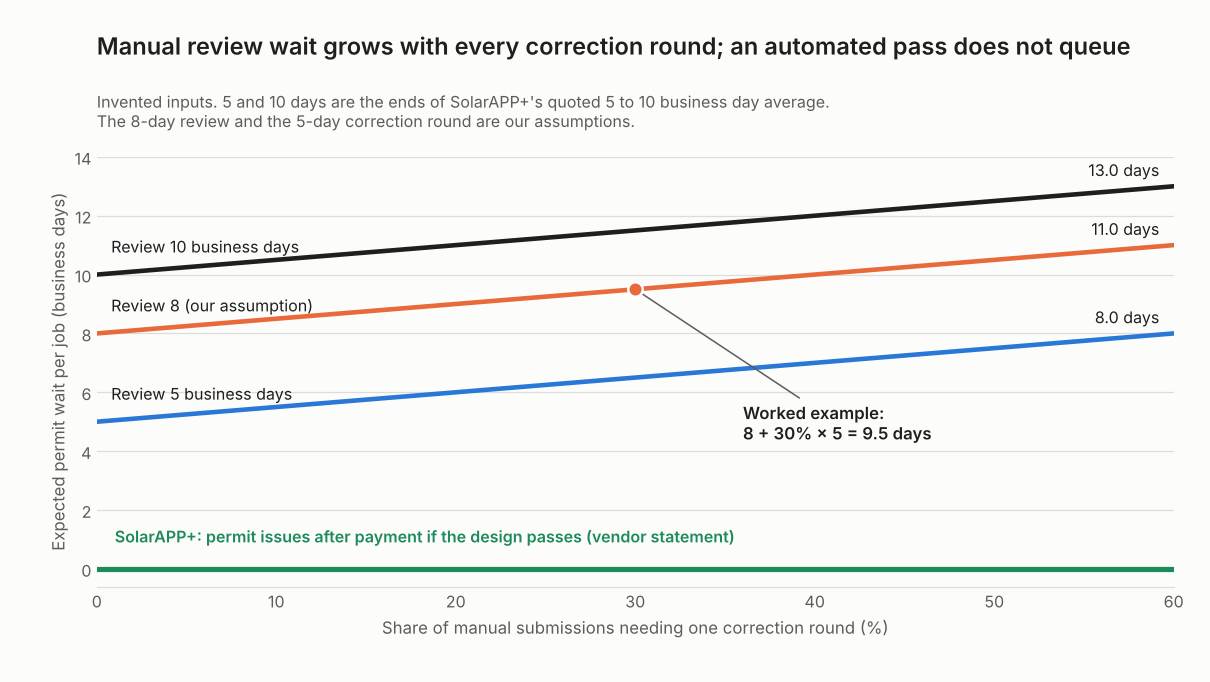
Figure 1. With these example inputs, each 10 points of correction share add 0.5 days to the manual wait, while an automated pass adds none.
| Case (example) | Wait per eligible job | Job-days in the quarter | Average over all 50 jobs |
|---|---|---|---|
| Fast review, no corrections (5 days, 0%) | 5.0 | 120 | 2.4 |
| Page example (8 days, 30%) | 9.5 | 228 | 4.6 |
| Slow review, many corrections (10 days, 50%) | 12.5 | 300 | 6.0 |
| Page example, but 30% of jobs in adopting towns | 9.5 | 114 | 2.3 |
These limits apply. Jobs wait in parallel. So job-days are not crew days lost. The example assumes each entry passes the first time. Data-entry time is zero in the model. Fixing a flagged entry costs office time. Inspection and utility approval are not counted. NREL’s 14.5 days is a different measure.
SolarAPP+ permit days calculator
Enter your jobs per quarter, the share in SolarAPP+ towns, review days and correction share. It returns the permit days saved per eligible job and over all jobs.
It uses the same formula as the example above. Open the SolarAPP+ permit days calculator on its own page if it does not load here.
Common mistakes with SolarAPP+
FAQs
Is SolarAPP+ available in my area?
Only where your AHJ has adopted it. NREL counted 256 AHJs in 13 states at 31 December 2024. DOE counted over 160 communities in 10 states on 20 December 2023. The SolarAPP+ site shows "350+" on one undated page and "340+" on another, because counts differ by date and method. Check the SolarAPP+ jurisdiction list for your town.
Does SolarAPP+ replace the AHJ or the inspection?
No. It replaces human plan review for qualifying jobs. Its help centre (14 May 2024) pairs automated checks with streamlined field inspections. Complex projects still use the traditional system.
Can I use SolarAPP+ for commercial or ground-mount jobs?
Not by the pages read: the technical FAQ describes rooftop systems only. Monterey County’s checklist lists "No ground mounted systems". The help centre (14 May 2024) says complex projects use the traditional system. Examples are commercial or multi-family jobs. Confirm with your AHJ.
Does my design software connect to SolarAPP+?
OpenSolar documents a connection (support page, 5 March 2026). Aurora Solar, Scanifly and Solargraf have no documented link in the sources below. Your company can say whether a project can start the application, so try one job before you rely on it.
Does SolarAPP+ cost installers anything?
Yes, installers pay administrative fees that support it, while DOE (20 December 2023) said it is free to jurisdictions. Prince George’s County says SolarAPP+ charges a processing fee for plan review, separate from county permit fees. OpenSolar’s article says some towns collect both fees in SolarAPP+ and others split them. Check the SolarAPP+ help centre for current amounts.
Related terms
- Permit plan set: the drawings that manual review checks.
- AHJ: the authority that adopts SolarAPP+ and inspects the work.
- Interconnection application: the separate request to the utility.
- PTO: the utility’s permission to switch the system on.
- PE stamp: an engineer’s seal, which some AHJs ask for.
Next step: Look up your AHJ on the SolarAPP+ jurisdiction list. If it is missing, use the best solar permitting software list for the plan-set route.
Sources
All pages checked October 2026.
| Source | Used for |
|---|---|
| SolarAPP+ help: how it differs from typical permitting (undated), replacing the permitting process (14 May 2024), existing permit software (7 February 2025), technical FAQ (undated, link now dead as of November 2026, checked against the current SolarAPP+ help centre) | Process, timing, scope, inputs, checks |
| SolarAPP+ site: home, product, installers, installers landing page, about (all undated) | Licensing, API, jurisdiction counts, who runs it |
| NREL, SolarAPP+ Enhancements and Commercialization final report (July 2025) | 256 AHJs, 13 states, 65,000 permits at 31 December 2024 |
| NREL, SolarAPP+ Performance Review final technical report (November 2024) | 14.5 business days, 2023 data |
| DOE, 160 communities automating solar permitting (20 December 2023) | Communities, states, installer survey and the 10%-20% price premium quote (checked 30 October 2026) |
| OpenSolar support: SolarAPP permitting integration (5 March 2026) | Software row, fees note |
| Aurora help: Apps and Instant Plan Sets (27 January 2026) | Software row |
| Scanifly integrations (24 September 2026) | Software row |
| Solargraf help: self-service permit plan set (18 September 2024) | Software row |
| Monterey County, SolarAPP+ eligibility checklist (26 April 2021) | Local checklist example |
| Prince George’s County, SolarAPP+ page (undated) | Processing fee note |
Last updated 3 November 2026. Next scheduled review: 30 January 2027.