Key takeaways
- On our sample roof with 36 in setbacks, all-portrait and all-landscape both fit 36 modules (15.30 kW). Add a vent and a skylight and both fit 30 (12.75 kW).
- With no setbacks, landscape fits 56 modules and portrait 40, which is 40% more. The better orientation flips as the plane gets longer.
- A mixed layout fits 38, 36 and 32 modules in the three setback cases, 2 more than either single orientation (5.6% to 6.7%). At 2,000 random keep-out positions, a mix never did worse than the better single orientation.
- Roof area divided by module area gives 60 modules, but the setback layout fits 36.
- Of six tools checked, five document automatic fill. Three document an orientation choice and two document fill that avoids keep-outs.
To compare tools that fill a roof plane around keep-outs, see the best solar panel layout software.
Solar panel layout at a glance
A layout is a drawing of whole modules inside the usable roof area. The count is always a whole number.
| Item | Detail |
|---|---|
| Formula | Modules per row = round down of (span + gap) ÷ (module side + gap). Count = rows × that, less keep-outs. kW = count × watts ÷ 1,000 |
| Unit / typical range | Modules and kW DC. Portrait means the long side runs up the slope. Landscape means it runs along the eave |
| Where it matters | Roof plan sheet in the permit plan set, kW sold, string split, bill of materials |
| Standard or rule | No single standard. Setbacks come from the adopted fire code. Clamping zones and rail spans come from the module and racking manuals |
| In software | Auto-layout tools fill a roof face. Company pages differ on orientation and keep-outs (see the table below) |
Why does solar panel layout matter for installers?
Layout decides how many kW you can sell and what the plan reviewer sees. On our sample roof, each module is 0.425 kW.
Reviewers check the roof plan sheet of the permit plan set against setbacks and pathways. The AHJ sets those rules, and the setbacks page owns the widths. A vent missed in the drawing becomes a module the crew cannot install.
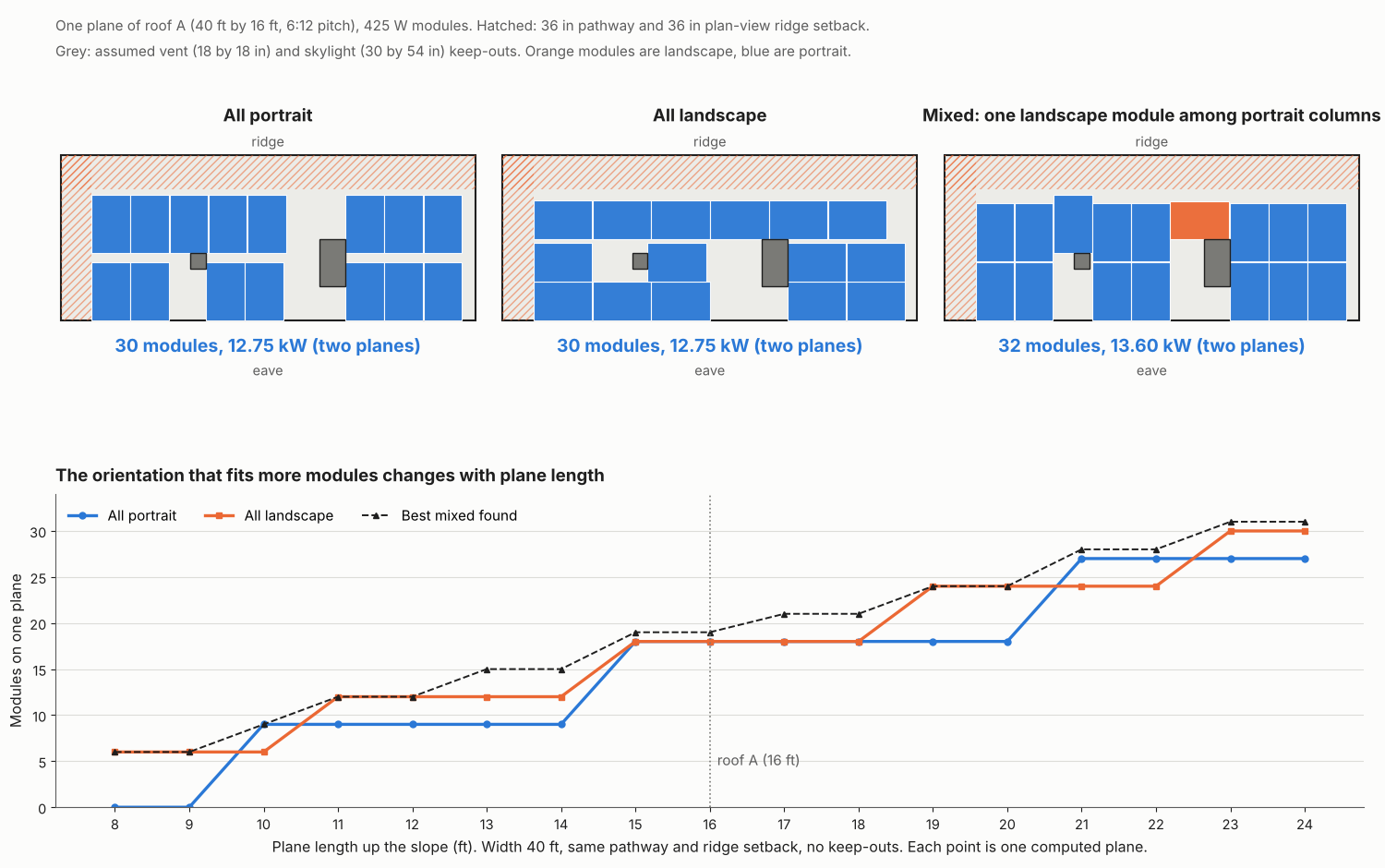
Figure 1. With a vent and skylight, all-portrait and all-landscape tie at 30 modules on roof A and a mixed layout fits 32. Which single orientation wins flips as the plane gets longer.
How do you lay out modules on a roof plane?
Work inward from the roof edge: subtract setbacks, mark keep-outs, then count whole modules in each orientation. The six steps below match the figure.
- Get the adopted setbacks and pathway widths from the AHJ, in writing.
- Measure each plane along the slope. Mark vents, skylights and chimneys (see keep-out zone). Clearances come from the roofer, the module manual and the AHJ.
- Subtract setbacks and pathways to get the usable rectangle.
- Count whole modules in portrait and in landscape: round down of (span + gap) ÷ (module side + gap), each way.
- Remove or refit modules around each keep-out. Then try a mix, because a strip too narrow for one orientation may take the other.
- Pass the count to stringing and racking. Rail and attachment counts are on the racking page.
Worked example: portrait, landscape and mixed on one gable roof
On roof A, orientation changes the count by up to 40% with no setbacks and by none with 36 in setbacks. Mixing adds 2 modules in every setback case.
Roof A is two identical planes at 6:12 pitch. Each is 40 ft along the eave by 16 ft up the slope. Each plane has a 36 in pathway at its left edge. The ridge setback is 36 in in plan view, or 40.2 in along the slope.
The module is the Qcells Q.TRON BLK M-G2+ 425 W, 1722 × 1134 mm, from the racking page. The gap is 0.375 in both ways. That is the racking page’s mid-clamp gap, applied up the slope as well.
We added two keep-outs on each plane. Both are our assumptions, not code values, and include clearance. The vent is 18 × 18 in, 150 in from the left edge and 60 in up from the eave. The skylight is 30 × 54 in, at 300 in and 40 in. Modules sit in whole rows, refitted around keep-outs. "Mixed" is the best of four searches we ran, not a proved maximum.
| Case (whole roof, two planes) | All portrait | All landscape | Mixed, best found |
|---|---|---|---|
| No setbacks, no keep-outs | 40 (17.00 kW) | 56 (23.80 kW) | 56 (23.80 kW) |
| 36 in setbacks only | 36 (15.30 kW) | 36 (15.30 kW) | 38 (16.15 kW) |
| Setbacks plus vent | 34 (14.45 kW) | 34 (14.45 kW) | 36 (15.30 kW) |
| Setbacks plus vent and skylight | 30 (12.75 kW) | 30 (12.75 kW) | 32 (13.60 kW) |
The table shows three patterns:
- Landscape wins big when nothing is removed. Four landscape rows use 179.7 of the 192 in, while two portrait rows use 136.0 in and leave 56.0 in unused.
- Setbacks make the single orientations tie, and a mix adds 2. Details are in the next table and paragraph.
- Keep-outs lower every layout but keep the tie and the 2-module gain. A mix needs its own rail runs, so the racking count needs a second look.
With setbacks, the usable area per plane is 444 × 151.8 in. Neither orientation leaves a strip that holds another module.
| Orientation | Fit per plane | Leftover strips |
|---|---|---|
| Portrait | 9 columns of 2 | 39.2 in wide and 15.8 in tall |
| Landscape | 6 columns of 3 | 35.4 in wide and 17.1 in tall |
The mix swaps one portrait column for a landscape column of 3, giving 16 portrait and 3 landscape modules per plane, or 19.
To test our keep-out positions, we placed the same vent and skylight at 2,000 random positions on one plane. The run used a fixed random seed. Orientation tied in 43.9%. Portrait was ahead in 41.9% and landscape in 14.3%. Mixed beat the better single orientation in 51.8% and never fell below it. The best gain was 3 modules per plane. This holds for this roof and these keep-outs only.
The area rule of thumb fails here. Roof area is 1,280 ft² and a module is 21.02 ft², which gives 60.9, or 60 modules. The setback layout fits 36.
Module count calculator
Enter the plane, setbacks and up to two keep-outs. It reports each layout and kW. The presets reproduce the table above. It does not check rails, rafters, code or shade.
Does portrait or landscape change energy output?
Not for unshaded modules on the same plane. Turning a module does not change the plane’s tilt or azimuth, so rotation changes count, shade behaviour and racking.
SolarQuotes engineer Finn Peacock writes that an unshaded portrait panel generates the same as a landscape panel. SolarQuotes’ footnote says some shade patterns favour one orientation, because shade can hit individual cell strings. In a reply to a reader, Peacock wrote that conventional panels "work best with big shade encroaching on the long side". He said the effect is "the other way round with half-cut panels". Check your module’s cell layout and run a shading analysis before you choose.
Be careful with field comparisons. A January 2024 Solar Power World article compares two Wisconsin flat-roof arrays. The landscape array (199.9 kW, 2019, monofacial, 10° tilt) made 1,151 kWh/kW. The portrait array (340 kW, 2021, bifacial, 23° tilt) made 1,290 kWh/kW. Tilt, module type, size and year all differ, so the gap cannot be put down to orientation. The article credits snow shedding at 23° and bifacial gain.
On pitched roofs the roof sets tilt and azimuth, so layout means choosing which planes to fill (see azimuth and tilt angle). On flat roofs and the ground, tilt sets row spacing, which the ground-mount design page covers.
How does layout feed stringing and the bill of materials?
The layout count sets kW, the ways modules can split into strings, and every part on the bill of materials. Change the count and all three move.
kW is the count times 0.425. A count of 36 divides into equal strings of 2, 3, 4, 6, 9, 12 or 18 modules. A count of 38 splits equally only as 2 strings of 19, or 19 of 2. Which lengths are allowed depends on the inverter and the site’s temperatures, as the string sizing page explains. Planes with different azimuth or tilt usually need separate strings. Rails, clamps and attachments follow the row pattern, so a mix changes them. See bill of materials for the export.
How solar software handles panel layout
The company pages we checked in October 2026 answer unevenly. Aurora Solar, PVcase Roof Mount and SolarNexus document an orientation choice, and Solo and HelioScope document keep-out handling. PVcase Roof Mount does not describe automatic fill. Details are in the list under the table.
| Software | Fills a roof for you? | Orientation | Keep-outs and setbacks |
|---|---|---|---|
| Aurora Solar | Yes | Yes | Not stated |
| OpenSolar | Yes | Not stated | Partly |
| Solo | Yes | Partly | Yes |
| HelioScope | Yes | Not stated | Yes |
| PVcase Roof Mount | Not stated | Yes | Partly |
| SolarNexus | Yes | Yes | Partly |
- Aurora Solar.
- Fill: Yes. AutoDesigner "Max Fit" places as many panels as fit.
- Orientation: Yes. A "Panel Orientation" option, plus a filler row in the opposite orientation.
- Keep-outs: Not stated for AutoDesigner.
- Source: Aurora help, three articles updated June to September 2026
- OpenSolar.
- Fill: Yes. Ada Auto Design builds from a template, instantly only on high-quality 3D imagery.
- Orientation: Not stated. The gutter edge sets the roof direction.
- Keep-outs: Partly. Obstructions are added on the scene. Ada detection is 3D only. Setbacks not mentioned.
- Source: OpenSolar support (July 2026) and Auto Design page (March 2026)
- Solo.
- Fill: Yes. Auto-fill places panels "filling as much space as possible", on one plane or all.
- Orientation: Partly. You select an orientation. The page does not name the options.
- Keep-outs: Yes. Placement avoids obstructions and fire setbacks.
- Source: Solo help, adding panels (October 2026) and studio features (July 2026)
- HelioScope.
- Fill: Yes. A field segment "will automatically fill up with modules".
- Orientation: Not stated. Azimuth is set, or aligned to a roof edge.
- Keep-outs: Yes. Keepouts have an optional buffer. Linear keepouts serve ridge setbacks.
- Source: HelioScope help (June and August 2026)
- PVcase Roof Mount.
- Fill: Not stated.
- Orientation: Yes. "The module orientation can be portrait or landscape".
- Keep-outs: Partly. Partial frames drop modules that overlap obstacles. Setbacks not mentioned.
- Source: PVcase help, Layout settings (February 2026)
- SolarNexus.
- Fill: Yes. Layout strategies fit modules into an area. The page says SolarNexus "can automatically layout your PV Modules into an array".
- Orientation: Yes. Four strategies, including portrait with a landscape row added where space allows.
- Keep-outs: Partly. "Optimal offset" is for areas with restrictions you have drawn.
- Source: orientation strategies help page. It describes SolarNexus’s auto-layout but sits on Solo’s help site, help.gosolo.io (undated).
Partly means the page covers only part of the question. Not stated means the company page we cite does not say. More tools are in the best solar panel layout software list, the best AI solar design software list and the best free solar design software list.
Common mistakes with solar panel layout
FAQs
Is portrait or landscape better for solar panels?
Neither wins everywhere. The better one wastes less of the usable area. On roof A the answer flips with setbacks (see the worked example). With random keep-outs, portrait led in 41.9% of cases and landscape in 14.3%.
Does panel orientation change how much power a system makes?
Not for unshaded modules on the same plane. It can change how shade affects cell strings, so check the datasheet. The Solar Power World comparison does not isolate orientation.
How many solar panels fit on my roof?
Subtract setbacks and keep-outs from each roof plane, then count whole modules in portrait and in landscape. Try a mix too. The calculator above does this for your own planes.
Can you mix portrait and landscape on one roof?
Yes. Aurora documents a filler row in the opposite orientation, and SolarNexus a portrait strategy that adds a landscape row. On roof A a mix added 2 modules. Check rail runs and strings first.
What is the difference between panel orientation and azimuth?
Portrait or landscape is the module’s rotation within its plane. Azimuth is the compass direction the plane faces, and tilt is its angle from level. Turning a module changes neither.
Related terms
- Keep-out zone: a roof area modules cannot cover, such as a vent.
- Tilt angle: the angle of a module from level.
- Azimuth: the compass direction a plane faces.
- AI auto design: software that drafts an array layout for you to review.
- Carport solar design: laying out modules on a raised frame over parking bays.
- Rooftop solar: a PV array fixed to a building roof.
Next step: enter your roof planes, setbacks and keep-outs in the calculator above. Then see the best solar panel layout software for tools that handle keep-outs.
Sources
- Orientation. SolarQuotes, landscape solar panels (Finn Peacock, published 18 October 2021, modified 11 October 2022, checked 30 October 2026). Solar Power World, portrait-oriented modules (January 2024, from its URL).
- Software, all company help pages checked October 2026. Aurora: Stringing and Connecting. Aurora: Solar Panel Placement. Aurora: AutoDesigner Filler Row. OpenSolar: Ada Auto Design. OpenSolar: Auto Design. Solo: adding panels. Solo: studio features. HelioScope: Step by Step Residential Design. HelioScope: Mechanical Layout. PVcase: Layout settings. help.gosolo.io: module orientation strategies (checked 30 October 2026).
- Geometry and module. Roof A, setbacks and pathway from our setbacks page. Module size, power and gap from our racking page.
Last updated 30 October 2026. Next scheduled review: 30 January 2027.