Key takeaways
- We compared five sources and 10 items. As-built drawings are named by 4 sources, the most. No item is named by all 5. NREL describes O&M, not a handover list.
- IEC 62446-1:2016 "defines the information and documentation required to be handed over to a customer" after a grid-connected PV install, per the IEC webstore abstract.
- One city’s permit form says a permit revision is needed for proposed changes after a permit is issued. Rules differ by AHJ.
- In our invented example, DC capacity fell 10.0% and three of eight lines changed. The re-issue map lists 12 entries, and 9 are distinct document types.
- Of five software tools, Sitemark documents as-built reports and closeout packages. Three are Partly and one is Not stated.
What is a handover pack at a glance?
The pack is the paper trail that hands a system from the builder to the owner and the O&M team. As-built drawings are one part of it.
| Item | Detail |
|---|---|
| What it holds | Items that several of the 5 sources name. See Contents and Figure 1. |
| As-built meaning | The final drawings showing what was actually built, with field changes marked. |
| Standard or rule | No single rule. Utilities, AHJs and contracts add their own. |
| Who needs it | The owner and the O&M provider. Some utilities ask for as-builts too, such as Idaho Power. |
| In software | Project tools, report tools and drone mapping tools. Few produce the whole pack. |
Why does the handover pack matter for installers?
It is the last thing you deliver and the first thing O&M uses. NREL (renamed NLR in December 2025) lists, in its O&M guide under plant administration, "curation of as-built drawings, equipment inventories, owners and operating manuals, and warranties".
A wrong record costs time later. Say a drawing shows 20 modules but the roof holds 18 modules. A technician then looks for modules that are not there. The serial list behind warranty claims must match what is on the roof. The pack also closes the job. See commissioning and the punch list.
What goes in a solar handover pack?
There is no single list. The five sources name ten items between them. None names all ten. Figure 1 shows the overlap, and the list below gives the same counts in text.
- Named by 4 sources: as-built drawings.
- Named by 3: equipment data or inventory. Test and commissioning records. O&M or owner’s manual. Warranties.
- Named by 2: design calculations or yield estimate. Signed completion declaration or certificate.
- Named by 1: authority or utility approval records. Protection settings and models (utility-scale). Emergency contact list.
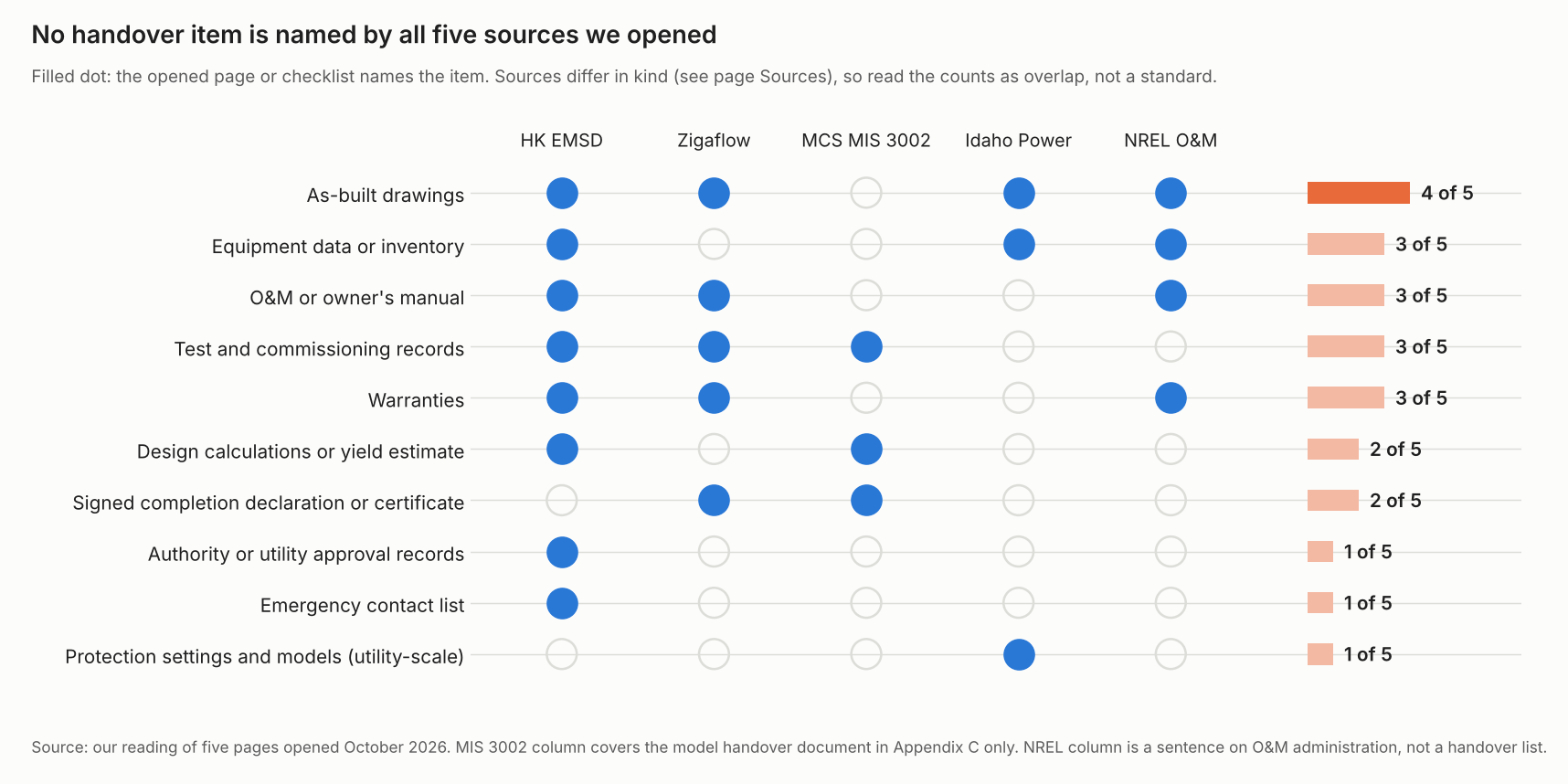
Figure 1. As-built drawings come closest to agreement, at 4 of 5 sources, and no item appears in all five.
The sources differ in kind. Treat the counts as overlap. They are not a standard.
- HK EMSD: a Hong Kong government O&M best-practice page, revised 6 June 2023. It lists ten asset documents. Mapped to our 10 items, they cover 8. They include a handover report, as-fitted drawings and test reports. They "should be kept properly and updated after each system modification".
- Zigaflow: a software company’s glossary page dated 19 May 2026. It lists test records, manuals, as-built drawings and warranties. It adds completion and compliance certificates.
- MCS MIS 3002: a UK installer standard, Issue 1.0, 1 January 2025. Appendix C has a model handover document. It has 13 information fields and a certification block. Fields include rated power, estimated performance and report references. The part reviewed does not mention as-built drawings.
- Idaho Power: a post-COD checklist for large generating facilities under that utility’s agreement. Its review date is 13 July 2026, and it asks for a single line diagram, a site plan and plan drawings. It also asks for relay settings and models.
- NREL: the sentence quoted above. It describes O&M administration, not a handover list.
IEC 62446-1 is one reference for these packs. The IEC webstore abstract (published 19 January 2016) says it "defines the information and documentation required to be handed over to a customer". Only the abstract is used, not the standard text. For test records, see the commissioning report page. For part counts, see bill of materials.
What changes between the permit plan set and the as-built?
The plan set says what you plan to build. The as-built records what you built. A SkyeBrowse blog (13 March 2026) defines as-builts as "the final set of plans that show how a building, structure, or site was actually constructed".
| Point | Permit plan set | As-built record |
|---|---|---|
| Shows | Design intent, checked by the AHJ. See permit plan set. | The installed system, with field changes. |
| When changes arise | Before install, as revisions. | During install, from field conditions. |
| One AHJ’s wording | Portland’s form: a permit revision "is required when there are proposed changes to the project after the permit has been issued". | Same form: this "may arise due to discrepancies between the city-approved permit drawings and actual field conditions". Changes "must be bubbled". |
| Who signs | Depends on the AHJ. See PE stamp. | Idaho Power (large generating facilities) asks for a single line diagram "stamped by a licensed Professional Engineer" within 120 calendar days of COD. |
Portland’s form is dated 08/24/20 as printed. The SolarAPP+ help page says a project "can be revised as many times as the contractor wishes prior to installation". It does not say what to do after install. It is undated. No general rule for every job is stated.
Each change reaches different documents. A changed module count affects the single line diagram, the layout, the BOM, the labels and the serial list. A shorter string affects the string table and the MPPT voltage-window check. The longest string sets maximum cold Voc. So only a change to that string affects the Voc check.
What does a field change do to the pack? A worked example
All values are example. The plan set shows 20 modules of 410 W in two strings of 10. A vent pipe forces two modules off. The conduit route also gets longer.
| Line | Plan set | As built | Change |
|---|---|---|---|
| Modules | 20 | 18 | -2 (-10.0%) |
| Module rating | 410 W | 410 W | same |
| Strings | 2 | 2 | same |
| Modules in shortest string | 10 | 8 | -2 (-20.0%) |
| Modules in longest string | 10 | 10 | same |
| Inverters | 1 | 1 | same |
| PV breaker | 40 A | 40 A | same |
| Conduit run | 18 m | 26 m | +8.0 (+44.4%) |
DC capacity falls from 8.20 kWdc (20 × 410 W) to 7.38 kWdc (18 × 410 W). That is a change of -10.0%. Three of eight lines changed. The map below lists twelve entries across the three changed lines.
| Changed line | Documents to re-issue (our judgement) |
|---|---|
| Modules | Layout and site plan, single line diagram, equipment list, labels, serial and warranty list, monitoring set-up. |
| Shortest string | Single line diagram, string table and test record, MPPT voltage-window check. |
| Conduit run | Layout and site plan, voltage-drop check, equipment list. |
Overlaps count once, so nine document types remain. The map is our judgement, not a rule. A change in system size may also matter to your permit and utility forms. Ask your AHJ and utility. The plan vs as-built calculator below repeats this with your own numbers. It also adds the pack checklist. Inputs are limited to set ranges, such as 100 to 800 W a module.
How solar software handles handover packs and as-built records: which tools document them?
Of the five tools we checked, only Sitemark states as-built reports and closeout packages. Rows come from company pages as checked October 2026.
| Software | As-built or handover output? |
|---|---|
| Sitemark | Yes |
| DroneDeploy | Partly |
| OpenSolar | Partly |
| Seaward SolarCert | Partly |
| Aurora Solar | Not stated |
Partly: the page covers part of the job, such as drone maps or documents, but not the whole pack. Not stated: the company page we cite does not say.
- Sitemark: Says it can "Generate as-built reports with full traceability" and "Provide stakeholders with structured digital closeout packages". Page undated. Footer 2026.
- DroneDeploy: Says it can "Produce high-accuracy orthos and 3D models for design and as-builts". Handover not mentioned. Page undated. Footer 2026.
- OpenSolar: Help articles describe generating an editable Owner’s Manual from a default template (updated 25 August 2026) and generating or uploading project documents (updated 17 September 2026). As-built and handover are not mentioned.
- Seaward SolarCert: Product page: performance reports for a site or a single string. Handover pack not mentioned on the page (undated).
- Aurora Solar: The plan set revision help page (updated 22 July 2025) says "Only minor layout changes are supported as Plan Set revisions". As-built is not mentioned on it or on the plan set set-up page.
None of the pages shows a pack that rebuilds itself when the design changes. SolarPlus, Bluerithm and CompanyCam are not rated here. For test records, see the best solar commissioning software.
Common mistakes with handover packs
FAQs
What is in a solar handover pack?
Usually it holds as-built drawings and equipment data. It adds test and commissioning records, manuals and warranties. Sources differ, so no item is universal. IEC 62446-1:2016 covers the documents you hand over after a grid-connected install.
Is there a handover pack template?
MIS 3002 Appendix C has a model handover document, as read in the 2025 issue. It has 13 information fields and a certification block. It adapts forms from BS EN 62446-1. It is a UK scheme template. Adjust it for your market.
Do I resubmit to the AHJ after field changes?
Often, but your AHJ sets the rule. Portland’s form says you need a revision for changes after a permit is issued. The SolarAPP+ page covers revisions before install only. Ask your AHJ before you build.
Does an as-built single line diagram need a PE stamp?
Not always. Idaho Power’s checklist (reviewed 13 July 2026) asks for a PE-stamped single line diagram. That is for large generating facilities. No general rule for small systems is stated. See PE stamp.
How long should the records be kept?
Your contract, warranty terms and AHJ set the retention period, and we have no verified figure to give. HK EMSD says to keep the documents properly and to update them after each system modification.
Related terms
- Commissioning: the tests that precede handover.
- Permit plan set: the design drawings the as-built is compared with.
- O&M: the work that uses the pack afterwards.
Scope: this page leaves out US residential closeout steps, such as the final AHJ sign-off and the PTO letter, because no primary source for them is used here. For the utility permission step, see PTO.
Next step: list the records your next job must hand over, then match them to a closeout tool in the best solar installation management software list.
Sources
- HK EMSD: record documentation, last revised 6 June 2023 (checked October 2026).
- Zigaflow: handover pack, 19 May 2026 (checked October 2026).
- MCS: MIS 3002, Issue 1.0, 1 January 2025 (checked October 2026).
- Idaho Power: Post-COD As-Built Documentation Checklist, review date 07/13/2026 (checked October 2026).
- NREL: Best Practices for O&M of PV and Energy Storage Systems, 3rd edition, December 2018, p. 8 (checked October 2026).
- IEC webstore: IEC 62446-1:2016 abstract, published 19 January 2016 (checked 30 October 2026). Abstract, not the standard text.
- AFNOR store: IEC 62446-1:2016 abstract, January 2016 edition (checked October 2026). Store abstract, not the standard text.
- City of Portland: permit revision form, dated 08/24/20 as printed (checked October 2026).
- SolarAPP+ help: changes to an approved project, undated (checked October 2026).
- SkyeBrowse: as-built drawings from a drone scan, 13 March 2026 (checked October 2026). Company blog.
- Sitemark: solar commissioning and DroneDeploy: solar, both undated (checked October 2026).
- OpenSolar: Owner’s Manual, updated 25 August 2026, and Document Management, updated 17 September 2026 (checked October 2026).
- Seaward: SolarCert Elements, undated (checked October 2026).
- Aurora help: request a plan set revision, updated 22 July 2025 (checked October 2026).
Last updated 30 October 2026. Next scheduled review: 30 January 2027.