Key takeaways
- A BOM is only as right as the design revision it was counted from.
- Our 24-module roof example has 13 BOM lines. 8 of them are ordered above the design count.
- In our example, 156 hardware design units become 167 order units at a 5% allowance. That is 11 extra.
- Even a 1% allowance adds 5 units here. Every line rounds up to a whole unit.
- IronRidge, Unirac and SolarEdge Designer document a BOM in their own tools. Aurora Solar and OpenSolar bring a racking BOM in from those tools.
To generate racking counts for a BOM in software, see the best solar mounting structure design software.
Bill of materials at a glance
A BOM turns a finished design into counts a supplier can fill. Each line is a design count plus an allowance, rounded up.
| Item | Detail |
|---|---|
| Formula | Order quantity = design count plus allowance, rounded up to a whole unit |
| Unit / typical range | Each, or feet for wire and conduit. Allowances are set by the installer. No published standard was found |
| Where it matters | Quote, purchase order, warehouse pick list, crew load-out |
| Standard or rule | No single standard. Part numbers and pack sizes come from each maker |
| In software | Racking tools output a BOM. General design tools mostly import it |
Why does a BOM matter for installers?
The BOM is the hand-off from design to purchasing. A short order stops the crew. An over-order ties up cash and stock.
The design sets the counts. The racking page gives rails, splices, attachments and clamps. The string page sets the string layout. The BOM feeds purchase orders.
Counts can move late. The racking page’s 48 in attachment spacing is an assumption until the manufacturer’s letter arrives. Attachment and flashing counts can change after the first BOM. Keep one BOM per design revision. Re-count when the array, inverter or roof face changes. A missed change costs you a second delivery or a return.
How is a BOM built from a design?
Freeze the design revision and copy its counts. Add runs and consumables. Then apply allowances and round up.
- Freeze the design revision and write it on the BOM.
- Copy module, rail, splice, attachment and clamp counts from the layout.
- Copy the inverter, breaker and disconnect counts from the single line diagram.
- Measure wire and conduit runs, and count strings for the PV wire.
- Add consumables such as flashing, lugs, fittings and labels.
- Apply your allowance to each line and round up. Then check part numbers and pack units.
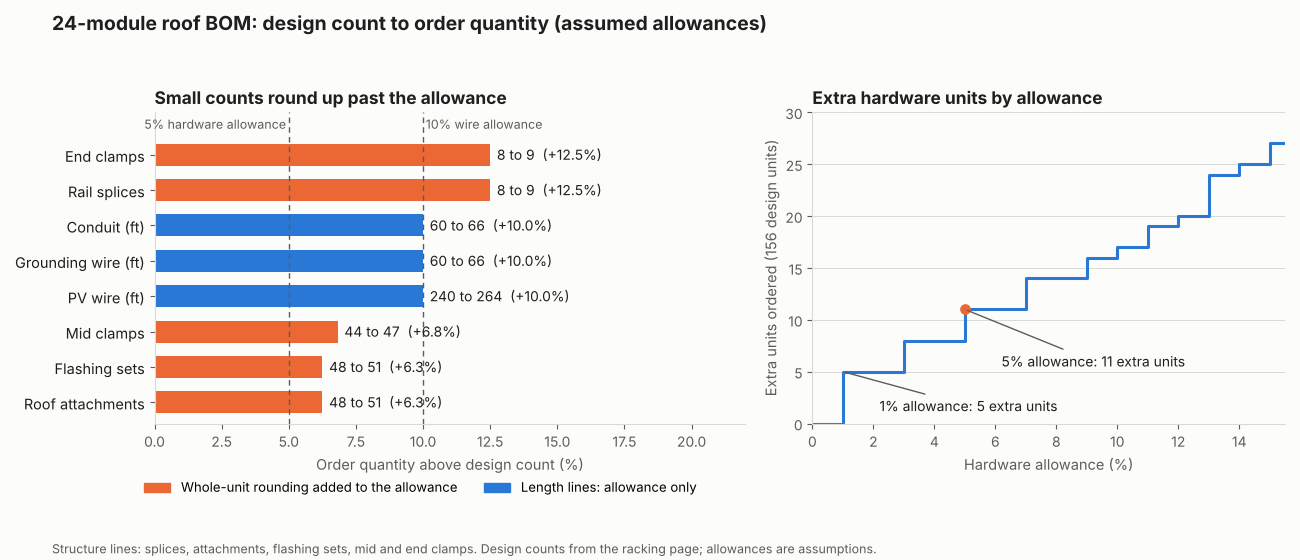
Figure 1. Whole-unit rounding makes small counts rise by more than the allowance. 8 splices at a 5% allowance become 9, which is +12.5%. A 1% allowance already adds 5 units across the five hardware lines.
Worked example: a 10.2 kW roof BOM
The 24-module roof gives 13 BOM lines. At a 5% hardware and 10% wire allowance, 8 lines are ordered above the design count.
| Input | Value |
|---|---|
| Array | 24 modules of 425 W, 2 rows of 12, 2 rails per row (10.2 kW DC). Counts come from the racking page |
| Rail line | 4 rail lines, 3 rail pieces and 12 attachments each (racking page) |
| Strings | 2 strings of 12 (assumed, set the real count with the string sizing page) |
| Run | 60 ft one way from array to inverter (assumed) |
| Allowances | 5% on hardware, 10% on wire and conduit, none on modules, rail, inverter and protection (assumed) |
| Item (unit) | Design | Allowance | Order | Count from |
|---|---|---|---|---|
| PV modules (each) | 24 | 0% | 24 | 2 × 12 layout |
| Inverter (each) | 1 | 0% | 1 | 1 per system (assumed) |
| Rail pieces (each) | 12 | 0% | 12 | 4 lines × 3 |
| Rail splices (each) | 8 | 5% | 9 | 4 lines × 2 |
| Roof attachments (each) | 48 | 5% | 51 | 4 lines × 12 |
| Flashing and fastener sets (each) | 48 | 5% | 51 | 1 per attachment (assumed) |
| Mid clamps (each) | 44 | 5% | 47 | 11 gaps × 4 lines |
| End clamps (each) | 8 | 5% | 9 | 2 × 4 lines |
| PV wire (ft) | 240 | 10% | 264 | 2 strings × 2 × 60 ft |
| Grounding conductor (ft) | 60 | 10% | 66 | 1 run |
| Conduit (ft) | 60 | 10% | 66 | 1 run |
| Breaker (each) | 1 | 0% | 1 | 1 per system (assumed) |
| Disconnect (each) | 1 | 0% | 1 | 1 per system (assumed) |
The five hardware lines total 156 design units and 167 ordered, 11 more or 7.1%. The racking counts are not re-derived here, and your inverter must accept 12 per string and 10.2 kW. Wire size, breaker rating and conduit fill are not set here. They come from the NEC 690 page methods. This example leaves out grounding lugs, conduit fittings, labels, rapid shutdown devices and meters. It has no prices.
Solar BOM quantity calculator
Use the calculator to count your own job. Its first preset reproduces the table above. It warns instead of answering when an input is blank, negative or out of range. It does not check spans, voltage or code. Prices are optional and yours. It holds none.
How solar software handles a bill of materials
Of the six tools we read, IronRidge, Unirac and SolarEdge Designer generate a BOM, and Aurora Solar, OpenSolar and Solargraf do so in part. On the company pages, the manufacturers’ own tools document the BOM, and general design tools mostly import it.
| Software | Generates a BOM? | Method |
|---|---|---|
| IronRidge Design Assistant | Yes | Manufacturer tool |
| Unirac U-Builder | Yes | Manufacturer tool |
| Aurora Solar | Partly | Partner racking apps |
| OpenSolar | Partly | IronRidge integration |
| Solargraf | Partly | Permit plan set option |
| SolarEdge Designer | Yes | Archived release page |
Partly: the tool imports or outputs a BOM through a partner app or option, not a full BOM of its own. The SolarEdge row rests on an archived July 2021 release page. How and where each tool does it, with notes:
- IronRidge Design Assistant. Release notes name a Bill of Materials page in each project, where a domestic content SKU is chosen. Separately, the design tools page says a free account lets you "send orders to distributors". It does not tie that to the BOM. (Notes: IronRidge release notes and design tools page, Oct 2026. Export format not stated)
- Unirac U-Builder. Gives "a detailed breakdown of what components you need and exact quantities to order", with options to adjust it for quote customisation. (Notes: Unirac U-Builder page, Oct 2026. Export format and distributor ordering not stated there)
- Aurora Solar. Saving in a racking app syncs a racking BOM to the project. Design Mode downloads a Bill of Materials .csv. A PDF of the racking BOM is on the project page. (Notes: Aurora help, updated 15 April 2026. Racking parts appear only after the app is used. Design changes do not update the racking design)
- OpenSolar. "Get Bill Of Materials" imports IronRidge’s recommended hardware with pricing. Download as CSV or PDF. (Notes: OpenSolar support, updated 21 October 2026. US projects only)
- Solargraf. A "Show BOM table" option puts a BOM on the PV-2 site plan page. It can be set company-wide and overridden per project. (Notes: Solargraf help, 19 March 2026. Contents and procurement export not described)
- SolarEdge Designer. A July 2021 release page lists a "BOM Export Feature". It says "Download the system BOM list in PDF or spreadsheet format and send it to your SolarEdge supplier when placing an order". (Notes: SolarEdge Designer release archive, checked 30 October 2026. A 2018 press release named a "Bill of Materials report". No current help page was found)
For wider comparisons, read the best solar mounting structure design software and best solar design and proposal software lists. To track what the BOM becomes on the shelf, see solar inventory management software.
Common mistakes with a BOM
FAQs
What is the difference between a BOM and a quote?
A BOM lists parts and quantities. A quote puts prices and terms in front of the customer. The example on this page has no prices, so it is a BOM only.
What should a solar BOM include?
Group it as generation, structure, wiring, protection, and labels and consumables. Each line needs a description, part number, unit, design count, allowance, order quantity and the design revision. The example above has 13 lines in four groups. It also lists what it leaves out.
How much waste allowance should I add?
No published standard was found, so set your allowance from your own jobs. Our example assumes 5% on hardware and 10% on wire. Lines round up. So a 1% allowance still adds one unit to each line that carries an allowance.
Can design software send the BOM to a distributor?
Some can. IronRidge says a free account lets you send orders to distributors. It does not say this is the BOM. OpenSolar imports an IronRidge BOM with pricing. The Unirac page does not describe distributor ordering. Check the tool’s own help before relying on it.
What is the difference between a BOM and a bill of quantities?
A BOM lists the parts a job needs, with units and quantities, so you can quote, order and pick stock. A bill of quantities is the measured list of work and materials that tenderers price.
Related terms
- Racking and mounting design: the plan for rails, attachments and clamps that sets the structure lines of the BOM.
- String sizing: choosing modules per string, which sets the PV wire count.
- Single line diagram: the drawing that fixes inverter, breaker and disconnect counts.
- Procurement and purchase orders: where a finished BOM becomes an order.
- Bill of quantities: the measured list of work and materials that tenderers price.
- Balance of system: everything in a plant except the modules.
Next step: pull racking counts from the best solar mounting structure design software, then price them in the best solar estimating software.
Sources
- Unirac. U-Builder (checked October 2026).
- IronRidge. Release notes and design tools page (checked October 2026).
- Aurora Solar. How to use racking apps in Design Mode, updated 15 April 2026 (checked October 2026).
- OpenSolar. IronRidge on OpenSolar (US), updated 21 October 2026 (checked October 2026).
- Solargraf. Permit plan set settings, 19 March 2026 (checked October 2026).
- SolarEdge. Designer release archive, July 2021 (checked 30 October 2026).
- pv magazine USA. SolarEdge press release, 7 June 2018 (checked October 2026).
- Array counts: SolarSoftwares racking and mounting design page. Allowances, runs and strings are our assumptions. Arithmetic recomputed in code.
Last updated 30 October 2026. Next scheduled review: 30 January 2027.