Key takeaways
- Measure it from the moment an enquiry arrives to the first human attempt. Report the median, the 90th percentile and the share never contacted.
- The best-known study (InsideSales.com and MIT, 2007) used 6 companies and over 15,000 web leads. It reports odds, such as 100 times the odds of contact at 5 minutes against 30.
- An odds ratio is not a probability ratio. With an example base chance of 1%, 100 times the odds is 50%. With a base of 10%, it is 91.7%.
- In this example’s 400-lead example the median is about 52 minutes. The 90th percentile is in the 1 to 7 day bucket, and 5% were never contacted.
- In an example office open Monday to Friday, 9 to 17, the median wall-clock delay is 8.8 hours. Every in-hours lead is answered at once.
To time first contact in software, see the best solar lead management software.
Speed to lead at a glance
Speed to lead is one clock with a start, a stop and a summary. Get those three choices wrong and the number misleads.
| Item | Detail |
|---|---|
| Start of the clock | The moment the enquiry arrives (form, call, message), not the moment a rep is assigned. |
| Stop of the clock | The first call, text or email by a person. An automatic reply does not count. This is our definition, not a standard. |
| Summary | Median, 90th percentile and the share never contacted, in minutes. |
| Standard or rule | None. Each company sets its own target. |
| In software | CRMs hold the timestamps, alerts and, in some, a response-time report. See the software table. |
Why speed to lead matters for installers
You pay for every enquiry, and an unanswered one earns nothing. Speed to lead shows loss before the first call, which no close-rate figure reveals.
See lead management for the funnel.
What the response-time evidence shows
The studies agree that slow replies cost contacts. Most give no rate you can reuse, and several are company-run. The table lists each sample.
| Study and date | Sample |
|---|---|
| InsideSales.com/MIT Lead Response Management Study, presented 16 October 2007 | 3 years of data, 6 companies, over 15,000 web leads, over 100,000 call attempts |
| Harvard Business Review, "The Short Life of Online Sales Leads", 2011 (Oldroyd, McElheran, Elkington) | Not stated |
| Velocify lead-distribution study, no date printed | About 2.7 million leads from over 600 customers across industries, one month of distribution, tracked 90 days or more |
| Secret-shopper test of solar installers, reported by Renewable Energy World, 19 August 2015 (the article does not name the sponsor, its link points to velocify.com) | 30 residential solar companies, followed for 22 days |
What each study prints, and its limits:
- InsideSales.com/MIT: "The odds of contacting a lead in 5 minutes versus 30 minutes drop by 100 times!" Qualifying: 21 times. Over the first hour: contact odds fall over 10 times, qualify odds over 6 times. Limits: relative odds only. "This study did not address close ratios." Contact means a call that "connects with a live person". The call must last a minimum length set by each company, 2 to 6 minutes (footnote 1).
- Harvard Business Review: The abstract says "Our research shows that most companies are not responding nearly fast enough." Only the abstract is quoted, so no figures are used.
- Velocify: Companies in the top quartile for share of leads called within 5 minutes had a contact rate 9% above average. The bottom quartile was 18% below. Limits: a company study about distribution, with quartiles against the average, not minute by minute.
- Secret-shopper test: "19 percent of leads did not receive any sort of response". 30% of online buyers never got a phone call. 43% got no email. Limits: no median time or lead count is printed, and the figures come from the news article, not the test page.
The article also says a call within one minute can raise conversion by as much as 391 percent. It gives no sample, so we do not use it. Two cautions follow. These are observational data. A fast reply may go with a better lead or a quiet day. So speed alone is not proven to cause the gain. Also, "contact" means a live conversation. Your response time is the first attempt.
The odds wording needs care. An odds ratio of 100 does not mean 100 times as likely. This table uses example base chances of contact at the slower time.
| Base chance at the slower time (example) | 4 times the odds (qualify, 5 v 10 min) | 21 times the odds (qualify, 5 v 30 min) | 100 times the odds (contact, 5 v 30 min) |
|---|---|---|---|
| 1% | 3.9% | 17.5% | 50.3% |
| 10% | 30.8% | 70.0% | 91.7% |
| 30% | 63.2% | 90.0% | 97.7% |
The study prints no base chances, so this is not a finding.
How to measure speed to lead
Record two timestamps per lead: enquiry arrival and first human attempt. Subtract, then report the median, 90th percentile and never-contacted share.
- Stamp the arrival.
- Stamp the first attempt by a person. Ignore auto-replies, assignments and status changes.
- Subtract in minutes. Keep leads with no attempt as "never", not as blanks.
- Report the median (half of leads are faster), the 90th percentile (9 in 10 are faster) and the never share. Split by source and by in-hours or out-of-hours.
The mean is the wrong headline number. Here is an example list of 20 leads, 19 contacted and 1 never. The median is 20 minutes. The mean of the contacted leads is 3.9 hours. Three slow replies of 300, 900 and 2,880 minutes drag it up. The 90th percentile is 18.3 hours.
Worked example: median, 90th percentile and a contact curve
An example installer logs 400 web enquiries in a month. Buckets hold the time to first human attempt. The median is the 200th lead and the 90th percentile the 360th.
| Bucket (example) | Leads | Cumulative leads | Contact chance at midpoint (example curve) | Expected leads reached |
|---|---|---|---|---|
| 0-5 min | 48 | 48 | 68.3% | 32.8 |
| 5-15 min | 56 | 104 | 63.6% | 35.6 |
| 15-30 min | 52 | 156 | 56.8% | 29.5 |
| 30-60 min | 60 | 216 | 47.5% | 28.5 |
| 1-4 h | 72 | 288 | 29.5% | 21.2 |
| 4-24 h | 64 | 352 | 25.0% | 16.0 |
| 1-7 days | 28 | 380 | 25.0% | 7.0 |
| Never contacted | 20 | 400 | 0% | 0.0 |
The 200th lead sits in the 30 to 60 minute bucket. If leads spread evenly inside it, the median is 52 minutes. The 360th lead is in the 1 to 7 day bucket. So the 90th percentile is only known to lie between 24 and 168 hours. The shares contacted within 5, 30 and 60 minutes are 12%, 39% and 54%.
The curve is example: chance = 25% + 45 points x 0.5 to the power (minutes / 45). It starts at 70% and falls to a 25% floor. Summed over the buckets, it expects 170.6 leads reached (42.7%). Now move every lead slower than 60 minutes into the 15 to 30 minute bucket. Expected leads reached rise to 219.6 (54.9%), a gain of 49.0.
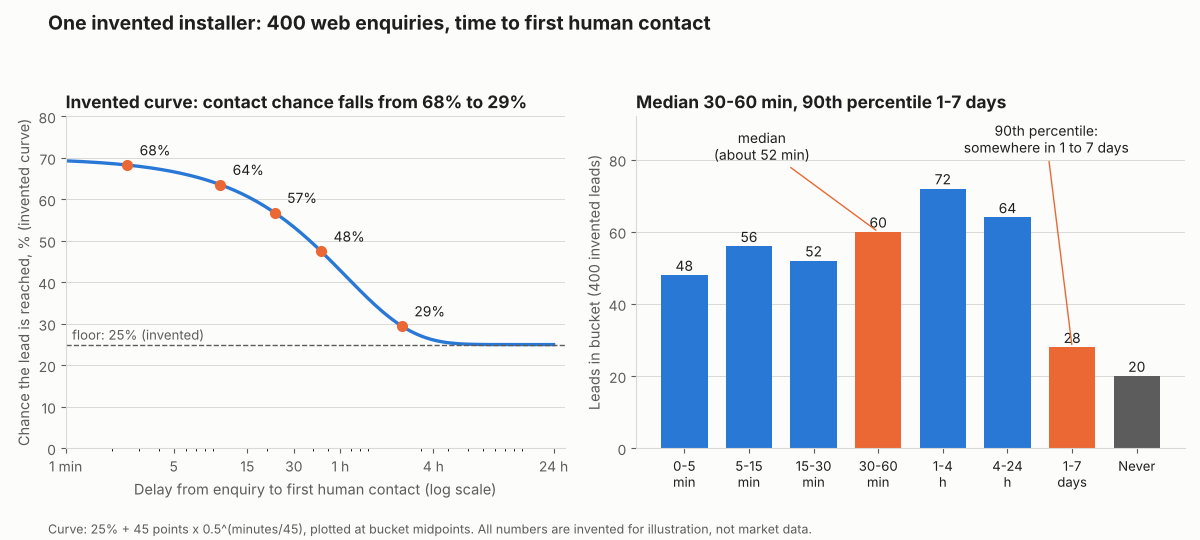
Figure 1. In this example month the median is about 52 minutes. Yet the 90th percentile is 1 to 7 days out, and 5% of leads were never contacted.
The gain of 49.0 holds only if delay caused the lower chance. The studies cannot prove that.
Business hours and queue maths
Closed hours and a full queue slow a first reply even with willing reps.
First, hours. Assume example, evenly spread arrivals. In-hours leads are answered at once. Others wait for the next opening.
| Opening hours (example) | Share of week open | Median delay | 90th percentile | Mean / longest |
|---|---|---|---|---|
| Monday to Friday, 9 to 17 | 23.8% | 8.8 hours | 47.2 hours | 15.2 hours / 64.0 hours |
| Monday to Saturday, 8 to 20 | 42.9% | 2.0 hours | 19.2 hours | 6.0 hours / 36.0 hours |
Counted in business minutes, every delay above is 0. Report both clocks. Wall-clock time is what the customer feels.
Second, the queue. At a peak hour, suppose 8 new leads arrive and each ties up a rep for 10 minutes. That is 1.33 reps of work. The table uses the Erlang C formula for one shared queue, with random arrivals and call lengths that vary.
| Reps free (example case) | Busy share of rep time | Leads that wait | Mean wait, all leads | Wait over 5 min / over 30 min |
|---|---|---|---|---|
| 1 | 133% | Queue grows without limit | - | - |
| 2 | 66.7% | 53.3% | 8.0 min | 38.2% / 7.2% |
| 3 | 44.4% | 18.1% | 1.1 min | 7.9% / 0.1% |
| 4 | 33.3% | 5.2% | 0.2 min | 1.4% / 0.0% |
Two reps look two-thirds busy, yet over half the leads wait. Speed depends on cover at the peak, not the daily average.
How to improve speed to lead
Four levers help: ownership, alerts, cover and capacity.
- Ownership: give every lead an owner and a timer. Lead routing covers rotation and moving unanswered leads.
- Alerts and cover: push new leads to the owner’s phone and share evening duty.
- Capacity: staff for the peak hour. Lead scoring can order the queue. An automatic text from a drip sequence does not stop the clock.
Speed to lead calculator
Paste response times, try the bucket and curve model, then test your hours and queue.
Not showing? Open the speed to lead calculator on its own page. It reproduces the tables above and warns on bad or ambiguous numbers such as 1.000.
How solar software handles speed to lead
No tool below documents a report that times first contact from enquiry. HubSpot’s report counts from assignment, and the others document alerts or tasks only. These are five tools, from company pages read October 2026.
| Software | Alert or task when a lead arrives | Report on time to first contact |
|---|---|---|
| HubSpot Sales Hub | Partly | Partly |
| Zoho CRM | Yes | Not stated |
| Pipedrive | Partly | Not stated |
| Sunbase | Partly | Not stated |
| JobNimbus | Partly | Not stated |
What each page says, with source and date:
- HubSpot Sales Hub: A HubSpot marketing page says real-time notifications by email, app and Slack. The knowledge-base page on assigning owners does not say if the owner is notified. A lead response time report counts from when a contact is assigned to a user until the first qualifying engagement. It resets on reassignment, so it is not time from enquiry. It needs Sales Hub Starter, Professional or Enterprise (HubSpot pages in the Sources list).
- Zoho CRM: A workflow rule can run when a record is created, with instant actions such as email notifications and tasks. Source: Zoho CRM help, configuring workflow rules, no date printed
- Pipedrive: Automatic assignment can fire on "Lead added" (Professional and higher). The page does not say whether the owner is notified. The pages read mention only when the tool processed the item. Source: Pipedrive help, automatic assignment, last updated 3 September 2026
- Sunbase: It assigns new leads and notifies users "about overdue actions or inactive opportunities". Instant new-lead alerts are not described. Source: Sunbase solar CRM page, no date (2026 copyright)
- JobNimbus: An event-based automation on a new Contact with Status "New" creates a Task for the chosen assignees. No notification channel is described. Source: JobNimbus help, new-lead automation page, no date printed (2025 copyright)
HubSpot, Zoho CRM and Pipedrive are general CRMs. Not stated: the company page we cite does not say. For scored company comparisons, see the best solar lead management software list.
Common mistakes with speed to lead
FAQs
Is the 5-minute rule proven?
Not as a rule. The 2007 study compared 5 minutes with 30 and 10 and printed odds, not rates. Set a target from your own data.
Why report the 90th percentile?
It shows how slow the tail is, which a median hides. The median can look fine while 1 lead in 10 waits days. Report both, plus the share never contacted.
Does an automatic reply stop the clock?
No, an auto-reply is not contact. An assignment is not contact either. The clock stops at the first call, text or email by a person, so count the first human attempt.
How fast should I respond to a solar lead?
In minutes, not hours. The 2007 study printed 100 times the odds of contact at 5 minutes against 30. Treat that as odds, not a rule, and set your target from your own median and 90th percentile.
Related terms
- Lead management: handling each enquiry from capture to contract or loss.
- Lead routing: the rule that decides which rep gets each lead.
- Canvassing app: software that logs door knocks and appointments.
Next step: pull your own enquiry and first-call timestamps, then look for a CRM with new-lead alerts in the best solar lead management software.
Sources
- The InsideSales.com/MIT Lead Response Management Study, Elkington and Oldroyd, presented 16 October 2007. Copy retrieved 17 July 2008 (checked October 2026).
- BYU ScholarsArchive record: The Short Life of Online Sales Leads, Harvard Business Review 89(3), 2011 (checked October 2026).
- Velocify, Best Lead Distribution Methods for Optimal Sales Performance, no date printed (checked October 2026).
- Renewable Energy World: solar sales response study, 19 August 2015. No sponsor named (checked October 2026).
- HubSpot knowledge base: create sales reports, last updated 18 June 2026 (checked October 2026).
- HubSpot knowledge base: assign and rotate record owners, last updated 23 September 2026 (checked October 2026).
- HubSpot: lead response time, no date printed, 2026 copyright (checked October 2026).
- Zoho CRM help: configuring workflow rules, no date printed (checked October 2026).
- Pipedrive help: automatic assignment, last updated 3 September 2026 (checked October 2026).
- Sunbase: solar CRM software, no date printed (checked October 2026).
- JobNimbus help: automation to notify a sales rep of a new lead, no date printed (checked October 2026).
Last updated 30 October 2026. Next scheduled review: 30 January 2027.