Key takeaways
- A sequence needs a trigger, delays, a send window and exit rules. They set what enrols a lead, how long to wait, when sending is allowed and what removes a lead.
- In our example, 200 leads get 6 touches over 45 days and 17.3% reply or book. Replies come early because the example rates fall (72% of the total by touch 3).
- In the same example, the last touch costs 66.7 messages per reply on unrounded replies (the 2.4 in the table is rounded). The first costs 16.7.
- With no exit rule, the example sequence sends 116 more messages to leads who already replied. The reply total does not change.
- The FTC guide says you must honour an email opt-out within 10 business days (page dated August 2023, edited January 2024).
To run a sequence like this in software, see the best solar CRM software.
Drip campaigns at a glance, and why they matter
A drip campaign keeps a lead warm with a few timed messages. Nobody has to remember to chase. It ends when the lead answers, books or opts out.
| Item | Detail |
|---|---|
| The settings | Trigger (what enrols a lead), delay (the gap between messages), send window (the days and hours allowed) and exit rule (what removes a lead). This split is our framing, not a standard. |
| Rule or standard | None for the design. Law limits sending, and it differs by country and channel. See the consent section. |
| In software | CRMs call it a sequence, a cadence or an automation. See the software table. |
A sequence gives each lead a next action and a date without anyone writing each message. Exit rules stop you mailing people who have already answered.
A sequence does not replace a call. Speed to lead and lead routing decide who makes first contact. Lead scoring can decide who enters a sequence, and lead management covers the wider process.
How a drip sequence works: triggers, delays, send windows and exit rules
A trigger enrols the lead. A delay spaces the messages. A send window limits when they go out, and exit rules remove the lead.
- Trigger: the event that enrols a lead. Examples are a status change, a quote sent with no reply, or a form fill. JobNimbus documents an automation that fires a set time after a contact last changed status.
- Delay: the wait between messages. HubSpot sets sequence delays in business days, up to 90 (page last updated 17 August 2026). A delay of 5 business days from a Thursday ends the next Thursday, 7 calendar days later. Pipedrive said its delay starts counting when the first action triggers (page by-lined 2 November 2023, now offline). Check Pipedrive’s current automation help pages before relying on this.
- Send window: the days and hours when sending is allowed. HubSpot sends sequence follow-ups on business days by default and lets you set a time range. Texts may have their own time limits. This page does not list them.
- Exit rules: the conditions that stop messages. Common ones are a reply, a booking, an opt-out, a bounced address, and a status change to won or lost. HubSpot and Zoho CRM list theirs in the software table.
The workflow automation behind a sequence reads fields in your solar CRM.
Consent and opt-out basics
Every drip message needs a working way to stop it. You also need a record of why you may send it. In the US, the FTC sets email opt-out duties and the FCC sets text consent rules. This is not legal advice, and other countries differ.
- Email, US: the FTC guide to CAN-SPAM (page dated August 2023, edited January 2024) says "It covers all commercial messages". It adds "The law makes no exception for business-to-business email." A message must explain clearly how to opt out. You must honour a request "within 10 business days". The opt-out method must work for at least 30 days after sending. You cannot charge a fee or ask for more than an email address. The FTC page prints penalties of up to USD 53,088 per violating email. A 2026 FTC notice says it will keep applying the 2025 penalty levels.
- Text, US: texts fall under separate FCC rules. The FCC order printed in the Federal Register on 5 March 2024 (FCC 24-24) adds 47 CFR 64.1200(a)(10). A person can revoke consent "by using any reasonable method". The request must be honoured "not to exceed ten business days" from receipt. Hunton (12 January 2026) says most of the amendments, including the ten-business-day limit, took effect on 11 April 2025. The FCC waived only the "revoke-all" part, to 31 January 2027 (FCC order DA 26-12). Check the FCC for the current status.
- Other countries: the UK, EU, Australia and India have their own rules, which this page does not cover.
- Our practice suggestion, not a legal rule: store the consent source and date on each lead. Treat a "stop" reply as an opt-out on every channel. Remove opted-out leads from every sequence.
Worked example: one sequence, 200 leads, 6 touches
In this example, 200 leads get 6 touches over 45 days.
Assumptions, example: each touch has a reply or booking rate, shown below. It applies to leads who have not replied or opted out. Opt-outs are 1% of messages sent, for every recipient. Replied leads leave the sequence. Texts and emails are treated alike.
| Touch (example) | Reply rate (%) | Messages sent | Replies or bookings | Cumulative response (%) |
|---|---|---|---|---|
| 1 Email: thanks and what to expect (day 0) | 6.0 | 200.0 | 12.0 | 6.0 |
| 2 SMS: short check-in (day 2) | 4.0 | 186.0 | 7.4 | 9.7 |
| 3 Email: how a roof survey works (day 5) | 3.0 | 176.7 | 5.3 | 12.4 |
| 4 Email: a local install story (day 10) | 2.5 | 169.6 | 4.2 | 14.5 |
| 5 SMS: offer a call slot (day 21) | 2.0 | 163.7 | 3.3 | 16.1 |
| 6 Email: last check-in (day 45) | 1.5 | 158.8 | 2.4 | 17.3 |
| Whole sequence (day 45) | 1,054.8 | 34.6 | 17.3 |
Opt-outs by touch, at 1% of messages sent, run 2.0, 1.9, 1.8, 1.7, 1.6 and 1.6. That is 10.5 for the whole sequence.
Days are running totals of the delays 0, 2, 3, 5, 11 and 24. Totals are rounded separately. The next table adds the no-exit case.
| Measure (example inputs) | Exit on reply | No exit rule |
|---|---|---|
| Messages sent | 1,054.8 | 1,170.4 |
| Replies or bookings | 34.6 | 34.6 |
| Opt-outs | 10.5 | 11.7 |
| Messages per reply | 30.5 | 33.8 |
| Sent to leads who already replied | 0.0 | 115.6 |
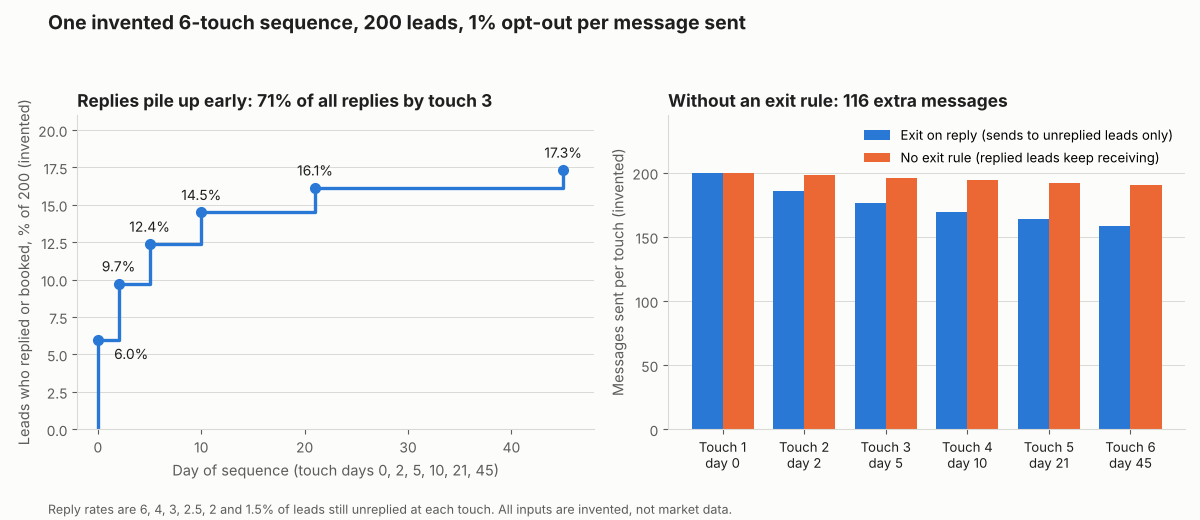
Figure 1. Cumulative response climbs fast, then flattens. Without an exit rule the sequence sends 116 extra messages to leads who already replied.
The last touch sends 158.8 messages for about 2.4 replies (rounded in the table), or 66.7 messages per reply on the unrounded figure. The first sends 16.7. With a fixed 1% opt-out rate, opt-outs per reply rise from 0.17 to 0.67. Use your own reply data for each touch.
Here the exit rule saves 116 messages and about 1 opt-out. This assumes replied leads opt out at the same 1% rate.
Drip sequence calculator
Enter leads, the opt-out rate and up to 6 touches with a delay and reply rate. It gives messages, replies, cumulative response and the cost of having no exit rule.
Not showing? Open the drip sequence calculator on its own page. Enter rates as percentages (6, not 0.06). It warns about blank, negative, out-of-range or unclear numbers such as 1.000.
How solar software handles drip campaigns
Only HubSpot Sales Hub documents timed steps, delays and exit rules together, and no tool here documents all four features (company pages read October 2026).
| Software | Timed multi-step sequence | Delays and send window | Exit rules | Text messages in the sequence |
|---|---|---|---|---|
| HubSpot Sales Hub | Yes | Yes | Yes | Not stated |
| Zoho CRM | Partly | Not stated | Yes | Not stated |
| Pipedrive | Partly | Partly | Partly | Not stated |
| Sunbase | Not stated | Not stated | Not stated | Partly |
| JobNimbus | Partly | Partly | Not stated | Yes |
Not stated: the company pages we read do not say, which is not proof the tool lacks it. Partly: the page covers some of the feature.
HubSpot Sales Hub
- Timed multi-step sequence: Sequences of emails and tasks. Sales Hub or Service Hub Professional or Enterprise, with an assigned seat.
- Delays and send window: Delays in business days, up to 90. A send-window time range. Business days only by default. Weekend sending needs a switch turned off.
- Exit rules: Automatic unenrolment on reply (when the reply setting is on), on a meeting booked through a sequence link, on bounce, on unsubscribe and on completion.
- Text messages in the sequence: The sequence article lists email, call, general, InMail and connection request tasks.
- Source and date: HubSpot knowledge base, create and edit sequences, last updated 17 August 2026. Unenrol from a sequence, last updated 30 September 2026.
Zoho CRM
- Timed multi-step sequence: Cadences run timed follow-ups by email, task, call and WhatsApp (Leads and Contacts). No delay setting described on the page read
- Exit rules: Exit on call outcome, deal stage, record conversion, a chosen date, last step or manual removal. An email unsubscribe stops emails while other channels continue. Reply as an exit is not stated
- Text messages in the sequence: not stated. WhatsApp is, for Leads and Contacts
- Source and date: Zoho CRM help, FAQs: Cadences, no date printed
Pipedrive
- Timed multi-step sequence: Automations could add a delay step and branch on whether a prior email was replied to or a link clicked, as the page read in 2023 and October 2026. Advanced and higher (plan name as printed in the 2023 article, our routing page cites Professional and above for another feature, from a 2026 page)
- Delays and send window: A delay step was documented. Send windows were not described
- Exit rules: "If the conditions are not met, the automation will stop." Open tracking was not supported
- Source and date: Pipedrive support, automation sequences based on email conditions, by-lined 2 November 2023. As of November 2026 this page returns a 404. Check Pipedrive’s current automation documentation before relying on this row.
Sunbase
- Timed multi-step sequence: The page mentions follow-up automation and follow-up messages, not drip or nurture sequences
- Text messages in the sequence: It lists Email and SMS kept on the customer record. Sending from a sequence is not described
- Source and date: Sunbase solar CRM page, no date printed (2026 copyright)
JobNimbus
- Timed multi-step sequence: Time-based automations can send an email a set time after a contact last changed status. The actions page lists no wait action.
- Delays and send window: Delays run from minutes to years after a status change. Send windows are not described
- Exit rules: The status page describes no way to stop an automation
- Text messages in the sequence: A Send Text Message action is listed. The actions page says automated texts need Engage in the subscription
- Source and date: JobNimbus help, automation actions and time-based status email pages, no dates printed (2025 copyright)
HubSpot, Zoho CRM and Pipedrive are general CRMs, not solar tools. Solar CRMs with sequences are ranked in the best solar CRM list. Email and text campaign tools are in the best solar marketing software list.
Common mistakes with drip campaigns
FAQs
What is the difference between a drip campaign and a nurture sequence?
None in mechanics. Both are automated, timed messages to a lead. "Drip" stresses the slow release of messages, and "nurture" stresses the goal. Tools use other names, such as sequence, cadence or automation.
How many messages should a sequence have, and how far apart?
No source we read sets a standard, so this page gives no benchmark. In our example the sixth touch cost 66.7 messages per reply against 16.7 for the first, so cut late touches first. Judge each touch in your own data, as the calculator does.
What should stop a sequence?
At least a reply, a booking and an opt-out. Add a bounced address and a status change to won, lost or do not contact. HubSpot and Zoho CRM document their own lists in the software table.
Do I need consent before sending drip emails or texts?
Not for US email under CAN-SPAM, which is built on opt-out. The FTC guide’s list of requirements includes an opt-out, and none is prior consent. Texts have separate FCC rules that this page does not cover. Rules differ by country and we cannot advise, so ask a qualified adviser.
Related terms
- Speed to lead: how fast first contact follows an enquiry.
- Lead scoring: ranks leads, and can decide who enters a sequence.
- Lead management: the wider process around leads.
- Appointment setting: booking a sales visit with a lead.
- Sales pipeline: the stages an opportunity passes through, from proposal to contract.
- Review management: asking for, collecting and answering customer reviews.
Next step: to build the sequence in your CRM, use the best solar CRM software. For email and text campaigns, use the best solar marketing software.
Sources
- Federal Trade Commission: CAN-SPAM Act, a compliance guide for business, page dated August 2023, edited January 2024 (checked 30 October 2026).
- Federal Register: Strengthening the Ability of Consumers To Stop Robocalls (FCC 24-24), 5 March 2024 (checked 30 October 2026).
- Hunton: portion of TCPA global revocation rules further extended, 12 January 2026 (checked 30 October 2026).
- FCC order DA 26-12 (CG Docket 02-278), 6 January 2026 (checked 30 October 2026).
- HubSpot knowledge base: create and edit sequences, last updated 17 August 2026 (checked 30 October 2026).
- HubSpot knowledge base: unenrol from a sequence, last updated 30 September 2026 (checked 30 October 2026).
- Zoho CRM help: FAQs, Cadences, no date printed (checked October 2026).
- Pipedrive support: automation sequences based on email conditions, by-lined 2 November 2023 (checked October 2026, this URL returned a 404 when re-checked 3 November 2026).
- Sunbase: solar CRM software, no date printed (checked October 2026).
- JobNimbus help: automation actions, no date printed (checked October 2026).
- JobNimbus help: email after a contact sits in a status, no date printed (checked October 2026).
- Federal Trade Commission: civil penalty amounts notice, Federal Register document 2026-18853: "will continue to apply the 2025 penalty levels" (checked 30 October 2026).
Last updated 30 October 2026. Next scheduled review: 30 January 2027.