Key takeaways
- The process runs until a lead becomes a signed contract or is recorded as lost. A small team can run it in a spreadsheet.
- Cost per lead alone can mislead. In the example four-source example, three sources tie at 50 USD yet differ nearly tenfold per contract (188 to 1,852 USD).
- The 100 USD source is the dearest per lead but not per contract. The shared source is the dearest per contract.
- If the shared source reached 80% of its leads, not 45%, cost per contract would fall from 1,852 to 1,042 USD. That assumes later contacts convert as well as early ones.
To run this process in software, see the best solar lead management software.
Lead management at a glance
Lead management turns raw enquiries into booked appointments and then contracts. Each lead should have one owner and one next action.
| Item | Detail |
|---|---|
| Core question | Who owns this lead, what is its status and what happens next? |
| Record fields to keep | Source, owner, status, next action with a date, and outcome with a lost reason. That is 5 fields. This list is our suggestion, not a standard. |
| Numbers it produces | Contact rate, appointment rate, close rate, cost per lead and cost per contract, by source. |
| Standard or rule | None. Each company sets its own steps and status names. |
| In software | Solar CRMs and general CRMs hold lead records, statuses and follow-up tasks. See the software table. |
Why lead management matters for installers
An enquiry you paid for is worth nothing until someone answers it. Without a clear owner and next action, leads sit in an inbox. You also cannot tell which source earns its cost.
Lead generation brings enquiries in. Lead management handles them once they arrive. A sales pipeline then tracks the opportunities that reach proposal and contract. For how quickly you answer, see speed to lead.
The five steps of lead management
A common loop has five steps. The names vary, and the five-step split is our framing, not a standard.
- Capture: bring every enquiry into one place, with its source, from forms, calls, referrals, door knocking and bought leads.
- Qualify: check the basics, such as the address, ownership, roof and bill. Lead scoring can rank the leads.
- Assign: give each lead one owner. Rules such as round-robin routing can do it for you.
- Follow up: log every attempt and always set the next action and date. This is where appointment setting happens.
- Close: mark the lead won, lost or on hold. Record a lost reason so the lead can be recontacted later.
Lead status says where one enquiry is in handling, and a pipeline stage says where an opportunity is in the sale. HubSpot documents both. It has 8 default lifecycle stages and 8 default lead status options (page last updated 17 July 2026).
Worked example: four sources, two rankings
Cost per lead is what you pay for an enquiry. Cost per contract is what you pay for a sale. They rank sources differently because the contact, appointment and close rates differ.
These inputs are example for one month. Appointments are a share of contacted leads. Contracts are a share of appointments held. See also cost per lead, close rate and shared and exclusive leads.
The first table lists the inputs. The second shows what each source costs per lead and per contract.
| Source (example) | Leads | Spend (USD) | Contacted / appointments / contracts |
|---|---|---|---|
| Shared marketplace leads | 120 | 6,000 | 45% / 30% / 20% |
| Exclusive paid leads | 40 | 4,000 | 70% / 45% / 25% |
| Own website form | 60 | 3,000 | 65% / 40% / 22% |
| Referrals (reward spend) | 15 | 750 | 95% / 70% / 40% |
| All four sources | 235 | 13,750 |
| Source (example) | Cost per lead (USD) | Contacted / appointments | Expected contracts | Cost per contract (USD) |
|---|---|---|---|---|
| Shared marketplace leads | 50 | 54.00 / 16.20 | 3.24 | 1,852 |
| Exclusive paid leads | 100 | 28.00 / 12.60 | 3.15 | 1,270 |
| Own website form | 50 | 39.00 / 15.60 | 3.43 | 874 |
| Referrals (reward spend) | 50 | 14.25 / 9.98 | 3.99 | 188 |
| All four sources | 58.51 | Not summed | 13.81 | 996 |
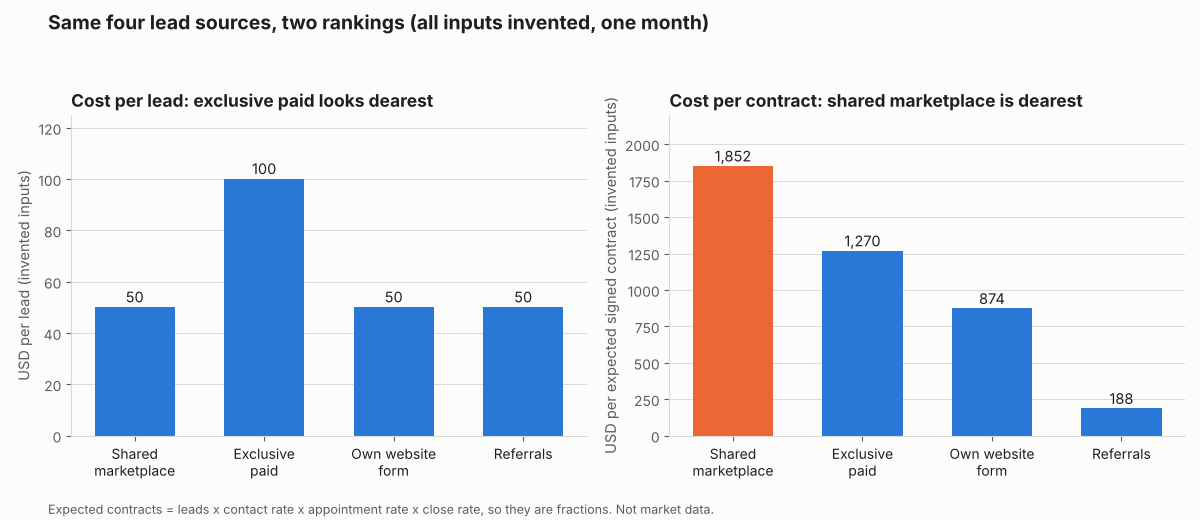
Figure 1. In this example month, the shared source is cheapest per lead (tied at 50 USD) but dearest per contract (1,852 USD), and the 100 USD exclusive source costs 31% less per contract than it.
Expected contracts are leads times three rates, so they are fractions. The shared source leaves 66 of its 120 leads uncontacted. Its appointment and close rates are also the lowest of the four. A tool that shows contact rate by source would show the first problem. Cost per contract here uses lead spend only, not rep time or design cost.
Lead source cost per contract calculator
Enter up to four sources with leads, spend and the three rates. You get cost per lead and cost per expected contract, with an optional what-if contact rate.
Not showing? Open the lead source cost calculator on its own page. Enter rates as percentages (45, not 0.45). It reproduces the tables above. It warns on blank, negative, out-of-range or ambiguous numbers such as 1.000.
How solar software handles lead management
Of the four tools below, only Sunbase has a page that documents stages, source tracking, assignment and follow-up. All ratings come from company pages read October 2026.
| Software | Stages or status | Source tracking | Assignment or follow-up |
|---|---|---|---|
| Sunbase | Yes | Yes | Yes |
| JobNimbus | Partly | Not stated | Partly |
| Aurora Solar | Not stated | Yes (deprecated API) | Not stated |
| HubSpot Sales Hub | Yes | Not stated | Not stated |
Not stated: the page we read does not say. Partly: the page describes some of it. The Aurora rating comes from API endpoints that its page calls deprecated. What each page says:
- Sunbase (solar CRM page, no date printed): stages are set around your sales process, from new enquiry to contract. It brings leads from several channels into one workflow, tracks referral source, assigns new leads to a representative and automates reminders and follow-up tasks.
- JobNimbus (new-lead automation help page, no date printed): the page uses a Status of "New" on a Contact and says status names vary by workflow. An automation creates a Task for the assignees chosen when it is built. No rotation is described.
- Aurora Solar (leads reference, no date printed, the page says these endpoints are deprecated): Lead Capture AI creates a lead. Source shows by template ID, template name or UTM parameters. A lead can be converted to a project.
- HubSpot Sales Hub (lifecycle stages article, last updated 17 July 2026): 8 default lifecycle stages and 8 default lead status options. The article says lead status describes the sub-stages within the Sales Qualified Lead stage. It does not cover capture, source tracking or assignment.
The HubSpot lifecycle-stages article does not cover round robin, which another HubSpot page documents: see lead-routing-round-robin. HubSpot is a general CRM, not a solar tool. For ranked options, see the best solar lead management software.
Common mistakes with lead management
FAQs
What is the difference between lead management and a CRM?
Lead management is the process of handling enquiries. A CRM is the software that stores the records and runs reminders. See solar CRM for what the tool covers.
Is lead management the same as lead generation?
No. Lead generation creates or buys enquiries. Lead management starts when one arrives. Our lists of solar lead generation companies and lead generation software cover the first stage.
What should every lead record hold?
At least a source, an owner, a status, a next action with a date, and an outcome with a lost reason. These 5 fields are our suggestion. Add more only if you will report on them.
Which numbers show that lead management is working?
Contact rate, appointment rate, close rate and cost per contract, each split by source. If you track only total leads, you cannot see which source loses leads before the first call.
Can a spreadsheet do lead management?
Yes, for a small team that logs every lead and checks next-action dates daily. It gets hard when several people share leads or when you need contact rate by source.
Related terms
- Sales pipeline: the stages an opportunity passes through, from proposal to contract.
- Referral programme: a scheme that rewards existing customers for sending new leads.
- Sales commission tracking: recording what each rep earns on won contracts.
- Canvassing app: a phone app for door-to-door reps.
Next step: enter last month’s lead sources in the calculator, then compare tools in the best solar lead management software list.
Sources
- Sunbase: solar CRM software, no date printed (checked October 2026).
- JobNimbus help: automation to notify a sales rep of a new lead, no date printed (checked October 2026).
- Aurora Solar docs: leads, no date printed, endpoints marked deprecated (checked 30 October 2026).
- HubSpot knowledge base: use lifecycle stages, last updated 17 July 2026 (checked 30 October 2026).
Last updated 30 October 2026. Next scheduled review: 30 January 2027.