Key takeaways
- Fit points rarely change. Engagement points should fade. In the example model, Lead B drops from 73 points to 41 once old activity decays.
- A fit floor stops a busy, poor-fit lead reaching sales. Example Lead C scores 65, over the line of 60, but its fit of 5 misses the floor of 20.
- In an example 400-lead history, a threshold of 60 passes 20% of leads and 51.6% of contracts. A threshold of 50 would pass 125 leads, above the capacity of 100.
- Of 5 tools checked in October 2026, 2 document points-based scoring in their help pages: Zoho CRM, and HubSpot (contact scores need Marketing Hub). Pipedrive names it on a product page only.
To score leads inside a CRM, see the best solar lead management software.
Lead scoring at a glance and why it matters
Lead scoring answers one question: which open leads should a rep call first? It turns facts and actions into one number. Then it compares that number with a line.
| Item | Detail |
|---|---|
| Core parts | Fit points, engagement points, negative points, caps, decay and a hand-off threshold. |
| Two scores or one | Fit and engagement can be kept apart or added. Keeping them apart shows a busy lead with a poor fit. |
| Numbers to watch | Contract rate by score band, leads passed to sales, and contracts missed below the line. |
| Standard or rule | None. Each company sets its own points and threshold. |
| In software | CRMs hold the rules. See the software table. |
Scoring matters when you have more leads than reps can call quickly. It orders the queue by value. A good lead then does not wait behind a poor one. See speed to lead for why delay costs contracts. Scoring sits in the "qualify" step of lead management and can set the lead type for lead routing.
How a points model works
A points model adds and subtracts points for facts and actions, caps the total, and fades old actions. The six parts below are design choices, not standards.
- Fit points: score facts about the lead, such as roof ownership or bill size. These come from the form or a lookup and change rarely.
- Engagement points: score actions, such as a quote request, a proposal view or a reply. Each action adds points when it happens.
- Negative points: subtract for signs of a poor lead, such as an address outside your service area.
- Caps: limit a group so that ten page views cannot outweigh one quote request. Cap the total too.
- Decay: reduce an action’s points as it ages. Without decay, a lead that went quiet months ago still looks hot.
- Threshold: pick the score, and any fit floor, at which sales takes the lead.
Which solar signals can you score?
The useful signals are the ones you can capture before the first call. They also change what a rep does. These suggestions are our framing. No outside source ranks their power, so test each against your own history.
| Signal | Type | Why it may matter | Caution |
|---|---|---|---|
| Roof ownership | Fit | A tenant usually needs the owner’s consent before a roof install. | Often self-reported. Mark it unknown, not owner, when blank. |
| Monthly bill size | Fit | A larger bill gives more savings to offer. | Banded points suit it better than a straight line. Bills are seasonal. |
| Address match | Fit | A lead whose address is in your service area and found on roof imagery can be quoted at once. | Define "match" in writing. An outside-area lead can use a large negative score. |
| Quote request or call booked | Engagement | It states intent directly. | Needs decay. An old request is not fresh. |
| Proposal view or reply | Engagement | It shows live interest after first contact. | Cap repeat views. |
Worked example: four example leads
The rules below are example. Fit points never decay. Each engagement action loses its points in a straight line over 60 days. So an action 30 days old keeps half. Proposal views are capped at 20 points in total, and the total is capped at 100.
| Rule (example) | Points |
|---|---|
| Roof owner / unknown / tenant | +20 / 0 / -20 |
| Monthly bill 150 USD or more / 100 to 149 / 50 to 99 / under 50 | +15 / +10 / +3 / -10 |
| Address matched in area / not matched / outside area | +10 / 0 / -40 |
| Quote request / proposal view / reply (before decay) | +30 / +10 / +10 |
The hand-off rule is a total of 60 or more and a fit of 20 or more. Ages are days before the scoring day.
| Lead (example) | Facts and actions | Fit / engagement after decay | Total (without decay) | Hand off? |
|---|---|---|---|---|
| Lead A | Owner, 180 USD bill, matched. Quote 3 days ago, view 1 day ago, reply 2 days ago. | 45 / 48.0 | 93.0 (95) | Yes |
| Lead B | Owner, 90 USD bill, matched. Quote 50 days ago, reply 40 days ago. | 33 / 8.3 | 41.3 (73) | No |
| Lead C | Tenant, 200 USD bill, matched. Quote, 2 views and reply today. | 5 / 60.0 | 65.0 (65) | No: fit below 20 |
| Lead D | Owner, 160 USD bill, outside area. Quote today. | -5 / 30.0 | 25.0 (25) | No |
Lead B shows why decay matters. Without it, B scores 73 and goes to sales on activity that is 40 to 50 days old. Lead C shows why a fit floor matters. Its total passes 60, but a tenant may not be able to buy. The fit floor of 20 is never tested in the history below, so treat it as a rule to review.
How to set the hand-off threshold
Choose the threshold from past leads, not from a round number. Count leads and contracts by score band. Then pick the lowest score whose leads your team can work in time.
An example history has 400 leads and 31 contracts, an overall rate of 7.75%. Assume the team can work 100 leads over the same period. Score bands are 10 points wide, and a total below 0 goes in the 0 to 9 band.
Higher thresholds pass fewer leads but a higher contract rate.
| Score at or above | Leads | Contracts | Contract rate (95% interval) | Share of leads / contracts |
|---|---|---|---|---|
| 40 | 170 | 24 | 14.1% (9.7 to 20.1) | 42.5% / 77.4% |
| 50 | 125 | 21 | 16.8% (11.3 to 24.3) | 31.3% / 67.7% |
| 60 | 80 | 16 | 20.0% (12.7 to 30.0) | 20.0% / 51.6% |
| 70 | 50 | 11 | 22.0% (12.8 to 35.2) | 12.5% / 35.5% |
| 80 | 25 | 7 | 28.0% (14.3 to 47.6) | 6.3% / 22.6% |
Threshold 50 passes 125 leads, over the capacity of 100. Threshold 60 passes 80 and is the lowest that fits. The history counts total score only, so it cannot show the effect of the fit floor, which would pass fewer leads. That threshold alone gives a contract rate of 20.0%, which is 2.6 times the overall rate. The 320 leads below 60 still hold 15 contracts, a rate of 4.7%.
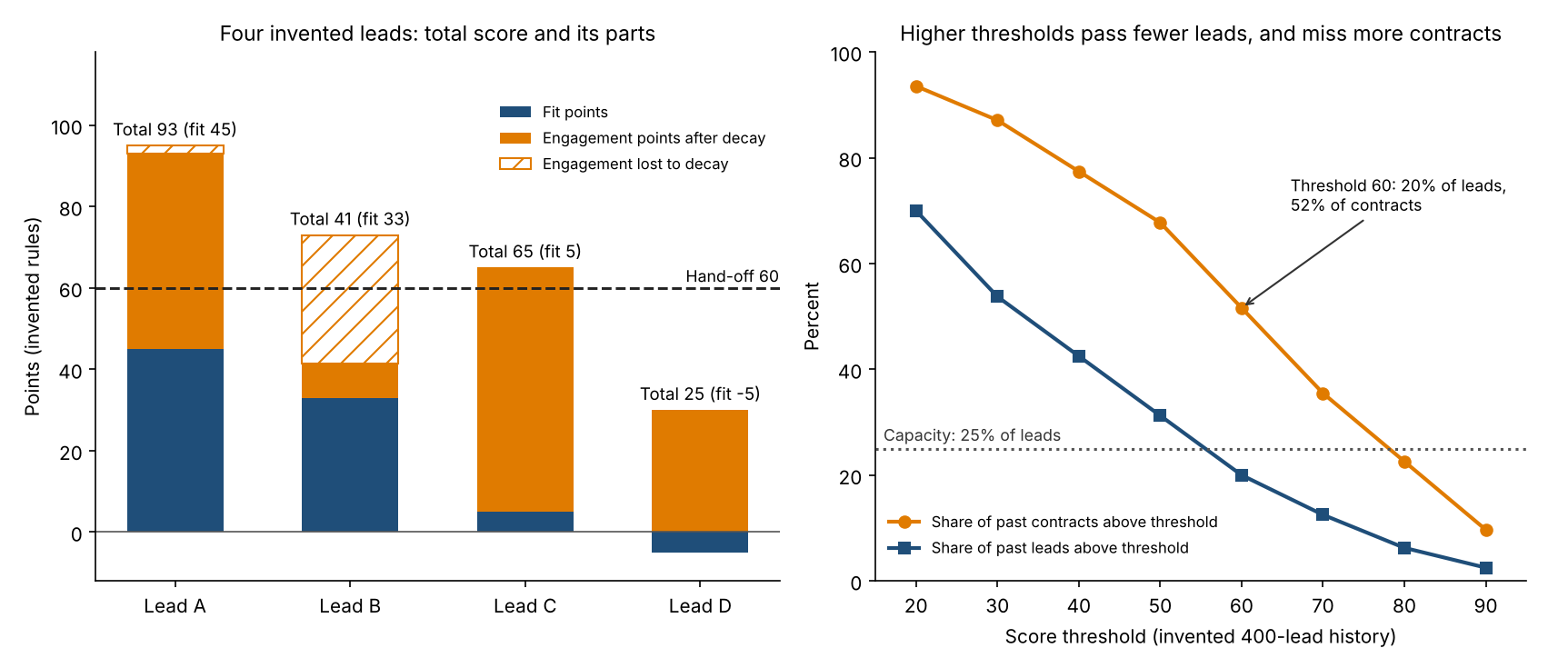
Figure 1. In the example model, decay and a fit floor keep Lead B and Lead C from sales, and a threshold of 60 hands over 20% of past leads that held 52% of past contracts.
The intervals overlap heavily, so 50 and 60 are not different on the evidence. These are Wilson 95% intervals, the same method as on the lead routing page. Capacity picks between them. With only 31 contracts, recheck as contracts build up.
MQL and SQL. Larger teams split the hand-off into two. HubSpot’s lifecycle help defines a Marketing Qualified Lead as one "your marketing team has qualified as ready for the sales team". A Sales Qualified Lead is one "your sales team has qualified as a potential customer". Many installers have one team. For them, the hand-off is the point where a rep takes ownership. The 40 to 59 band in the example history holds 90 leads and 8 contracts (8.9%). Send it to a nurture list, not the bin.
Rules-based or predictive scoring?
Rules-based scoring uses points you set by hand. Predictive scoring uses past outcomes to learn the weights. So it needs enough past leads and contracts to learn from.
Companies set minimums. HubSpot’s lead scoring overview says AI-built contact scores need "a minimum sample size of 50 contacts, containing 25 converted and 25 non-converted". They also need a Marketing Hub Enterprise subscription. Zoho’s help says Zia Scores need at least 200 records to start. Its Conversion and Field Attribute scores also need 75 records for each ideal and non-ideal condition. The example 400-lead history clears HubSpot’s sample bar (31 contracts) and Zoho’s 200 records. Zoho’s 75-record rule applies per condition, which the history cannot test. Rules you can read and change are easier to explain to reps.
Lead scoring and threshold calculator
Part 1 scores one lead on the example rules. Part 2 takes your counts by score band and finds the lowest threshold that fits your capacity.
Not showing? Open the lead scoring calculator on its own page. Part 2 puts a total below 0 in the 0 to 9 band. It reproduces the tables above. It warns on blank, negative, out-of-range or ambiguous numbers such as 1.000.
How solar software handles lead scoring
Only HubSpot and Zoho CRM document points-based scoring in help pages, and only HubSpot documents decay. Pipedrive names scoring on a product page only. Rows come from company pages read in October 2026.
| Software | Points-based scoring | Decay or time rules | Predictive or AI |
|---|---|---|---|
| HubSpot Sales Hub (contact scores need Marketing Hub) | Partly | Yes | Partly |
| Zoho CRM | Yes | Partly | Yes |
| Pipedrive | Partly | Not stated | Not stated |
| Sunbase | Not stated | Not stated | Not stated |
| JobNimbus | Not stated | Not stated | Not stated |
Not stated: the pages we read do not mention scoring, which does not mean the tool lacks it. Partly: the page covers some of the feature. For HubSpot Sales Hub, Partly means contact scores need Marketing Hub.
- HubSpot Sales Hub:
- Points: Rules add or subtract points.
- Contact scores need Marketing Hub. Company scores work with Marketing Hub or Sales Hub, at Professional or Enterprise.
- Deal scores need Sales Hub and are combined engagement and fit scores only.
- The default maximum is 100 per score and can be changed (HubSpot build page, last updated 14 August 2026).
- Users set thresholds that label score ranges (such as A to C, 1 to 3).
- Decay: Optional on event-based rules: a percentage reduction over a chosen period (the build page’s example is 50% every three months). The overview page lists intervals of 1, 3, 6 or 12 months.
- AI: AI rules recommend events for engagement and combined scores. AI-built contact scores need Marketing Hub Enterprise and a sample of 50 contacts.
- Source: HubSpot knowledge base, build lead scores, last updated 14 August 2026. Lead scoring overview, last updated 2 September 2026.
- Points: Rules add or subtract points.
- Zoho CRM:
- Points: Positive and negative scores per rule, plus touchpoint scores on Leads and Contacts. Each layout can have up to 10 rules, 5 of them active.
- Decay: Time conditions such as "in last 15 days" are supported. Decay is Not stated.
- AI: Zia Scores are AI-based, from Professional edition, with a 200-record minimum.
- Source: Zoho CRM help, configuring multiple scoring rules, and Zia Scores, no dates printed.
- Pipedrive: the product page says it can rank leads with custom scoring. It gives no points rules or plan. Source: Pipedrive product page, no date printed (2026 copyright).
- Sunbase: the page mentions qualification status but not scoring. Source: Sunbase solar CRM page, no date printed (2026 copyright).
- JobNimbus: the two help pages read (new-lead automation, custom lead sources) do not mention scoring. Source: JobNimbus help pages, no date printed.
HubSpot, Zoho CRM and Pipedrive are general CRMs, not solar tools. Our lead management and lead routing pages rate the same tools on other features. Only HubSpot and Zoho CRM document points-based scoring, so shortlist those two first. For ranked options, see the best solar lead management software and the best software for solar and roofing companies.
Common mistakes with lead scoring
FAQs
What is a good lead score?
Use the lowest score your team can work in time. Each company sets its own points, so there is no universal figure. A good threshold also sends a clearly higher share of contracts to sales, as the history above shows.
What is the difference between a fit score and an engagement score?
Fit scores facts about the lead, such as roof ownership and bill size. Engagement scores actions, such as a quote request or a reply. HubSpot has separate fit and engagement score types for contacts and companies, and also allows a combined score.
Should scores decay?
Yes, engagement scores should decay, because old activity says little about interest now. Fit points normally should not, unless the fact itself can go stale. In the example, decay moves Lead B from 73 to 41.
Does a small installer need lead scoring?
A small installer needs scoring only when leads outnumber the calls it can make quickly. If one person calls every lead the same day, a queue and a good lost-reason field may be enough.
Related terms
- Lead management: the process of handling each enquiry from capture to contract.
- Speed to lead: how quickly a new enquiry gets its first reply.
- Close rate: the share of leads or appointments that become contracts.
Next step: count your own past leads and contracts by score band, then check which tool in the best solar lead management software list can hold your rules.
Sources
- HubSpot knowledge base: build lead scores, last updated 14 August 2026 (checked October 2026).
- HubSpot knowledge base: overview of the lead scoring tool, last updated 2 September 2026 (checked October 2026).
- HubSpot knowledge base: use lifecycle stages, last updated 17 July 2026 (checked October 2026).
- Zoho CRM help: configuring multiple scoring rules, no date printed (checked October 2026).
- Zoho CRM help: Zia Scores, no date printed (checked October 2026).
- Pipedrive: sales prospecting software, no date printed (checked October 2026).
- Sunbase: solar CRM software, no date printed (checked October 2026).
- JobNimbus help: automation to notify a sales rep of a new lead, no date printed (checked October 2026).
- JobNimbus help: create custom lead sources, no date printed (checked October 2026).
Last updated 30 October 2026. Next scheduled review: 30 January 2027.