Key takeaways
- The core record is one pin per address plus a status, called a disposition. Demand IQ lists 8 statuses a rep can set after its default of Prospect. RepCard names 3.
- Of the six tools below, five have a company page that documents knock statuses, three name GPS and three state a CRM sync.
- In this example’s shift, 64 of 120 knocks were not home and 5 became appointments: 4.17 per 100 knocks, or 24 knocks per appointment.
- A return pass pays off only if it reaches more than 44.2% of not-home doors, the same share the first pass reached (example).
To pick a door-to-door tool for a solar team, see the best solar canvassing apps.
Canvassing app at a glance
A canvassing app turns a street into a list of addresses, each with an owner and a status. That log is what lets a manager count doors, conversations and appointments.
| Item | Detail |
|---|---|
| Core record | One pin per address, with a status, a time and a rep. Notes and photos are optional. |
| Statuses | No standard. Demand IQ’s help page lists 8 settable statuses and RepCard’s feature page names 3. Our table below suggests 6. |
| Numbers it produces | Knocks per hour, contact rate and appointments per 100 knocks, by rep and by turf. |
| Rules | None for the app itself. Door-to-door selling is regulated by place. See the rules section. |
| In software | Door-to-door tools such as Demand IQ, Ecanvasser, Knockio, SPOTIO, RepCard and Sunbase, and CRMs with a field module. See the software table. |
Why a canvassing app matters for solar sales teams
An app replaces paper maps and memory with a record of every door. Without it, a manager cannot tell why a week was weak. It could be few knocks, few conversations or few appointments.
It is one stage of a longer process. Door-to-door sales covers the method. Lead management covers what happens once an enquiry exists. Speed to lead covers how fast you reply. Each appointment set at the door becomes a lead. The knock log should carry the rep, address and source into your CRM.
The five jobs of a canvassing app
A canvassing app does 5 jobs. Each stores a different kind of data. The five-job split is our framing, not a standard.
- Turf: draw a territory on a map and give it to a rep or team. The manager can see which addresses were knocked and which were not.
- Route: order the doors so reps walk or drive less. Check any limit on stops per route.
- Knock log: record a status for each door, with a time and a location. It should take one tap, not a form.
- Appointment: book the visit with the closer from the door. See appointment setting.
- Sync: pass the record to a CRM so follow-up does not rest on a rep’s memory. Demand IQ’s page, for example, names ServiceTitan, JobNimbus, AccuLynx and HubSpot. APIs and webhooks explain how records move.
GPS has two uses. It can show where a rep is. It can also check that a logged knock happened near the address. Ecanvasser’s page says reps can "track every knock with GPS verification", and SPOTIO’s says location verification. Either shows a rep was nearby, not that anyone spoke to the occupant.
Signal drops in flats and cul-de-sacs. See mobile app offline mode for how queues and syncing work.
What is a disposition in a canvassing app?
A disposition is the recorded outcome of one knock. Keep the list short. Then reps tap fast and every status triggers one clear next action.
| Status (our suggestion) | Meaning | Next action | Counts as a conversation? |
|---|---|---|---|
| Not home | No answer at the door. | Add to a return pass. Note the time of day. | No |
| Not interested | Spoke to the occupant, who declined. | Close the pin. Keep it for reporting. | Yes |
| Not qualified | Spoke to the occupant, who cannot buy. For example, a tenant. | Close the pin with the reason. | Yes |
| Call back | Spoke to the occupant, who asked for a later visit or call. | Create a task with a date. | Yes |
| Appointment set | A visit with the closer is booked. | Create the lead and appointment in the CRM. | Yes |
| Do not knock | A no-soliciting sign or a request at the door. Do not revisit. | Flag it and keep it out of routes. | No |
Companies use different lists. Demand IQ’s help page gives a default of Prospect. Reps can then set Appointment, Call, Do Not Knock, Follow Up, Not Home, Not Interested, Not Qualified or Sold. Managers and admins can add more. RepCard’s canvassing page names three: interested, not home and not interested.
Map each status to a CRM stage once. Otherwise your reports will not match. A status says where one door stands. A pipeline stage says where a deal stands. See sales pipeline.
Worked example: one example shift
One rep knocks for 4.0 hours and logs 120 knocks. The counts are example. Conversations are the four statuses marked Yes above.
| Status (example counts) | Knocks | Share of knocks |
|---|---|---|
| Not home | 64 | 53.3% |
| Not interested | 26 | 21.7% |
| Not qualified | 12 | 10.0% |
| Call back | 10 | 8.3% |
| Appointment set | 5 | 4.2% |
| Do not knock | 3 | 2.5% |
| All statuses | 120 | 100.0% |
| Measure (from the example counts) | Working | Result |
|---|---|---|
| Knocks per hour | 120 / 4.0 | 30.0 |
| Conversations | 26 + 12 + 10 + 5 | 53 |
| Contact rate | 53 / 120 | 44.2% |
| Appointments per 100 knocks | 5 / 120 x 100 | 4.17 |
| Knocks per appointment | 120 / 5 | 24.0 |
| Minutes per appointment | 4.0 x 60 / 5 | 48.0 |
| Appointments per conversation | 5 / 53 | 9.4% |
Now take the 64 not-home doors. At 30 knocks an hour, a return pass takes 2.13 hours. The first pass made 1.25 appointments an hour (5 / 4.0). The table shows the return pass at four reach rates. It assumes the same pace and 9.4% appointments per conversation.
| Share of 64 not-home doors reached (example) | Conversations | Appointments | Appointments per hour |
|---|---|---|---|
| 20% | 12.80 | 1.21 | 0.57 |
| 30% | 19.20 | 1.81 | 0.85 |
| 44.2% (break-even) | 28.27 | 2.67 | 1.25 |
| 60% | 38.40 | 3.62 | 1.70 |
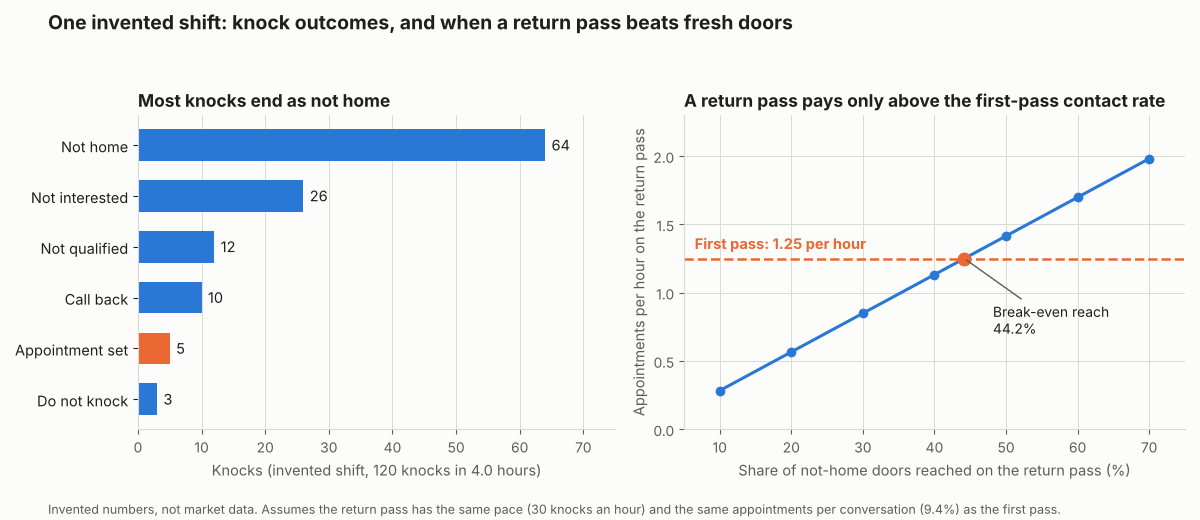
Figure 1. In this example shift, 64 of 120 knocks were not home. A return pass reaching 30% of them yields 0.85 appointments an hour, against 1.25 on the first pass.
A return pass breaks even when it reaches the same 44.2% share as the first pass, because pace and conversion are held equal. Real return visits may differ. Occupants may answer at set times, and known doors may be quicker to route. Test it on your own log.
Knock log calculator
Enter knocks by status, the hours spent and, optionally, a return-pass reach. It returns the measures in the tables above.
Not showing? Open the knock log calculator on its own page. Counts must be whole numbers. It warns on blank, negative, out-of-range or ambiguous entries such as 1.000.
How solar software handles canvassing
Five of the six tools document a status per door. Three name GPS (Ecanvasser, Knockio and RepCard) and three state a CRM sync (Demand IQ, Ecanvasser and SPOTIO). Sunbase documents neither a status log nor a CRM sync. The table uses company pages checked October 2026. Several are general door-to-door tools, not solar tools.
| Software | Knock status logging | GPS or rep location | Appointments | CRM sync |
|---|---|---|---|---|
| Demand IQ | Yes | Partly | Yes | Yes |
| Ecanvasser | Yes | Yes | Yes | Yes |
| Knockio | Yes | Yes | Yes | Partly |
| SPOTIO | Yes | Partly | Partly | Yes |
| RepCard | Yes | Yes | Partly | Partly |
| Sunbase | Not stated | Partly | Yes | Not stated |
Not stated means the company page we cite does not say. Partly means the page mentions the feature without detail, such as live tracking without naming GPS. All six mention territories and routes, though Knockio only lists Route Planning as a feature name.
What each company page says, with the pages and dates:
- Demand IQ: draw a territory, assign it to a rep, and the rep gets a phone-ready route. Its canvassing page shows a Quick log of four shortcuts: Lead, Not home, Callback and Skip. The 8 statuses above come from its help page, a separate list. It shows reps on the map. GPS is not named. Every lead and appointment syncs to ServiceTitan, JobNimbus, AccuLynx and HubSpot. Pages: canvassing app page, Updated June 2, 2026 (names contractors and roofing, not solar). Disposition help page, no date.
- Ecanvasser: territories by rep, team or vertical, and walking routes. The solar page mentions custom dispositions. It has real-time GPS tracking. It books appointments on the spot and lists pre-built CRM integrations. Pages: door-knocking page and solar page, 2024 copyright only.
- Knockio: hand-drawn or ZIP-based boundary, and route planning. Log a disposition at the door. It names Interested and Callback. It has live GPS tracking of every rep. Appointments are covered. For CRM, integrations are listed but sync is not described. Pages: two Knockio pages, 2026 copyright, no page date.
- SPOTIO: boundaries by territory, and route planning. Reps can mark a door Not Home, with one-tap logging. Location verification is stated. GPS is not named. Appointments are mentioned, not described. CRM and calendar sync are stated. Pages: door-to-door page, page metadata modified 14 October 2026. Names solar.
- RepCard: territories and map pins, and route optimisation. It pins outcomes: interested, not home, not interested. It has real-time GPS tracking of reps. The solar page lists Scheduling & Booking, a team calendar and "Connect your sales tools". The canvassing page states no appointments or CRM sync. Pages: canvassing feature page, no date. Solar page, 2026 copyright.
- Sunbase: map out territories, and route optimisation. Doors knocked is mentioned as a metric only. Live Map Tracking shows team locations. GPS is not named. It has appointment scheduling. CRM sync is not documented. Page: canvassing software page, 2026 copyright only.
Offline use is stated for Demand IQ and Ecanvasser. SPOTIO describes a Download My Day feature for limited connectivity. The pages for Knockio, RepCard and Sunbase do not mention it. For canvassing tools built for solar teams, see the best solar canvassing apps.
Common mistakes with canvassing apps
Door-to-door selling rules by place
Door-to-door selling is regulated. The rules depend on where you knock. This page does not give legal advice and does not cover places outside the US.
- US federal: the Federal Trade Commission titles its 16 CFR Part 429 rule summary "Cooling-off Period for Sales Made at Home or Other Locations". It says it is unfair and deceptive for a door-to-door seller to omit disclosures about the buyer’s right to cancel within three business days. It covers sales of USD 25 or more made at the buyer’s residence. In January 2015 the FTC raised the limit for sales at transient locations, meaning places other than the buyer’s residence, to USD 130 (80 FR 1329). The summary page lists Federal Register notices from 1995 to 2013. Current text: Cornell LII, 16 CFR 429.0 (checked 30 October 2026).
- States and towns: check state and local rules for each area before you assign turf. Nothing here covers them. An app can store a Do not knock flag and a time for each visit. It does not make a visit lawful.
FAQs
How is a canvassing app different from a CRM?
A canvassing app works on doors before a lead exists. That means turf, routes and knock status. A CRM holds the lead afterwards, with its owner, stage and follow-up. Some companies combine them. Knockio’s page says "Knockio doesn’t hand off; it’s already connected."
See solar CRM and our guide to the best CRM for solar sales teams.
Does GPS prove that a rep knocked on a door?
No. A location check shows the phone was near the address, not that anyone answered the door. Ecanvasser, Knockio and RepCard name GPS. Judge a logged knock by its status and time stamp.
Can a canvassing app book appointments for a closer?
Yes, for most. Four of the six companies’ pages describe booking or scheduling appointments, as the software table shows. They are Demand IQ, Ecanvasser, Knockio and Sunbase. RepCard’s solar page lists "Scheduling & Booking" and SPOTIO’s mentions appointments, both without detail. See appointment setting.
What is a disposition in a canvassing app?
It is the outcome a rep logs for one door, and it sets the next action: a return pass, a dated task or a closed pin. There is no standard list. The statuses section shows our six.
Related terms
- Door-to-door sales: selling by knocking on residential doors, the method a canvassing app supports.
- Appointment setting: booking a visit between a prospect and a closer.
- Lead management: handling each enquiry from capture to contract or loss.
Next step: shortlist a door-to-door tool from the best solar canvassing apps, or widen the search with the best solar sales apps for reps.
Sources
- Demand IQ: canvassing app, Updated June 2, 2026 (checked October 2026).
- Demand IQ knowledge base: Hero dispositions, no date printed, 2026 copyright (checked October 2026).
- Ecanvasser: door knocking app and Ecanvasser: solar, 2024 copyright only (checked October 2026).
- Knockio: canvassing app and Knockio: sales canvassing software, 2026 copyright, no page date (checked October 2026).
- SPOTIO: door-to-door sales, page metadata modified 14 October 2026 (checked October 2026).
- RepCard: solar, 2026 copyright, and RepCard: canvassing, no date printed (checked October 2026).
- Sunbase: canvassing software, 2026 copyright only (checked October 2026).
- Federal Trade Commission: statement on the 2015 Cooling-Off Rule amendment, dated January 6, 2015, citing 80 FR 1329 (checked October 2026).
- Federal Trade Commission: Cooling-off Period for Sales Made at Home or Other Locations (checked 30 October 2026).
- Cornell LII: 16 CFR 429.0, USD 25 and USD 130 thresholds (checked 30 October 2026).
Last updated 30 October 2026. Next scheduled review: 30 January 2027.