Key takeaways
- In our invented audit of 20 projects, 87.4% of expected items left a tool, but only 62.4% left in a usable form.
- In that audit, 3 of 8 data types met our 90% usable test. Notes and pricing had no usable copies.
- Company pages state limits: OpenSolar caps a project CSV at 2,000 projects per export, and SolarNexus says no single step pulls the whole database.
- A DXF carries drawing shapes, not customer records.
- OpenSolar’s terms say Protected Data is deleted or returned "without delay, at your written request". Clause 9(k) sets no number of days, so get one in writing.
To compare design tools before you test their exports, see the best solar design software list.
Data export at a glance: what to measure
Measure two shares. One is what left in any form. The other is what left in a form you can reuse. The gap between the two is lost work.
| Item | Detail |
|---|---|
| Formula | Usable share = items out as a structured or original file ÷ items expected. Any-form share (the headline "exported" figure) = items out in any form, including a PDF, ÷ items expected. You can weight both by how much each data type matters to you. |
| Typical range | No benchmark. This example’s audit gives 62.4% usable and 87.4% in any form. |
| Where it matters | Switching tools, audits, disputes, warranty claims and handing a job to another firm. |
| Standard or rule | No solar standard. Each company’s help page and contract set the rules. A legal right exists for some personal data. See the section below. This page is not legal advice. |
| In software | Export buttons, bulk download tools and APIs. The table below has details. |
Why does data export matter for installers?
A warranty claim, permit query or customer call can come years after the install. By then you may no longer pay for the tool. A record you can see on screen may still not leave. Our company lock-in page prices a switch. This page tests whether the data can leave, and in what form.
What leaves with you: projects, designs, customers and files
Different data leaves by different routes. Check each data type on its own, because one working button does not cover the rest. The table has one row for each of the audit’s eight data types, in the same order as the worked example.
| Data type | Route to look for | What to check | Company pages read |
|---|---|---|---|
| 1. Customer contact fields | CSV from a list or report | Which fields, and any row cap. | OpenSolar, Solargraf and Coperniq describe a CSV. See the software table. |
| 2. Stage and dates | CSV from a list or report | Which date range, and whether stage changes come out. | Solargraf filters its CSV by creation date. Coperniq exports by date range. |
| 3. Notes and history | Not named on the pages read | Do notes come out as rows or only as a printout? | No page read documents it. |
| 4. Design geometry | DXF | Layers, units and whether modules are blocks. See CAD, DWG and DXF files. | Aurora, HelioScope and OpenSolar describe DXF export. |
| 5. Design parameters | Report files | Do the assumptions come out, or only the results? | HelioScope lists reports in Bulk Download. |
| 6. Pricing and line items | A table export, not only a PDF proposal | A PDF keeps the page, not the rows. | No page read documents it. |
| 7. Files and photos | Download all, per record or in bulk | Are the files originals, and can you pull them for all projects at once? | JobNimbus: a zip per contact or job. |
| 8. Hourly production | CSV | Are all 8760 hourly values there? | Aurora: a CSV of 8760 hourly values. HelioScope: hourly CSV. |
A branded app or portal adds a question. Who keeps the data, messages and account when you leave? See white-labelling and customer portal.
Worked example: an export completeness audit
An audit counts items before and after an export. The counts below are example for 20 sample projects. Replace them with your own.
Usable means a structured file or an original file. View-only means a PDF or printout. The weights are example. They add up to 100. A row passes at 90% usable. That is our rule, not a standard.
Three of the eight data types pass, and view-only copies pull the usable share well below the any-form share.
| Data type (example counts) | Expected / usable / view-only / missing | Weight | Any-form / usable share | Passes 90%? |
|---|---|---|---|---|
| Customer contact fields | 80 / 78 / 0 / 2 | 20 | 97.5% / 97.5% | Yes |
| Stage and dates | 120 / 90 / 0 / 30 | 10 | 75.0% / 75.0% | No |
| Notes and history | 240 / 0 / 120 / 120 | 15 | 50.0% / 0.0% | No |
| Design geometry | 20 / 20 / 0 / 0 | 15 | 100.0% / 100.0% | Yes |
| Design parameters | 160 / 40 / 120 / 0 | 10 | 100.0% / 25.0% | No |
| Pricing and line items | 200 / 0 / 200 / 0 | 10 | 100.0% / 0.0% | No |
| Files and photos | 400 / 344 / 0 / 56 | 15 | 86.0% / 86.0% | No |
| Hourly production | 20 / 20 / 0 / 0 | 5 | 100.0% / 100.0% | Yes |
| Weighted result | 100 | 87.4% / 62.4% | 3 of 8 |
For the weighted share, multiply each weight by its share, add them up and divide by the total weight. The gap is 25.0 points. Pricing is 100% in any form but 0% usable.
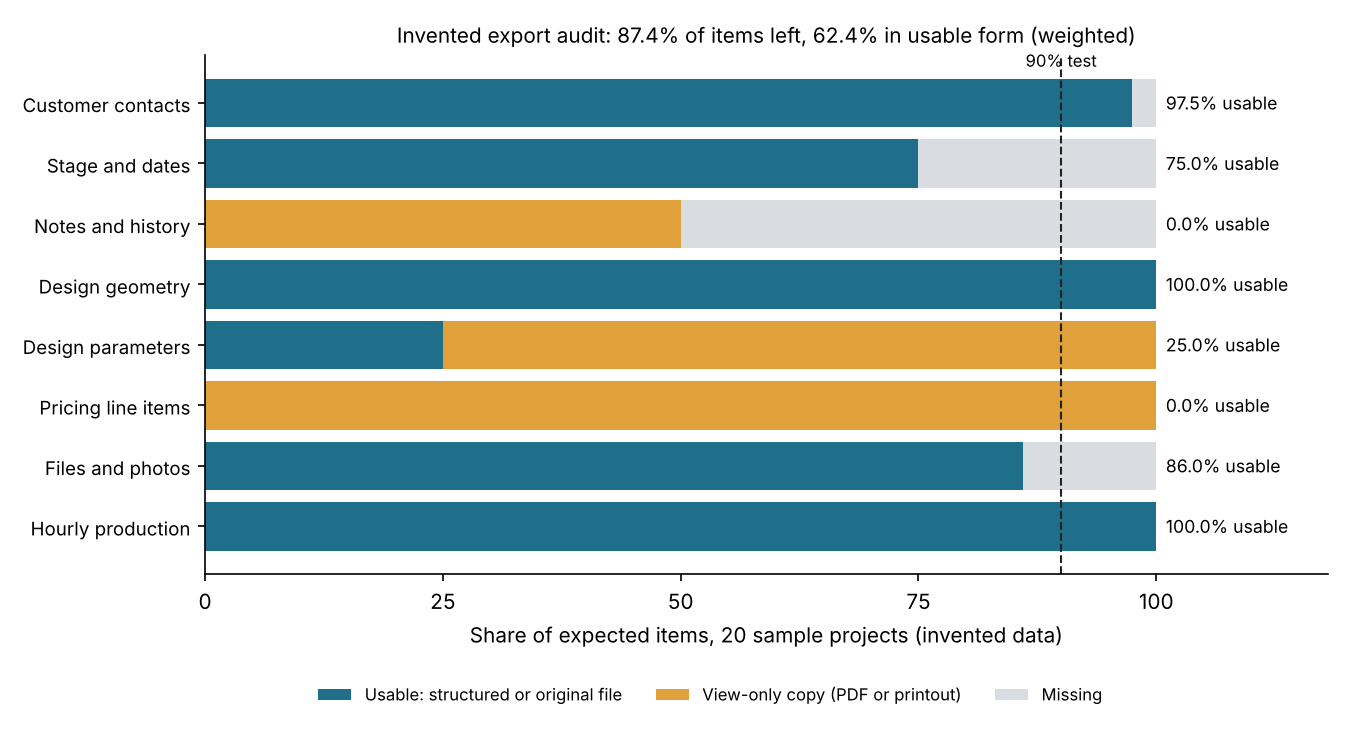
Figure 1. In this example audit, the headline "87.4% exported" falls to 62.4% once view-only copies are not counted as usable.
Enter your own counts below. The result leaves out any row that has weight 0.
How do you test a trial export?
Run the audit on 20 real projects during the trial, before you sign. It takes six steps.
- Pick 20 projects, old and new, with photos, notes and a revised design.
- Count the expected items for each data type on screen before you export anything.
- Run every documented route. Note the plan, the user role and any cap. OpenSolar’s project CSV needs a role with permission, and only Admins can pick all project data.
- Open each file. Load CSVs in a spreadsheet, open DXFs in a CAD viewer and check the unit.
- Count the usable, view-only and missing items. Enter them in the calculator.
- Send the missing rows to the company in writing and keep the trial files. Run the audit again on the same projects each year.
Check caps early. At 2,000 projects per export, 5,000 projects take at least 3 exports.
How solar software handles data export
Export support is uneven. Three of the six tools describe a record export in full and JobNimbus in part, and caps are common. The table covers six tools, plus SolarNexus below it, from pages read in October 2026.
| Software | Record export (CSV or similar) | Design or file export | API route |
|---|---|---|---|
| OpenSolar | Yes | Yes | Yes, for a fee |
| Aurora Solar | Not stated | Yes | Partly |
| HelioScope | Not stated | Yes | Yes, Enterprise plan only |
| Solargraf | Yes | Not stated | Not stated |
| Coperniq | Yes | Not stated | Not stated |
| JobNimbus | Partly | Yes, per record | Not stated |
Not stated: the company page we cite does not say. Partly: the page covers only part of the route.
- OpenSolar. Records: projects page to CSV, with current-view columns, or all project data for Admins. You need a role with permission. Up to 2,000 projects per export. Files: DXF with "three key layers: panels, facets, and obstructions". API: yes, for a fee. See API. Pages read: CSV article, updated 23 July 2026. DXF article, updated 16 September 2025. Post, 16 February 2026. API article, updated 31 March 2026.
- Aurora Solar. Files: DXF with a choice of layers, from Design Mode only. Also a CSV of 8760 hourly production values. API: partly. The Design API is an Enterprise "Add-on". See API. Pages read: DXF help, updated 15 April 2026. Hourly export help, updated 5 October 2026. Pricing page, modified 29 September 2026.
- HelioScope. Files: Bulk Download lists the hourly CSV, Shade Report, Production Report and DXF "among others". No plan stated. API: yes, Enterprise plan only. See API. Pages read: Bulk Export article, updated 24 June 2026. API article, updated 8 July 2025.
- Solargraf. Records: a CSV of the projects list, filtered by creation date, with fields you pick by tick box. Files: not on the page read. See single line diagram for SLD export. Pages read: Help article, published 7 September 2023.
- Coperniq. Records: a .csv of Accounts (clients), Deals and Projects, by date range or Smart View. Fields and limits not stated. Pages read: Support article, no date printed ("Last updated 1 year ago").
- JobNimbus. Records: a Custom Report for a record type such as Contact or Job. The format is not stated. Files: "Download All" on a Contact or Job saves a zip of attachments, one record at a time. Asked if a full export exists, the page says: "no; you would have to follow the instructions outlined above". Pages read: Backup article, no date printed (copyright 2025).
SolarNexus’s help page (profile, dated 16 January 2026) offers a limited CSV through Reports. It also offers an XML export of one project’s data. It says "there is no way to extract the entire database in one operation". To compare tools, see the best solar design software list.
What happens to your data after you cancel?
The company pages state few numbers, so the contract decides. Before you sign, ask for the export window, the format and a written deletion date.
OpenSolar’s terms (last modified 18 July 2023) cover this in clause 9(k). OpenSolar shall "without delay, at your written request, either securely delete or return all the Protected Data to you". We read the whole page. It sets no number of days.
Zoho’s field service help page is not about a solar tool. It does show what a stated period looks like. If a user closes an account, Zoho keeps live data for 30 days and backups for 3 months. Notice and minimum terms are on the company lock-in page.
Does a legal right apply? (UK example)
The UK ICO says the right to data portability "gives individuals the right to receive personal data they have provided to a controller". It covers only personal data the individual provided. Project designs, company records and data the controller made fall outside it. The right runs from a person to the controller. The ICO page does not say whether a business customer, such as an installer, can use it. UK GDPR Article 20 gives the right to "the data subject", and Article 4(1) defines a data subject as "an identified or identifiable natural person". A limited company is not a natural person, so the right does not belong to the company itself. A named individual, such as a sole trader, can use it for personal data provided about them. Ask a lawyer how this applies to your business structure before you rely on it. A request must be met "without undue delay and at the latest within one month of receipt". The guidance "is under review and may be subject to change" (page metadata date 6 February 2025, still shown as under review in November 2026). This page covers the UK only. Rules differ by country, so check yours. This is not legal advice.
Common mistakes with data export
FAQs
What is the difference between data export and data portability?
Data export is the feature: a button, a report or an API call. Data portability is the result: your data can move to another tool and work there. Some personal data also has a legal right to portability. See the UK example above.
Which file formats should a solar tool export?
Company pages show CSV for records, DXF for design geometry and original files for attachments. One shows XML. Confirm the format you get for each data type. A DXF holds geometry, not customer notes.
How long do I have to export after I cancel?
There is no fixed period in the pages we read. OpenSolar’s clause 9(k) sets none ("without delay"). Zoho’s field service page states 30 days for live data. Get the window in writing, and export during the trial or notice period.
Can I export everything in one go?
Often not, according to the company pages. OpenSolar caps a project CSV at 2,000 projects. JobNimbus works per contact or job. SolarNexus says no single operation extracts the whole database. API access can help but may cost extra or need a higher plan. See API.
Related terms
- Company lock-in: the cost of leaving a tool.
- API: the documented route for programs to read and write your data.
- CAD, DWG and DXF files: drawing formats for design geometry.
- Handover pack: the records given to the owner when a job ends.
Next step: run the 20-project audit during your trial, and compare customer-record export in the best solar CRM list.
Sources
- OpenSolar support: How to Export Project Data and information to CSV, updated 23 July 2026 (checked October 2026).
- OpenSolar support: Exporting a DXF CAD data file, updated 16 September 2025 (checked October 2026).
- OpenSolar: announcement on API access and connectors, 16 February 2026 (checked October 2026).
- OpenSolar support: API Access trial details, updated 31 March 2026 (checked October 2026).
- OpenSolar: User Terms and Conditions and Privacy Policy, "last modified on 18 July 2023" (checked October 2026).
- Aurora Solar help: How to export DXF files, updated 15 April 2026 (checked October 2026).
- Aurora Solar help: Hourly Production Data Export, updated 5 October 2026 (checked October 2026).
- Aurora Solar: pricing page, modified 29 September 2026 (checked October 2026).
- HelioScope help: How to Export my Designs and Reports, updated 24 June 2026 (checked October 2026).
- HelioScope help: HelioScope API, updated 8 July 2025 (checked October 2026).
- Solargraf help: How to export your projects list, published 7 September 2023 (checked October 2026).
- Coperniq support: Exporting records from Coperniq, no date printed (checked October 2026).
- JobNimbus support: backup or copy account data, no date printed (checked October 2026).
- SolarNexus help: exporting data from SolarNexus, 16 January 2026 (checked October 2026).
- Zoho: Data retention in Zoho FSM, no date printed (checked October 2026).
- UK Information Commissioner’s Office: Right to data portability, no review date printed. Page metadata date 6 February 2025 (checked November 2026).
- UK GDPR, Article 20, right to data portability (checked November 2026).
- UK GDPR, Article 4(1), definition of personal data and data subject (checked November 2026).
Last updated 30 October 2026. Next scheduled review: 30 January 2027.