Key takeaways
- A solar CRM answers three questions: who the customer is, where the sale stands and what has been said.
- Solar CRM here means 5 record types: lead, contact, opportunity, project and activity. Companies name and split them differently.
- The counting basis changes every rate you report. In this example’s month, 22 contracts give an 11.0% close rate per enquiry row but 12.5% per household.
- Run 7 demo tests before you buy. The duplicate test comes first, because it shows how a tool treats your records.
To compare solar CRMs that keep these records, see the best solar CRM software.
Solar CRM at a glance
A solar CRM keeps one linked history for each customer. It runs from first enquiry to the project that follows the contract. It is a database with rules, not a list.
| Item | Detail |
|---|---|
| System of record | It is not the design tool or the field app, but it should pass data to both. |
| Records it holds | Lead, contact, opportunity, project and activity: 5 types. This is our framing, and company names differ. |
| Numbers it produces | Contact rate (the share of leads reached), close rate, pipeline value and rep activity. Each needs a stated counting basis. |
| Standard or rule | None defines a solar CRM. Stored customer data may carry data-protection duties in your country. |
| In software | Solar CRMs, general CRMs with solar set-up, and all-in-one platforms that add design and proposals. |
Why a solar CRM matters for installers
Every later step reads from the CRM. If a record is wrong or split in two, the error can reach the proposal, the permit pack and the commission payment.
It also decides what your reports mean. A sales pipeline report is only as good as its records. The lead management process, from capture to close, runs inside the CRM. So do commission calculations that depend on who owned the sale.
Which records does a solar CRM hold?
Lead, contact, opportunity, project and activity. Each record answers a different question and has a different owner.
| Record | What it is | Example fields |
|---|---|---|
| Lead | An enquiry that has not been qualified. See lead scoring, lead routing and speed to lead. | Source, date received, owner, status. |
| Contact | A person, with the property they own or occupy. | Name, phone, email, address, consent. |
| Opportunity (deal) | A possible sale with a value and a stage. | Value, stage, expected close date, proposal versions, lost reason. |
| Project | The delivery work after a signed contract. See solar project management software. | Stage, equipment, permit status, install dates. |
| Activity | One call, email, note, visit or task, with a date and an owner. | Type, date, owner, linked records. |
The software table below shows how companies name these. One tool converts a lead into a contact and optionally a deal. Another keeps contacts and jobs as separate records. The label matters less than whether the links work.
Worked example: one household, 14 records
One sale can create 14 linked records. A tool that links them lets you count households, not only enquiry rows. All numbers here are example.
| Record type | Count | Detail (example) |
|---|---|---|
| Lead | 2 | A web form on 3 March and a referral on 20 March, from the same household. |
| Contact | 2 | Two people at one address. |
| Opportunity | 1 | One residential system, valued at 18,500 USD. |
| Project | 1 | Opened when the contract was signed. |
| Activity | 8 | 3 calls, 2 emails, 1 site visit and 2 tasks. |
| All records | 14 | 2 + 2 + 1 + 1 + 8. |
Now scale up. In an example month, the list has 200 enquiry rows. Of these, 24 are repeat enquiries from a household already listed (12%). That leaves 176 households. The business signs 22 contracts.
| Counting basis | Count | Contracts | Close rate |
|---|---|---|---|
| Per enquiry row | 200 | 22 | 11.0% |
| Per household | 176 | 22 | 12.5% |
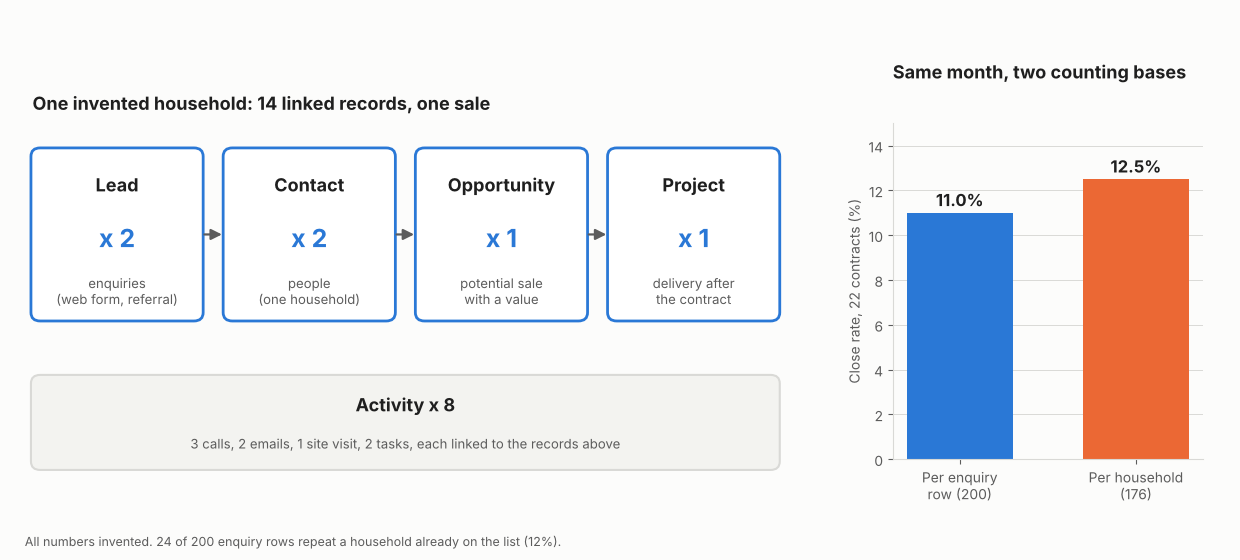
Figure 1. Repeat enquiries lower the close rate from 12.5% to 11.0% when each row counts as a lead, though sales did not change.
Neither basis is wrong, but you must name it. A CRM that merges repeat enquiries into one contact lets you report both. A spreadsheet with one row per enquiry gives the lower figure unless someone removes repeats by hand. The close rate page covers how to choose a base.
What should a solar CRM pass to other tools?
Customer, property and sale data should reach design, proposal, project, field and review steps without retyping. Each retyped field risks an error.
| Hand-off | Data that should pass | See |
|---|---|---|
| CRM to design | Address, roof notes, usage or bill. | Solar design software |
| Design to proposal | System size, equipment, price, finance option. | Solar proposal software |
| Won deal to project | Customer, address, signed contract, system data. | Project management |
| Project to field | Work orders with site details and dates. | Work order |
| Project to customer | Stage, documents and messages. | Customer portal |
| Completed install to reviews | Contact and job-complete status. | Review management |
Some tools bundle several of these steps. Our list of all-in-one solar CRMs with design and proposals covers them. Others pass data through an API or webhooks.
Seven demo tests for a solar CRM
Run each test live, on a trial or demo account, with your own sample data. A feature list cannot show how records behave.
- Duplicate test: add the same person twice, once by web form and once by phone. The tool should warn or merge, and keep both histories.
- Conversion test: qualify a lead into an opportunity. Contact details and notes should carry across with no retyping.
- Hand-off test: mark the opportunity won. The project should open with address, system and customer data filled in.
- Permission test: log in as a rep. You should see only the records and prices that role allows. See user roles and permissions.
- Report test: ask for contact rate and close rate by lead source. Ask which counting basis the report uses.
- Export test: export every contact, opportunity and activity. You should get a file with ids that still link the records. See data export and company lock-in.
- Connection test: ask which records the API reads and which events a webhook sends. Ask where the company documents them.
How solar software handles the CRM record chain
Only Sunbase documents a full path from lead to project on the page we read. The other four are Partly. Company pages were read in October 2026, and the table is not a ranking. OpenSolar’s row comes from its marketing page, not its help centre.
| Software | Lead-to-project chain documented? | Source |
|---|---|---|
| Sunbase | Yes | Sunbase solar CRM page, no date printed (2026 copyright) |
| OpenSolar | Partly | OpenSolar CRM page, metadata modified 2026-08-25 |
| JobNimbus | Partly | JobNimbus help, contact and job conversion page, no date printed (2025 copyright) |
| Zoho CRM (general CRM) | Partly | Zoho CRM help, converting leads, no date printed |
| HubSpot Sales Hub (general CRM) | Partly | HubSpot knowledge base, CRM database, last updated 18 September 2026 |
- Sunbase names lead, contact and opportunity records, and also describes customer and property details and project delivery. The page says to move accepted opportunities into project delivery, and to send qualified customer, property and energy information into the design workflow.
- OpenSolar lists customers, leads, contacts and projects. The CRM covers customers and projects from pre-sale through installation, and projects move through workflow stages. No explicit hand-off is described.
- JobNimbus keeps contacts and jobs as separate records, each with its own workflow. The page says a Contact cannot be turned into a Job. How the two are linked is not described on the page read.
- Zoho CRM uses lead, contact, account and deal records. Converting a lead creates a contact and account, and a deal only if chosen. No project record is described on the page read.
- HubSpot Sales Hub names contacts, companies, deals and tickets in an example. Records can be associated across objects. The page does not list standard objects or a project record.
Partly means the page describes some links in the chain but not all of them. Zoho CRM and HubSpot are general tools, not solar products. They are shown because a general CRM can be set up for solar.
Common mistakes with a solar CRM
FAQs
What is the difference between a solar CRM and a general CRM?
A general CRM is built around contacts, companies and deals. You add solar fields and links yourself. A solar CRM is sold with solar records, such as projects, and sometimes design and proposals. Run the seven tests rather than trusting the label.
Is a solar CRM the same as project management software?
No. A CRM covers the sale, from lead to signed contract. Project management covers contract to handover. Some tools do both. See the best solar project management software list.
Do I need a CRM, or can a spreadsheet do the job?
A spreadsheet can work for a small team that logs every enquiry. It holds one row per enquiry, so it struggles with households, history and permissions. Move when several people edit the same leads or you need hand-offs.
Which numbers should a solar CRM report?
Contact rate (the share of leads reached) and close rate by lead source, pipeline value by stage, and rep activity. State the counting basis on each report. A KPI dashboard can show them together.
What should I check before switching CRM?
Export contacts, opportunities, activities and files, and check that ids still link them. Ask how the company handles your data after you leave. See data export.
Related terms
- Lead management: the process for handling each enquiry.
- Sales pipeline: the stages an opportunity passes through.
- Workflow automation: triggers, conditions and actions that move records on.
Next step: run the duplicate test on a demo account, then compare the best solar CRM software or the best CRM for solar sales teams.
Sources
- Sunbase: solar CRM software, no date printed (checked October 2026).
- OpenSolar: project management CRM, metadata modified 2026-08-25 (checked October 2026).
- JobNimbus help: can I turn a contact into a job and vice versa, no date printed (checked October 2026).
- Zoho CRM help: convert leads, no date printed (checked October 2026).
- HubSpot knowledge base: manage your CRM database, last updated 18 September 2026 (checked October 2026).
Last updated 30 October 2026. Next scheduled review: 30 January 2027.