Key takeaways
- An example pack of 25,000 credits for USD 2,750 (USD 0.11 a credit) costs more per report than its list price suggests.
- At 5 reports a month, 39.5% of that pack’s credits expire unused, so each credit used costs USD 0.182.
- Against an example USD 450 monthly subscription, whole packs win only up to 8.27 reports a month. Counting every credit, the break-even would be 16.2.
- Aurora’s bundle pages print USD 0.10 a credit, but they carry no date, so confirm the rate with Aurora.
- Companies use different units: credits at Aurora and Pylon, a money wallet at OpenSolar, and per-1,000-event billing at Google.
To compare the design tools that sell credits, see the best residential solar design software list. For tools that bundle proposals, see best solar design and proposal software.
Credits at a glance: why the price per credit is not the cost
A credit is a unit of account, not a product. Its worth depends on what the company lets it buy and how long you can keep it.
| Item | Detail |
|---|---|
| Formula | Effective cost per credit = price paid ÷ credits used. Cost per report = credits per report × effective cost per credit. |
| Unit | USD per credit used, and USD per report, project or site model. |
| Where it matters | Per-project plans, on-demand site models, premium imagery, AI features, e-signature and API access. |
| Standard or rule | None. Each company sets its own credit sizes, prices and expiry. |
| Not to confuse with | Carbon credits and tax credits, which are covered under incentives. |
Credits make the bill follow your volume. That suits a team with uneven months, but it hurts a team that buys more than it uses.
Stripe is a payments company. It says customers "prepay for credits that they can redeem for products or services" (last updated 4 April 2025). It adds that expiring credits "can create resentment if customers feel rushed". That is a seller’s view, but the risk is real for a buyer.
How do credits work in solar software?
You buy credits in advance. The company then takes a set number each time you do something billable. The company, not you, sets that number.
- What spends credits. Aurora’s API reference (modified 8 September 2026) lists what spends them: project creation, expert design requests, Aurora AI runs, Contract Manager agreements and plan sets. Aurora’s help article, for example, lists 90 credits for an AI-assisted site model. Reads, AutoDesigner, irradiance analysis, performance simulation, design edits and proposals use none.
- Accepted-only charges. The same page says expert design credits are charged per model accepted. If you do not accept the model, there is no charge. Aurora AI is charged per accepted run. You cannot recover credits spent on creating a project.
- Packs and top-ups. Aurora’s Self Serve article says you buy bundles online with no annual contract. If the balance reaches zero or below, Aurora charges the card on file. It tops the account up to a minimum reload of 2,500 credits or USD 250.
- Expiry. The same article says purchased credits expire 12 months after purchase. Aurora’s usage-dashboard article (updated 15 April 2026) does not say. The Pylon and Scanifly pages give no expiry.
- Credits, wallets and meters. A wallet holds money, not credits. OpenSolar takes the cost of premium imagery and API Access from a prepaid wallet. A meter charges per call with no prepayment. Google’s Solar API lists a price per 1,000 events.
How do you cost a credit?
Divide what you paid by the credits you used, not the credits you bought. Then multiply by the credits one report needs.
- Write down the pack price, pack size and expiry. Price per credit is price ÷ credits. Never compare companies on this figure alone.
- List the credits for each billable step in a report. Steps are project, site model, imagery, AI, e-signature and plan set.
- Weight each add-on by the share of reports that use it. Add them up. That is credits per report.
- Forecast your reports over the expiry period. Credits needed = credits per report × reports.
- Round up to whole packs. Paid = packs × price. Expired credits = packs × pack size − credits needed.
- Divide paid by credits needed to get the cost per credit used. Divide it by reports to get the cost per report. Compare with a subscription over the same months. Do not test with live projects, because project-creation credits are not recovered.
Add set-up and training separately. See onboarding and implementation. For the subscription side, see per-seat pricing and per-project pricing.
Worked example: packs against a subscription (example numbers)
All inputs are example. A pack is 25,000 credits for USD 2,750 (USD 0.11 a credit). It expires after 12 months. A report uses 200 credits. An on-demand site model (100 credits) goes on 40% of reports and premium imagery (40 credits) on 30%. That is 252 credits a report, or USD 27.72 a report if every credit is used. The subscription is USD 450 a month for 60 reports, then USD 12 for each extra report. The plan is example to be cheap per report at volume. A smaller allowance or a higher fee would move the break-even, so the comparison shows the method, not a verdict.
You buy the packs at the start of the year for the forecast volume. The last pack’s unused credits expire. The table shows packs winning only at the lowest volume.
| Reports a month | Credits needed in 12 months | Packs bought / paid (USD) | Credits expired / USD per credit used | USD per report: packs vs subscription |
|---|---|---|---|---|
| 5 | 15,120 | 1 / 2,750 | 9,880 / 0.182 | 45.83 vs 90.00 |
| 10 | 30,240 | 2 / 5,500 | 19,760 / 0.182 | 45.83 vs 45.00 |
| 20 | 60,480 | 3 / 8,250 | 14,520 / 0.136 | 34.38 vs 22.50 |
| 40 | 120,960 | 5 / 13,750 | 4,040 / 0.114 | 28.65 vs 11.25 |
Packs are cheaper at 5 reports a month and dearer from 10. At 10 a month the packs cost USD 5,500 against USD 5,400. The subscription wins by USD 100, even though the pack rate looks low.
Whole packs make the crossing lumpy. One pack covers 8.27 reports a month (25,000 ÷ 252 ÷ 12). The second pack lifts the cost. If you used every credit, the crossing would be at 16.2 reports a month. Rollover or a shorter expiry would change both figures.
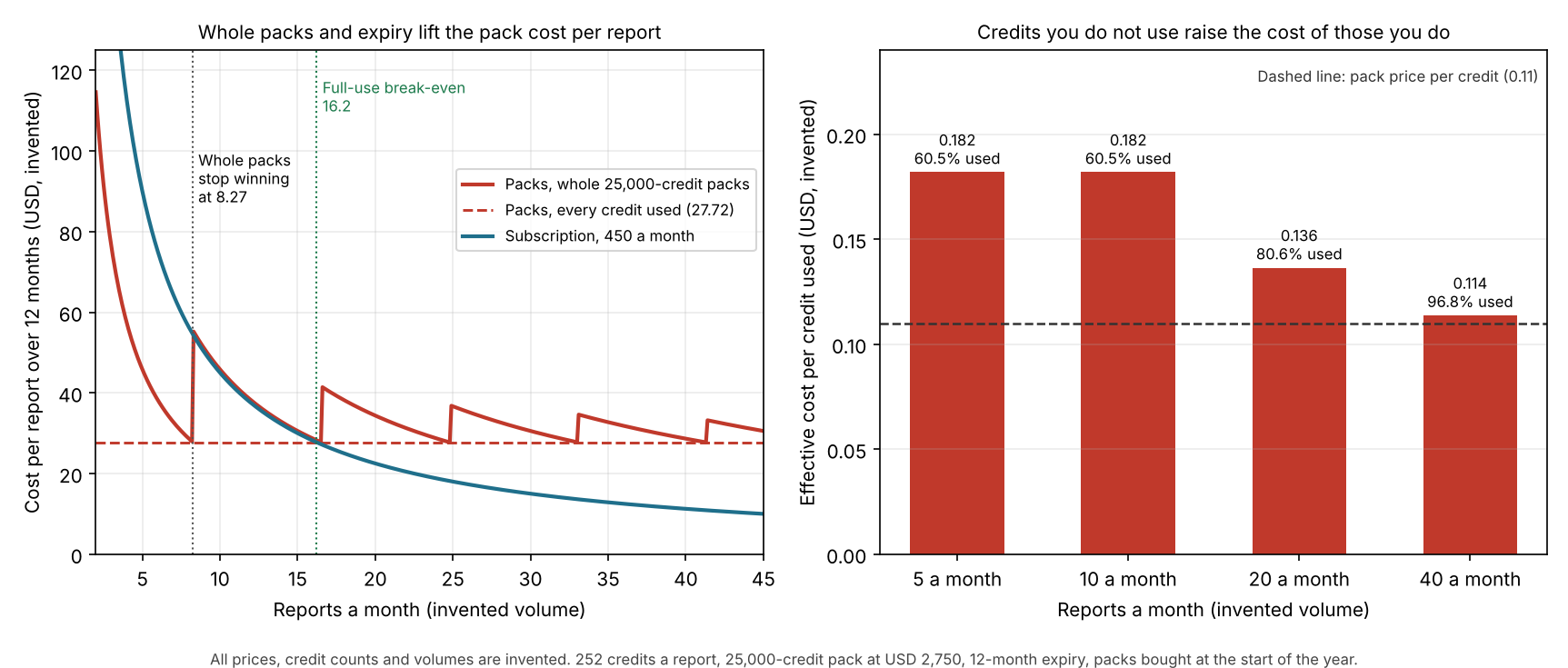
Figure 1. With whole packs and a 12-month expiry, the example pack stops beating the example subscription at 8.27 reports a month, about half the 16.2 full-use break-even.
Credit cost calculator
Enter a pack, your credits per report and your volume. The calculator gives the cost per credit used and the cost per report. It also compares a subscription. It starts with the example numbers above.
Not showing? Open the credit cost calculator on its own page.
How solar software handles credits
Aurora documents credits in the most detail, while Pylon and Scanifly print a price and little else. OpenSolar bills a money wallet and Google meters events. The table records what each page said in October 2026, not what a company charges you.
| Software | Credits documented? | Pages read |
|---|---|---|
| Aurora Solar | Yes | Two bundle pages (no date), a help article (15 August 2026) and the API reference (8 September 2026). |
| OpenSolar | No (money wallet) | Two help articles, updated 19 May 2026 and 31 March 2026. |
| Pylon | Yes | UK pricing page, no date shown. |
| Scanifly | Partly | Help pages on projects and credits, no date shown. The product page shows no credits. |
| Google Solar API | No (metered) | Google Maps Platform pricing list, last updated 2026-10-28 UTC. |
Partly: the pages describe credits but leave out key terms such as what a credit buys. Dates and links are in Sources.
- Aurora Solar. The bundle pages print USD 0.10 a credit. A 30,000-credit bundle for USD 3,000 is the minimum purchase, valid one year and not refundable. After you cancel, unexpired credits cannot be used. The help article gives a reload minimum of 2,500 credits or USD 250 and a 12-month expiry. The API reference says amounts vary by contract.
- Aurora credit costs. The help article lists residential projects at 150 credits on Foundation and 220 on Build, and commercial projects at 2,000 credits. Other Aurora pages tie the 150-credit rate to time-limited promotions, with 220 credits as the standard residential price once a promotion ends, so confirm which figure applies to your plan today. Add-ons cost 90 credits for an AI-assisted site model, 50 for e-signature, 150 for an on-demand site model and 200 for an expedited one. A bundle page lists EagleView Powered Models at 500 credits.
- OpenSolar. You pay for premium imagery per image from a prepaid wallet. The help article lists Nearmap and MetroMap but leaves the price per image blank. Check the price shown in the app before you buy, and ask OpenSolar how tax applies. API Access is a per-project fee taken from the wallet after a 30-day trial, amount not stated. Project creation is blocked if the wallet is short. Neither page mentions credits.
- Pylon. Standard GBP 4.00 and Pro GBP 10.00 a project. "Credits are purchased in packs within our web application." Credits pay for new projects or for features on each project. New users get free credits for five Standard projects. Pack sizes, pack prices and expiry are not stated.
- Scanifly. You order credits by quantity at USD 1 each (the page prints a dollar sign without naming the currency). The page does not say what a credit buys, or give expiry or refund terms.
- Google Solar API. Per 1,000 events. Building Insights has a free usage cap of 10,000 (the page says usage is calculated monthly). It then costs USD 10.00 per 1,000 up to 100,000, falling to USD 3.50 above 5,000,000. Data Layers has a free cap of 1,000, then USD 75.00 per 1,000, falling to USD 26.25.
Aurora’s pricing page names Basic and Premium plans. The help article names Foundation and Build, and the usage-dashboard article names Build, Grow and Scale. No page maps one set of names to another, so the right tier for your contract is a question for Aurora.
The help article’s reload of 2,500 credits or USD 250 implies the same USD 0.10 rate as the bundle pages. Those pages carry no date and mention a promotion that ended on 31 December 2025, so confirm the current rate with Aurora.
The pricing page (modified 29 September 2026) lists on-demand site models "Starting at" USD 9.99 on Basic and Premium plans. It also says its Enterprise plan includes "volume-based discounts on credit purchases". The help article lists on-demand site models at 150 credits on a different plan. The pages do not link the two figures, so ask Aurora which applies to your plan.
Common mistakes with credits
FAQs
What is a credit in solar software?
A credit is a prepaid unit. You spend it on billable actions, such as creating a project or ordering a site model. The company sets how many credits each action costs. Aurora and Pylon both document credits on their own pages.
Are software credits the same as carbon credits or tax credits?
No. Software credits pay for use of a tool. Tax credits and rebates are incentives. The incentives page covers them. Carbon credits are a separate topic that this page does not cover. For incentives, see solar incentives and rebates.
Do solar software credits expire?
Some do. Aurora’s Self Serve article says purchased credits expire 12 months after purchase. Aurora’s usage-dashboard article does not say. The Pylon and Scanifly pages give no expiry, so get the expiry and any rollover in writing.
Are credits cheaper than a subscription?
Only below a break-even volume. In the example, whole packs win up to 8.27 reports a month. If you used every credit, they would win up to 16.2. Test your own numbers in the calculator.
What happens when the credits run out?
Aurora charges the card on file when the balance reaches zero or below. Its Self Serve article says the account is topped up to a minimum reload of 2,500 credits or USD 250. OpenSolar blocks project creation if the wallet is short for API Access. The other company pages do not say.
Related terms
- Per-project pricing: a fee for each design or project.
- Per-seat pricing: a fixed fee for each person with a login.
- Quote-only pricing: a price you can only get by asking.
- Aerial imagery: the imagery that a credit or wallet often buys.
- API: the interface that many metered and credit charges attach to.
Next step: before you buy a pack, get the pack size, price and expiry from the company in writing and run them through the calculator. Then compare companies in the best residential solar design software list.
Sources
- Aurora help: Self Serve Plans: Foundation and Build, last updated 15 August 2026 (checked October 2026).
- Aurora help: Viewing Your Credit Usage & Remaining Balance in Aurora, updated 15 April 2026 (checked October 2026).
- Aurora API reference: Credits, v2024.05, last modified 8 September 2026 (checked October 2026).
- Aurora Solar pricing page, last modified 29 September 2026 (checked October 2026).
- Aurora Solar credit bundle pages, aurorasolar.com/?p=17020 and aurorasolar.com/?p=17975, no date shown (checked October 2026).
- OpenSolar: Enabling Imagery Marketplace, updated 19 May 2026, and API Access trial details, updated 31 March 2026 (checked October 2026).
- Pylon pricing page, UK, no date shown (checked October 2026).
- Scanifly help: Projects & Credits and projects and credits, no date shown (checked October 2026).
- Google Maps Platform pricing list, last updated 2026-10-28 UTC (checked 30 October 2026).
- Stripe: What is a credits-based subscription model, last updated 4 April 2025 (checked October 2026). A seller-side explainer.
Last updated 30 October 2026. Next scheduled review: 30 January 2027.