Key takeaways
- Platforms differ. Google’s policy page says merchants may not offer incentives. Yelp says "Don’t ask anyone to review your business".
- The FTC Q&A says asking only customers you think are happy "could violate the FTC Act". Its rule took effect on 21 October 2024.
- Timing advice is thin. EnergySage’s page says to ask as soon as installation is finished and does not mention PTO.
- In our example, a request for every install reaches 100 reviews in 12 months. A request for 40% of installs takes 30 months.
To run the request, monitor and reply steps in software, see the best review management software for solar companies.
Review management at a glance, and why it matters
Review management turns a finished job into a public record that you can answer.
| Item | Detail |
|---|---|
| The 4 steps | Request, collect, monitor, reply. This split is our framing, not a standard. |
| Where reviews live | Google, Facebook, Yelp and solar marketplaces such as EnergySage. Each site has its own rules and its own owner of the data. |
| Numbers it produces | Requests sent, reviews posted per request, rating mix, reviews per month and months to a goal. |
| Rules | Platform policies and, in the US, the FTC rule. See the rules section. |
| In software | Review apps, CRMs with automations, and the platforms’ own tools. See the software table. |
A request not sent is a review you do not get. A reply is public. A request that breaks a platform policy can get reviews removed. This page gives no sales figure, because we found no source that measures what reviews do for solar sales.
How does the review loop work?
Give each of the 4 steps one owner.
- Request: ask every customer with one link. Google lets you create a link or QR code from your Business Profile. You can share it by email, WhatsApp or a Facebook post.
- Collect: the review lands on the platform, not in your CRM. Log which jobs were asked and when.
- Monitor: watch each site for new reviews. Some tools link to only certain sites.
- Reply: replies are public. Google’s help page asks for replies that are professional, polite and short. The reviewer gets a notice and may edit the review afterwards.
A request series is similar to a drip campaign. If you text customers, confirm consent and opt-out rules for your region. This page does not cover them. A customer portal or handover pack could carry the link. That is our suggestion, not a company claim.
When should you ask: at install, at PTO or later?
No cited source compares trigger events for solar. The sources below give different starting points. Choose one and use it for every job.
| Source | Date printed | What it says about timing |
|---|---|---|
| EnergySage, "How to manage customer reviews" | None (2026 copyright) | Ask "as soon as you’ve finished the installation". It does not mention PTO. |
| Solargraf blog, solar reviews and referrals | 21 January 2021 | No single best time. It lists contract signing, after installation and after the first electric bill. |
| NiceJob help, campaign pages | 25 September 2026 (one page). Others none | A customer can be enrolled "when you complete a job or mark an invoice paid". Messages go at day 0, 2, 7 and 12. |
| JobNimbus help, review automation | None (2025 copyright) | The example fires when a job status becomes "Paid & Closed". The page describes no delay. |
| Google Business Profile help | None | Gives no timing advice. |
A solar job has three plausible triggers: install complete, PTO and the first bill. PTO is the utility’s permission to switch the system on. If you ask at install, the customer may still be waiting for it. That risk is our own reasoning, not a finding. See commissioning for when the job counts as finished.
Moving the trigger from install to PTO pushes every review later by the wait between the two. It does not change reviews per month once requests are flowing.
What do platform and FTC rules say about requests?
Google and Yelp ban incentives outright. The FTC rule is narrower. This table reports pages checked in October 2026. It is not legal advice, and the FTC row is US only.
| Source | Date or version | What it says |
|---|---|---|
| Google, "Prohibited & restricted content" | No date printed | "Rating Manipulation includes Incentivized or Biased Reviews, which are not allowed and will be removed from Maps." |
| Google, same page, merchant list | No date printed | Merchants may not "Offer incentives – such as payment, discounts, free goods and/or services". |
| Google, same page, merchant list (second item) | No date printed | Merchants may not "Discourage or prohibit negative reviews, or selectively solicit positive reviews from customers". |
| Google Business Profile help (tips and link pages) | No date printed | Offering incentives for reviews, for changes to reviews or for removal of negative reviews is "strictly prohibited". |
| Yelp for Business, "Don’t Ask for Reviews" and "Should I ask my customers to write reviews on Yelp?" | No date printed (copyright 2004-2024 and 2004-2026) | "Don’t ask anyone to review your business." "Proactively asking for reviews may hurt your Yelp rating." On the "Should I ask" page: incentives for reviews are "a violation of our policies". |
| FTC, Consumer Reviews and Testimonials Rule: Questions and Answers | Printed November 2024. Rule effective 21 October 2024 | Incentives are not banned unless the review must express "a particular sentiment". More in the bullets below. |
What the FTC Q&A adds:
- Section 465.4: incentives are not banned unless the review must express "a particular sentiment". Paying for 5-star reviews on third-party sites violates the rule, even with a disclosure.
- Selective asking: asking only likely-happy customers has no specific ban in the rule, but "could violate the FTC Act".
- Section 465.7: contacting a negative reviewer to resolve the issue is not prohibited.
- Penalties: courts can impose civil penalties for knowing violations. The page prints no amount.
Review gating means sending only some customers to a public site, usually those you expect to be happy. Neither the FTC Q&A nor the Google policy page uses the term. Google lists selective solicitation as not allowed. The FTC Q&A covers it in the bullets above. Facebook (rules not covered here) may differ.
Negative and fake reviews. The FTC Q&A says contacting a customer who posted a negative review to resolve the issue is not prohibited. It also says rule section 465.7 covers suppressing reviews. So do not threaten or pay a reviewer to remove one. If you think a review is fake, Google’s help page says reviews that appear to break its content policies can be flagged. It does not promise removal. Reply in public, factually, and keep private details out.
Worked example: a review-request funnel
A funnel multiplies three things: installs, the share asked and the share of requests that become a review. These inputs are example, not solar-industry rates.
| Step (all inputs example) | Scenario A: ask every install | Scenario B: ask 40% of installs |
|---|---|---|
| Completed installs per month | 20 | 20 |
| Requests sent | 20.00 | 8.00 |
| Requests that become a posted review | 25% | 25% |
| New reviews per month | 5.00 | 2.00 |
| New 1-star and 2-star reviews per month | 0.20 | 0.08 |
| Months from 40 reviews to 100 | 12.0 | 30.0 |
| Reviews after 12 months | 100.0 | 64.0 |
| Average after 12 months | 4.66 | 4.68 |
The example mix of new reviews is 78% 5-star, 14% 4-star, 4% 3-star, 2% 2-star and 2% 1-star. That gives a simple mean of 4.64. The profile starts at 40 reviews with an average of 4.7. Scenario B’s average is higher only because the starting 4.7 carries more weight there. The counts are fractions because they are expected values.
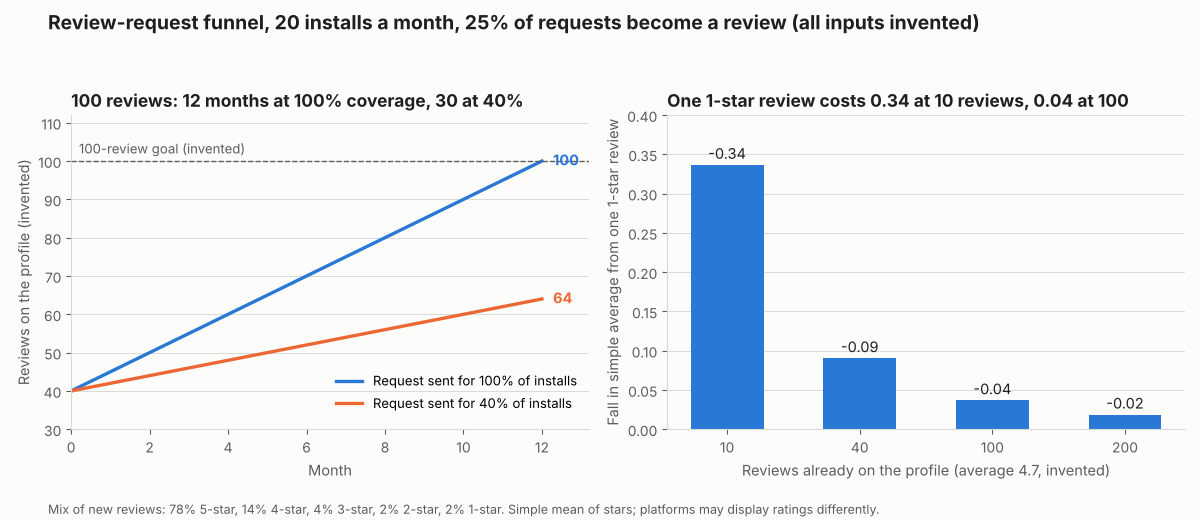
Figure 1. In this example funnel, asking at every install reaches 100 reviews in 12 months. One 1-star review costs 0.34 at 10 reviews but 0.04 at 100.
A 1-star review lowers a simple average by (average - 1) / (reviews + 1). With an average of 4.7, that is 0.34 at 10 reviews, 0.09 at 40, 0.04 at 100 and 0.02 at 200. This page does not cover how each platform works out its shown rating. Volume protects an average from one bad review.
Review request funnel calculator
Enter installs, two request shares, the review rate and a star mix to get the projected average.
Not showing? Open the review request funnel calculator on its own page. Enter rates as percentages (25, not 0.25). It also gives reviews per month and months to a goal, and reproduces the table above. It warns you about blank, negative, out-of-range or ambiguous numbers such as 1.000. It also warns when the star mix does not add to 100.
Which tools handle review management? How solar software handles it
Of the four tools checked in October 2026, none is documented as handling request, monitor and reply fully. None is built only for solar installers, and Google Business Profile is a platform, not a review app.
| Software | Request | Monitor | Reply |
|---|---|---|---|
| NiceJob | Yes | Partly | Not stated |
| Birdeye | Not stated | Not stated | Yes |
| JobNimbus | Yes | Not stated | Not stated |
| Google Business Profile | Yes | Partly | Yes |
Not stated: the pages we cite do not document that step. Partly: the pages document some of the step, not all of it. What each page says, with source and date:
- NiceJob. Request: timed texts and follow-up emails over 14 days. It enrols when a job is completed or an invoice is marked paid in a connected app. Monitor: it detects a customer’s review and stops reminders. No wider monitoring is described. Source: NiceJob help, campaign page (no date) and message schedule page (25 September 2026).
- Birdeye. Reply: on integrated sources a chosen template fills the reply box. On other sources the template is copied for you to paste into the site. The pages read do not describe monitoring. Also: "Automatically respond to reviews using certain custom rules". Source: Birdeye help, two pages (no dates, 2023 footer on one).
- JobNimbus. Request: an email automation you write. It emails the job’s primary contact when the status becomes "Paid & Closed". The page describes no review link or delay. Source: JobNimbus help, review automation (no date, 2025 copyright).
- Google Business Profile. Request: create a review link or QR code and share it. The QR code works on a computer browser only. Monitor: reviews are read in the profile. Reply: verify the business first. Replies are checked against content policy. Source: Google Business Profile Help, three pages (no dates).
More tools are compared in the best review management software for solar companies list. For the CRM side, see lead management.
Common mistakes with review management
FAQs
Can I give a customer a gift or discount for a review?
Google and Yelp prohibit it on their pages. The FTC Q&A says incentives are not banned unless they depend on a particular sentiment. Ask a lawyer about your case.
Can I ask only my happy customers?
Google lists selectively soliciting positive reviews among prohibited merchant actions. The FTC Q&A says the rule has no specific ban, but the practice "could violate the FTC Act". Sending the same request to every customer avoids the issue.
Should I ask for Yelp reviews?
Yelp says not to ask. Its help page warns that proactively asking for reviews may hurt your Yelp rating. It also warns that its software may not recommend requested reviews.
Should I ask for a review at install or at PTO?
Pick one trigger and track reviews posted per request, because the sources do not settle it. EnergySage says to ask once installation is finished. Solargraf lists signing, install and first bill.
Should I reply to every review?
Not every review needs a long reply. Google’s help page says to focus on reviews where you can share a helpful update or answer a question. It also says to keep replies short.
How many reviews do I need?
No sourced target exists for solar installers, so none is given here. Use the calculator to see how long your own pace takes to hit a goal you pick. Set that pace from your own request-to-review rate.
Related terms
- PTO: the utility’s permission to operate, a candidate trigger for a request.
- Referral programme: a scheme that rewards customers for sending new leads.
- Drip campaign: timed messages that run until the customer replies or opts out.
Next step: choose your request trigger, then match a tool to it in the best review management software for solar companies.
Sources
- FTC: The Consumer Reviews and Testimonials Rule: Questions and Answers, printed November 2024 (checked October 2026).
- Google: Prohibited & restricted content, no date printed (checked October 2026).
- Google Business Profile Help: tips, manage reviews and review link or QR code, no dates (checked October 2026).
- Yelp for Business: Don’t Ask for Reviews and Should I ask, no dates (checked October 2026).
- EnergySage: How to manage customer reviews, no date printed (checked October 2026).
- Solargraf: How to get more reviews and referrals for your solar business, 21 January 2021 (checked October 2026).
- NiceJob help: campaign page (no date) and message schedule (25 September 2026), checked October 2026.
- Birdeye help: review management on autopilot and respond to reviews, no dates (checked October 2026).
- JobNimbus help: automation that requests a review, no date printed (checked October 2026).
The pages above were re-opened on 30 October 2026.
Last updated 30 October 2026. Next scheduled review: 30 January 2027.