Key takeaways
- An install work order points to a project. An O&M work order points to an asset and often an alarm. Both close with evidence, parts, time and sign-off.
- SolarPower Europe’s O&M guidelines (version 3.0, December 2018) list 7 items for a major-loss fault report, including the alarm and status log (Section 5.1).
- Status names differ by tool. Salesforce Field Service lists 7 defaults: New, In Progress, On Hold, Completed, Cannot Complete, Closed and Canceled.
- On our invented log of 10 work orders, 67 of 80 required fields were filled (83.8%). Only 4 jobs were complete.
- The 6 incomplete jobs carried 8,220 of 23,330 USD cost (35.2%, example).
To run work orders in software, see the best solar field service management software.
Work order at a glance
A work order turns a need into an assigned job, then keeps the proof that it was done. It is the unit of work that a CMMS or field service tool tracks.
| Item | Detail |
|---|---|
| Job types grouped here | Install, inspection, repair (corrective), truck roll. |
| Core links | Asset or project, alarm or ticket, parts, time, invoice. |
| Statuses | Set by each tool. Salesforce Field Service lists 7 default values. |
| Standard or rule | No standard defines a work order for solar, so the job types here are a grouping, not a rule. SolarPower Europe v3.0 says maintenance tasks should be linked to the alarms that triggered them. |
| In software | A module in a CMMS, a field service tool or a monitoring platform. |
Why do work orders matter for solar teams?
A work order is the evidence behind a bill, a warranty claim or an owner report. Without it, a job is a memory.
SolarPower Europe v3.0 lists "maintenance activities and work orders performed" among the periodic deliverables (Section 2). Contract terms are on the O&M page, and the record system is on the CMMS page. This page covers the job record itself.
What does a work order contain?
Every work order needs a reference, a scope, people and dates, evidence, parts and cost, and a close-out. What goes in each group depends on the job type.
| Job type | Starts from | Closes when |
|---|---|---|
| Install | A sold project and its equipment list. | Checks are signed and the pack is handed over. |
| Inspection | A preventive schedule. | The checklist is done and findings are logged. |
| Repair | An alarm or ticket. | The fault is cleared and checked. |
| Truck roll | Any dispatch to site. | The finding is recorded, even if no fault was found. |
Here, "truck roll" means any dispatch of a vehicle and crew. The fields below are our design view. They draw on three pages. Solarspy lists "problem description, defect list, deadline, assignee, and execution stage". Fieldproxy’s install blueprint names system specifications, equipment requirements, permit details, milestone dates and inspection checklists. SolarPower Europe’s report items are below the table.
| Field group | Install work order | O&M work order |
|---|---|---|
| Reference | Project ID, system specification, permit status. | Asset ID, site, serial number, warranty. |
| Scope | Scope of work, equipment list. | Fault description, linked alarm or ticket, or the scheduled task. |
| People and dates | Crew, milestone dates. | Assignee, due date, arrival and finish times. |
| Evidence | Photos, inspection checklist. | Findings, alarm and status log, photos. |
| Parts and cost | Equipment issued, labour hours. | Parts used, labour hours, travel. |
| Close-out | Sign-off, as-built records for the handover pack. | Fault cleared, ticket closed, sign-off. |
For a fault causing major loss, SolarPower Europe v3.0 (Section 5.1) says the intermediate report should carry 7 items:
- The device model, type and serial number.
- The peak power of the strings on the device.
- The alarm and status log.
- Estimated production losses.
- Resolution planning and any replacement needed.
- Spare parts available.
- Estimated cost of the extra maintenance.
It also lists activity tracks such as alarm timestamp, acknowledge time and intervention time. Service clocks are covered on the CMMS page. The distributor-hosted copy of this guide we checked in October 2026 no longer loads, so check a current copy of SolarPower Europe’s O&M Best Practices Guidelines v3.0 before citing these section numbers.
What status stages does a work order go through?
Most tools use a short chain: created, assigned, in progress, completed, closed, with side exits for on hold and cancelled. Names and counts differ by tool.
The Salesforce Field Service WorkOrderStatus page lists seven default values. They are New, In Progress, On Hold, Completed, Cannot Complete, Closed and Canceled. It says that if you create custom Status values, you must say which category each belongs to. Salesforce is a general field service platform, not a solar tool.
Keep "completed" and "closed" apart. Our suggested rule: completed means the crew has left site. Closed means the record passed review, with parts, time and photos posted. A "cannot complete" exit matters for truck rolls, because the visit still cost money.
How does a work order link to alarms, parts and invoices?
The links are shared IDs. Put an alarm ID, an asset ID, a part serial and an invoice number on one record. Then anyone can trace a bill back to the fault.
- Alarm to work order. SolarPower Europe v3.0 says maintenance tasks should be documented back to and linked with the alarms (Section 6.1). Alarm rules are on alerts and alarms. A webhook or an API can create the work order from a monitoring event.
- Work order to parts. Log each part used, or write "none". A part with no job may be a stock error. A job with parts and no part line cannot be costed.
- Work order to time. Record arrival, finish and labour hours. Travel can be its own line.
- Work order to invoice or claim. The invoice, warranty claim or owner report quotes the work order number and its evidence.
A visit that finds nothing still earns a work order. It shows why remote checks help. See remote diagnostics.
Worked example: a completeness and cost check on 10 jobs
All inputs are example, including the labour rate of 55 USD per hour and the 8 required fields. A job is invoice-ready only if all 8 required fields are filled. That is our rule, not a standard.
- Asset or project ID.
- Link to an alarm, ticket or project.
- Assignee.
- Arrival and finish times.
- Findings or work done.
- Parts used, or "none".
- Photos.
- Sign-off.
Jobs WO-101 to WO-105:
| Job and type | Hours, travel (USD), parts (USD) | Fields filled | Cost (USD) | Invoice-ready? |
|---|---|---|---|---|
| WO-101 (Install) | 22.0 h. Travel 85. Parts 5,200 | 8 of 8 | 6,495 | Yes |
| WO-102 (Install) | 18.5 h. Travel 70. Parts 4,650 | 6 of 8 | 5,738 | No |
| WO-103 (Install) | 26.0 h. Travel 90. Parts 6,100 | 8 of 8 | 7,620 | Yes |
| WO-104 (Inspection) | 3.5 h. Travel 45. Parts 0 | 8 of 8 | 238 | Yes |
| WO-105 (Inspection) | 4.0 h. Travel 60. Parts 0 | 7 of 8 | 280 | No |
Jobs WO-106 to WO-110:
| Job and type | Hours, travel (USD), parts (USD) | Fields filled | Cost (USD) | Invoice-ready? |
|---|---|---|---|---|
| WO-106 (Inspection) | 3.0 h. Travel 40. Parts 0 | 5 of 8 | 205 | No |
| WO-107 (Repair) | 5.5 h. Travel 75. Parts 380 | 8 of 8 | 758 | Yes |
| WO-108 (Repair) | 7.0 h. Travel 80. Parts 910 | 6 of 8 | 1,375 | No |
| WO-109 (Repair) | 4.0 h. Travel 55. Parts 120 | 4 of 8 | 395 | No |
| WO-110 (Truck roll) | 2.5 h. Travel 90. Parts 0 | 7 of 8 | 228 | No |
Each row is one job. The last column shows whether every required field was filled. Cost is hours times 55 USD, plus travel and parts, shown to the nearest USD. Totals use unrounded values.
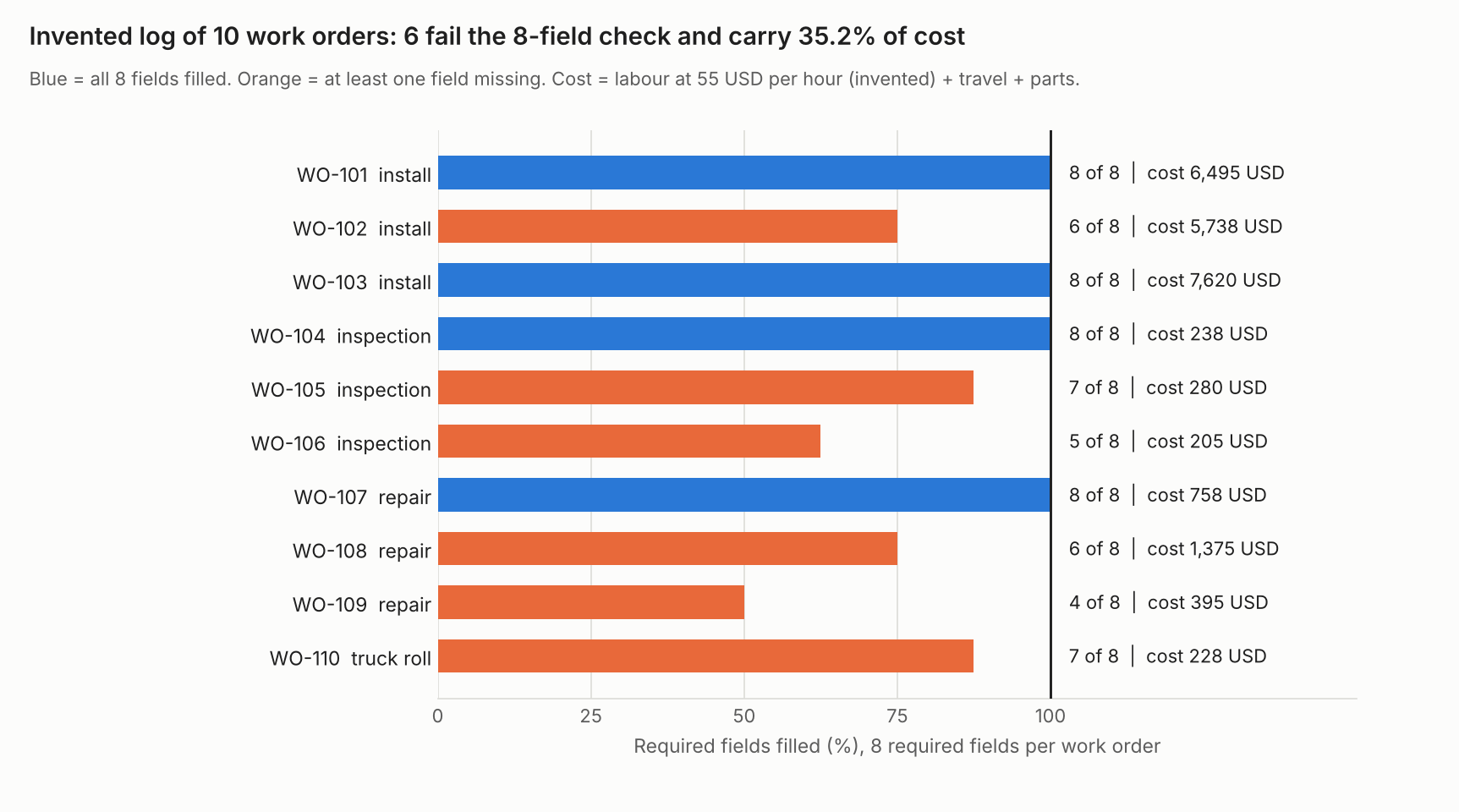
Figure 1. On an example log of 10 work orders, 6 fail the 8-field check and carry 35.2% of total cost.
| Job type and jobs (example log) | Mean hours | Mean cost per job (USD) | Mean completeness | Invoice-ready |
|---|---|---|---|---|
| Install (3 jobs) | 22.17 | 6,617.50 | 91.7% | 2 of 3 |
| Inspection (3 jobs) | 3.50 | 240.83 | 83.3% | 1 of 3 |
| Repair (3 jobs) | 5.50 | 842.50 | 75.0% | 1 of 3 |
| Truck roll (1 job) | 2.50 | 227.50 | 87.5% | 0 of 1 |
Overall, 67 of 80 required fields are filled (83.8%) and 4 of 10 jobs are invoice-ready. The 6 incomplete jobs carry 8,220 of 23,330 USD (35.2%). That is cost sitting on weak records, not a loss figure.
WO-102 alone is 24.6% of the total, so the install parts dominate. Without the install jobs, the incomplete jobs hold 2,483 of 3,478 USD (71.4%).
Repair orders score lowest at 75.0%. The truck roll (WO-110) cost 227.50 USD (example), a little below the 240.83 USD mean cost of an inspection. The log does not say which fields were missing. With real data, count misses by field to find the weak step. The sample is 10 jobs, so treat it as a method, not a benchmark.
Check your own work orders
Paste one job per line. The calculator returns mean completeness, invoice-ready jobs, the cost on incomplete jobs and cost per job by type. It loads the example log first.
How solar software handles work orders
Of the four tools read in October 2026, only meteocontrol VCOM and Power Factors Unity say a work order can start from an alert or ticket.
| Software | Work order from alert or ticket | Checklists or forms | Cost or invoice |
|---|---|---|---|
| meteocontrol VCOM | Yes | Yes | Not stated |
| Power Factors Unity | Yes | Yes | Partly |
| Coperniq | Not stated | Partly | Not stated |
| Zuper | Not stated | Partly | Partly |
Photos and parts, for the same four tools:
| Software | Photos | Parts |
|---|---|---|
| meteocontrol VCOM | Not stated | Not stated |
| Power Factors Unity | Yes | Yes |
| Coperniq | Partly | Partly |
| Zuper | Partly | Partly |
Not stated: the company page we cite does not say. Partly: the page names the feature without saying how it ties to work orders. The quotes below are from each company’s own pages. Dates are in Sources.
- meteocontrol VCOM: "Create digital work orders directly from the ticket system". It "Allows technicians to fill out and submit digital forms and checklists". It "Tracks time spent on-site for work orders", but no cost or invoice is stated.
- Power Factors Unity: "Convert performance insights, alerts, and degradation signals into actionable maintenance work". The page says alerts, not alarms. It lists "Standardized checklists, inspections, and data capture" and "Photos, notes, labor, and parts logged directly from the field". It also gives "Visibility into parts usage and availability". Cost is Partly because it "exchanges work, labor, and parts data with ERP systems". No invoicing is mentioned.
- Coperniq: The products page read in October 2026 listed Alert Management and Work Order Management separately, with forms, photo capture and parts tracking as quoted below. That page no longer exists. Coperniq’s current home page, read in November 2026, instead lists "Field Work Orders & Forms" and "Performance Alerts" with no equivalent wording on forms, GPS-tagged photos or multi-location parts tracking, so treat those three quotes as superseded and check the live site before relying on them.
- Zuper: "Hands-Free Checklists" is listed with no detail. A customer quote on the page says photos and videos are in the job record. "Inventory" and "Invoice Management" are product names only.
Coperniq and Zuper are rated from undated home or product pages. Zuper is a general field service tool, and its documentation also uses "work order" for an order sent to a subcontractor. Companies may document more elsewhere, so put these questions to each one:
- Can I export every work order with its status history?
- What creates a work order from an alarm: a built-in rule, a webhook or an API?
- Can I make some fields required before a job can close?
- Does a closed work order feed the invoice, or only a cost report?
Common mistakes with work orders
FAQs
What is the difference between a work order and a ticket?
A ticket groups related alarms, as the CMMS page shows. A work order sends someone to do the job. SolarPower Europe v3.0 uses both words and says tickets should be stored electronically. Some tools use one word for both.
Is a work order the same as a purchase order or an invoice?
No. A work order authorises and records a job. A purchase order buys parts. An invoice bills the customer. Some tools reuse the words: Zuper’s documentation describes a work order sent to a subcontractor for approval.
What is a truck roll in solar?
A truck roll is any dispatch of a vehicle and crew to a site. Each one costs hours, travel and sometimes parts, even when no fault is found. Our example truck roll cost 227.50 USD (example).
Who should own work order records?
The asset owner should keep ownership, according to SolarPower Europe v3.0 (Section 6.1). It also says tickets should be available to all partners. Your contract sets the actual terms.
Related terms
- CMMS: the system that holds work orders, assets, parts and service clocks.
- O&M: the service contract that work orders carry out.
- Alerts and alarms: the rules that start a repair job.
- Commissioning: the checks that close an install job.
- Handover pack: the records given to the owner when the job ends.
- Install stage: the on-site build from mounting to commissioning.
Next step: To pick a dispatch tool, see the best solar field service management software, or the best solar workflow automation software for alarm-driven jobs.
Sources
- SolarPower Europe: O&M Best Practices Guidelines, version 3.0, printed December 2018 (copy hosted by Autarco, checked October 2026, Sections 2, 5.1 and 6.1). Re-checked November 2026: this hosted link no longer resolves and no archived copy was found, so find a current host for the document before relying on its section numbers.
- Salesforce: WorkOrderStatus, Field Service developer guide, no release label or publication date printed (checked 30 October 2026).
- Solarspy: Structured work orders, modified 2026-07-28 (checked October 2026).
- Fieldproxy: Solar installation blueprint, copyright 2026, no page date (checked October 2026, company marketing).
- meteocontrol VCOM help: CMMS, last modified 2026-07-01 (checked October 2026).
- Power Factors: Unity field service management, copyright 2024-2026, no page date (checked October 2026).
- Coperniq: home page, no page date (the October 2026 Products page cited then has since been retired, re-checked November 2026).
- Zuper: home page, copyright 2026, and Zuper documentation: accept or reject a work order, no date (checked October 2026).
Last updated 30 October 2026. Next scheduled review: 30 January 2027.