Key takeaways
- Lock-in is a cost, not a yes or no. In our example case B (600 projects, 10 users), leaving costs USD 13,140 once.
- In that case, slower work during migration is USD 7,200, or 55% of the total. The export itself is USD 1,440.
- Notice costs nothing until it passes the parallel run. In case B, 0 or 1 month gives USD 10,740 and each extra month adds USD 1,200 (example licence).
- HelioScope’s Bulk Download lists the hourly CSV, Shade Report, Production Report and DXF. A design file is not your customer and project records.
- Three of the five companies we read document a design file export. The others document monitoring or API routes only.
To shortlist design tools before you test their exports, see the best solar design software list. For what leaving takes, see data export and portability.
Company lock-in at a glance: the cost of leaving a tool
Lock-in is the gap between what a tool costs to keep and what it costs to leave. The table shows how to measure that gap.
| Item | Detail |
|---|---|
| Formula | Switching cost = export effort + re-keying + slower work during migration + old licence paid after the decision. The formula leaves out monthly price differences. |
| Typical range | No benchmark. Our three example cases run from USD 3,945 to USD 28,560. |
| Where it matters | Design, proposal and monitoring tools. |
| Standard or rule | No standard. The contract and company pages decide. This page is not legal advice. |
| In software | Export tools, API access, plan terms and device support. See the table below. |
Why does company lock-in matter for installers?
Lock-in weakens your position at renewal. If leaving costs a lot, you may accept a price rise or weaker service.
Lock-in is not always bad. One tool that does design, proposals and projects can save time. The aim is to know the price of leaving before you commit. Pricing models also shape it. See quote-only pricing and per-seat pricing. Onboarding effort counts too. See onboarding and implementation.
Where does company lock-in hide in solar software?
It hides in these places. Check each one on its own, because a tool can be open in one place and closed in another. The table gives a short summary of each.
| Layer | What can lock you in | What company pages show |
|---|---|---|
| 1. Data export | Records (customers, notes, project history) that cannot leave in a format you can open. | HelioScope’s Bulk Download names files, not records. OpenSolar’s 16 February 2026 post treats data leaving the platform as moving it "through the OpenSolar API or a Connector". |
| 2. File formats | Designs that only the original tool opens. DXF and PVsyst files are widely readable, but DXF carries drawing geometry, not project records. | On 13 August 2026 pv magazine reported PVcase Ground Mount adding PVC 2.0 export. PVcase says the current version "focuses on geometry". See CAD, DWG and DXF files. |
| 3. API access | An API that is paid, capped or on a higher plan. See API. | Aurora’s pricing page marks the Design API "Add-on" in the Enterprise column. OpenSolar charges for API Access from 16 April 2026. |
| 4. Contract terms | Minimum terms, notice, renewal and what happens to data after you close the account. | Aurora’s pricing page: no minimum commitment on monthly Basic and Premium, a one-year commitment on annual ones. OpenSolar’s terms, clause 8, say closing an account "does not necessarily delete or remove all of the information we hold". |
| 5. Hardware-tied monitoring | Data that sits in the device maker’s cloud and needs its credentials. See software-agnostic and hardware-agnostic, and the best solar monitoring software. | Enphase’s FAQ says tokens must use Enphase Cloud credentials and developers need the system owner’s authorisation. Solytic’s homepage says its software is "hardware-independent" and needs no "retrofit" of extra hardware. |
For monitoring, a 2021 opinion article by Johnny Dobbins argues for a different setup. Owners should have data loggers send data to their own storage. He describes building his own solar analytics product. The article names no company. See also data logger and gateway and data export and portability.
Worked example: what does it cost to switch?
Switching costs more in staff time than in fees. All inputs below are example to show the method. Replace them with your own. The first table lists the inputs. The second table lists the results.
Shared inputs (example) are 600 projects and 10 users. Each user has 120 project hours per month at USD 30 per hour. The old licence is USD 1,200 a month. Case A has open exports. Case B is mixed. Case C has tied formats.
| Example input | Case A | Case B | Case C |
|---|---|---|---|
| Hours to export and tidy 100 projects | 4 | 8 | 12 |
| Share that cannot be exported | 5% | 20% | 50% |
| Minutes to re-key one project | 15 | 15 | 20 |
| Slower work during migration | 5% | 10% | 15% |
| Migration, parallel run, notice (months) | 1, 1, 1 | 2, 1, 3 | 3, 2, 6 |
| Result (USD, example inputs) | Case A | Case B | Case C |
|---|---|---|---|
| Export and tidy | 720 | 1,440 | 2,160 |
| Re-keying | 225 | 900 | 3,000 |
| Slower work during migration | 1,800 | 7,200 | 16,200 |
| Old licence paid after the decision | 1,200 | 3,600 | 7,200 |
| Total, one-off | 3,945 | 13,140 | 28,560 |
| Of which old licence after the parallel run ends | 0 | 2,400 | 4,800 |
You pay the old licence for the longer of the parallel run and the notice period. Notice adds cost only when it is longer than the parallel run.
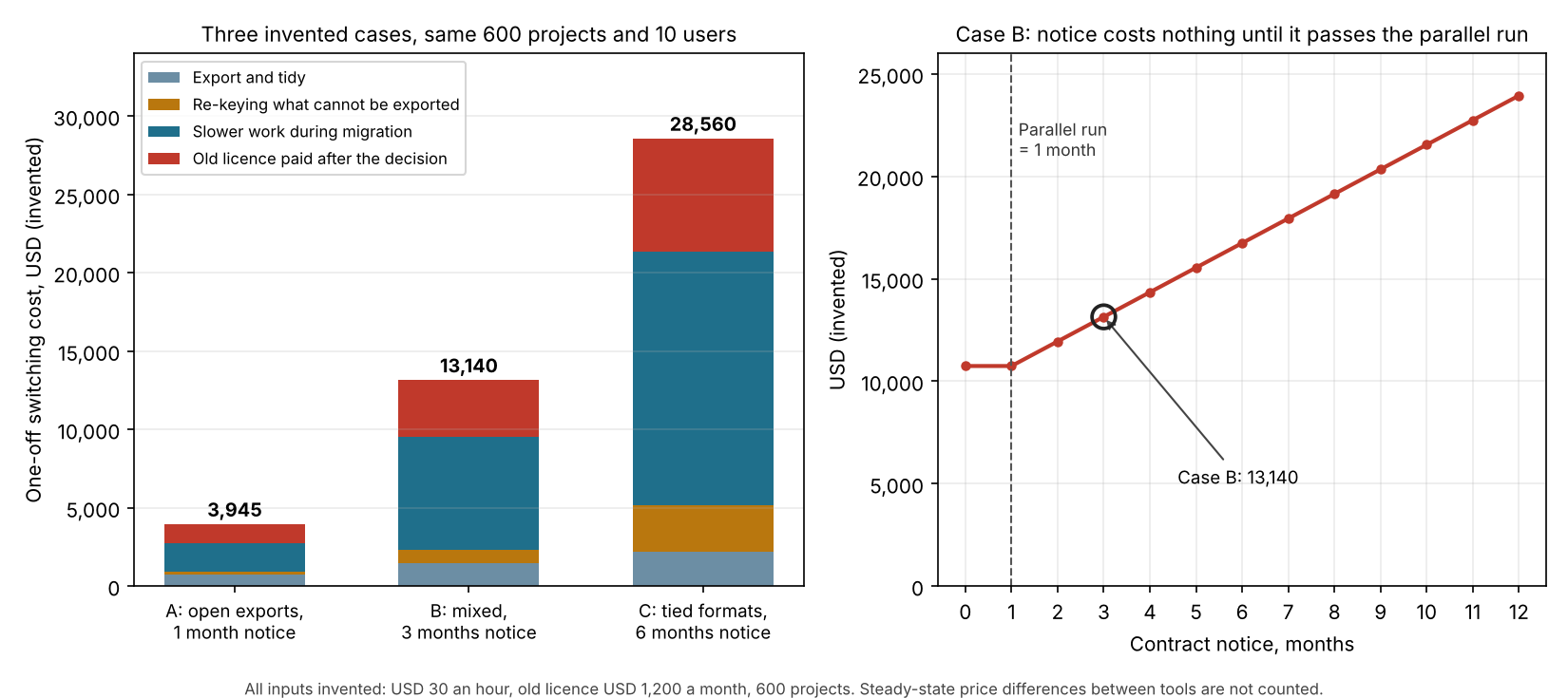
Figure 1. In these example cases, migration slowdown is the largest part of the cost. Case C costs 7.2 times case A. In case B, notice adds cost only after month 1, at USD 1,200 a month.
Change the numbers to match your own business.
The calculator uses the same formula. It starts on example case B. It leaves out any monthly price difference between the tools.
How solar software handles company lock-in
Three of the five companies document a design file export. Four document some API or bulk data route, and a charge or plan limit applies to most. The table is based on pages read in October 2026, and details and quotes follow it.
| Software | Design file export | API or bulk data access |
|---|---|---|
| OpenSolar | Yes, DXF | Yes, charged |
| Aurora Solar | Yes, DXF | Partly |
| HelioScope | Yes, bulk download | Yes, Enterprise only |
| Enphase Enlighten | Not stated | Yes, with plans |
| Solytic | Not stated | Not stated |
Not stated: the company page we cite does not say. Enphase and Solytic are monitoring tools, so a design file export is not their job. Partly: the page lists the route only as an add-on.
- OpenSolar:
- The DXF (help article updated 16 September 2025) has "three key layers: panels, facets, and obstructions".
- The announcement says charges apply from 16 April 2026 to external connections through API Access. The post told existing API users to enable API Access by 17 March 2026 to avoid interruptions. Turning it on starts a 30-day free trial. After the trial, a fee is deducted for each new project created (support article, its update date was not visible on 30 October 2026).
- Terms (last modified 18 July 2023): "You may close your Account at any time." Clause 9(k) covers data. Protected Data is deleted or returned "without delay, at your written request". No time period is set.
- Aurora Solar: The DXF export has a choice of layers. The Export button works in Design Mode only. Design API is marked "Add-on" in the Enterprise column, and Sync API is listed under Enterprise capabilities. No price is shown. There is no minimum on monthly Basic and Premium. Annual plans run one year. For Enterprise, the minimum is contact sales.
- HelioScope: Bulk Download (help article updated 24 June 2026) lists the hourly CSV, Shade Report, Production Report and DXF "among others". The File Exports section also lists a PVsyst .DAE article. The API (article updated 8 July 2025) covers Project, Design and Simulation data on the Enterprise plan only. No price is shown, so contact sales. The pages read give no other terms.
- Enphase Enlighten: The page covers monitoring data. Endpoints cover production, consumption, battery and grid import and export. Plans, as read on 30 October 2026 (the page is undated): Watt is free (10 a minute, 1,000 hits a month). Kilowatt is USD 249 a month and Megawatt USD 999. Meter-based telemetry is in 15-minute intervals, with a 7-day maximum per request. Tokens are generated with Enphase Cloud credentials. "developers must get authorization from the system owner".
- Solytic: Its homepage says the software is "hardware-independent" and that there is "no need to retrofit additional hardware thanks to compatibility with over 40 manufacturers". A testimonial on the white-label page says it works "independently of logger types and free from manufacturers". The pages do not list supported devices by name.
Companies may document more in logged-in help centres. A file export can still leave your records behind, so test it. Design tools that also hold your projects are ranked in our list of the best solar design software.
What should you ask before you sign?
Get the answers to these questions in writing. Then run one test. Export 20 projects during the trial and open them in a spreadsheet.
| Question | Why it matters |
|---|---|
| 1. Can I export customer and project records, not only drawings, on my plan? | A DXF of one design does not carry notes, contacts or history. |
| 2. Does any export use the API, and what does API access cost? | Aurora marks Design API as an add-on. See the software section for OpenSolar. |
| 3. Which formats can another tool open? | DXF and PVsyst files are widely readable, though DXF holds geometry only. A format only this tool reads is a risk. |
| 4. What are the minimum term, notice and renewal rules? | You pay for notice that runs longer than your parallel run, with no use. |
| 5. How fast is data returned after I close, and in what format? | OpenSolar’s terms say return is "without delay" on written request, with no fixed timeline. Ask for one. |
| 6. Does monitoring need this maker’s hardware or cloud login? | Enphase’s tokens need Enphase Cloud credentials and owner authorisation. |
Common mistakes with company lock-in
FAQs
Is company lock-in always bad?
No. A tool that covers design, proposals and projects can save time, and some lock-in is the price of that. It becomes a problem when you did not know the price of leaving. Use the worked example to put a number on it.
How do I test lock-in before I buy?
Export 20 real projects during the trial and open them in a spreadsheet. Check that notes, contacts and history survive, not only drawings. The questions in the section on what to ask before you sign cover the rest, including notice, formats and API cost.
Can a company charge for exporting my data?
Yes, some companies charge for some routes. The OpenSolar post we read prices API connections only and does not mention file exports. Ask which routes are free on your plan.
Does hardware-agnostic software remove lock-in?
It removes one layer, the link to a device maker. Data, formats or contract can still lock you in. See software-agnostic and hardware-agnostic.
Related terms
- Data export and portability: the ability to take your records out.
- API: the documented route for programs to read and write your data.
- Quote-only pricing: prices given only on request.
- SaaS: software you rent and use in a browser or app.
Next step: before you sign, weigh export, API and contract terms across the best solar design software, or see the best solar monitoring software for hardware-tied data.
Sources
- OpenSolar: User Terms and Conditions and Privacy Policy. The page says "last modified on 18 July 2023" (checked October 2026).
- OpenSolar: announcement on API access and connectors, 16 February 2026 (checked 30 October 2026).
- OpenSolar support: Exporting a DXF CAD data file. Updated 16 September 2025 (checked October 2026).
- Aurora Solar: pricing page, modified 29 September 2026, and How to export DXF files. Updated 15 April 2026 (checked October 2026).
- HelioScope help: How to Export my Designs and Reports. Updated 24 June 2026, and the File Exports section, undated (checked October 2026).
- Enphase: developer FAQ (checked October 2026) and developer plans, undated (checked 30 October 2026).
- HelioScope help: HelioScope API. Updated 8 July 2025 (checked October 2026).
- OpenSolar support: API Access and Raw Data API Access trial details. No update date visible (checked 30 October 2026).
- Solytic: homepage and white-label PV monitoring (testimonial quote). Modified 21 October 2026 (checked November 2026).
- pv magazine: PVcase adds key export option to its solar design software. 13 August 2026 (checked October 2026).
- Towards Data Science: Rescue your solar data from hostage taking dashboard and KPI companies. Johnny Dobbins, 6 February 2021, opinion (checked October 2026).
Last updated 30 October 2026. Next scheduled review: 30 January 2027.