Key takeaways
- G98 covers up to and including 16 A per phase: 3.68 kW single-phase or 11.04 kW three-phase (G98 Issue 2, 10 March 2025).
- The installer tells the DNO no later than 28 days after commissioning, counting the commissioning day. Under G99 the customer applies, and the DNO must accept before install.
- G99 applies above the G98 per-phase limit. Type A (0.8 kW to under 1 MW) is a size class within G99, not a threshold (G99 Issue 2, 10 March 2025).
- SSEN says total site generation counts. In our invented example, 3.68 kW of solar plus a 3.0 kW battery on one single-phase supply makes 6.68 kW, above the limit.
- To pick a route, add all the kW on the premises, divide by the phases and compare with 3.68 kW per phase. Above it, a domestic job is G99.
To prepare DNO forms from the design in software, see the best solar design software in the UK.
DNO, G98 and G99 at a glance
The DNO runs the local network. G98 and G99 are the ENA rulebooks. They say how a generator or battery joins that network.
| Item | Detail |
|---|---|
| What a DNO is | Operator of the local distribution network. G99 refers to "the DNO’s Distribution Network". No regulator definition in the sources used. |
| G98 | G98 Issue 2, 10 March 2025: up to and including 16 A per phase (3.68 kW single-phase, 11.04 kW three-phase). Connect first, then tell the DNO. |
| G99 | ENA EREC G99 Issue 2, 10 March 2025: generation above what G98 covers. Type A is 0.8 kW to under 1 MW below 110 kV. Apply first. |
| Who files | The installer notifies under G98. Under G99 the customer completes the application (ENA connecting-generation page, undated). |
| In software | CRM and design tools can prepare or send the forms. Each tool states what it covers, so read the help page. |
Why do G98 and G99 matter for installers?
They decide whether you may fit first or must wait for the DNO. A wrong guess can stall commissioning or leave the job unreported.
MCS says you must tell the relevant DNO about your generating installations "in all instances" (MCS page, last modified 14 July 2026). ENWL says: "Do not switch on your generation system until these commissioning documents have been reviewed and approved" (G99 page, undated, 2026 footer).
Cost and time also change. ENWL says it charges a fee from 1 January 2026 to check commissioning documents for schemes over 50 kW. The page does not print the amount. Ask your DNO before you quote.
The US equivalents are the interconnection application and PTO. UK installers also meet MCS certification and the Smart Export Guarantee. Both sit alongside this step.
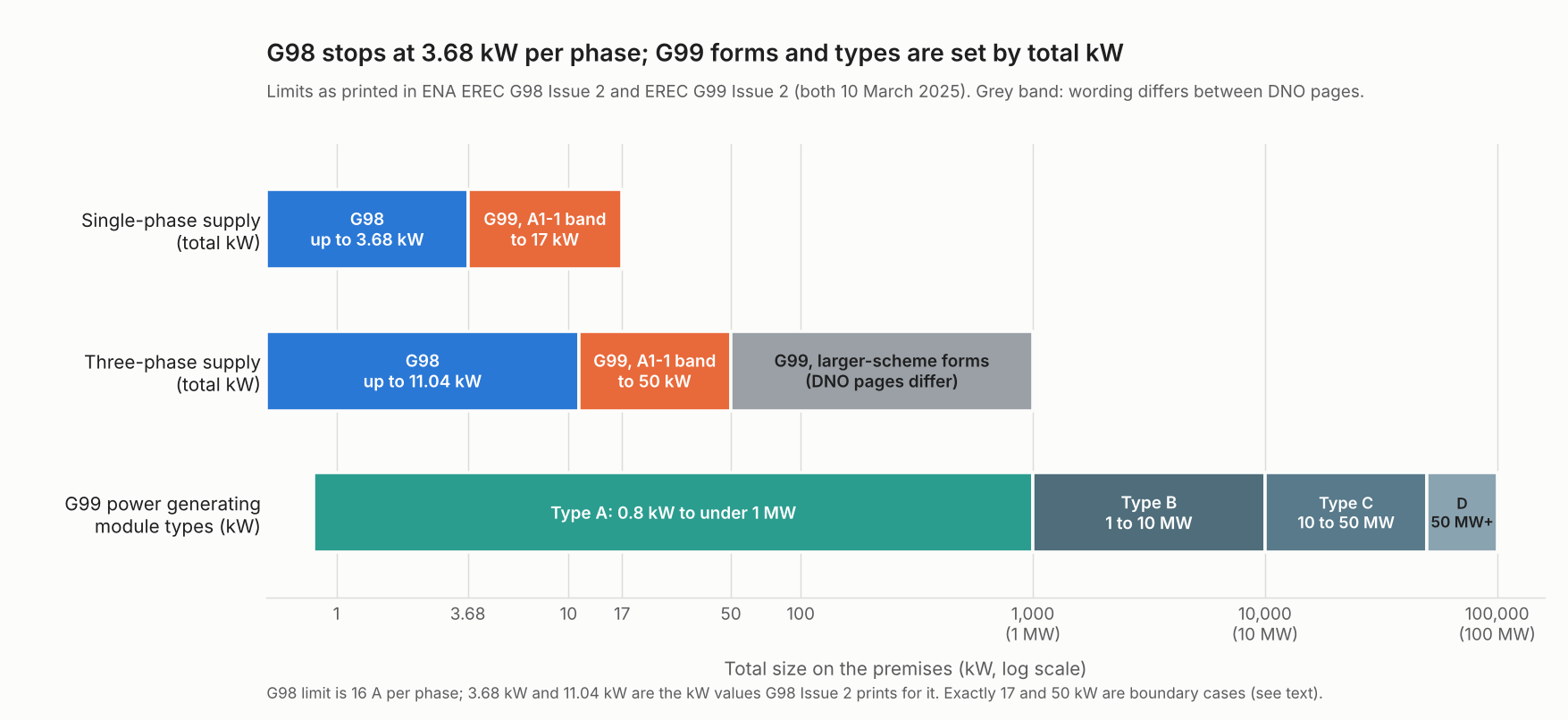
Figure 1. G98 stops at 3.68 kW per phase. G99 form bands and its Type A to D size classes are set by total kW. This page covers Type A.
What do the G98 and G99 routes involve?
Under G98 the installer connects first and notifies after. Under G99 the DNO must accept the application before you install.
| Step | G98 (up to 16 A per phase) | G99 (above G98, Type A small scale) |
|---|---|---|
| Before install | Usually nothing for one premises. SSEN says apply first for more than one generator, or site generation over the G98 limits. | Apply to the DNO with Form A1-1 and a single line diagram (ENWL, up to 50 kW). See single line diagram. |
| After install | Form B no later than 28 days after commissioning, counting that day (G98 Issue 2, section 8.3.1). | Commissioning documents, including Form A3-1 (ENWL). Do not switch on until the DNO approves. |
| Fees | None printed on the SSEN and ENWL G98 pages read. | ENWL: a review fee for schemes over 50 kW from 1 January 2026, amount not printed. |
| Timing | 28 days after, not before. | Pages differ: see "Where do the sources differ?". |
For the commissioning step, ENA says you owe a commissioning confirmation within 28 days if the DNO does not watch the tests.
How do you work out which route applies?
Add up all the kW on the premises. Divide by the number of phases. Compare with the limit per phase. At or below it, G98 is the route. Above it, G99.
- Find the DNO from the site address. ENA links a "Who’s my network operator?" page.
- Add every inverter on the premises: new solar, new battery and existing plant. G98 Issue 2 defines Registered Capacity as the maker-declared maximum. That is the lesser of the inverter rating or the energy source rating. We use inverter AC kW as a stand-in. Ask your DNO how it counts export limits.
- Divide by the number of phases. We assume the load is even across phases.
- Compare with 3.68 kW per phase (16 A). We show amps using 230 V, our assumption. G98 also needs the equipment to be Fully Type Tested (Form C). If not, use G99.
- If above, pick the form band. The title of Form A1-1 says below 50 kW three-phase or 17 kW single-phase. Beyond that, ask the DNO.
The per-phase rule has a side effect. A 10 kW three-phase inverter is 3.33 kW per phase, so it fits inside G98. A 5 kW single-phase inverter does not.
Worked example
All seven cases are example. The rules above are applied to every case, and the calculator below gives the same results. Amps use our assumed 230 V.
A battery or a few extra kW per phase can change the route.
| Case | Supply and kW (example) | kW per phase | Amps at 230 V | Route and form band |
|---|---|---|---|---|
| A | Single-phase, 3.68 solar | 3.68 | 16.0 | G98 (Form B after) |
| B | Single-phase, 3.68 solar plus 3.0 battery | 6.68 | 29.0 | G99 (A1-1 band) |
| C | Three-phase, 11.04 solar | 3.68 | 16.0 | G98 (Form B after) |
| D | Three-phase, 12 solar | 4.00 | 17.4 | G99 (A1-1 band) |
| E | Three-phase, 40 solar | 13.33 | 58.0 | G99 (A1-1 band) |
| F | Three-phase, 50 solar | 16.67 | 72.5 | G99 (Boundary: ask the DNO) |
| G | Three-phase, 120 solar | 40.00 | 173.9 | G99 (Above A1-1 band) |
Case A sits exactly on the limit and stays in G98, as the limit reads "no greater than 16 A per phase". Add a battery in case B and the same house moves to G99.
For G98, the 28 days count the commissioning day. A system commissioned on 2 November 2026 (example date) needs Form B by 29 November 2026. That is our sum, from the section 8.3.1 wording.
G98 or G99 first check
Enter the kW and phases. The tool shows kW per phase, the route and the G98 Form B date.
Where do the sources differ?
The ENA documents are the base. DNO pages and guides add detail. They do not always match each other or the documents.
- Form band edges: the G99 Issue 2 form title reads "<50 kW 3-phase or 17 kW single phase". ENWL’s December 2021 slides say "up to and including" 17 kW and 50 kW. Ask about cases at exactly 17 or 50 kW.
- Above 50 kW: the pages do not all agree at 50 kW. ENWL points above 50 kW to the ENA standard application form, where Form A1-1 stops (up to 50 kW). SSEN says to complete a G99 A1-1 application in advance for 50 kW and above. SSEN’s page gives two different answers at exactly 50 kW.
- G99 timing: ENA’s fast-track page says the planned commissioning date must be between 10 working days and three months after the application. Confirm the notice period for your route with your DNO.
- Old documents: ENWL’s G98 and G99 FAQ has no date and says it awaits G99 Amendment 4. Its numbers are not used here. In its own amendment history, G99 Issue 2 follows Issue 1 Amendment 10 (4 March 2024).
- G98 limit wording: G98 Issue 2 says Registered Capacity "no greater than 16 A per phase". ENA’s web page says G99 starts above 3.68 kW per phase, and MCS says under 16 amps. We follow the standard. Check with your DNO.
- Dates: the ENA web pages, ENWL’s G99 pages and the Payaca pages read show no update date. They show only a 2026 copyright footer.
How solar software handles DNO applications
Payaca’s pages cover G98 and G99 naming, sending the application and the commissioning forms. Easy PV’s cover the application only (pages read October 2026).
| Software | Handles G98 or G99 applications? | Source |
|---|---|---|
| Payaca | Yes | Payaca DNO checker page and grid connections page, both undated (2026 footer) |
| Easy PV | Partly | Easy PV help page, revision 10, no calendar date |
| OpenSolar | Not stated | OpenSolar homepage, metadata dated 28 September 2026 |
Yes means the pages read say so. Partly means they cover some of the job, not all of it. Not stated means the company page we cite does not say.
- Payaca: says you can "Submit G98 and G99 applications directly from each job via ENA Connect". Another page says it can auto-generate ENA commissioning forms.
- Easy PV: help page says Connect Direct can create and send a DNO application from the design. It supports pre-installation applications only. It does not name G98 or G99.
- OpenSolar: the homepage does not mention DNO, G98 or G99.
Design tools that can prepare DNO applications are ranked in the best solar design software in the UK list. Job and form workflows sit in the best solar CRM for UK installers list.
Common mistakes with G98 and G99
G98 and G99 rules by region
G98 and G99 are Great Britain rules. This list says where they stop applying and which Great Britain changes are pending.
- Great Britain: G98 and G99 apply here, as set out above. Your own DNO’s current forms come first.
- Northern Ireland and other countries: not covered on this page. For the US steps, see interconnection application.
- Plug-in solar: Ofgem’s decision on DCRP/MP/26/02 and the matching regulations, the Plugs and Sockets etc. (Safety) Regulations 1994 and Electricity Safety, Quality and Continuity Regulations 2002 (Amendment) Regulations 2026 (SI 2026/848), came into force on 27 August 2026 in England, Wales and Scotland. A plug-in micro-generator is now defined as a solar device with a maximum AC output of 800 W that connects through a standard plug and socket, and it must meet the Plug-in Solar Device Interim Product Specification. The customer tells the DNO directly, rather than an installer filing Form B. This is no longer a pending change.
- Export payments: ENWL says exports of 30 kW or less can be approved by a letter to the energy supplier for the SEG tariff. Larger exports need an export MPAN request. See Smart Export Guarantee.
FAQs
What is the difference between G98 and G99?
G98 covers fully type tested micro-generators up to and including 16 A per phase. You connect, then tell the DNO within 28 days. G99 covers generation above that, and you apply to the DNO first.
Do I need DNO approval before installing solar?
Under G99, yes. The DNO must accept the application first. Under G98 the installer tells the DNO afterwards, though SSEN lists cases that need an application first. In every case MCS says the DNO must be told.
Does a battery need G98 or G99?
Both apply to storage. G98 Issue 2 applies in full to storage commissioned on or after 1 September 2022, with extra falling-frequency rules from 1 March 2026. MCS says a G98 battery is notified within 28 days of installation. A G99 one is sent in before installation.
How long do I have to send Form B?
No later than 28 days after commissioning, counting the commissioning day (G98 Issue 2, section 8.3.1). Commissioning on 2 November 2026 (example date) gives 29 November 2026.
How do I find my DNO?
Find your DNO by site address. ENA links a "Who’s my network operator?" page that names it. Send forms to that operator, as ENA does not handle them.
Related terms
See interconnection application for the US step, net metering for the US export approach, interconnection queue for large projects and commissioning for the test step.
Next step: to prepare the forms from a design, use the best solar design software in the UK. To track forms job by job, use the best solar CRM for UK installers.
Sources
- ENA EREC G98 Issue 2, 10 March 2025 (checked October 2026).
- ENA EREC G99 Issue 2, 10 March 2025 (checked October 2026).
- ENA: connecting generation, undated (checked October 2026).
- ENA: G99 Type A summary guide, undated (could not be opened on 30 October 2026, no claim on this page relies on it).
- ENWL: generation G99 and G99 new, undated, 2026 footer (checked October 2026).
- ENWL: G98 and G99 application guidance, December 2021 (checked October 2026).
- SSEN: installations up to 3.68 kW per phase, published 26 September 2022 per page metadata (checked October 2026).
- SSEN: generation connections, published 26 January 2022 per page metadata (checked October 2026).
- MCS: notifying DNOs, last modified 14 July 2026 per page metadata (checked October 2026).
- Ofgem: decision on DCRP/MP/26/02, published 11 August 2026 (checked October 2026).
- The Plugs and Sockets etc. (Safety) Regulations 1994 and Electricity Safety, Quality and Continuity Regulations 2002 (Amendment) Regulations 2026, SI 2026/848, made 16 July 2026, in force 27 August 2026 (checked November 2026).
- Payaca: DNO application checker and grid connections, undated, 2026 footer (checked October 2026).
- Easy PV help: DNO application via Connect Direct, revision 10 (checked October 2026).
- OpenSolar homepage, metadata dated 28 September 2026 (checked October 2026).
Last updated 30 October 2026. Next scheduled review: 30 January 2027.