Key takeaways
- GreenLancer’s table gives remote a plain "Yes" for one case: clear, recent aerial imagery. One more, a simple shingle roof, is "Often". The other cases are preliminary, screening only or limited.
- Imagery gives roof planes, pitch, azimuth and shade. EagleView says its Inform measurements are "all delivered to you remotely".
- Imagery cannot show framing or the inside of the panel. Scanifly says "you can’t get internal data remotely".
- This example’s cost model compares three ways to survey. Visiting every lead costs 1,000 USD per signed job, remote first costs 430 USD, and remote first with trigger visits costs 388 USD. The 80% visit share behind that last figure is a placeholder.
- Skipping a visit pays only while rework risk times rework cost stays below the visit cost. With a 250 USD visit and 800 USD rework, the break-even rework risk is 31.25%.
To collect site photos in software, see the best solar site survey apps. For the roof model, see the best 3D solar design software.
Remote site assessment at a glance
A remote assessment answers two questions. Is the site worth designing? What is left to confirm? It does not replace field verification for engineering and permits.
| Item | Detail |
|---|---|
| Formula | Cost per signed job = remote cost ÷ sign rate + visit share × visit cost + (1 − visit share) × rework risk × rework cost. Our model. |
| Unit and range | USD per signed job. Our placeholders give 1,000, 430 and 388 USD for three strategies. |
| Where it matters | Lead screening, quotes, preliminary layout, and deciding which jobs get a technician. |
| Standard or rule | No single standard. No rule on what a remote survey must show was found. Your AHJ’s checklist decides what the permit set needs. |
| In software | Imagery tools build the roof model. Survey apps collect photos. See the best solar site survey apps and best 3D solar design software. |
Why does remote site assessment matter for installers?
It decides which leads get a technician. A visit to a lead that never signs is cost with no sale. A skipped visit that hides a wrong panel rating means a redesign after permitting.
GreenLancer sums up the trade-off: "A short site visit costs far less than a redesign after permitting". Its advice is: "When in doubt, send a technician". The skill is knowing which doubts remote data can settle. For the full survey checklist, see site survey.
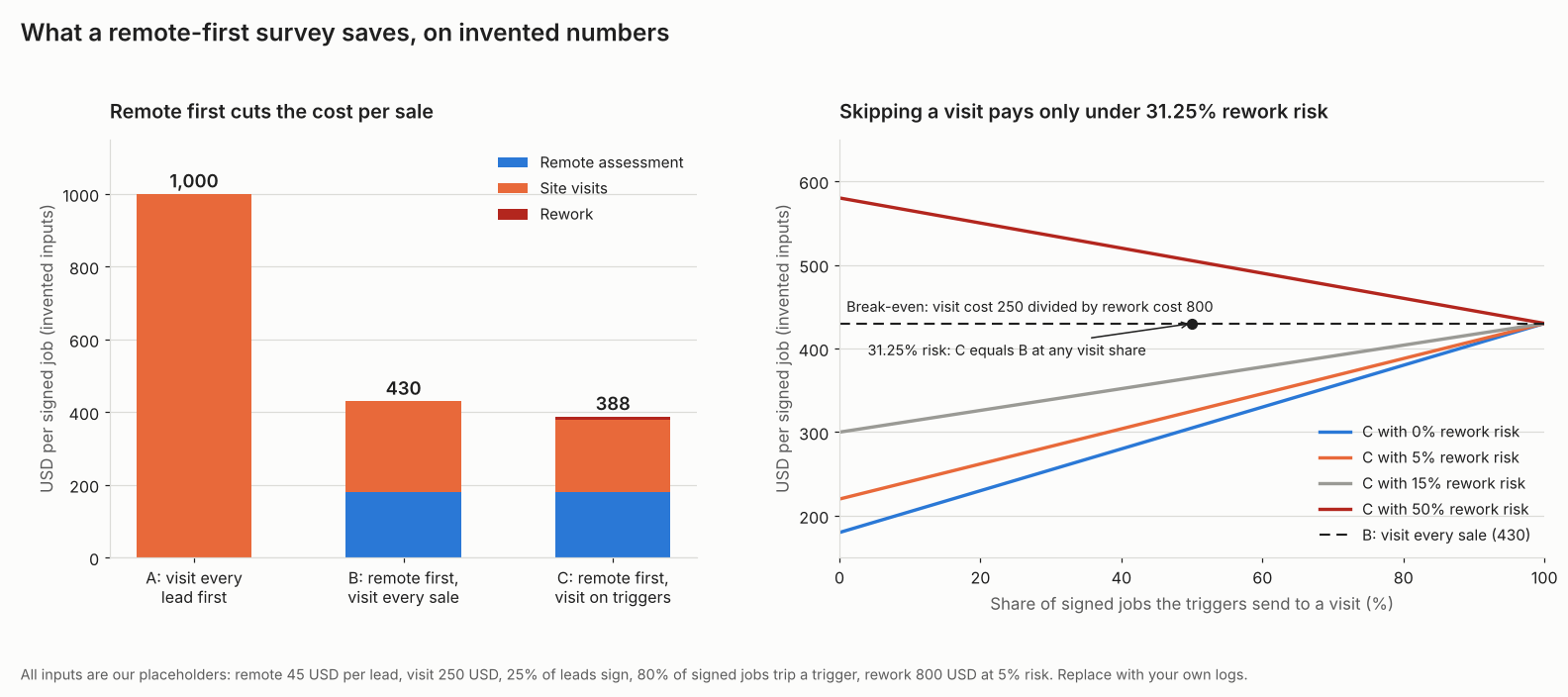
Figure 1. On our example inputs, remote first saves 570 USD per sale against visiting every lead, and skipping a visit stops paying above 31.25% rework risk.
What can a remote assessment check, and what can it not?
Remote data is strong on outside geometry. It is weak on anything hidden or recent. Roof planes and shade come from imagery. Framing, panel ratings and recent changes need a person or a photo.
| Item | Remote can | Still needs a visit, or evidence from the site |
|---|---|---|
| Roof planes, pitch, azimuth | Measure from imagery or LiDAR. | Complex roofs, hidden edges, imagery older than a change. |
| Shade from trees and buildings | Model it from LiDAR or 3D scenes. | Trees that grew or were cut since capture. Close-in objects. |
| Small obstructions: vents, chimneys | Flag large ones. | Small items, where pixels are coarse. See aerial imagery. |
| Roof covering and condition | Flag visible wear. | Layers, age, sagging, damage under the surface. |
| Framing and structure | Screen only. | Rafter size and spacing. The structural review. See structural loads. |
| Main panel, bus and breaker | Nothing from imagery. Read ratings from photos someone takes. | Label photos, spare positions, interior view. |
| Meter, equipment and conduit routes | Propose locations on the model. | Confirm the meter, wall space, trench and access routes. |
| Recent additions | Little. | Any addition after the imagery date. |
What the sources say about each item:
- Roof planes, pitch, azimuth: GreenLancer: clear, recent imagery is a "Yes". Complex roof geometry is "Preliminary only". EagleView Inform lists pitch and azimuth.
- Shade from trees and buildings: Aurora describes tree and structure shade as "LIDAR shading rather than drawn manually". That is a method, not an accuracy claim. Scanifly’s blog, a company survey, says 81% of surveyors think on-site data is better for shade (sample not stated).
- Small obstructions: vents, chimneys: EagleView Inform lists 2D and 3D obstructions. Whether a 0.1 m vent shows depends on pixel size.
- Roof covering and condition: GreenLancer: remote value "drops once framing, panel labels, or roof condition cannot be confirmed from imagery".
- Framing and structure: GreenLancer: remote "Preliminary screening only". On-site "Usually required before final structural review". A technician’s notes are "different from determining structural adequacy".
- Main panel, bus and breaker: GreenLancer asks for panel photos "including breaker and bus rating labels". Scanifly: "you can’t get internal data remotely".
- Meter, equipment and conduit routes: GreenLancer’s photo list includes the utility meter, inverter, disconnect and battery spots, access routes and trenching areas.
- Recent additions: GreenLancer: remote "Limited". On-site "Yes".
Outside geometry is remote work. Inside data is not. The pages read give no neutral accuracy figure for remote roof data. For pixel sizes and image age see aerial imagery. For pitch and area errors see roof measurement.
Some companies say software can read panel labels from photos. One AI company page says its model can "read its label, main breaker rating, and breaker layout from a photo". The page is undated and gives no accuracy figure. Someone must still take a legible photo. Panel interiors are live equipment. We would leave opening a cover to a qualified person. That is our safety view, not a cited source’s.
When does a job still need a visit?
Send a technician when any of eight triggers applies. Six come from the cases in GreenLancer’s remote-versus-on-site table. Two come from its field verification advice: outdated imagery and hidden roof edges.
A remote-first job runs in five steps.
- Screen the lead on aerial imagery, bills and a rough size. GreenLancer says this "filters out sites with poor solar access or obvious red flags".
- Build a preliminary design from imagery or LiDAR. See 3D solar modelling.
- Ask for the customer’s photos: roof, panel label, meter and equipment spots.
- Run through the eight triggers. Any tick sends a technician.
- Field-verify before engineering and permits. GreenLancer describes this as confirming "the design inputs are accurate enough for engineering and permitting".
The eight triggers are:
- Outdated imagery.
- Hidden roof edges.
- A recent addition.
- Complex roof geometry.
- An unreadable panel label or rating.
- A battery retrofit.
- A commercial flat roof.
- Framing that cannot be verified, when the job needs structural review.
Six example jobs show how the triggers apply. They are a sample, not a rate.
| Example job | Triggers ticked | Result |
|---|---|---|
| 1. Simple gable, clear imagery, legible panel photo, framing known | 0 | No trigger |
| 2. Same as job 1, panel label photo blurred | 1 (label) | Visit |
| 3. Garage added after the imagery date | 1 (addition) | Visit |
| 4. Hip roof with dormers, tree hides one eave | 2 (complex roof, hidden edges) | Visit |
| 5. Battery retrofit, clear photos | 1 (battery) | Visit |
| 6. Commercial flat roof, framing unknown | 2 (flat roof, framing) | Visit |
Five of the six example jobs trip a trigger, so remote first mostly moves the visit to after the sale. Your own job log gives your rate. A job with no trigger is still not proven sound. It only avoids these eight cases.
How do you work out whether a visit pays?
Compare cost per signed job. Most leads never sign. Remote first spreads a cheap check over every lead. It sends the costly visit only to buyers.
| Input (all this example’s placeholders) | Value |
|---|---|
| Remote assessment per lead | 45 USD |
| Site visit | 250 USD |
| Leads that sign | 25% |
| Signed jobs sent to a visit (strategy C) | 80% (a placeholder, not a measured rate) |
| Rework risk if a job skips the visit | 5% |
| Rework cost | 800 USD |
Three strategies follow from those inputs. Strategy C uses the example 80% visit share.
| Strategy | Working | USD per signed job |
|---|---|---|
| A: visit every lead before quoting | 250 ÷ 0.25 | 1,000 |
| B: remote first, visit every signed job | 45 ÷ 0.25 + 250 | 430 |
| C: remote first, visit on triggers | 180 + 0.80 × 250 + 0.20 × 0.05 × 800 | 388 |
A costs 570 USD more than B. The saving is the 75% of leads that never sign. A visits those for nothing. C costs 42 USD less than B.
The break-even for skipping a visit is simple. C beats B when rework risk times rework cost is below the visit cost. Here that is 250 ÷ 800 = 31.25%. At 50% risk, C costs 460 USD, which is 30 USD above B. If the rework cost doubles to 1,600 USD, break-even falls to about 16%.
Remote first also stops paying if nearly every lead signs. A beats B only above an 82% sign rate on these placeholders. At 100%, A costs 250 USD and B costs 295 USD. Arka 360’s blog says digital tools can cut site visits "by almost half". It gives no data, so we do not use the figure.
The calculator reproduces these tables and ticks the eight triggers for one job. All defaults are placeholders. Replace them with your logs.
How solar software handles remote site assessment
Of the five tools checked, two pages say they build the roof and shade model from imagery, and one says so in part. Ratings reflect what each page read says, checked in October 2026.
| Software | Remote roof and shade model? | Remote electrical or framing data? |
|---|---|---|
| Aurora Solar | Yes | Not stated |
| EagleView | Yes | Not stated |
| Scanifly | Not stated | Partly |
| Solargraf | Not stated | Partly |
| Arka 360 | Partly | Partly |
What each page says, and when it was read, is listed below.
- Aurora Solar: Roof and shade: It "automatically generates a 3D roof model from HD imagery and LIDAR data". Tree shade is "LIDAR shading rather than drawn manually". Electrical or framing: Not stated on the page read. Page read: Aurora help, creating a 3D site model, updated 3 June 2026.
- EagleView: Roof and shade: Inform lists pitch, azimuth, obstructions, shading and TSRF, "all delivered to you remotely". Electrical or framing: The page says nothing on electrical or framing. Page read: Inform product page, modified 14 April 2025.
- Scanifly: Roof and shade: Drone images come from the field. Electrical or framing: Digital checklists capture electrical and structural data. It works as a field app. The page does not state remote customer submission. Page read: Scanifly Mobile page, modified 24 June 2026.
- Solargraf: Roof and shade: Not stated on the page read. Electrical or framing: The homeowner sends measurements and photos from an email link. You can change fields in Settings. The page names no panel field. Page read: Solargraf virtual site assessment page, undated.
- Arka: Roof and shade: A company blog says satellite imagery gives roof size and orientation. It also says tools simulate shade. Electrical or framing: The blog says customers can share photos or videos. It does not say which data still needs a visit. Page read: Arka 360 blog, 8 April 2026. No help page read.
Not stated means the page read does not say it. It does not mean the tool lacks the feature. Partly means the page covers some of the item, not all of it. No tool page read says it checks framing or panel ratings without a person or a photo. For field apps that collect photos and ratings, see the best solar site survey apps. For the roof model, see the best 3D solar design software and best solar shading analysis software lists.
Common mistakes with remote site assessment
FAQs
Can you do a solar site assessment without a site visit?
For screening and a preliminary design, yes. GreenLancer describes three stages. They are remote screening, remote assessment and field verification. It says field verification confirms the inputs for engineering and permitting. Whether your AHJ accepts a fully remote survey is not covered here, so confirm that with them.
What cannot be assessed remotely?
Imagery cannot show framing or the inside of the panel. It cannot show roof layers or anything built after the capture date. Those need a visit or photos from the site. GreenLancer lists framing and service ratings as "Usually required" on site. That is before final structural and electrical design.
What photos should a customer send?
Send photos of the property, every roof plane, obstructions and roof covering. Add the main panel with labels, the meter, equipment spots and access routes. GreenLancer’s minimum list has 7 items. It also asks that ratings be "shown in photos rather than transcribed by hand only".
Does remote assessment save site visits?
It saves visits to leads that never sign. On our example inputs that is 570 USD per signed job. It saves little on jobs that sign. Most of them trip a trigger. The calculator lets you test your own numbers.
How accurate is a remote assessment?
No neutral accuracy figure was found. Image age and pixel size set what you can see, so treat remote results as preliminary until a visit confirms roof, framing and panel. The EagleView Inform page read gives no accuracy figure. Scanifly’s blog says satellite imagery is "infrequently updated at best". For image age and pixel size, see aerial imagery.
Related terms
- Site survey: the full on-site, remote or drone check of roof, service and shade.
- Drone site survey photogrammetry: models built from drone photos.
- LiDAR: laser height data used for roof and shade models.
Next step: tick the eight triggers for your next lead, then compare field apps that collect panel photos in the best solar site survey apps.
Sources
All pages below were checked in October 2026.
- GreenLancer: How to Perform a Solar Site Survey, published 28 July 2026, updated 10 September 2026.
- Aurora help: creating a 3D site model, updated 3 June 2026.
- EagleView Inform, modified 14 April 2025.
- Scanifly Mobile, modified 24 June 2026.
- Scanifly blog: 6 Reasons Why Solar Contractors Can’t Eliminate Site Visits, published 17 March 2023, modified 2 May 2025. Company survey, sample not stated.
- Solargraf: virtual site assessment, undated.
- Arka 360 blog: reduce site visits, 8 April 2026.
- Roboflow: solar site survey, undated, copyright 2026.
Last updated 30 October 2026. Next scheduled review: 30 January 2027.