Key takeaways
- A quote is the supplier’s offer. A PO is your order. A three-way match compares the PO, the goods receipt and the invoice before you pay.
- In our example, the PO is 7,036.00 USD and the invoice is 7,087.00 USD. The goods received are worth 6,960.00 USD at PO prices.
- A three-way match holds two of the five lines, worth 1,951.00 USD. A two-way match would pass the rail line, billed for 12 when 10 arrived, and hold only the 1,495.00 USD inverter line.
- Tolerance moves money. Widening price tolerance from 2% to 3.5% releases the inverter line and cuts the held amount to 456.00 USD (example).
- Of 6 tools checked, only Ply describes comparing the invoice with both the PO and the receipt. Odoo and Business Central describe it only in part.
To run PO and invoice matching in software, see the best solar ERP software.
Procurement and purchase orders at a glance
Procurement turns a parts list into delivered goods and a paid invoice. It also covers choosing suppliers, checking lead times, approving spend and deciding whether goods go to the warehouse or straight to site. The PO is the record that fixes what you agreed to buy.
| Item | Detail |
|---|---|
| Flow | Four documents: quote, purchase order, goods receipt and supplier invoice. Then match and pay. |
| Control | Compare the invoice with the PO and the receipt. A tolerance is the difference you accept without stopping payment. |
| Unit and range | Money and quantity per line. Tolerance is a percentage or a USD amount. No solar benchmark is cited. |
| Where it matters | The hand-off from the parts list, stock, cost against each job, and supplier payment. |
| Standard | None for solar installers. Two guides print the practice: Precoro (31 July 2026) and Cleverence (updated 20 October 2026). |
| In software | ERP, inventory, project and field service tools. |
Why do purchase orders matter for installers?
A PO fixes price and quantity before the goods ship. It gives you something to check the invoice against, and it ties spend to a job.
Without a PO, the invoice is the only record, and the supplier writes it. A short delivery or a price change then shows up only when someone asks. Payaca’s help article (6 July 2026) places POs inside the project: the Materials tab "is the central hub for creating purchase lists". Cost against a job is covered on job costing.
The PO also marks where design stops and buying starts. The bill of materials lists what the job needs. The inventory page explains what you already hold and what is on order. The PO covers the gap. It is not a quote, and it is not a work order.
What are the steps from parts list to payment?
A normal buy runs from parts list to payment. You match three documents: the PO, the goods receipt and the invoice.
- Freeze the parts list for the job revision and net off stock you hold.
- Get a supplier quote. Precoro’s guide describes it as the supplier’s proposed price and terms.
- Issue the PO. Precoro lists a unique number, dates, ship-to address, line items with quantity and unit price, and a revision suffix for changes.
- Receive and count the goods against the PO. Record short and partial deliveries.
- Log the supplier invoice when it arrives.
- Match the invoice to the PO and the receipt, resolve differences, then pay.
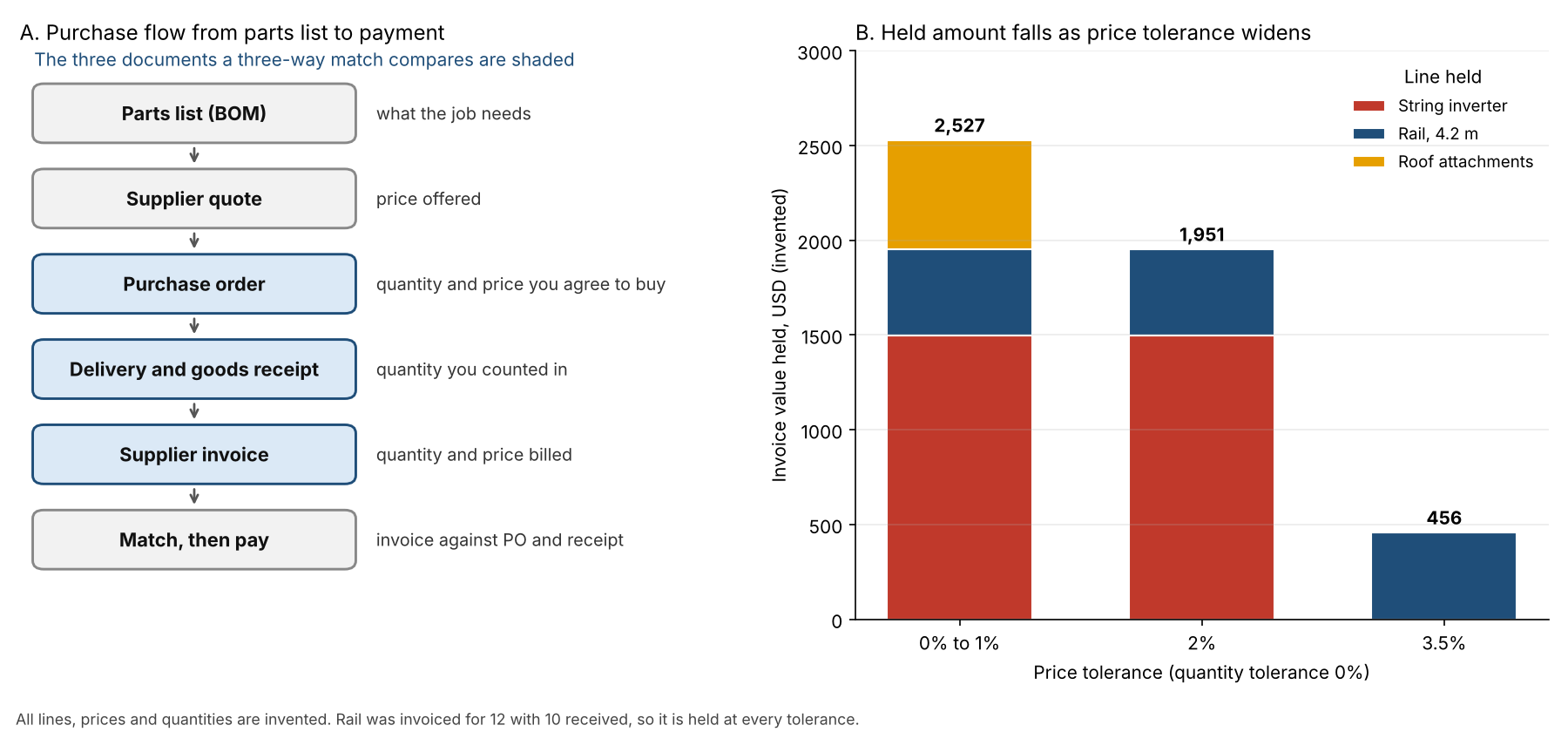
Figure 1. In an example, widening price tolerance from 2% to 3.5% cuts the held invoice value from 1,951 USD to 456 USD. The short-delivered rail line stays held.
How does a three-way match work?
A three-way match checks a supplier invoice against the PO and the goods receipt before it is paid. Cleverence’s guide (updated 20 October 2026) says to match each line on item, quantity and price within your tolerance.
Cleverence names the three records. The PO holds the agreed quantity and price. The receipt holds what your own staff counted. The invoice holds what the supplier asks you to pay. It treats the delivery note as the supplier’s claim of what they sent, which helps at the dock but does not replace your count.
Two-way matching checks the invoice against the PO only and skips the count. Four-way matching adds an inspection record of what was accepted or rejected. Cleverence’s results table shows mismatches such as these:
- Invoiced for more than was received.
- A price above the PO price.
- Goods received that are not on the order.
The same guide defines a tolerance as the difference you accept without stopping the payment, and treats it as your own finance policy. Ply’s help page (10 August 2026) lets you set a quantity percentage, a price percentage and a line value limit in USD. Lines within the thresholds can be auto-approved.
Worked example: one PO, five lines
The rule is ours. A line passes if the invoiced quantity is no more than the quantity received. The invoice price must also be at most 2% above the PO price. A failed line is held in full. All figures are example, in USD.
First, the inputs for each line.
| Line | PO (qty × price) | Received | Invoiced (qty × price) |
|---|---|---|---|
| PV modules | 24 × 185.00 | 24 | 24 × 185.00 |
| String inverter | 1 × 1,450.00 | 1 | 1 × 1,495.00 (+3.1%) |
| Rail, 4.2 m | 12 × 38.00 | 10 | 12 × 38.00 |
| Roof attachments | 60 × 9.50 | 60 | 60 × 9.60 (+1.05%) |
| PV wire, metres | 100 × 1.20 | 100 | 100 × 1.20 |
| Totals | 7,036.00 | 6,960.00 at PO price | 7,087.00 |
Now the result of each match.
| Line | Two-way | Three-way |
|---|---|---|
| PV modules | Pass | Pass |
| String inverter | Hold | Hold |
| Rail, 4.2 m | Pass | Hold |
| Roof attachments | Pass | Pass |
| PV wire, metres | Pass | Pass |
| Totals | Holds 1,495.00 | Holds 1,951.00, pays 5,136.00 |
The invoice is 127.00 USD above the goods received at PO price. That is 45.00 USD on the inverter, 76.00 USD for the 2 rails not delivered, and 6.00 USD on the attachments. The 2% tolerance passes the attachments, so 6.00 USD goes through.
Holding a whole line is a blunt policy. Some teams pay the supported part and hold the rest. Here the supported value is 6,960.00 USD.
Next, vary the price tolerance, with quantity tolerance at 0%.
| Price tolerance | Lines held | Held (USD) | Payable now (USD) |
|---|---|---|---|
| 0% or 1% (same result) | Inverter, rail, attachments | 2,527.00 | 4,560.00 |
| 2% | Inverter, rail | 1,951.00 | 5,136.00 |
| 3.5% | Rail | 456.00 | 6,631.00 |
A percentage tolerance scales with the line. On the 4,440.00 USD module line, 2% allows 88.80 USD, nearly double the inverter’s 45.00 USD overcharge. A line value limit, as Ply offers, caps that.
Three-way match calculator
Enter up to 5 lines, the quantities received and the invoice, then set the tolerances. It shows which lines pass or hold.
Not showing? Open the three-way match calculator on its own page. It reproduces the tables above. It warns on blank, negative, out-of-range or ambiguous numbers such as 1.000.
How solar software handles purchase orders
Only Ply describes a comparison of the invoice with both the PO and the receipt in current pages. Six tools are below, from company pages read in October 2026. "Yes" means the page says it. Only Payaca is solar-specific. The others are general purchasing or inventory tools.
| Software | Create PO | Receive against PO | Invoice matching |
|---|---|---|---|
| Ply | Partly | Yes | Yes |
| Odoo | Not stated | Partly | Partly |
| inFlow Inventory | Yes | Yes | Not stated |
| Payaca | Yes | Not stated | Not stated |
| Microsoft Dynamics 365 Business Central | Not stated | Partly | Partly |
| Finale Inventory | Partly | Partly | Not stated |
- Ply: The pages cover the match. They mention PO creation only as recommended, and say external POs can be uploaded. The third document is a receipt recorded in Ply or an uploaded packing slip, which is the supplier’s own document. The page says it "automatically compares your Purchase Orders, supplier invoices, and goods receipts" and is "a paid add-on". Tolerances are quantity %, price % and a line value in USD. Page read: Ply help, 3-way match articles. Auto-approval page dated 10 August 2026.
- Odoo: The page covers bill control after a PO is confirmed, not PO creation. One option reads "On ordered quantities: Creates a vendor bill as soon as a PO is confirmed." That bills on order. Another reads "On received quantities: A bill is created only after part of the total order has been received." That bills on receipt. A 3-way matching feature "ensures vendor bills are only paid once some, or all, of the products included in the PO" are received. No quantity or price comparison or tolerance is described. Page read: bill control policies (19.0 URL, no version printed).
- inFlow Inventory: The features page lists "Purchase orders", "Purchase approvals", "Approval limits" and "Push purchases to QuickBooks Online / Xero", in the Inventory and Manufacturer apps only. For receiving it lists "Receive stock" and "Scan to receive", and a support article on partial receiving is listed by title. It shows no invoice matching feature. Page read: inFlow features page (modified 25 September 2026). Purchasing index, no date.
- Payaca: "Create PO" sits on a project’s Materials tab, then you send it. A connected Xero or QuickBooks account gets the sent PO. Page read: Payaca help, purchase orders, 6 July 2026.
- Business Central: The page describes purchase invoices and order lines, not PO creation. The existing "Get Receipt Lines" action matches posted receipts line to line. That plan is archived, so it is not current documentation. It says "Advanced purchase order matching lets you match invoice lines to multiple order and receipt lines, even without existing receipts." Read it as a plan. Page read: Microsoft Learn release plan, 2026 wave 1 (updated 27 August 2026, archived October 2026).
- Finale Inventory: The help index lists PO creation and import articles, by title. Titles also cover receiving a shipment and a partial shipment. For invoices it has "Bills" titles only, such as adding a bill to a PO. Page read: Finale help index, no date.
Not stated: the company page we cite does not say. In the Create PO column it usually means the page covers matching or bills, not that the tool lacks POs. Partly: the page covers part of the step or lists it only by title. The Business Central row rests on a release-plan page that Microsoft marks as archived, so check its current help.
For more tools, see the best solar ERP software, the best solar inventory management software and the best solar EPC project management software. The ERP page covers whole-company systems.
How do you evaluate purchasing features?
Test the tool on your last mismatched supplier invoice (our view). Then ask these questions:
- Can it raise a PO from a parts list and tag it to a job?
- Can you receive part of a PO and see what is still on back order?
- Does it compare the invoice with both the PO and the receipt?
- Can you set tolerances by price, quantity and line value?
- Does the PO cost reach job costing and your accounts, and can you export it?
Common mistakes with purchase orders
FAQs
What is the difference between a quote and a purchase order?
A quote is the supplier’s offer of price and terms. A PO is your order. Precoro says you issue the PO after you review and approve the quote.
Is a purchase order legally binding?
Often, but not always. Precoro’s guide says an accepted PO becomes a legally binding contract. A US law-firm article (bc-llp.com, checked 30 October 2026) agrees but adds that the PO alone does not create one. The contract forms when the seller accepts it. Terms and law vary by country and supplier agreement. This is not legal advice, so read your supplier’s terms.
Do small installers need a purchase order system?
Not always. The record matters more than the tool. For any invoice, you should be able to say what was ordered, what was received and which job it was for. A numbered PDF and a receiving note can do that.
Is a PO the same as a work order or a change order?
No. A PO buys goods or services from a supplier. A work order directs your crew or a sub. A change order changes your customer’s contract. See subcontractor management for paying subs.
Related terms
- Bill of materials: the parts list that a PO buys against.
- Bill of quantities: measured quantities of work and materials, used to price and tender.
- Balance of system: the label for parts around the modules, which sources define in different ways.
Next step: take your last mismatched supplier invoice and test whether a tool in the best solar ERP software list would have held it.
Sources
- Cleverence, three-way matching (page says updated 20 October 2026, checked October 2026).
- Law-firm article: do purchase orders create a contract (US context, quote: "Purchase orders create a contract when the seller accepts the purchase order", checked 30 October 2026).
- Precoro, what is a purchase order (dated 31 July 2026, checked October 2026).
- Ply help: create and review a 3-way match, how to use 3-way match and auto-approval (10 August 2026). Checked October 2026.
- Odoo, bill control policies (19.0 URL, no version printed, checked October 2026).
- inFlow: features (modified 25 September 2026) and purchasing index. Checked October 2026.
- Payaca, purchase orders (6 July 2026, checked October 2026).
- Microsoft Learn, match purchase invoices to multiple order and receipt lines (updated 27 August 2026, archived notice October 2026).
- Finale Inventory help index (no date, checked October 2026).
Last updated 3 November 2026. Next scheduled review: 30 January 2027.