Key takeaways
- Of 6 tools read, 3 are installed (PVsyst, PV*SOL premium, SketchUp). The other three are browser-based (HelioScope, Aurora, OpenSolar).
- Two list Windows only (PVsyst, PV*SOL premium). Three name a Mac system (SketchUp, Aurora, OpenSolar). HelioScope lists no systems.
- Installed does not mean offline. SketchUp needs internet to install and authorize. PV*SOL’s product page lists an internet connection. PVsyst activates with internet or an external key. The three browser pages say nothing about internet.
- No page covers offline design, so test airplane mode, one export and your own Mac or Windows set-up on a trial.
- Browser tools still use your computer. OpenSolar’s page says at least 8 GB of RAM. Aurora’s page lists 4 GB for residential projects and 8 GB for commercial projects (see the Aurora note below).
To compare design tools on Mac support and file export, see the best solar design software.
Cloud-based vs desktop software at a glance
Cloud-based software opens in a browser. Desktop software installs on your computer. Some tools mix the two.
| Item | Cloud-based (browser) | Desktop (installed) |
|---|---|---|
| Where it runs | In a browser. The Aurora, HelioScope and OpenSolar help pages name Chrome. | On your computer after install. PVsyst, PV*SOL premium and SketchUp are installed programs. |
| Windows and Mac | Set by the browser and the company’s list. Aurora’s page lists MacOS and Windows. OpenSolar’s says it is "available to use freely on all platforms and browsers". | Set by the company. PVsyst and PV*SOL list Windows only. SketchUp lists Windows and macOS. |
| Updates | Not stated | You install each release. PVsyst’s release notes list 8.1.8 on 26 October 2026. |
| Licence | Not stated | A licence for a machine or a user. PVsyst limits transfers to four in 30 days. |
| Offline | Not stated | Not stated for design. PVsyst documents activation without internet. |
| Project files | Not stated | On your disk. PVsyst’s page warns you not to use synced folders such as OneDrive. |
Not stated means the company pages we read do not say, so ask the company. The one partial answer is offline: PVsyst documents activation without internet, but not offline design.
A hybrid exists. SketchUp installs on your computer, but its page lists "An internet connection to install and authorize your subscription."
Why cloud-based vs desktop matters for installers
The delivery model sets which computers your team can use. It sets what happens with no signal. It also sets how easily you can leave.
Operating system. Both Windows-only tools here are installed programs. A designer on a Mac would need another tool. Or they would need a Windows virtual machine. PVsyst’s page lists only Windows and says nothing about other systems. On its forum, a PV*SOL administrator wrote that the software is "written for Windows systems only" (25 November 2024). The company does not test on Mac. That is a forum reply, not official docs.
Signal and site work. A browser tool needs a connection. A rooftop may not have one. The pages read say little. For field apps, see mobile app offline mode.
Cost and exit. Companies count licences per machine, per user or per seat. See per-seat pricing. If you leave, your files and formats matter. See company lock-in and DWG and DXF files.
How solar software handles cloud-based vs desktop delivery
None of the six company pages we read in October 2026 says full design works offline, and only PVsyst documents activation without internet. The table gives what each page states, and the list under it adds system and internet details.
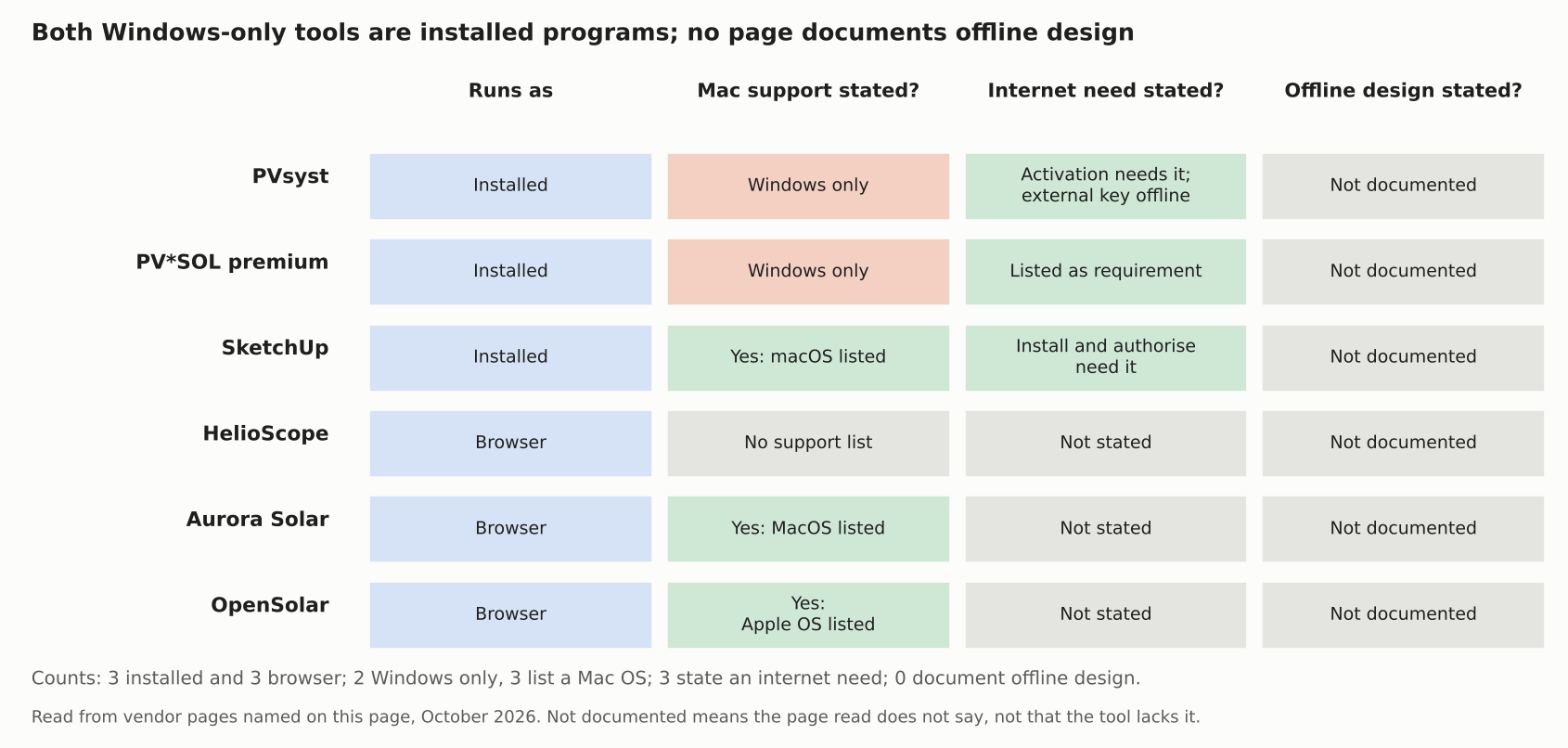
Figure 1. Both Windows-only tools are installed programs. None of the six pages says full design works offline.
| Tool | Runs as | Offline design | Page read and date |
|---|---|---|---|
| PVsyst | Installed | Not stated | PVsyst help, Requirements and Activate a license, no date shown |
| PV*SOL premium | Installed | Not stated | PV*SOL Help system requirements (2026 footer, no date). Product page last modified 30 September 2026 |
| SketchUp | Installed | Not stated | SketchUp help, system requirements, last updated 2 November 2026 |
| HelioScope | Browser | Not stated | HelioScope help, WebGL article, updated 9 July 2025 |
| Aurora Solar | Browser | Not stated | Aurora help, system requirements, no date shown. Browser article updated 14 April 2026 |
| OpenSolar | Browser | Not stated | OpenSolar support, performance article, updated 13 December 2023 |
System and internet, as stated:
- PVsyst: "PVsyst runs only under Windows (see below for other operating systems)". What follows lists Windows only. Activation: direct "requires Internet access on the computer running PVsyst". External key for computers without internet.
- PV*SOL premium: Windows 10 or 11, 64 bit. Macs are not mentioned. The product page lists an internet connection. Release notes list an "Up-to-date offline database" (4 December 2024). The page does not say it covers design.
- SketchUp: Windows and macOS are listed. 2027.0 will need Windows 11 and, for macOS, Apple silicon. Install and sign-in need internet.
- HelioScope: Chrome and Firefox are named, and Chrome is "our recommended browser". Mac and Windows appear only in a quit instruction. There is no support list.
- Aurora Solar: Chrome is listed for Design Mode. "MacOS, Windows" are listed. Minimum RAM is 4 GB for residential and 8 GB for commercial projects. Internet is not mentioned.
- OpenSolar: Recommends Chrome with WebGL on. Apple and Windows are listed, and it is "available to use freely on all platforms and browsers". Internet is not mentioned.
SketchUp plug-ins run inside the installed SketchUp. See the SketchUp solar plug-in page. For tools you can inspect and run yourself, see open-source solar software.
Six checks before you choose
Run these six checks on any tool. You can test each one in an afternoon on a trial.
| Check | What to look for |
|---|---|
| 1. Operating system | Does the company’s page list the systems your designers use? Two of the six read are Windows only. |
| 2. No signal | Switch on airplane mode and try to open, edit and save a design. The company pages here do not cover it. |
| 3. Files | Where do projects live, and how does one leave? Export a DXF or PDF and re-open it. PVsyst’s page says its workspace does not support shared or remotely synced folders. |
| 4. Updates | Can you re-run an old design with the model that made it? Ask the company. See PVsyst report for what a report records. |
| 5. Licence | Does the company count it per machine, per user or per account? What does a transfer cost? PV*SOL’s page names perpetual and user-based licence servers. |
| 6. Hardware | Browser tools still need memory and graphics. Compare the stated minimums, which cover different tasks. |
Common mistakes with cloud-based vs desktop software
FAQs
Is PVsyst cloud-based?
Not by its help pages. The requirements page says "PVsyst runs only under Windows (see below for other operating systems)" and lists only Windows. You install it. Then you activate it with a licence, using internet or an external key.
Can I run PV*SOL on a Mac?
The company’s system requirements name Windows 10 or 11 and no Mac. A forum administrator said on 25 November 2024 there were no plans for macOS. Ask the company before you buy.
Do Aurora, HelioScope and OpenSolar need Chrome?
Aurora recommends the latest Chrome. OpenSolar recommends Chrome. HelioScope names Chrome and Firefox, and calls Chrome its recommended browser. None of these pages says other browsers fail.
Can cloud-based design tools work offline?
The pages read do not cover it. Test the exact task you need with airplane mode on. For site surveys and inspections, see mobile app offline mode.
Which is better, cloud-based or desktop?
Neither wins in general. A browser tool suits a mixed Mac and Windows team with reliable signal. An installed tool suits a Windows team that wants files on its own disk. Run the six checks above to decide.
Related terms
- Company lock-in: how hard it is to move your data and workflow to another tool.
- Open-source solar software: tools whose source code is public.
- SketchUp solar plug-in: solar tools that run inside SketchUp.
- SaaS: software you rent and use in a browser or app.
Next step: shortlist tools from the best solar design software list, then run the six checks above on each trial.
Sources
- PVsyst help: Requirements, no date shown (checked October 2026).
- PVsyst help: Activate a license, Transfer a license and Synchronize a license, no date shown (checked October 2026).
- PVsyst release notes, 8.1.8 listed 26 October 2026 (checked November 2026).
- PV*SOL Help: system requirements, footer 2026, no page date (checked October 2026).
- PV*SOL premium product page, metadata last modified 30 September 2026 (checked October 2026).
- PV*SOL forum, PV*SOL on MacBook M1, administrator replies 3 February 2023 and 25 November 2024 (forum, not documentation, checked October 2026).
- SketchUp help: system requirements, last updated 2 November 2026 (checked November 2026).
- HelioScope help: WebGL not supported by your browser, updated 9 July 2025 (checked October 2026).
- Aurora help: system requirements, no date shown, and which browser is Aurora compatible with, updated 14 April 2026 (checked October 2026).
- OpenSolar support: optimize performance, updated 13 December 2023 (checked October 2026).
Last updated 30 October 2026. Next scheduled review: 30 January 2027.