Key takeaways
- Reorder point = demand during lead time + safety stock. In this example’s module example (96 a week, 2-week lead time, 95% service level) it is 289, of which 97 is safety stock.
- Lead-time spread can matter more than demand spread. An example 0.5-week spread lifts module safety stock from 56 to 97, up 73%.
- Trigger the order on inventory position: on hand less allocated plus on order. With 180 on hand, 120 allocated and 240 on order (example), position is 300 and no order is due.
- With independent demand on 4 trucks, a shared buffer needs about half the safety stock: 40 against 79 connector pairs (example).
- Of 4 tools checked, inFlow, Finale and Ply state serial-number tracking. Ply does so only in a company blog.
To track stock and reorder rules in software, see the best solar inventory management software.
Inventory management at a glance
It records what you hold, where it sits and when to order more. The reorder rule is the part that needs maths.
| Item | Detail |
|---|---|
| Formula | Reorder point = average demand × lead time + safety stock. Safety stock = z × √(lead time × demand variance + demand² × lead-time variance). |
| Unit / typical range | Units (each, metres, boxes). Use one time unit for demand and lead time. No sourced benchmark for solar stock levels is given here. |
| Where it matters | Crew load-outs, purchase orders, warranty records and cash tied up in stock. |
| Standard or rule | No solar standard. Two supply-chain guides print the same formulas: SPS Commerce (updated 6 August 2026) and Cleverence (28 April 2026). |
| In software | Inventory tools, field service tools and ERP modules. |
Why does inventory management matter for installers?
Stock sits between the design and the crew. A short order stops a job. An extra order ties up cash.
The bill of materials says what a job needs. Inventory management says what you hold against it. The purchase order closes the gap. Ply’s blog (2 July 2026) names load-outs as a common failure point. It wants stock committed to each job. Treat that as a company view.
Serial numbers link a unit to a site. inFlow’s solar page says warranty tracking is easier when you know "exactly which PV panel was installed at which site". The record can then back up a work order or a claim later.
What do installers track, and how?
Track high-value units by serial number and everything else by quantity. This split is our design view, not a standard.
| Class | Examples | Track by | Reason |
|---|---|---|---|
| Serialised equipment | Modules, inverters, batteries, optimisers | Serial number and location | Warranty and fault history follow the unit |
| Counted hardware | Rail, splices, clamps, connectors, breakers | Quantity per location | Many identical parts, low value each |
| Cable and conduit | PV wire, AC cable, conduit | Length per reel | Bought and cut by length |
| Consumables | Sealant, labels, lugs | Par level on each truck | Cheap, but a missing one stops work |
How do warehouse stock and truck stock differ?
Warehouse stock feeds the trucks, and truck stock feeds the jobs. Scan each move, so every unit has one place.
inFlow’s solar page says to "Scan materials to transfer them from the warehouse to each truck". Ply’s truck page says "Trucks return for restocking based on min/max level thresholds". Both are company pages.
Stock has three states. On hand is physically in a location. Allocated is promised to a job. On order is bought but not yet received. Inventory position combines them: on hand − allocated + on order. Reorder on the position. inFlow’s support page says a product may be missing from its reorder list when an open purchase order is on its way.
Trucks add a second question: one buffer or many? The table uses the safety-stock formula for connector pairs, with a 1-week restock (example, 95% service level). It assumes each truck’s demand is independent.
| Setup | Weekly demand spread | Safety stock, pairs |
|---|---|---|
| 4 trucks, each with its own buffer | 12 per truck | 19.7 each, 79 in total |
| One shared buffer | 24 (12 × √4) | 40 |
A shared buffer is smaller. So hold the buffer in the warehouse and keep trucks to a par level. The saving shrinks when trucks serve the same large job, because their demand then moves together.
How do you set a reorder point and safety stock?
Add the demand you expect during the lead time to a buffer for the variation. That buffer is safety stock.
- Pull weekly usage for the item. Use the average and the standard deviation.
- Record the supplier lead time in weeks. Add its spread if deliveries vary.
- Pick a service level. Cleverence defines it as the chance of not running out in a restock cycle. It gives z ≈ 1.645 at 95% and 2.33 at 99%.
- Work out safety stock with the formula in the glance table. With a fixed lead time, the lead-time term is 0.
- Add the lead-time demand to get the reorder point. Then round up.
- Compare the reorder point with inventory position, not the count on the shelf.
Cleverence assumes demand in the lead time is roughly normal. For intermittent demand, it suggests percentiles or simulation. It treats short histories as weak and cites under 26 weeks as an example. SPS Commerce adds that the average-max shortcut "assumes everything goes wrong at once". The reorder point says when to order, not how much. Pack sizes and pallet rules set the order size.
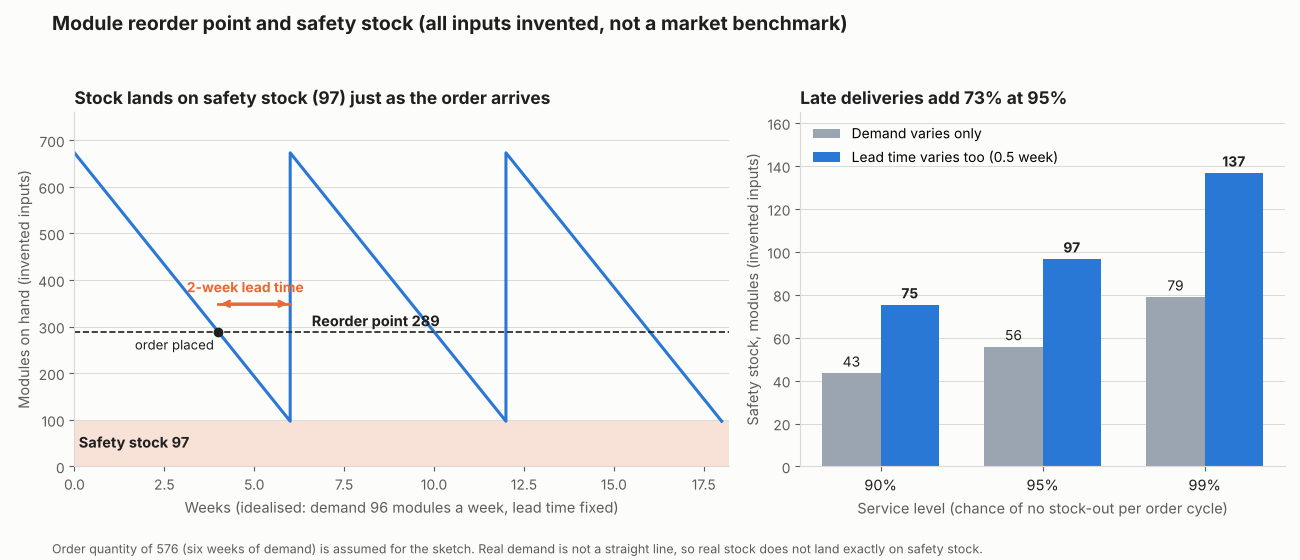
Figure 1. In an example module example, a 0.5-week lead-time spread lifts 95% safety stock from 56 to 97 modules and the reorder point from 248 to 289.
Worked example: modules, inverters and attachments
The example firm sells about 4 jobs of 24 modules a week. Service level is 95%, so z = 1.645. The first table shows the module step by step.
| Step (modules, example inputs) | Demand variation only | With lead-time spread |
|---|---|---|
| Average demand, lead time, spreads | 96 a week, 2 weeks, 24 a week | Same, plus 0.5 week lead-time spread |
| Demand during lead time | 192 | 192 |
| Safety stock | 55.8, so 56 | 96.7, so 97 |
| Reorder point | 248 | 289 |
The same method on three items, with lead-time spread (example):
| Item | Demand / spread a week | Lead time / spread (weeks) | Safety stock | Reorder point |
|---|---|---|---|---|
| PV modules | 96 / 24 | 2 / 0.5 | 97 | 289 |
| String inverters | 4 / 1.5 | 3 / 1 | 8 | 20 |
| Roof attachments | 480 / 120 | 1 / 0.2 | 253 | 733 |
Now check the module trigger. Position is on hand − allocated + on order (example stock counts).
| Scenario | On hand / allocated / on order | Position | Against 289 |
|---|---|---|---|
| A: as planned | 180 / 120 / 240 | 300 | Hold, 11 above |
| B: two more jobs signed | 180 / 180 / 240 | 240 | Order now, 49 short |
In B, on hand plus on order reads 420 and says hold. The position says order. In A, a shelf count of 180 would trigger a second order for stock already on its way.
Reorder point and safety stock calculator
Enter demand, lead time, service level and today’s stock. It shows safety stock and reorder point, and tells you whether to order.
Open the reorder point and safety stock calculator on its own page. It reproduces the tables above and warns you about blank, negative, out-of-range or ambiguous numbers such as 1.000.
How solar software handles inventory management
Of the four tools checked in October 2026, inFlow, Finale and Ply state serial-number tracking, and Ply does so only in a company blog.
| Software | Serial numbers | Reorder point or min/max | Warehouse and truck | Stock tied to jobs |
|---|---|---|---|---|
| inFlow Inventory | Yes | Yes | Yes | Partly |
| Finale Inventory | Yes | Yes | Partly | Not stated |
| Ply | Yes | Yes | Yes | Yes |
| Blu Banyan SolarSuccess | Not stated | Not stated | Not stated | Partly |
Not stated: the company page we cite does not say. Partly: the page covers part of the feature, as the notes explain. Only company pages count for Yes.
- inFlow Inventory: serial numbers are a paid add-on on Lite, Core and Pro. Max is not listed on the pricing page. They sit under the Inventory and Manufacturer apps, not the Stockroom scanning app. Its solar page says "Track serial numbers for every PV module". Reorder point and quantity are set per location, and can make purchase orders, stock transfers or manufacture orders. Another line says "Track the parts on every service truck", and transfers are scanned from warehouse to truck. Jobs are covered by "multiple projects and jobsites at once". Sources: solar page (modified 23 March 2026), features page (modified 25 September 2026), reorder support article (updated 24 July 2026) and pricing page (October 2026).
- Finale Inventory: its solar page says it can "accurately track serial numbers for solar panels or other equipment" and offers "several ways to create reorder points". It supports multiple warehouses and does not mention vehicles. Source: solar landing page, no date printed.
- Ply: a company blog says "Every serialized item has its own permanent record inside Ply" (3 August 2026). The product pages read do not state serial numbers. They list "Per-truck par levels and reorder thresholds" and "min/max level thresholds", warehouse bin locations, truck stock and "cost allocation to jobs". Solar is not named on the product pages. Sources: truck inventory and inventory product pages (copyright 2026) and the serialized-inventory blog.
- Blu Banyan SolarSuccess: a 2021 company article mentions "Synchronization of project bills of materials (BOM) on sales orders". It says nothing on serial numbers, reorder rules or trucks. This row rests on that 2021 article alone. We did not check Blu Banyan’s current product pages. Source: NetSuite article, 17 March 2021.
inFlow lists serial numbers under its Inventory and Manufacturer apps, not its Stockroom scanning app. Ranked options are in our guide to the best solar inventory management software. Whole-company systems are on the ERP page.
Common mistakes with inventory management
FAQs
What is the difference between a reorder point and safety stock?
The reorder point is the stock level that triggers an order. Safety stock is the part of it that covers variation. In this example’s module example, 192 modules cover expected lead-time demand. The other 97 are safety stock.
Should every item be tracked by serial number?
Not necessarily. Our view is to serialise modules, inverters and batteries, where warranty follows the unit. Count the rest. Serial tracking adds a scan per unit, so the benefit must outweigh that effort.
How much stock should a truck carry?
Par level is average weekly use over the restock gap plus safety stock. In this example’s truck table, each truck needs 19.7 connector pairs of safety stock, or 40 in a shared buffer. Ply documents per-truck par levels set from job history. In the calculator, enter the truck’s weekly usage and treat the restock interval as the lead time.
Is inventory management the same as procurement or ERP?
No. Inventory management tracks stock and sets reorder rules. Procurement buys it, through purchase orders that close the gap to the bill of materials. An ERP may hold both, with accounts.
Related terms
- Bill of materials: the parts list that stock is allocated against.
- CMMS: keeps spare-parts records for O&M. Its page covers spares cover, not install stock.
- Field service management: dispatch and job records that draw on truck stock.
Next step: enter one item’s weekly use and lead time in the calculator, then compare the best solar inventory management software. If accounts belong in the same system, see the best solar ERP software.
Sources
- SPS Commerce, how to calculate safety stock (page says last updated 6 August 2026, checked October 2026).
- Cleverence, safety stock and reorder point calculation (dated 28 April 2026, checked October 2026).
- inFlow, inventory management for solar installers (checked October 2026).
- inFlow, features, pricing and reorder support article (checked October 2026).
- Finale Inventory, solar page (checked October 2026).
- Ply, truck inventory, inventory product page blog, 2 July 2026 and serialized inventory blog, 3 August 2026 (checked October 2026).
- NetSuite, Blu Banyan article (17 March 2021, checked October 2026).
Last updated 30 October 2026. Next scheduled review: 30 January 2027.