Key takeaways
- A CMMS keeps five linked records and ties an alarm to a tracked repair, the parts used and the time taken.
- On an invented log of 12 inverter repairs (40 inverters), active repair averaged 4.75 hours but recovery took 39.83.
- "MTTR" reads 4.75, 33.83, 39.83 or 56.08 hours on the same log, depending on where the clock starts and stops.
- Three of the 12 repairs waited for a part, 45.2% of downtime hours (example). A spare on site for every repair lifts operational availability from 99.864% to 99.925%.
- Expect 1.84 failures per 56-day resupply (example). Holding 4 spares then gives 96.1% cover, if failures are independent.
To run work orders and alarm tickets in software, see the best solar CMMS software.
CMMS at a glance
A CMMS is the logbook of a maintenance team. It records what failed, who fixed it, with which part, and how long it took.
| Item | Detail |
|---|---|
| Core records | Asset register, work orders, preventive schedules, spare parts, alarm-to-closure timestamps. |
| Core measures | MTTR, MTBF, availability, backlog, preventive compliance, response-time attainment. |
| Where it matters | O&M contracts, warranty claims, audit trails, owner reports. |
| Standard or rule | SolarPower Europe v3.0 says to store tickets electronically and link maintenance tasks to alarms. |
| In software | A module in a monitoring platform, a field service tool, or a general CMMS. |
Why does a CMMS matter for solar O&M?
An O&M contract is only as good as its records. A CMMS is where you log response times, repairs and parts use. You report from it later.
SolarPower Europe v3.0 says "tickets (ticket interventions) should be stored electronically and made available to all partners" (Section 6.1). It also says maintenance tasks should be documented back to and linked with the alarms. An O&M contractor "can have" a CMMS to measure KPIs (Section 5.1). The O&M page covers contract terms such as availability and response time. This page covers the records behind them.
What does a CMMS hold?
A CMMS holds five linked records. Each one answers a question that a contract or an owner will ask.
| Record | What it holds | Question it answers |
|---|---|---|
| Assets | Each inverter, string box, tracker and meter, with site, serial number and warranty. | What failed, and is it under warranty? |
| Work orders | Task, assignee, due date, status, findings, time spent. | Who did what, and when? |
| Preventive schedules | Recurring tasks, such as annual inspections and vegetation work. | Was planned work done on time? |
| Spare parts | Stock levels and parts used per job. | Is the right part on site? |
| Service clocks | Timestamps for alarm, acknowledgement, arrival and closure. | Did we meet the response target? |
NLR’s (formerly NREL) best-practice guide (3rd edition, December 2018) puts spare-parts inventory under operations. SolarPower Europe v3.0 says the asset owner should own spare parts. It says the O&M contractor should handle their maintenance, storage and replenishment.
How do preventive and corrective work orders differ?
A preventive work order is planned from a calendar or interval. A corrective work order follows a fault. A CMMS holds both in one queue. Planned and unplanned jobs then compete for the same technicians.
NREL’s guide (3rd edition, December 2018) says corrective maintenance is "required to repair damage or replace failed components". It says the operations function sets the scheduling and frequency of preventive maintenance.
In this example’s year, 80 filter cleans were due (preventive) and 12 repairs were logged (corrective). You track preventive work by due date and compliance. You track corrective work by clocks, parts and repair hours. The O&M page covers the contract scope for each.
A monitoring alert says something is wrong now. A CMMS also remembers planned work and who did it. Neither replaces the other.
How does an alarm become a work order?
A monitoring rule raises an alarm. A ticket groups related alarms. A work order sends a technician. Each handoff adds time. A CMMS can timestamp it.
- The monitoring platform raises an alarm. meteocontrol says its alarm fires only for incidents that last past a set delay.
- The platform groups related alarms. meteocontrol says several alarms can be grouped into one ticket.
- A dispatcher triages the ticket. Some faults clear with a remote reset. They need no visit.
- You create a work order from the ticket and share it with technicians through an app.
- The technician records findings, parts used and time. Then you close the work order and ticket.
Grouping cuts the load. The table uses an example year for our 40-inverter plant.
| Stage (example counts) | Count | Share of previous stage |
|---|---|---|
| Alarm notifications | 112 | - |
| Tickets after grouping | 31 | 27.7% |
| Corrective work orders with a site visit | 12 | 38.7% |
If each alarm made its own work order, dispatchers would face 112 jobs, not 12. Alerts and alarms covers thresholds. Oxmaint’s guide describes a webhook link from monitoring. An API is another route. SCADA covers data collection.
What does MTTR really measure?
MTTR is "mean time to repair", but reports use four different clocks. The same repair gives four different answers.
Reliamag’s guide (published 18 August 2026) says MTTR is the same as mean corrective-maintenance time. TeepTrak (last verified 16 May 2026) discusses four variants. SolarPower Europe v3.0 Table 1 lists acknowledgement, intervention, response and resolution time as minimum requirements. It lists MTBF as a recommendation. Table 1 has no MTTR row.
| Clock | Starts | Stops | Our mean (example log) |
|---|---|---|---|
| Repair | Repair starts | Repair ends | 4.75 h |
| Alarm to repair start | Alarm | Repair starts | 33.83 h |
| Recovery | Failure | Back in service | 39.83 h |
| Resolve | Ticket opened | Ticket closed | 56.08 h |
The alarm-to-repair-start clock includes the wait for a part. We place that wait before repair starts. That is our assumption. SolarPower Europe v3.0 defines intervention time as acknowledgement until a technician reaches the plant. It defines response time as acknowledgement plus intervention, so its response time ends at arrival. See O&M. Confirm which definition a CMMS report uses.
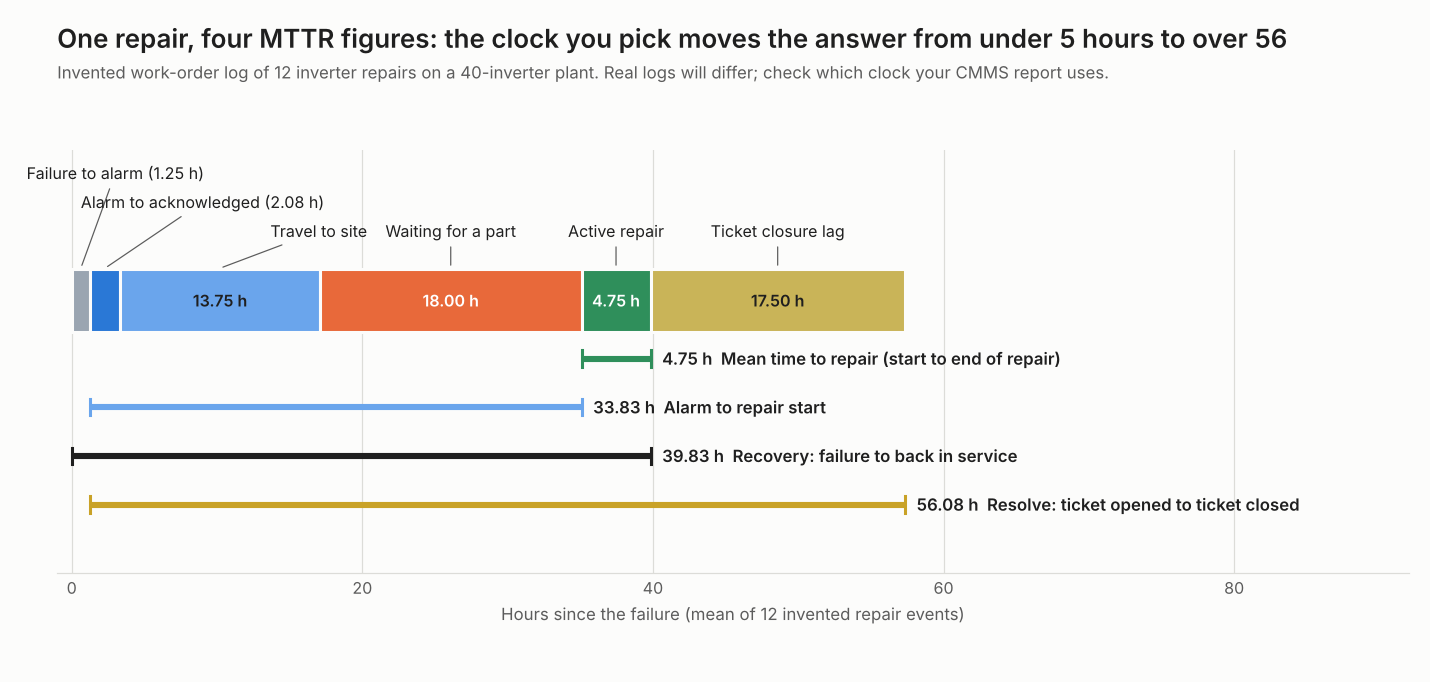
Figure 1. On an example 12-repair log, the same mean repair reads 4.75 hours or 56.08 hours, depending on which MTTR clock a report uses.
How are the CMMS metrics calculated?
Each metric is a ratio of logged hours or counts. Pick the clock first. Then do the sums.
- MTTR is the sum of the chosen clock over all repairs, divided by the number of repairs.
- MTBF per device is device count × period hours ÷ failures. Reliamag defines a failure as the loss of, or inability to perform, the required function.
- Inherent availability is MTBF ÷ (MTBF + MTTR). Reliamag says its MTTR leaves out administrative delay, logistic delay and preventive time.
- Operational availability is 1 minus total downtime ÷ (devices × period hours). Downtime here runs from failure to return to service. It includes waits.
- Response attainment is the share of repairs where acknowledgement plus travel met the target. Preventive compliance is tasks done by their due date ÷ tasks due. For example, 71 of 80 filter cleans is 88.75% (example counts).
Worked example: 12 repairs on a 40-inverter plant
All inputs are example. They show how the clock and the spares policy change the numbers.
| Input (example) | Value |
|---|---|
| Fleet and period | 40 string inverters, 8,760 hours |
| Repairs logged | 12, each with six stage times |
| Mean stage times | Failure to alarm 1.25 h. Alarm to acknowledged 2.08 h. Travel 13.75 h. Part wait 18.00 h. Repair 4.75 h. Closure lag 17.50 h |
| Response target | 24 h, acknowledgement plus travel |
| Spare lead time and cover | 56 days. 95% |
| Result | Value |
|---|---|
| MTBF per inverter | 29,200 h (40 × 8,760 ÷ 12) |
| Inherent availability | 99.984% |
| Operational availability (478 downtime hours) | 99.864% |
| Repairs waiting for a part | 3 of 12, 45.2% of downtime hours |
| Recovery MTTR if every part were on site | 21.83 h. Operational availability 99.925% |
| Repairs within the 24 h response target | 10 of 12 (83.3%) |
The response target was met in 10 of 12 repairs. Yet three repairs waited 48 to 96 hours for a part. A response target alone does not cover that wait. The contract needs a spares or repair-time term. The availability basis is time over all hours, not energy. Contracts define availability in other ways. See O&M.
For spares, we count failures during one resupply. Expected failures are 12 × 56 ÷ 365 = 1.84. The chance of at most k failures follows a Poisson distribution.
| Spares held (k) | 0 | 1 | 2 | 3 | 4 | 5 |
|---|---|---|---|---|---|---|
| Chance demand during resupply is at most k | 15.9% | 45.1% | 72.0% | 88.5% | 96.1% | 98.9% |
Four spares is the smallest stock that reaches 95%. A batch fault can fail many inverters at once. So the independence assumption may not hold. One year of failures is also a thin basis. Stock cost is not modelled.
Check your own work-order log
Paste repairs from your CMMS export. The calculator gives the four MTTR figures, availability and a spares count. It loads this example’s log first.
How solar software handles a CMMS
For a CMMS, four things matter: the link from alarm to work order, preventive work, parts tracking and response-time reporting. Power Factors Unity documents all four on the page read. The other three tools cover some. Four tools were read in October 2026.
| Software | Alarm or alert to work order | Preventive work | Parts or inventory | Response or SLA reporting |
|---|---|---|---|---|
| meteocontrol VCOM | Yes | Partly | Not stated | Not stated |
| Power Factors Unity | Yes | Yes | Yes | Yes |
| Sitetracker | Partly | Partly | Partly | Partly |
| Oxmaint | Partly (company guide) | Partly (company guide) | Not stated | Not stated |
Yes: the page names the step. Partly: the page names it only in general terms, or only in a company marketing guide. Not stated: the company page we cite does not say. What each page says:
- meteocontrol VCOM: Alarm to work order: Tickets can be created automatically, alarms can be grouped, and work orders are created from tickets. Preventive: The datasheet lists "recurring events such as annual inspections and vegetation maintenance".
- Power Factors Unity: Alarm to work order: "Convert performance insights, alerts, and degradation signals into actionable maintenance work". The page says alerts, not alarms. Preventive: "Corrective and preventive work orders". Parts: "Visibility into parts usage and availability". Response or SLA: "Real-time dashboards for backlog, response times, and SLAs".
- Sitetracker: Alarm to work order: Mobile tools "integrate directly with your asset monitoring system". Preventive: "Proactive and reactive maintenance management". Parts: "tracking parts, labor, and expenses directly within the platform". No stock management described. Response or SLA: "Coordinate field resources to meet SLAs".
- Oxmaint: Alarm to work order: "Inverter fault alerts from SCADA and monitoring platforms trigger OxMaint work orders via webhook". Preventive: "Auto-generates work orders ahead of each interval".
Ask each company four questions before you buy.
- Can I export every work-order timestamp, so I can work out my own clocks?
- How does an alarm create a ticket: built in, webhook or API?
- Does it track spare-parts stock, or only parts used per job?
- Can it report preventive compliance and response attainment?
Quotes are from each company’s own pages. Oxmaint’s page is a general CMMS guide and company marketing. Page dates are in Sources.
Common mistakes with a CMMS
FAQs
What does a CMMS do for a solar plant?
It keeps the asset list, work orders, preventive schedules, parts and timestamps in one place. That lets an O&M team show what it did, when, and how long repairs took.
Is a CMMS the same as monitoring or SCADA?
No. Monitoring and SCADA read device data and raise alarms. A CMMS manages the repair that follows. Some companies sell both as one product.
What is a good MTTR for solar?
No reliable public MTTR benchmark exists, so set targets in the contract. SolarPower Europe’s guidelines list four clocks instead: acknowledgement time, intervention time, response time and resolution time. Table 1 has no MTTR row. Fix the clock first, then compare the figure with your contract’s response and repair terms.
How many spare inverters should we hold?
The worked example gives 4 for 40 inverters at 95% cover. Your number depends on failure rate, resupply lead time and the cover you want. Use the calculator with your own log.
Related terms
- O&M: the service contract a CMMS supports.
- Alerts and alarms: the rules that start a ticket.
- Fleet monitoring: portfolio views that can feed a CMMS.
- KPI dashboard: where MTTR and backlog are shown.
- Handover pack: the as-built records a new asset register starts from.
Next step: test an alarm-to-work-order flow on a trial from the best solar CMMS software list. For field crews and dispatch, see the best solar field service management software.
Sources
- SolarPower Europe: O&M Best Practices Guidelines, version 3.0, printed December 2018 (copy hosted by Autarco, checked October 2026). This host did not resolve when we tried to re-check it in November 2026, so the Table 1 reading above is not re-verified. A newer version 6.0 (2025) is published on solarpowereurope.org. Check that edition before relying on the MTTR row claim.
- NREL: Best Practices for Operation and Maintenance of PV and Energy Storage Systems, 3rd edition, December 2018 (checked October 2026, definitions in Section 4 only). NREL (the National Renewable Energy Laboratory) became the National Laboratory of the Rockies (NLR) in December 2025. We cite this 2018 report under the name it was published with and link it at its current nlr.gov address.
- Reliamag: Reliability vs Availability, 18 August 2026 (checked October 2026).
- TeepTrak: MTTR variants, last verified 16 May 2026 (checked October 2026).
- meteocontrol VCOM help: CMMS, last modified 2026-07-01, and the VCOM CMMS datasheet, copyright 2023 (checked October 2026). The meteocontrol alarm, ticket and work-order text is from the help page. The preventive line is from the datasheet.
- Power Factors: Unity field service management, no page date printed, copyright 2024-2026 (checked October 2026).
- Sitetracker: Operations and Maintenance, no page date printed (checked October 2026).
- Oxmaint: Solar power plant maintenance CMMS guide, 1 April 2026 (checked October 2026).
Last updated 30 October 2026. Next scheduled review: 30 January 2027.