Key takeaways
- IBM lists 5 functions: scheduling, dispatch, work order management, inventory management and contract management. Five of our 8 stages map to IBM’s list. Intake, crew skills and on-site capture do not.
- FSM is the umbrella. Scheduling, work orders, crews, a CMMS and mobile apps each have their own page, linked below.
- First-time fix rate is the jobs fixed on the first visit, divided by all completed jobs. IBM says the average "hovers around 80%" for field service in general, not for solar.
- On our invented log of 12 jobs, 7 were fixed first time (58.3%). Six extra visits followed, and missing parts caused 3 of them.
- Across 4 company pages, all mention scheduling and customer updates. Simpro’s page names the most: parts, invoicing, updates and maintenance.
To compare tools that run scheduling, work orders and parts together, see the best solar field service management software.
Field service management at a glance
FSM is a way of running work that happens off company property. It is a set of linked jobs, not one feature. Each company draws its edges in a different place.
| Item | Detail |
|---|---|
| Core idea | IBM: "the coordination of a company’s resources, including employees and equipment" in work off company property. Salesforce Trailhead: coordinating workers to deliver "fast and efficient in-person service". |
| Five functions in IBM’s list | Scheduling, dispatch management, work order management, inventory management and contract management. |
| Main metric | First-time fix rate, the share of jobs completed on the first visit (IBM). |
| Standard or rule | No standard defines it for solar. Skedulo words it as "the planning and coordination of services delivered across locations". |
| In software | A field service tool, or modules inside a solar project, CRM or O&M platform. |
Why field service management matters for installers
Every site visit costs a technician’s hours and a trip. IBM says effective use of data can help teams optimise scheduling and preparation "to drive a higher FTFR".
In the worked example below, 6 of 18 visits (33.3%) were extra. At an example 190 USD per visit, that is 1,140 USD in a month. The same records feed O&M response targets (see O&M). They also feed the customer’s view of the job (see customer portal).
What does field service management cover, and which pages go deeper?
We split solar field work into 8 stages. Five of the 8 stages map to IBM’s list (stage 4 holds two of its functions). Intake, crew skills and on-site capture do not. The stage names are our own design.
| Stage | What happens | Read more | In IBM’s list? |
|---|---|---|---|
| 1. Intake | A call, portal request or alarm opens a job. | Alerts and alarms, customer portal | No |
| 2. Work order | One record holds the job, its status and its findings. | Work order | Yes, work order management |
| 3. Crew and skills | Who may do the job, and who is free. | Crew management | No |
| 4. Schedule and dispatch | A date and crew are set, then the job is sent. | Scheduling and dispatch | Yes, two functions |
| 5. On-site capture | Forms, photos and sign-off in the field, with or without signal. | Mobile app offline mode | No |
| 6. Parts | Spares in the warehouse and on the van. | Inventory management | Yes, inventory management |
| 7. Close-out | The job is closed, documented and invoiced. | Handover pack | Yes, within work order management ("through completion to customer invoicing") |
| 8. Contracts | Service plans and response targets. | CMMS, O&M | Yes, contract management |
How is FSM different from a CMMS, a project tool or a CRM?
They answer different questions. FSM runs the visit and the technician’s day. The others hold the asset record, the install pipeline or the sales deal. Many products mix two or more.
| System | Main record | Question it answers | Read more |
|---|---|---|---|
| Field service management | The visit | Who goes where, when, with what? | This page |
| CMMS | The asset and its maintenance history | What failed, and what is due? | CMMS |
| Project management | The install project | Which phase is this job in? | Solar project management software |
| CRM and lead tools | The customer and the deal | Who is the prospect, and what is next? | Lead management |
| ERP | Finance, purchasing and stock | What did it cost, and what do we owe? | ERP |
Only the CMMS contrast has a cited source. A Praxedo blog (12 June 2023) says a CMMS "primarily focuses on maintenance-related tasks" while FSM software "covers a broader scope". That is one company’s view. The other rows are our reading.
How do you measure field service performance?
Start with first-time fix rate (FTFR). IBM defines it as the percentage of jobs done on the first visit. That means no follow-up visit, extra parts or outside help.
- List every job completed in the period, such as one month.
- Count the visits each job took.
- First-time fix rate = jobs completed on the first visit, divided by all completed jobs, times 100 (IBM’s formula).
- Extra visits = total visits minus completed jobs, because every job needs one visit.
- Tag the reason for each extra visit: part, skill, access or diagnosis in our example.
IBM says organisations should agree how work orders are logged and how completion is judged. It gives no separate rule for return trips, so write your own. Open jobs are left out until they close. That can flatter the rate. IBM says some providers in "mature or narrowly scoped service environments" report higher rates.
Worked example: 12 service jobs in one month
All inputs are example: the jobs, the visit counts, the reasons and a cost of 190 USD per visit. Each repeat job has one reason.
| Job | Task | Visits | Reason for extra visits |
|---|---|---|---|
| S1 | String fault | 1 | None |
| S2 | Inverter swap | 1 | None |
| S3 | Optimiser replacement | 2 | Part |
| S4 | Annual inspection | 1 | None |
| S5 | Isolator fault | 2 | Skill |
| S6 | Panel cleaning | 1 | None |
| S7 | Gateway reset | 1 | None |
| S8 | Inverter swap | 3 | Part (twice) |
| S9 | Thermal check | 1 | None |
| S10 | Roof leak check | 2 | Access |
| S11 | Underperformance | 2 | Diagnosis |
| S12 | Vegetation | 1 | None |
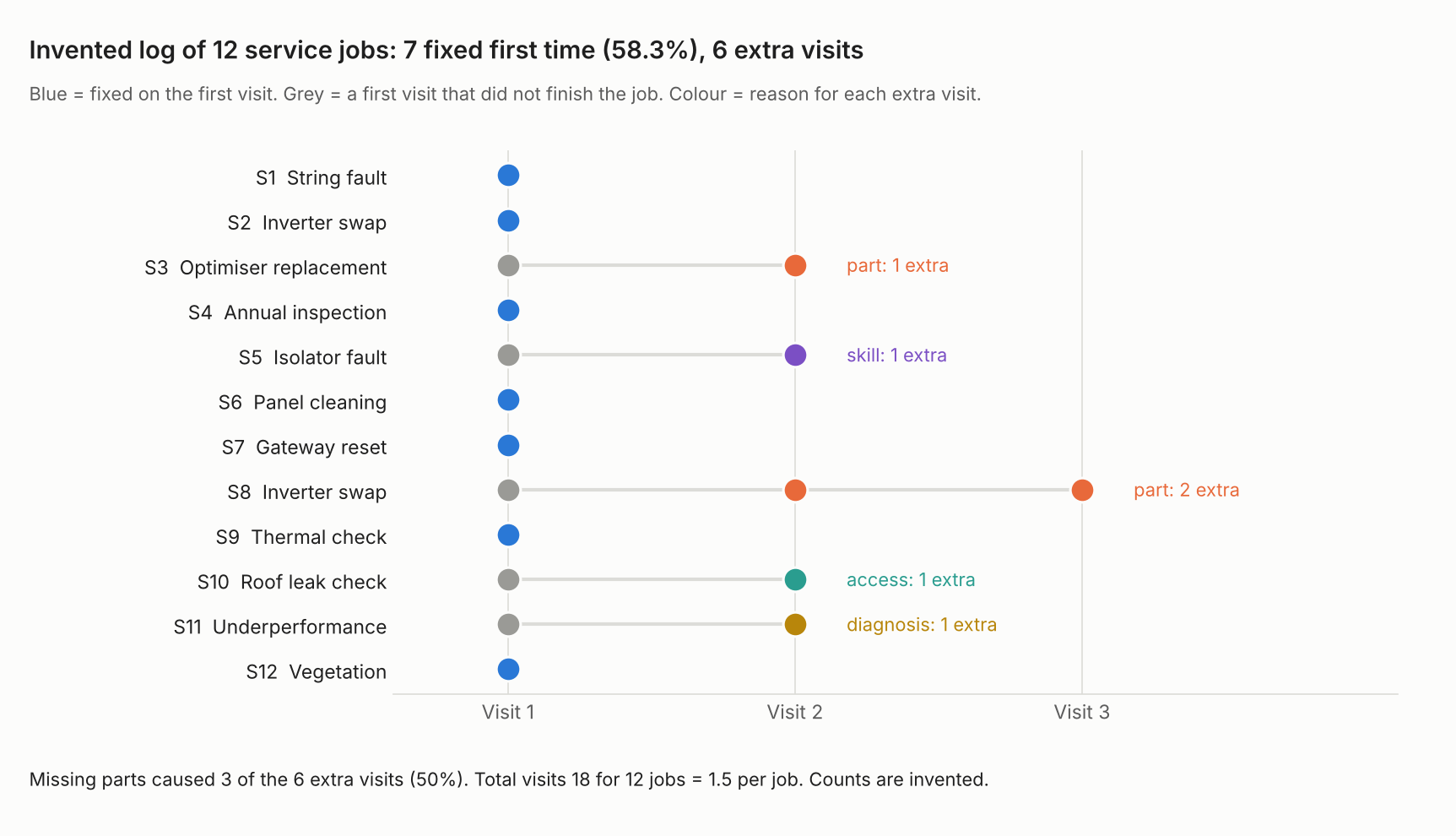
Figure 1. On an example log of 12 jobs, 5 needed more than one visit. Missing parts caused 3 of the 6 extra visits.
| Result (example log) | Working | Value |
|---|---|---|
| Total visits | 7 jobs x 1 + 2 + 2 + 3 + 2 + 2 | 18 |
| First-time fix rate | 7 / 12 x 100 | 58.3% |
| Visits per job | 18 / 12 | 1.5 |
| Extra visits | 18 - 12 | 6 (33.3% of all visits) |
| Cost of extra visits | 6 x 190 USD (example) | 1,140 USD |
The next table asks what the rate would be if one cause vanished. It assumes every job with that reason would then finish on the first visit.
| Cause removed | Jobs | Extra visits | First-time fix rate |
|---|---|---|---|
| Part | 2 | 3 | 75.0% |
| Skill | 1 | 1 | 66.7% |
| Access | 1 | 1 | 66.7% |
| Diagnosis | 1 | 1 | 66.7% |
Parts are the biggest lever here: 3 of 6 extra visits. IBM’s 80% average is a general figure, and 12 jobs is a method demo, not a benchmark. Parts stock is covered on the inventory management page.
Check your own first-time fix rate
Enter one line per completed job. Add the visits it took and, if more than one, a one-word reason. The calculator gives the rate, extra visits, their cost and the effect of removing each cause. It loads the example above.
If the calculator does not load, open the first-time fix rate calculator on its own page.
How solar software handles field service management
Simpro’s page covers four of the five functions in full and scheduling in part. The other three pages leave parts, invoicing or maintenance partly or fully unstated. The tables check 5 things: scheduling and dispatch, parts or stock, invoicing or payment, customer updates and maintenance records. Each tool comes from one company page, read in October 2026.
| Software | Scheduling and dispatch | Parts or stock | Invoicing or payment |
|---|---|---|---|
| Praxedo | Yes | Not stated | Not stated |
| Zuper | Partly | Partly | Partly |
| Simpro | Partly | Yes | Yes |
| Coperniq | Partly | Yes | Not stated |
Customer updates and maintenance records are in a second table.
| Software | Customer updates | Maintenance records |
|---|---|---|
| Praxedo | Yes | Partly |
| Zuper | Yes | Not stated |
| Simpro | Yes | Yes |
| Coperniq | Yes | Partly |
- Praxedo: scheduling is "SmartScheduler to manage numerous solar field jobs swiftly and automatically". Parts get only a passing FAQ mention ("managing inventory"). No parts feature is described. The page lists connectors to ERP, CRM and accounting software. Updates: "Send automatic job progress notifications". It mentions "recurring visits" and work order histories. No asset record is described.
- Zuper: the solar page says "AI Dispatch Assistant picks the best-fit crew by skill and location". Zuper’s docs show manual drag and drop (see our scheduling page). Inventory appears only as a product menu link, with no feature described. "Zuper Pay handles cards, ACH, and tap-to-pay at the kitchen table." "Invoice Management" is a product name only (see our work order page). Updates: "Automated arrival updates, live ETAs, and a branded customer portal on every job." Recurring maintenance is not stated on the solar page.
- Simpro: "effective scheduling and dispatch features". Auto-assignment is not stated. Stock: "real-time insight into your stock levels". Invoices include "labor and materials added to the job". Updates: "automatic updates to customers and staff via SMS and email". Assets: "an in-depth database of all customer assets". The Maintenance Planner add-on covers preventative maintenance.
- Coperniq: route optimisation and a live technician map are listed. Assignment is not stated. "Inventory Management: Track spare parts and equipment across multiple locations". Invoicing is not stated on the page read. Updates: "Communication Triggers: Automated customer updates at key milestones". "Preventive Maintenance Scheduling" is listed. No asset history is stated. The products page cited has since moved, so check Coperniq’s current site before relying on this wording.
Dates: Praxedo’s solar page was modified 6 October 2026. Zuper’s carries a 2026 copyright. Simpro’s and Coperniq’s pages print no date.
Not stated means the page we read does not say, which is not proof the tool lacks it. Partly means the page describes part of it or names it without detail. These columns differ from our scheduling and dispatch, work order and CMMS tables, so ratings do not compare across pages. Questions to put to each company:
- Which of the 8 stages above does the product cover, and which need a second tool?
- Can I export every visit with its reason code, so I can compute my own first-time fix rate?
- Does a repeat visit link back to the original work order?
- Does an alarm open a job by itself, or only by hand?
For tools that handle scheduling, work orders and customer updates together, see the best solar field service management software list.
Common mistakes with field service management
FAQs
What is the difference between field service management and a CMMS?
A CMMS keeps the asset and its maintenance record. FSM runs the visits and the people. A Praxedo blog (12 June 2023) says a CMMS "primarily focuses on maintenance-related tasks" and FSM covers a broader scope. See the CMMS page.
Is field service management the same as scheduling and dispatch?
No. IBM lists scheduling and dispatch as 2 of its 5 functions. The other 3 are work orders, inventory and contracts. See scheduling and dispatch.
What is a good first-time fix rate?
IBM says the average "hovers around 80%" for field service in general. No solar benchmark is cited. Measure your own rate with one counting rule, then track the trend.
Does FSM cover installs as well as service visits?
IBM’s definition covers any work off company property, so installs count. In our reading, tracking an install by phase is usually called project management. See solar project management software.
Does a small installer need FSM software?
No source sets a size threshold. One test is whether you can list last month’s visits per job and the reason for each repeat. If you cannot, the records are the first problem.
Related terms
- Scheduling and dispatch: giving a job a date and crew, then sending it.
- Work order: the record of one job.
- Crew management: crews, skills and availability.
Next step: tag the reason for every repeat visit this month, then compare field service tools against what the tags show.
Sources
- IBM: What is field service management (FSM)?, no date in the body. Metadata lists 4 August 2021 and 16 December 2024 (checked October 2026).
- IBM: What is first-time fix rate (FTFR)?, 11 February 2026 (checked October 2026).
- Salesforce Trailhead: Field Service basics, no date printed (checked October 2026).
- Skedulo: What is field service management?, no date printed (checked October 2026, company page).
- Praxedo: Streamlining field service operations, FSM software vs CMMS, 12 June 2023 (checked October 2026, company blog).
- Praxedo: solar industry page, metadata modified 6 October 2026 (checked October 2026).
- Zuper: Solar, copyright 2026 (checked October 2026).
- Simpro: solar and renewable business software, no date printed (checked October 2026).
- Coperniq: Products, no date printed (checked October 2026).
Last updated 30 October 2026. Next scheduled review: 30 January 2027.