Key takeaways
- ERP is the back office record: money, stock, suppliers and job cost. None of the 5 company pages read below names PV design or proposals as a module.
- An ERP removes re-typing only if several systems hold the same job.
- For an invented installer with 40 projects a month and 5 systems, re-entry costs 13,440 USD a year.
- If an ERP removes 70% of that (an example share), typing time saved is worth at most 9,408 USD a year. We call this the value ceiling, our own label and not a standard term.
- Four of the 5 company pages describe licensing, each on a different basis. The Jonas page does not say.
To compare ERP tools ranked for a solar back office, see the best solar ERP software.
ERP at a glance: why it matters for installers
An ERP is one system of record for the money side of a solar business. Sales and field tools feed it, and it feeds the accounts.
| Item | Detail |
|---|---|
| Unit of work | A job or contract, tracked from order to final invoice. |
| Core areas | Finance, purchasing, stock, projects, service and payroll. |
| Left to other tools | PV design, proposals and monitoring. NetSuite names CRM and CPQ (quoting) modules. |
| Standard or rule | None for solar. Each company sets its own module list. |
| In software | A general ERP, a construction ERP, or a solar suite built on an ERP platform. |
Growth adds systems, and each system holds its own copy of the job. A job typed in five times must be fixed five times.
The damage shows up in cash. An invoice waits for a purchase order to be matched. A stock count disagrees with the install record. Month-end waits while someone rebuilds job cost by hand. Accounting links are covered on accounting integration.
What does an ERP cover?
Each row below is a function that company pages in this field name. Detail pages explain the solar side.
| Area | What it keeps | Solar job example | Detail page |
|---|---|---|---|
| Finance and job costing | Ledger, invoices, cost per job. | Invoice at a milestone. See cost against contract value. | Accounting integration |
| Purchasing | Orders to suppliers and what was received. | A module and inverter order tied to one job. | Procurement and purchase orders |
| Stock | Items, locations and counts. | Panels in the warehouse versus on a van. | Inventory management, bill of materials |
| Projects | Budget, costs and milestones. | A job from survey to PTO. | Solar project management software |
| Service and dispatch | Work orders and crew visits. | A warranty visit booked and invoiced. | Field service management, work order |
| People and payroll | Timesheets and pay. | Crew hours posted to the right job. | Scheduling and dispatch |
Design, proposals and monitoring are not in this list. Those jobs stay in solar design and monitoring tools that feed the ERP.
How is ERP different from a CRM, accounting software or a solar suite?
Each tool is built around a different record. A CRM holds the deal. Accounting software holds the ledger. An ERP joins the ledger to stock, purchasing and projects.
| Tool type | Built around | Gap it leaves |
|---|---|---|
| CRM or lead tool | Lead and deal. | Stops at signature. See project software for the job. |
| Accounting package | Ledger, invoices, bank. | Stock, purchasing and project detail may sit in other tools that you must link. |
| ERP | One database for ledger, stock, purchasing and projects. | Sales, design and monitoring tools still need links through an API. |
| Solar suite on an ERP platform | Solar workflows on top of an ERP. | Narrower choice. One example is SolarSuccess by Blu Banyan, a NetSuite add-on for solar installers (Solar Power World, 1 August 2021, sponsored content). |
An all-in-one solar suite may hold sales and project data, with accounting in its own module. See the guide to all-in-one solar software.
Worked example: what is re-entering a job worth?
This asks one narrow question: how much typing does an ERP or a good integration remove? More projects and more systems both push the cost up. All inputs are example. A re-entry takes 12 minutes. Labour costs 35 USD an hour, loaded. An ERP removes 70% of re-entry. Each project is typed once into its first system, then again into every other system that holds it.
Re-entries a year = projects a month x 12 x (systems - 1). Hours = re-entries x 12 / 60. Cost = hours x 35 USD. Value ceiling = 70% of cost, where 70% is an example share. It is the most the typing saving can be worth on these inputs.
| Installer (example) | Projects a month and systems | Re-entries and hours a year | Cost a year (USD) | Value ceiling (USD) |
|---|---|---|---|---|
| A | 10 projects, 3 systems | 240 re-entries, 48 hours | 1,680 | 1,176 |
| B | 40 projects, 5 systems | 1,920 re-entries, 384 hours | 13,440 | 9,408 |
| C | 120 projects, 6 systems | 7,200 re-entries, 1,440 hours | 50,400 | 35,280 |
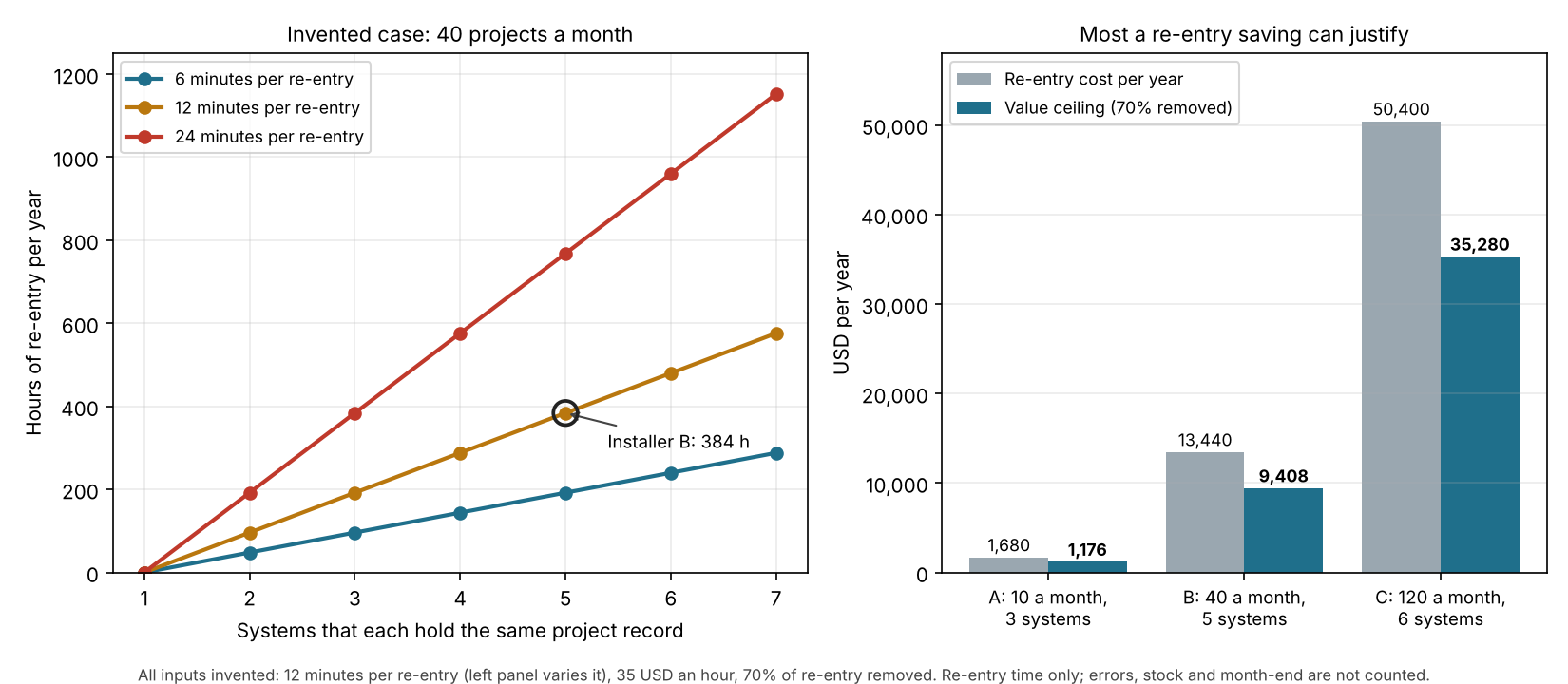
Figure 1. On example inputs, re-entry hours grow in a straight line with each extra system, and installer C’s re-entry cost of 50,400 USD a year is 30 times installer A’s.
The result depends on the time per record. For installer B, 6 minutes gives a ceiling of 4,704 USD a year and 24 minutes gives 18,816 USD. Count your own minutes before you trust any of these.
The ceiling is not a saving forecast. It counts typing time only and assumes you use or cut the freed hours. It leaves out errors, late invoices, stock mismatches and month-end work. Licences, implementation and admin time are costs against it. Compare it with a real quote. If the quote is higher, other benefits must cover the gap.
Check your own re-entry cost
Enter your project volume, the number of systems that hold the same record and your own time per record. The calculator opens with the example installer B.
If the calculator does not load, open the ERP re-entry calculator on its own page.
How solar software handles ERP functions
Of the five tools below, only the Jonas page, an energy and solar contractors page, uses solar wording. The other four are general or construction ERP tools, taken from company pages read in October 2026.
| Software | Finance and job costing | Stock and purchasing | Projects | Service and dispatch |
|---|---|---|---|---|
| Jonas Construction | Yes | Yes | Yes | Yes |
| Oracle NetSuite | Partly | Yes | Yes | Yes |
| Acumatica (Construction) | Yes | Not stated | Yes | Yes |
| Microsoft Dynamics 365 Business Central | Partly | Yes | Yes | Partly |
| FOUNDATION | Yes | Yes | Yes (add-on) | Yes (add-on) |
A "Yes" means the page names the function. "Partly" means it names only part. "Not stated" means the page read does not mention it.
- Jonas Construction: finance is "Accounting & Payroll" (General Ledger, AP, AR) and "Job Costing". Stock is "Inventory Management / Control" and "Purchase Order & Procurement". Projects is "Project Management". Service is "Service Management" and "Dispatch Scheduling". Licence wording: not stated.
- Oracle NetSuite: "Advanced Financials" covers budgeting and expense allocation. Job costing is not named. Inventory Management and Procurement are named. Projects is "Project Management". Service is "Field Service Management". No prices. Modules "can be added separately at any time during your contract".
- Acumatica (Construction): accounting, Job Costing, Budgets, Retainage and Payroll. Stock and purchasing are not in the construction list. Projects covers Project Billing, Change Orders and Daily Field Reports. Service is "Service Management". "Starting price under USD 1,500 monthly". "Unlimited Users". Pay for "the functionality you need and the data you use".
- Microsoft Business Central: finance is named. Job costing is not. Purchasing, inventory and warehouse management are in Essentials, as is project management. Service Order Management is in Premium only. "Licensed per user". The page prints two price sets, so none is quoted here.
- FOUNDATION: Job Costing, General Ledger, Payroll, AP and AR are built in. Purchase Orders and Subcontracts are built in. Inventory and Material Management is an add-on. Projects (ProjectHQ) and service (Service Dispatch) are add-ons. Built-in modules are bundled. Add-ons need "separate per-module or per-user licensing fees".
Page dates are in Sources. The Jonas page says: "Manage complex, multi-phase solar or energy projects with full visibility into costs". The others are general or construction tools, and companies may document more elsewhere. For the ledger side, see the best solar accounting software list.
How do you evaluate an ERP?
Test it on your last 10 jobs, from signed contract to final invoice. These questions tell a useful back office record from a heavy system you will not use.
- Which of the six areas above does it hold natively, and which need an add-on or a partner tool?
- How does a sold job arrive from your CRM or proposal tool? Ask about the API and webhooks.
- Can you invoice at milestones and see cost against each job before month-end?
- What is the licence basis: per user, per module, or by data used? See per-seat pricing and quote-only pricing.
- What does go-live involve, and who does it? See onboarding and implementation.
- Can the crew record time, stock and photos from the field, and can you export all job history if you leave?
Run the calculator first. If the re-entry ceiling is small, the case rests on stock control, job cost or month-end speed. Test those instead.
Common mistakes with ERP
FAQs
Is an ERP the same as accounting software?
No. Accounting software holds the ledger. An ERP holds the ledger plus areas such as stock, purchasing and projects in one database. Many ERPs include accounting as their core.
Do small installers need an ERP?
A small team can often manage without one. With 10 projects a month and 3 systems, this example’s ceiling for re-entry alone is 1,176 USD a year. An accounting package and a linked project tool may serve better.
Is there an ERP made for solar?
Yes, some suites are built for solar on an ERP platform, such as SolarSuccess by Blu Banyan, which works with NetSuite (Solar Power World, 2021, sponsored content). Most ERP pages read here are general or construction tools, so a solar suite narrows the choice.
How is an ERP priced?
The 4 pages that describe licensing use different bases: per user, bundled with add-ons, modules added separately, or by functionality and data used. Only Acumatica states a starting price on the page read. Ask each company for a written quote.
Related terms
- Accounting integration: how job and invoice data reach the ledger.
- Procurement and purchase orders: ordering equipment against a job.
- Inventory management: counts and locations for stock.
- Solar project management software: the staged job record.
Next step: run your own numbers in the calculator, then compare ERP tools built for solar back offices.
Sources
- Jonas Construction: Energy and solar contractors. Page metadata: last modified 4 December 2025. Checked October 2026.
- NetSuite: NetSuite modules. Dated 13 February 2026. Checked October 2026.
- Acumatica: Construction ERP. Page metadata: last modified 6 April 2026. Checked October 2026.
- Microsoft: Dynamics 365 Business Central licensing guidance. No date shown. Checked October 2026.
- FOUNDATION: The ultimate guide to FOUNDATION modules. Shows 10 September 2026. Checked October 2026.
- Checked but not used for any claim: a mirror of the NIST CSRC glossary entry. The official NIST page could not be opened, so this page makes no claim from it.
- Solar Power World: Blu Banyan builds software for solar installers on NetSuite. Dated 1 August 2021. Sponsored content by Blu Banyan, bylined to an Oracle NetSuite author. It names the SolarSuccess product. Checked October 2026.
Last updated 30 October 2026. Next scheduled review: 30 January 2027.