Key takeaways
- SOC is a percentage of some capacity, and sources pick different ones. An invented 4.5 kWh reads 45.0% of 10 kWh nominal and 50.0% of 9.0 kWh usable.
- Analog Devices (ADI) describes coulomb counting and the voltage method. It then looks at enhanced coulomb counting, which uses open-circuit voltage to set the starting SOC.
- A reserve is a floor for daily running. It is not an outage limit. Enphase says a battery with a 30% reserve will not discharge below 30% unless there is an outage.
- In the example day, a 20% and a 50% reserve both read 77.9% at 18:00. The stored energy above the floor differs. It is 5.79 kWh against 2.79 kWh.
- Limits change the trace. A 1.5 kW limit delays a full battery from 12:00 to 14:00, and an 80% ceiling cuts the day’s solar charging.
To model reserve and minimum SOC settings, see the best solar battery storage design software.
State of charge at a glance
SOC is the fuel gauge of a battery. It tells a system if it can charge or discharge.
| Item | Detail |
|---|---|
| Formula | SOC (%) = stored energy ÷ capacity × 100, with the capacity basis stated. HOMER Pro 3.16 calls the ratio to maximum capacity relative state of charge. |
| Unit / typical range | Percent, 0 to 100. Settings differ by maker. See the reserve section for two company defaults. |
| Where it matters | Backup promises, daily savings behaviour, monitoring screens and hourly simulation. |
| In software | Simulation tools take a minimum, maximum and starting SOC. Monitoring apps show the reading. |
Why does state of charge matter for installers?
SOC decides what a battery can do at a given hour. That sits behind each backup promise and savings claim. Energy Toolbase’s glossary says SOC "determines whether the system can charge or discharge".
It also ties to depth of discharge. ADI defines depth of discharge as "the percentage of the capacity that has been discharged relative to Crated". On one capacity basis, arithmetic from the two definitions gives SOC plus depth of discharge as 100%. Usable capacity and warranty limits are on depth of discharge. Sizing is on battery storage design.
Percent of what? The capacity basis
One amount of stored energy gives different percentages on different bases. Sources do not agree on the base. The datasheet or help page says what 100% means.
| Source | What the percentage is of |
|---|---|
| Analog Devices article | SOC is "the percentage of the releasable capacity relative to the battery rated capacity". |
| HOMER Pro 3.16 manual | Relative SOC is "the ratio of the current absolute state of charge to the maximum capacity of the storage bank". |
| Energy Toolbase glossary | "The percentage of energy currently stored in the battery relative to its full capacity." |
| Aurora Sales Mode help | Backup Allocation is a "% of usable capacity". |
| Enphase owner’s guide | Reserve capacity is "the percentage of your battery’s capacity that you want to reserve for outages". |
Suppose 4.5 kWh is stored in a battery with 10 kWh nominal and 9.0 kWh usable capacity (example). It reads 45.0% of the nominal figure and 50.0% of the usable figure. HOMER’s absolute state of charge is the energy itself in kWh. So it has no base.
How is state of charge estimated?
A shown percentage is an estimate. ADI describes two basic methods, coulomb counting and the voltage method.
- Coulomb counting (also ampere-hour counting or current integration) is "the most common technique for calculating the SOC". The article says it needs exact current readings. It says losses and self-discharge "cause accumulating errors". A wrong starting SOC can also throw it off.
- Voltage method: it "converts a reading of the battery voltage to the equivalent SOC value". The article says voltage is "more significantly affected by the battery current". It says the need for a stable voltage range makes the method "difficult to implement".
ADI then looks at enhanced coulomb counting. It says open-circuit voltage can set the starting SOC "if a long period rest time is available".
What do reserve and floor settings do?
A reserve is the lowest SOC the battery uses in daily running. That keeps energy back for an outage. Three company pages describe it in different ways.
| Product | Setting |
|---|---|
| Tesla Powerwall 3 | Backup Reserve |
| Enphase IQ Battery 5P | Reserve capacity. Battery shutdown level |
| SolarEdge battery | Backup Only mode |
- Tesla: It "determines how much of Powerwall’s stored energy will automatically be saved for backup power". The setup guide gives a 20% default. The support page gives a 0% to 80% slider and a Max Backup option, 100% for up to 72 hours. It says the battery "may discharge below your set reserve percentage" in a long outage. It also says a 100% reserve "prevents use of Self-Powered mode or Savings mode".
- Enphase: With a 30% reserve the batteries "will not discharge below 30%" unless there is an outage. You cannot adjust reserve in the Full Backup profile. The shutdown level is separate. Its default is 10%. At that level the battery shuts down and later restarts "using the conserved energy".
- SolarEdge battery: "Backup Only mode keeps the battery fully charged." After the grid returns, the battery recharges to 100%.
So treat a reserve as a daily floor. Tesla and Enphase both say an outage can use it. See solar-plus-storage for modes and backup power for hours of supply.
Worked example: one day of state of charge
An example battery runs through one example day. The battery is 10 kWh nominal and 3 kW. The 90% round trip splits equally between charge and discharge. It starts at 20% and the day uses hourly steps. Solar charges first. Nothing charges from the grid. The percentage is stored energy over nominal capacity.
Hourly inputs, kWh per hour
| Hourly input (kWh per hour) | Values |
|---|---|
| Load, 00:00 to 11:00 | 0.6 0.5 0.5 0.5 0.5 0.6 0.9 1.3 1.1 0.8 0.7 0.7 |
| Load, 12:00 to 23:00 | 0.8 0.8 0.9 1.1 1.6 2.4 3 2.8 2.2 1.6 1 0.7 (day total 27.6) |
| Solar, 00:00 to 11:00 | 0 0 0 0 0 0.1 0.5 1.4 2.6 3.6 4.3 4.7 |
| Solar, 12:00 to 23:00 | 4.8 4.4 3.7 2.6 1.4 0.5 0.1 0 0 0 0 0 (day total 34.7) |
Case A is the base. Compare each other row with case A.
Table 1. Each case changes one setting from case A, except case B, which changes floor and start together. All inputs are example. Stored kWh is battery-side energy.
| Case | Highest SOC (first reached) | Back at floor | SOC at 18:00 |
|---|---|---|---|
| A. 20% floor, 3 kW, 90% | 100% (12:00) | 20:00 | 77.9% |
| B. 50% floor, 50% start | 100% (11:00) | 19:00 | 77.9% |
| C. 1.5 kW limit | 100% (14:00) | 22:00 | 82.1% |
| D. 80% ceiling | 80% (11:00) | 20:00 | 57.9% |
| E. 80% round trip | 100% (12:00) | 20:00 | 76.5% |
| F. 95% round trip | 100% (12:00) | 20:00 | 78.5% |
The same cases, with grid flows.
| Case | Stored kWh above floor at 18:00 | Import / export (kWh) |
|---|---|---|
| No battery | - | 16.80 / 23.90 |
| A. 20% floor, 3 kW, 90% | 5.79 | 9.21 / 15.47 |
| B. 50% floor, 50% start | 2.79 | 12.06 / 18.63 |
| C. 1.5 kW limit | 6.21 | 9.21 / 15.47 |
| D. 80% ceiling | 3.79 | 11.11 / 17.58 |
| E. 80% round trip | 5.65 | 9.64 / 14.96 |
| F. 95% round trip | 5.85 | 9.00 / 15.69 |
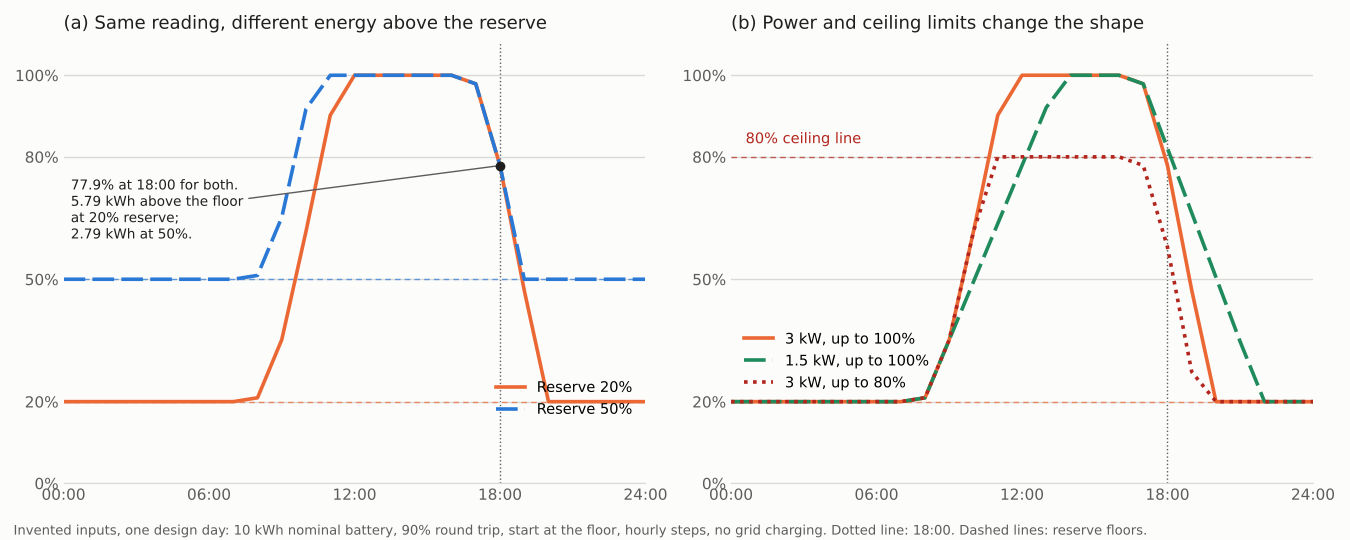
Figure 1. A 20% and a 50% reserve read 77.9% at 18:00, yet hold 5.79 and 2.79 kWh above their floors.
- The reading hides the reserve. Cases A and B both read 77.9% at 18:00, as both stayed at 100% until 16:00. Case B has 3.00 kWh less to give before it hits its floor. In case A, 5.79 kWh stored gives about 5.49 kWh at the home after discharge losses (94.9%).
- A power limit shifts the timing. At 1.5 kW the battery is full at 14:00 and back at its floor at 22:00. The day’s import is the same 9.21 kWh as case A. In the 18:00 hour it imports 1.40 kWh, where case A imports 0.00.
- A ceiling cuts the day’s work. An 80% ceiling leaves 11.11 kWh of import. Case A has 9.21 kWh. The ceiling also cuts solar charged into the battery from 8.43 to 6.32 kWh.
- Efficiency shifts the reading less. An 80% round trip gives 76.5% at 18:00 and a 95% round trip gives 78.5%.
This is one day with hourly steps and no ageing or temperature effect.
State of charge day calculator
Enter 24 hourly values for load and solar. Then add the battery settings.
How solar software handles state of charge
Five of the six tools below document a reserve or minimum-SOC setting on their own pages, and HOMER Pro only partly. A row says Yes only when the company’s own page names the setting or output. Tools that model these settings are in the best solar battery storage design software. For live charge readings, see the best solar monitoring software.
| Software | Names a reserve or minimum-SOC setting? | Method |
|---|---|---|
| Aurora Solar | Yes | Modelled |
| OpenSolar | Yes (minimum charge field) | Modelled |
| Solargraf | Yes (reserve wording) | Modelled |
| SAM (PySAM docs) | Yes | Modelled |
| HOMER Pro | Partly | Modelled |
| Enphase App | Yes | On-site monitoring |
Yes covers a named reserve or minimum setting. Partly: the manual defines relative SOC but shows no minimum SOC input.
- Aurora Solar: Sales Mode help: "Backup reserve enables you to specify a backup percentage to reserve for use in case of outages". Backup Allocation is set as a "% of usable capacity". The Backup Duration page ends a run "if the battery reaches its minimum state of charge". Pages show no date.
- OpenSolar: The battery control scheme table has a "Minimum stage of charge (%)" field, as printed, and a maximum charge and discharge rate in kW. Page shows no date. The text read does not use the words state of charge.
- Solargraf: The Solargraf 3D battery guide says the Gear icon edits the target backup duration or "battery reserve". It names a reserve setting, not SOC. Published 29 Aug 2024. It does not use the words state of charge.
- SAM (PySAM docs): The BatteryStateful model takes inputs "Minimum allowed state-of-charge [%]", "Maximum allowed state-of-charge [%]" and "Initial state-of-charge [%]". An output is "State of Charge [%]". PySAM docs version 3.0.1. The page covers one battery model.
- HOMER Pro: The manual defines absolute SOC in kWh and relative SOC as a ratio. It says it reports relative SOC. Version 3.16 manual, no date shown. The pages read show no minimum SOC input.
- Enphase App: The owner’s guide lets a backup-enabled system edit reserve capacity and the shutdown level. It says to check the Enphase App or Installer Platform for charge status. Colour moves from blue to green as the state of charge rises. Guide USG-00018-4.0, July 2025. It names the Enphase App and Installer Platform.
Common mistakes with state of charge
FAQs
Is state of charge the same as depth of discharge?
No. They are opposite readings. ADI defines SOC as releasable capacity against rated capacity. It defines depth of discharge as capacity discharged against rated capacity. On one basis they add to 100%. See depth of discharge for warranty and usable-capacity limits.
What state of charge should a home battery be kept at?
There is no universal target. A higher reserve gives more outage energy and less daily savings (case B above). Tesla’s default Backup Reserve is 20%, and Enphase’s default shutdown level for the IQ Battery 5P is 10%.
How does a battery know its state of charge?
It estimates it. ADI describes coulomb counting, which adds up current over time. It also describes a voltage method, which converts a voltage reading. Each has limits: coulomb counting builds up errors from losses and self-discharge, and the voltage method is hard to use when the current changes.
Why can two batteries show the same state of charge but hold different energy?
The percentage does not show the floor. Two batteries can read the same while one holds less energy above its reserve. The worked example on this page shows this case with two reserve settings.
Related terms
- Depth of discharge: the share of capacity used, with usable capacity and warranty limits.
- Solar-plus-storage: battery operating modes and what each does to the bill.
- Round-trip efficiency: energy out over energy in.
- Hybrid inverter: the unit that often controls battery charging and its SOC limits.
Next step: state the SOC basis and reserve on every battery quote, then compare tools that model them in the best solar battery storage design software.
Sources
Every source was checked in October 2026.
- Analog Devices (ADI), SOC and SOH estimation techniques, 31 March 2023.
- HOMER Pro 3.16 manual: absolute state of charge and relative state of charge, no date shown.
- Energy Toolbase glossary, no date shown.
- NLR (formerly NREL) PySAM battery model, documentation version 3.0.1.
- Sandia, SAND2013-7084, storage protocol, printed August 2013.
- Tesla, Powerwall 3 setup guide, modified 20 January 2026, and Tesla, Backup Reserve, no date shown (checked 30 October 2026).
- Enphase, IQ Battery 5P owner’s guide, USG-00018-4.0, July 2025.
- SolarEdge, battery mode control note, version 1.5, June 2025.
- Aurora help: battery storage in Sales Mode and backup duration calculations, no dates shown.
- OpenSolar, battery control scheme, no date shown, and Solargraf, battery in 3D, published 29 August 2024.
Last updated 30 October 2026. Next scheduled review: 30 January 2027.