Key takeaways
- The mode, not the hardware, sets the result. On our invented day two modes import the same 15.56 kWh, but time-of-use leaves 3.85 kWh in the peak window and self-consumption leaves 6.70 kWh.
- Full backup runs the example panel 14.9 hours at the worst time, but it saves nothing on energy.
- Reserve is the dial. At 20% (Tesla’s default, our assumption) the worst case drops to 2.5 hours.
- Companies give the same modes different names. Examples are Self-Powered, Self-Consumption profile and Maximize Self Consumption.
- Storage changes the utility form. PG&E’s non-export storage form asks for the inverter nameplate and the grid-charging rule.
To model these modes in software, see the best solar battery storage design software.
Solar-plus-storage at a glance
A design has three choices. Where does the battery connect? Which mode does it run? What must the utility form say?
| Item | Detail |
|---|---|
| Layouts | AC-coupled (battery on the AC side) or DC-coupled (battery on a hybrid inverter’s DC side). |
| Modes | Self-consumption, time-of-use shifting and backup. Makers use different names. |
| Inputs that set the mode | Load shape sets surplus (self-consumption). Critical loads set reserve (backup power). Tariff decides if time-of-use pays (time-of-use optimisation, net metering). |
| What changes in approval | Battery data on the plan set and the utility form, charging and export rules, and storage listings and fire-code checks. |
| In software | Proposal and design tools let you pick a mode. Hourly runs show the result. |
Why solar-plus-storage matters for installers
You can sell the same battery as savings or as insurance. The setting decides which one the customer gets. A proposal that models one mode while the battery runs another gets the bill and backup time wrong.
Sizing is a separate step. See battery storage design. This page keeps the battery fixed. It changes how the battery runs.
How do AC-coupled and DC-coupled layouts connect?
Aurora’s help says an AC-coupled battery connects "on the AC side of the system via a storage-only inverter". A DC-coupled battery connects "to a hybrid inverter on the DC side".
In our model, both layouts can run all three modes. Coupling changes the path the power takes. OpenSolar’s help says it can model "the benefits of using a DC-connected battery for PV system oversizing". For efficiency and clipping, see our AC vs DC coupling page. For grid-tie basics, see grid-connected system. For inverter limits, see inverter.
What do the three operating modes do?
We group the modes into three. Self-consumption stores surplus solar. It uses it when load tops solar. Time-of-use holds it for the costly hours. Backup keeps the battery full for an outage. Makers use their own names. The table shows them.
| Mode | Tesla Powerwall 3 | Enphase IQ Battery 5P | SolarEdge |
|---|---|---|---|
| Self-consumption | "Self-Powered" | "Self-Consumption profile" | "Maximize Self Consumption" |
| Time-of-use | "Time-Based Control" | "Savings profile" | "Time of Use" |
| Backup | "Backup Reserve". "Backup Only" | "Full Backup profile" | "Backup Only" |
What each company says about its modes:
- Tesla Powerwall 3: "Self-Powered" (default) stores solar not used during the day to power the home at night. "Time-Based Control" uses smart charging and discharging to maximise savings. The setup guide says "Backup Reserve" sets the share saved for backup, default 20%. The Australian support page lists "Backup Only": 100% of the Powerwall reserved for backup. Read: Powerwall 3 Device Setup Guide topic, modified 20 January 2026. Tesla Australia support page, undated.
- Enphase IQ Battery 5P: the "Self-Consumption profile" always prioritises use or storage of produced solar. The "Savings profile" uses stored energy when electricity rates are highest. The "Full Backup profile" stores 100% of battery energy for an outage, and reserve is not adjustable. Read: owner’s guide USG-00018-4.0, July 2025 (Australian edition).
- SolarEdge: "Maximize Self Consumption" uses all available solar to power the home and charge the battery. "Time of Use": provide solar or stored energy when import rates are high. Grid charging only off-peak, with no solar, and "if permitted". "Backup Only" keeps the battery fully charged, for backup sites only. Read: battery mode control application note, version 1.5, June 2025.
Tesla’s Australian support page calls its time-of-use modes "Advanced - Time-Based Control (Balanced)" and "(Cost Saving)". SolarEdge also lists "Manual Control". It sets charge and discharge times. Its Time of Use mode needs firmware 4.20.36 or higher. The note also lists an external import/export meter.
Worked example: one day, three modes
We ran one example system through one design day. The load and the 6 kW solar day come from our battery storage design page. They are load 39.1 kWh and solar 29.38 kWh. We example everything else below.
| Input | Value (example unless stated) |
|---|---|
| Battery | 10 kWh delivered to the home, 5 kW, 90% round trip AC to AC, split equally between charge and discharge. |
| Reserve | 20% in self-consumption and time-of-use. 100% in full backup. Tesla’s default reserve is 20%. |
| Peak window | 18:00 to 22:00, an example two-price tariff. |
| Prices (example currency units per kWh) | Off-peak 1, peak 3, export credit 0.4. |
| Rules | Solar charges the battery first, then exports. No grid charging. The day repeats until the battery’s start level settles. |
| Backup panel | The example panel from the sizing page: 14.36 kWh a day. |
Table 1. One design day, steady state. Energy in kWh unless stated. Backup hours assume no solar and a released reserve.
| Result | No battery | Self-consumption | Time-of-use | Full backup |
|---|---|---|---|---|
| Imported | 23.56 | 15.56 | 15.56 | 23.56 |
| Imported in the peak window | 11.85 | 6.70 | 3.85 | 11.85 |
| Exported | 13.84 | 4.95 | 4.95 | 13.84 |
| Solar not exported (%) | 52.9 | 83.1 | 83.1 | 52.9 |
| Battery to home | 0.00 | 8.00 | 8.00 | 0.00 |
| Net energy cost for the day (example currency units) | 41.72 | 26.98 | 21.28 | 41.72 |
| Backup panel hours, worst outage start | 0 | 2.5 | 2.5 | 14.9 |
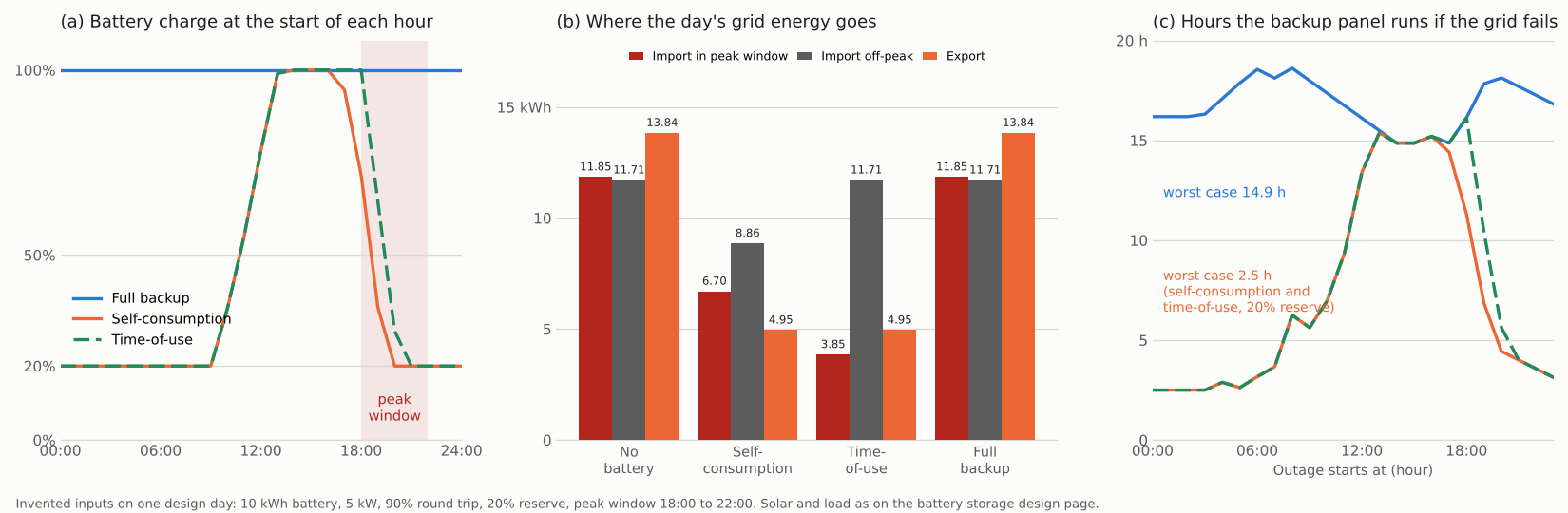
Figure 1. On one example day, time-of-use moves 2.85 kWh of import out of the peak window. Full backup gives 14.9 hours of backup, against 2.5 hours at a 20% reserve.
Both modes move the same energy. Self-consumption starts to discharge at 16:00. That is the first hour when load tops solar. It is also when the battery holds energy above the reserve. Less is left at 18:00. Time-of-use waits for the window.
Full backup never cycles the battery. Its flows match the no-battery column. It gives 14.9 to 18.6 hours of backup at any start time. Backup hours assume no solar. They also assume the reserve is released.
Table 2. Reserve changes both results. Time-of-use mode, same day.
| Reserve | Peak-window import (kWh) | Worst-case backup hours |
|---|---|---|
| 0% | 1.85 | 0.0 |
| 20% | 3.85 | 2.5 |
| 50% | 6.85 | 6.4 |
| 80% | 9.85 | 11.9 |
| 100% | 11.85 | 14.9 |
At 0% nothing is held back for backup, so the worst-case backup is 0.0 hours. At 100% the battery never discharges for savings. So the peak-window import equals the no-battery 11.85 kWh. This is one day, hourly. It has no clipping or coupling.
Mode comparison calculator
Enter 24 hourly values. Then set the battery and the peak window.
What changes in permitting and interconnection?
A battery adds storage data to the plan set and the utility form. It adds listing checks. Fire-code checks come too. Rules vary, so the examples below come from one utility and one national laboratory.
- Charging and export (PG&E, California): its form for non-export storage up to 500 kW (March 2023) allows only "Non-Exporting battery storage". It asks for the inverter’s gross nameplate in kW. It says there is "no limitation on an energy storage device’s kWh capacity rating". Appendix D says the storage "will not consume power" from the utility system. Or it sets a kW limit.
- Review scope (PG&E, 1 September 2023): its charging guide says Operational Mode 1, "No Grid Charging", avoids the charging-load review. PG&E still reviews the discharging impacts. Rules differ if the storage is added to a generator on net energy metering. They also differ if it comes with one.
- Listings and fire code (PNNL, 28 July 2026): the deck lists UL 9540 and UL 9540A for design and testing. It lists NFPA 855 for installation and operation. The deck says the 2026 NFPA 855 edition adds "new risk assessment and AHJ coordination requirements". Energy-Storage.News also advises early AHJ coordination. This page does not cite NEC article numbers. The edition your AHJ has adopted applies.
- Drawings: show the battery on the single line diagram. Show its inverter and the disconnects too. A 2017 PNNL and Sandia review checklist includes disconnects for all energy sources. See permit plan set and interconnection application.
The mode you sell must match what you file. If a proposal promises grid charging but the form says none, one of them is wrong. For plan set tools, see the best solar permitting software.
How solar software handles solar-plus-storage modes
Aurora, OpenSolar and Solargraf let you pick a storage mode and then model it. PVsyst is rated Partly because it names backup as an application, not a strategy. A "Yes" means the company’s help says you can pick a mode and the tool models it.
| Software | Can you select and model a storage mode? | Method |
|---|---|---|
| Aurora Solar | Yes | Modelled |
| OpenSolar | Yes | Modelled |
| Solargraf | Yes | Modelled |
| PVsyst | Partly | Modelled, hourly |
- Aurora Solar
- How and where: Sales Mode storage page: consumption schedule Self-Consumption or Energy Arbitrage. It asks "Does this battery provide backup?" and sets a Backup Allocation as a % of usable capacity. "How to Work with storage in Aurora" lists Backup (Essentials, Appliances, Whole Home), Self-consumption and Energy arbitrage.
- Notes: Sales Mode page undated. The other page shows 14 April 2026. Read October 2026. Hybrid inverters behave like inverters in simulations (storage types page, no date).
- OpenSolar
- How and where: Control schemes: Self-consumption, Minimize Grid Import Cost, Maximize Savings and Peak Demand Shaving, plus an NZ-only scheme. Default is a basic load-following scheme.
- Notes: Backup and outage modelling not mentioned on the two pages read. One page shows 7 May 2026, the other no date. Read October 2026.
- Solargraf
- How and where: Battery Design tool mode menu: Backup during outages, Self-consumption and Savings (with export). Savings needs a time-of-use tariff on the project. Backup duration target and reserve are set as defaults.
- Notes: Pages published 3 March 2022 and 29 August 2024. AC and DC coupling not mentioned. Read October 2026.
- PVsyst
- How and where: Help lists self-consumption, power shifting, peak shaving and weak grid recovery. Backup is named as an application, not a strategy.
- Notes: Page undated. Power shifting added in version 8.0.17. Coupling not named. Read October 2026.
More tools are in the best solar battery storage design software list and the best commercial solar proposal software list.
Common mistakes with solar-plus-storage
FAQs
Is solar-plus-storage the same as adding a battery to existing solar?
Yes, a battery can be added to existing solar. Aurora’s help says an AC-coupled battery uses a storage-only inverter, and a DC-coupled battery needs a hybrid inverter. So a retrofit starts from the inverter already on the roof. See AC vs DC coupling.
Do I need a utility form to add a battery to existing solar?
At PG&E, yes. Its Interconnection Agreement for Non-Export Storage Generating Facilities 500 kW or Less covers a battery that does not export. It asks for the inverter’s gross nameplate in kW and the grid-charging rule. Other utilities have their own forms, so check yours.
Which mode should the system run?
The one that fits the tariff and the outage promise. In our example, time-of-use mode left 2.85 kWh less peak-window import than self-consumption. A flat tariff would show no such gap. Full backup saves nothing on the bill.
Does the battery charge from the grid?
Only if the mode, the settings and the utility all allow it. SolarEdge says Time of Use charges from the grid only off-peak. That is with no solar, and "if permitted". PG&E’s non-export form asks the applicant to state no grid charging. Or it asks for a kW limit. Our example never charges from the grid.
How long does a reserve last in an outage?
Hours rise with the reserve. In our example, a 20% reserve is 2.00 kWh delivered. It runs the example panel 2.5 hours at the worst time. A 50% reserve runs it 6.4 hours.
Related terms
- Battery storage design: choosing battery kWh and kW for a goal.
- AC coupling vs DC coupling: where the battery joins the system.
- Grid-connected system: PV tied to the utility network.
- Net zero: a customer goal that the choice of battery mode can help or hurt.
Next step: before you quote a battery, set the mode in a tool from the best solar battery storage design software list.
Sources
We checked every source below in October 2026.
- Tesla, Powerwall 3 Device Setup Guide, operation settings, modified 20 January 2026.
- Tesla Australia, Powerwall Modes of Operation with Solar, undated.
- Enphase, Energy System with IQ Battery 5P owner’s guide, USG-00018-4.0, July 2025.
- SolarEdge, battery mode control application note, version 1.5, June 2025.
- PG&E, Interconnection Agreement for Non-Export Storage Generating Facilities 500 kW or Less, March 2023.
- PG&E, Guide to Energy Storage Charging Issues for Rule 21 Generator Interconnection, 1 September 2023.
- PNNL, Energy Storage Codes and Standards for Decisionmakers, 28 July 2026.
- PNNL and Sandia, Energy Storage System Safety: Plan Review and Inspection Checklist, April 2017.
- Aurora Solar help: storage system types and outputs, battery storage in Sales Mode and how to work with storage.
- OpenSolar support: battery control scheme and how OpenSolar models battery storage.
- Solargraf help: battery sections in your WebQuote and adding a battery in Solargraf 3D.
- PVsyst help, grid systems with storage.
- Energy-Storage.News, NFPA 855: 2026 edition updates (no date printed, checked 30 October 2026).
- Solar and load hours: NREL TMY3 file, station 723170, through pvlib, as on battery storage design.
Last updated 30 October 2026. Next scheduled review: 30 January 2027.