Key takeaways
- A rule has 3 parts: a trigger, conditions and actions. Delays and human steps are common additions.
- On an invented month of 40 contracts, a 6-step handoff costs 34 manual minutes each, or 22.7 h. A rule doing 5 of the 6 steps leaves 8.7 h.
- If the trigger matches every contract, steps nobody does fall from 7.2 to 3.2 a month (example miss rates).
- On the same example inputs, a trigger that misses 30% of contracts, with half the misses unnoticed, leaves 33.5 steps nobody does. Hours saved still read 10.0 h, because steps nobody does cost no time.
- JobNimbus caps active automations by plan: 10 on Essentials (the period is unclear), 100 on Premium and unlimited on Enterprise (pricing page, October 2026).
To compare rule builders on triggers, conditions and run history, see the best solar workflow automation software.
Workflow automation at a glance
Workflow automation moves routine handoffs from people to rules. It does not decide anything a rule cannot state.
| Item | Detail |
|---|---|
| Parts | Trigger, condition, action. Many tools add a delay or wait step. |
| Trigger types documented | Zuper: platform event, schedule, webhook. HubSpot: filter, event, schedule, webhook. |
| Where it matters | Lead handoff, design and permit tasks, customer messages, finance alerts, service jobs. |
| In software | CRMs, project tools and field service tools. See the table below. |
Why workflow automation matters for installers
A signed contract sets off about six admin handoffs: project, design task, survey call, welcome message, permit task and deposit invoice. A missed handoff, such as a permit task nobody created, delays the job and the cash that follows. A rule does the repeat work the same way each time, but only for events it matches.
It also changes where errors hide. A person forgets a step now and then. A rule with a wrong trigger can skip every matching job without any warning. The example below shows both effects on example numbers.
What are the parts of a workflow automation rule?
A rule has a trigger, one or more conditions and one or more actions. Engagedly is an HR product, not solar, so these terms are generic. Its help page defines them: a trigger "starts the workflow when a specific event occurs", and a condition "filters who the workflow acts on". An action "is the task the workflow performs". A delay "pauses the workflow execution for a set duration".
- Trigger: the event that starts the rule. Zuper’s documentation names three: platform events such as job or invoice changes, a schedule, and an incoming webhook. HubSpot lists filter-based, event-based, schedule-based and webhook-based enrolment triggers. See webhooks and the API page for outside triggers.
- Condition: a test that must pass. Zoho CRM’s FAQ allows up to 10 conditions per rule in Enterprise and Ultimate and 5 in Standard and Professional.
- Action: what the rule does, such as creating a task or sending a message. A rule that assigns leads is lead routing. One that sends jobs to crews is scheduling and dispatch.
- Human step: a task the rule creates but a person must finish. Stage gates in an installation workflow use this.
Worked example: one signed contract, 6 steps
All inputs are example. An installer signs 40 contracts a month. After each signature, 6 admin steps follow. The rule below does 5 and leaves the survey call to a person.
| Step | Manual minutes | Done by the rule? |
|---|---|---|
| 1. Create project from signed contract | 6 | Yes |
| 2. Assign design task to designer | 4 | Yes |
| 3. Book site survey with customer | 12 | No, a phone call |
| 4. Send welcome message and checklist | 5 | Yes |
| 5. Create permit task once design is approved | 4 | Yes, after a wait |
| 6. Tell finance to invoice the deposit | 3 | Yes |
The 6 steps take 34 minutes by hand, so 40 contracts take 22.7 h. The rule covers 22 of those minutes. A person adds 1 minute of review per contract. We assume a 3% chance that a hand step is missed and a 1% chance for a rule step that fires. Building and testing the rule takes 10 h. Upkeep takes 2 h a month. A missed step is a step nobody does.
Hours saved is manual hours minus rule hours minus upkeep. Break-even is build hours divided by hours saved a month.
| Case | Admin hours a month | Steps nobody does | Hours saved after upkeep | Break-even on build time |
|---|---|---|---|---|
| By hand | 22.7 | 7.2 | 0 | Not applicable |
| Rule matches every contract | 8.7 | 3.2 | 12.0 | 0.8 months |
| Trigger misses 30%, all noticed and done by hand | 12.9 | 4.4 | 7.8 | 1.3 months |
| Trigger misses 30%, half noticed | 10.7 | 33.5 | 10.0 | 1.0 months |
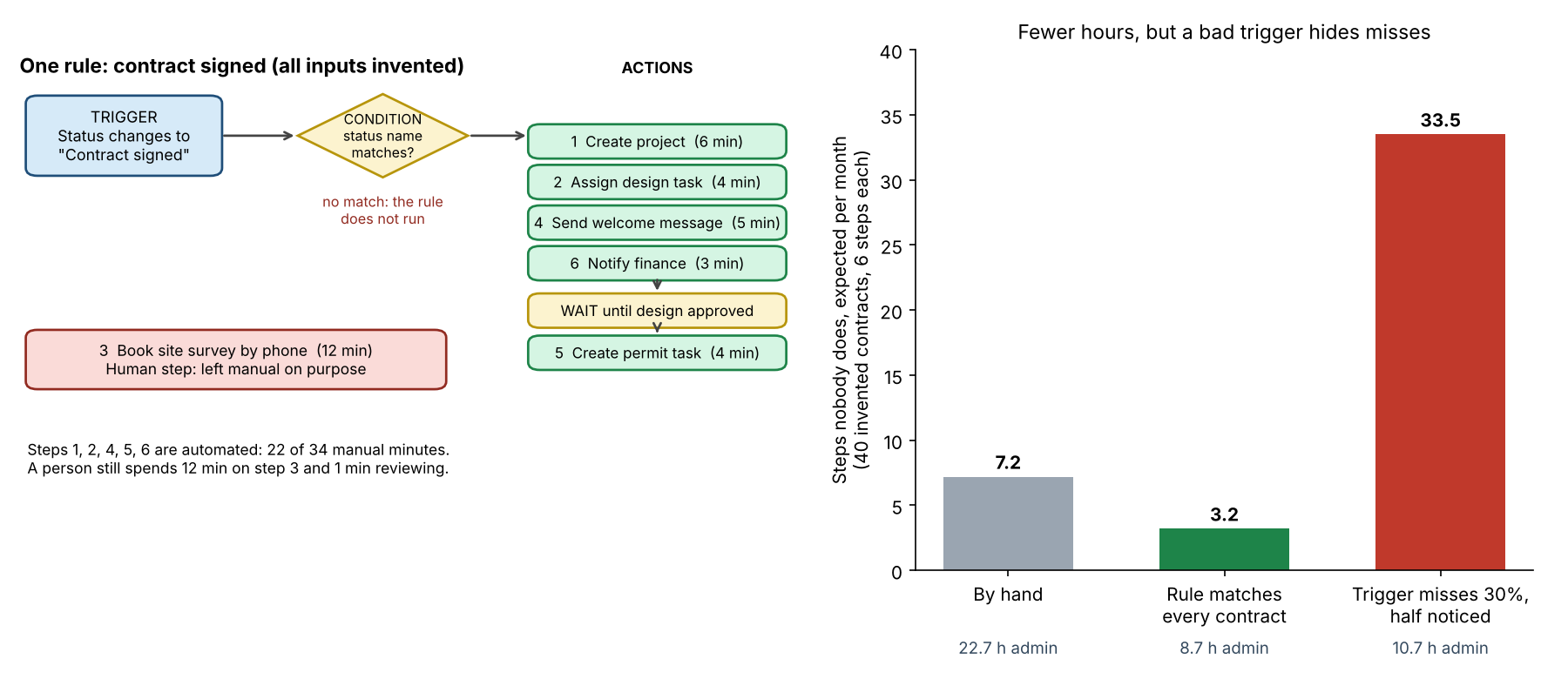
Figure 1. On example inputs, a rule that fires every time cuts missed steps from 7.2 to 3.2. A trigger that misses 30% of contracts raises them to 33.5.
The last row is the trap. Of 12 unmatched contracts, 6 get no rule steps and only the survey call by hand. That is 6 contracts times 5 steps, or 30 steps never done. Hours saved still look good at 10.0 h. Work nobody does takes no time. Track steps done as well as hours saved.
A realistic cause is a status name. JobNimbus’s new-lead help page notes that status names may vary by workflow. A rule written for "Contract signed" will not fire in a pipeline that names it "Signed".
Check your own automation
Enter your contracts, step minutes, miss rates and trigger coverage. The calculator returns hours, expected missed steps and break-even. It loads the example above, and every default is example.
If the calculator does not load, open the workflow automation calculator on its own page.
How solar software handles workflow automation
Of the six tools read in October 2026, only Zuper’s documentation shows trigger types, conditions, actions and a run history. Zuper’s pages carry no dates. One item, Zuper’s concurrency limit, is marked pending confirmation in its docs.
| Software | Triggers | Conditions or branches | Actions and delays | Run history or plan limits |
|---|---|---|---|---|
| Zuper | Yes | Yes | Yes | Yes |
| HubSpot Sales Hub | Yes | Yes | Yes | Partly |
| Zoho CRM | Yes | Yes | Yes | Not stated |
| JobNimbus | Partly | Yes | Partly | Partly |
| Coperniq | Yes | Partly | Partly | Not stated |
| Sunbase | Partly | Not stated | Partly | Not stated |
Not stated means the company page we cite does not say. Partly means the page names the feature but gives little detail, or is a marketing page. The notes below hold the company wording and sources.
Zuper (docs: Workflow overview and Triggers, undated)
- Triggers: Yes. Zuper event, scheduled and webhook triggers.
- Conditions: Yes. The Triggers page lets an event trigger "Set conditions". The overview mentions IF/Else and Split nodes without defining them.
- Actions: Yes. Nodes are steps "such as sending emails, updating attributes", with API calls via an HTTP node. A Wait node pauses.
- Run history or limits: Yes. "Each workflow run is tracked in the Execution History tab", with Success, Failed, In Progress and Queued. A concurrency limit is stated as "pending confirmation".
HubSpot Sales Hub (help pages last updated 16 October and 25 September 2026)
- Triggers: Yes. Filter, event, schedule and webhook enrolment triggers.
- Conditions: Yes. "Use branches to direct your enrolled record down specific workflow paths based on set criteria."
- Actions: Yes. "Use delays to add a pause between actions". "Automatically create new tasks."
- Run history or limits: Partly. Available actions "depend on your subscription". Run history not described on the pages read.
Zoho CRM (workflow FAQ, dated 13 January 2022)
- Triggers: Yes. A record action (create, edit, delete) or the date and time of a record.
- Conditions: Yes. Up to 10 conditions per rule in Enterprise and Ultimate, 5 in Standard and Professional.
- Actions: Yes. Instant actions include email notifications, tasks, field updates, webhooks and custom functions, with limits by edition. Scheduled actions are in all paid editions.
- Run history or limits: Not stated.
JobNimbus (new-lead help page, undated, pricing page, 2026 copyright)
- Triggers: Partly. The page shows an event-based trigger on a new Contact.
- Conditions: Yes. The example tests that Status is New.
- Actions: Partly. The example creates a task. Assignees are picked when it is built.
- Run history or limits: Plan limits cap active automations. Essentials shows "10/mo max" in one table and "10 max" in another, so the period is unclear. Pro is 30 max, Premium 100 max and Enterprise unlimited. Run history not described.
Coperniq (support page and products page, read October 2026, both now gone)
- Triggers: Yes, as read in October 2026. Work order or stage completion or transition.
- Conditions: Partly, as read in October 2026. The products page claimed "Conditional Workflows". The support page named no conditions.
- Actions: Partly, as read in October 2026. The support page listed SMS or email messages. No delays described.
- Run history or limits: Not stated.
- Both cited pages returned a 404 when re-checked in November 2026. Coperniq’s current home page instead lists "Workflows with Conditional Logic" and a "Workflow AI Copilot" under the heading "Describe any business process. Then enforce it", with no detail on triggers, delays or run history. Treat the October quotes above as superseded and check the live site before relying on them.
Sunbase (solar CRM page, undated)
- Triggers: Partly. "Trigger follow-up tasks when an opportunity reaches a new sales stage."
- Conditions: Not stated.
- Actions: Partly. "Automate assignments, reminders, follow-up tasks, stage-based actions and internal notifications."
- Run history or limits: Not stated.
HubSpot and Zoho CRM are general CRMs, not solar tools. Zoho’s limits come from an older FAQ and may have changed. Other pages from these companies may say more, so put these questions to each company:
- Which trigger types exist, and can a rule start from an outside event?
- Can a condition test more than one field, and what happens when none match?
- Can I see every run, its status and why it failed?
- How does the tool stop a rule that edits its own trigger from looping?
- Does my plan cap rules, runs or actions?
- Who owns each rule if its builder leaves?
To see which solar tools offer triggers, conditions and run history, read the best solar workflow automation software list.
Common mistakes with workflow automation
FAQs
How is workflow automation different from an API or an integration?
An API or integration moves data between tools. A workflow rule decides what to do when something happens. Rules often use an API or webhook as their trigger or action.
What should I automate first?
Start with steps that repeat on every job, follow clear rules and take little judgement. In the example, 5 of 6 steps qualify, and the survey call stays manual. This is our suggestion, not a company rule.
How do I know a rule ran?
A run history shows it. Zuper’s documentation describes an Execution History tab with a status for each run. For tools that do not document one, check outcomes, such as tasks created, against contracts signed.
Do plans limit how many automations I can have?
Some do. JobNimbus’s pricing page caps active automations by plan, from 10 on Essentials (the pricing page does not make the period clear) to unlimited on Enterprise. HubSpot says available actions depend on the subscription. Count the rules you need before you pick a plan.
Related terms
- Solar CRM: the system that holds leads, deals and projects that rules act on.
- Speed to lead: how fast a new enquiry gets a first reply, a common rule target.
- Field service management: software for jobs, crews and visits after install.
Next step: before you automate a handoff, test its trigger against a real contract. Then shortlist rule builders from the best solar workflow automation software.
Sources
- Engagedly help: trigger, condition, action and delay, copyright 2026 only (checked October 2026).
- Zuper docs: Workflow overview and Triggers, no dates printed (checked October 2026).
- HubSpot: create workflows, last updated 16 October 2026, and choose your workflow actions, last updated 25 September 2026 (checked October 2026).
- Zoho CRM help: FAQs on Workflow, title dated 13 Jan 2022 (checked October 2026).
- JobNimbus help: automation for a new lead, no date printed, and JobNimbus pricing, 2026 copyright (checked October 2026).
- Coperniq home page, no date printed (checked November 2026, the support and products pages cited in October 2026 have since been removed).
- Sunbase: solar CRM software, no date printed, 2026 copyright (checked October 2026).
Last updated 30 October 2026. Next scheduled review: 30 January 2027.