Key takeaways
- A listing tells you where an integration is, not how it works. IBM’s page says native integrations often use APIs, so the real split is who builds and maintains the link.
- Plans can cap connections. JobNimbus lists "Max 2" integrations on Essentials and "Unlimited" on Premium and Enterprise. Its "API & Webhooks" row reads "Unlimited" on all plans.
- Aurora’s HubSpot tutorial needs an "Aurora Enterprise plan with API Access" and HubSpot Workflows at Professional or Enterprise level. One connection can need two paid tiers.
- In an invented example with 40 projects a month and 32 minutes of re-keying each, native and middleware routes pay back in about one month. A custom API build takes 14.5 months.
- For a positive 12-month net, the same example needs about 44 projects a month on custom API, 19.4 on native and 11.8 on middleware.
To find tools that connect your CRM, design and project apps, see the best solar workflow automation software list. Then use the routes below to ask each company how a link is built.
Integrations at a glance: why they matter for installers
An integration removes a handoff. Without one, someone has to retype the same customer, design or invoice data into the next tool.
| Item | Detail |
|---|---|
| Formula | Net saving over 12 months = 12 x (hours saved x staff rate - fee - upkeep) - set-up cost. |
| Typical range | No benchmark. Our worked example is example. |
| Where it matters | Lead to design, proposal to contract, project to accounting, install to monitoring. |
| Standard or rule | No standard. Each company’s documentation and plan terms are the contract. |
| In software | An integrations page, an app directory, API documentation and plan limits. |
Handoffs cost time and cause errors. A mistyped address can reach a design, then a permit. Integrations also affect company lock-in. The more tools you wire to one company, the harder it is to leave. Software is usually rented, so connections can change with the plan. See SaaS.
What are the five integration routes?
The five routes differ in who builds the link, who maintains it and what triggers it. IBM’s page (updated 6 March 2026) defines native integration as built-in methods that swap data "without the need for external connectors". The software provider usually builds them. A live route moves data on its own. File transfer does not.
| Route | Who builds and runs it | Example read on a company page | Ask first |
|---|---|---|---|
| Native | The company builds and maintains it. | SiteCapture says it "offers a native integration with Salesforce", syncing projects, photos and forms. | Which fields move, and in which direction? |
| API | You or a partner call the company’s API. | A HubSpot workflow with Custom Code (Python 3.9) sends a POST to Aurora’s projects endpoint when a deal’s "Is Closed Won" property becomes True. | Is API access in my plan? What are the rate limits? |
| Webhook | The company pushes an event to your URL. | Aurora’s CRM apps page has the app subscribe to the performance_simulation_job_completed event, which Aurora uses as a proxy for design completion. | Which events? What if my system is down? See webhooks. |
| Middleware | A third-party tool links apps without code. | SiteCapture lists Zapier as a third-party route and says high-frequency workflows "may require costly Zapier plans". | How many tasks will we use each month? |
| File transfer | A person exports and imports a file. | Not a live link, so a person does the work. See data export. | Which records leave in a usable form? |
Routes can combine. A native link may use an API underneath. A workflow tool can take in a webhook and call an API. See workflow automation.
What is an integration marketplace, and what does a listing prove?
An integration marketplace is a directory where a platform lists the apps that connect to it. A listing proves only what the platform checks before it lists the app.
The pages read show three kinds.
- The company’s own list. Zuper’s integrations page says "60+ Integrations" in categories such as CRM, payments, measurements and suppliers. It does not use the word marketplace or name the routes. It adds "We ship new integrations every month based on customer requests".
- A partner app programme. Aurora’s Help Center has an Apps category with articles for racking, utility data and site survey apps. Aurora’s partner page says an app’s tagline appears on the Apps page, up to 256 characters. It also says the feature is in private beta.
- A CRM platform’s marketplace. HubSpot’s listing rules say an app needs at least three active, unique installs. Its Ecosystem Quality team reviews each listing by hand. OAuth must be the app’s sole authorisation method.
Those checks cover installs, a manual review and OAuth. They do not tell you the field map, the sync direction or the price. Those need their own written answers.
Which integration route pays back? A worked example
At 40 projects a month, a native or middleware route pays back in about one month. A custom API build takes 14.5 months. All inputs below are example.
A small installer retypes data at six handoffs. Minutes lost: CRM to design 6. Design to proposal 4. Proposal status to CRM 2. Contract to project tool 8. Project to accounting 7. Install to monitoring 5. That is 32 minutes a project. At 40 projects a month that is 21.3 hours, or 746.67 USD at 35 USD an hour.
| Route and re-keying removed | Set-up cost | Running cost and net saving a month | Break-even | 12-month net |
|---|---|---|---|---|
| Native, 60% removed | 210.00 USD | 200.00 USD / 248.00 USD | 0.8 months | 2,766.00 USD |
| Middleware, 75% removed | 420.00 USD | 130.00 USD / 430.00 USD | 1.0 months | 4,740.00 USD |
| Custom API, 90% removed | 4,800.00 USD | 340.00 USD / 332.00 USD | 14.5 months | -816.00 USD |
Set-up is hours times a work rate: 6 h and 12 h at 35 USD, and 60 h at 80 USD. Running cost is the fee plus upkeep hours at the same rate. Native: a 200 USD fee. Middleware: 60 USD plus 2 h. Custom build: 100 USD plus 3 h. The example leaves out tax, price rises and the cost of fixing sync errors. The break-even months above are at 40 projects a month.
The middleware route also needs tasks. Six synced events a project, each with 2 action steps, make 480 tasks a month at 40 projects. Zapier’s pricing page lists "100 tasks per month" on its Free plan (read 30 October 2026), so you would need a paid plan. Plan limits change.
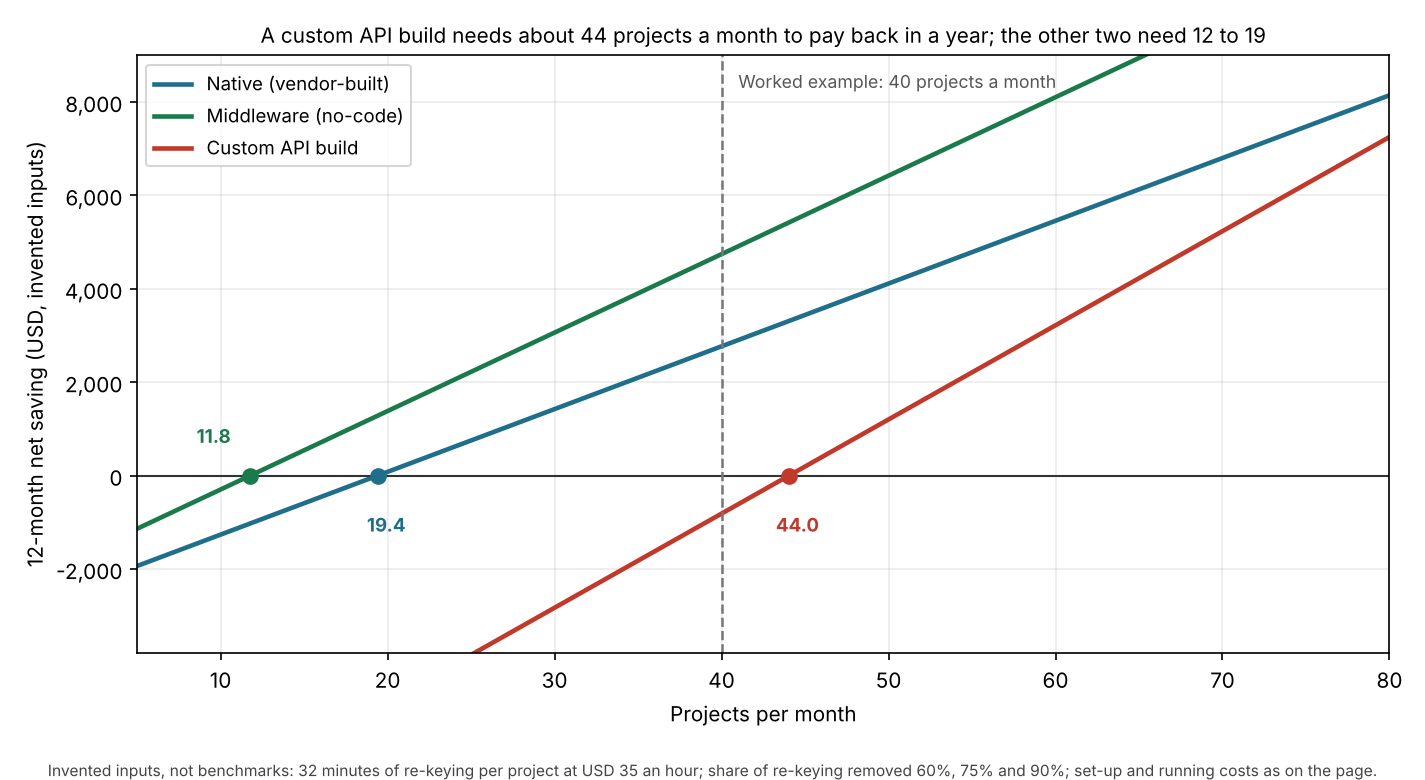
Figure 1. In the example, the projects a month needed for a positive 12-month net are about 44 for a custom API build, 19.4 for native and 11.8 for middleware.
Try your own numbers below. Swap every starting value for your own times and written quotes.
What should you check before relying on an integration?
Check these five things before you trust a listing. The pages read give a different example for each.
| Question | Why it matters | Example read |
|---|---|---|
| 1. Which direction does data move? | A link that creates a project may not sync results back. | Aurora’s CRM checklist asks for a POST to create entities, a GET to sync back and custom fields to hold the result. |
| 2. Which objects and fields move? | A project is not the whole customer record. | Aurora’s HubSpot tutorial sends the deal address, first and last name, email and deal name. It writes the project URL back to a deal property. |
| 3. Is it event-driven or scheduled? | Event-driven links react when something happens. Scheduled ones run on a timer. | Aurora’s CRM checklist requires the CRM to accept incoming webhooks for webhook workflows. |
| 4. Which plan, and how many connections? | The listing may need a higher tier or a cap. | JobNimbus caps integrations by plan. Aurora’s tutorial names Enterprise with API Access. |
| 5. Who fixes it when a field changes? | A native link is the company’s to maintain. API and middleware links are yours. | IBM: native integrations are built and maintained by the application company. |
How solar software handles integrations
Of the six tools read, four publish an integration list or directory. OpenSolar and JobNimbus publish only part of one.
| Software | Publishes an integration list or directory? | Routes named on the page read | Plan or access limits as read | Page read (October 2026) |
|---|---|---|---|---|
| Aurora Solar | Yes: Help Center Apps category | API with webhooks. Partner apps | HubSpot tutorial names Enterprise with API Access. Partner feature in private beta. | Apps category. HubSpot tutorial (5 May 2025). CRM apps page (metadata 28 May 2025). |
| OpenSolar | Partly: partners page only | Names Salesforce, HubSpot and Zapier. Does not say how each is built | None stated. Page undated | developers.opensolar.com/partners |
| SiteCapture | Yes: Integrations Overview | Native (Salesforce), Zapier, full REST API, Palmetto LightReach | LightReach is exclusively for the Palmetto Solar Program. No plans named. | Integrations Overview (posted 27 August 2026) |
| Zuper | Yes: "60+ Integrations" | Not stated. Footer links API Reference and Developer Portal | None stated | zuper.co/apps-integration |
| JobNimbus | Partly: pricing page names supplier and QuickBooks integrations | "API & Webhooks" row. Zapier not mentioned | Essentials "Max 2". Pro "Max 5" or "Max 5+". Premium and Enterprise "Unlimited" | jobnimbus.com/pricing (undated) |
| HubSpot | Yes: App Marketplace with published listing rules | OAuth apps. Webhook subscriptions count as install activity | Listing needs 3 active installs. The page read does not price connections | developers.hubspot.com listing requirements |
The table rates what each page says, not how well a tool works. Not stated means the company page we cite does not say. Partly means the page names some integrations but not a full list.
JobNimbus shows Pro as "Max 5" in one table and "Max 5+" in another, and the page does not explain the plus. Tools built around connections are ranked in our best solar workflow automation software guide. Design and proposal tools with connections are in the best free solar design software and best solar design and proposal software guides. Category pages: solar CRM, solar design software and solar proposal software.
Common mistakes with integrations
FAQs
What is the difference between a native integration and an API?
IBM says native integrations often use APIs. It puts the difference from third-party integrations in who builds and maintains them. For native, that is the software provider.
Do I need Zapier if two tools have APIs?
Not always. Middleware avoids code but counts usage. Zapier’s help page says each successful action step uses 1 task and triggers use none. So high volumes can need a paid plan.
Are apps in a marketplace checked?
Some are. HubSpot’s rules require three active installs and a manual review, and Zuper’s page read describes no review process. A listing proves only what the platform checks first. Read each directory’s own rules.
Do solar software plans cap integrations?
Some do, so confirm with the company. JobNimbus’s pricing page shows a cap per plan, from "Max 2" to "Unlimited", with Pro shown as "Max 5" or "Max 5+". Other pages read named no cap.
Does Aurora Solar integrate with HubSpot?
Yes, through the API. Aurora’s HubSpot tutorial needs an "Aurora Enterprise plan with API Access". It also needs HubSpot Workflows at Professional or Enterprise level. One connection can need two paid tiers.
Related terms
- API: the documented requests one program uses to read or write another’s data.
- Webhooks: automatic event messages one tool sends to another.
- Workflow automation: triggers, conditions and actions that run across tools.
- Single sign-on: one login for staff across apps. It does not move project data.
- Data export: taking your records out of a tool.
Next step: list the handoffs where your team retypes data. Then compare the best solar workflow automation software or, if the CRM is the hub, the best solar CRM software.
Sources
- IBM, What is native integration? (published 16 December 2025, updated 6 March 2026, checked October 2026).
- SiteCapture, Integrations Overview (posted 27 August 2026, checked October 2026).
- Zuper, Apps and integrations (checked October 2026).
- JobNimbus, Pricing (undated, checked October 2026).
- Aurora Help Center, Apps (checked October 2026).
- Aurora, Tutorial: Create an Aurora Project from HubSpot (5 May 2025, checked October 2026).
- Aurora, CRM Checklist for Aurora API Integrations (undated, checked October 2026).
- Aurora partner docs, CRM apps (page metadata 28 May 2025, checked October 2026).
- OpenSolar developers, Partners (undated, checked October 2026).
- HubSpot, App Marketplace listing requirements (checked October 2026).
- Zapier Help, How is task usage measured (updated 28 October 2026, checked October 2026).
- Zapier, Pricing (undated, Free plan figure only, checked 30 October 2026).
Last updated 30 October 2026. Next scheduled review: 30 January 2027.