Key takeaways
- No standard fixes the stages. Our 7-stage map is Survey, Design, Permit, Procurement, Install, Inspection, and Interconnection and PTO.
- Give each stage one owner, one exit check and two statuses, "waiting" and "done".
- On 8 invented finished projects, contract to PTO averaged 71.5 days. Install was 10 of 572 days (1.7%).
- A third party held 74.8% of the days. Another 39 days (6.8%) passed after permit and equipment were in and before the crew started.
- Of the 5 companies’ pages read in October 2026, only Zuper documents a status that launches a checklist the job must finish.
To track these stages and statuses in software, see the best solar project management software.
Install stage at a glance
The install stage starts when the crew has a permit, equipment and a date. It ends when the work is built, checked and logged. It is one stage in a chain. In our example, most of the calendar sits in the stages around it.
| Item | Detail |
|---|---|
| Starts when | Permit issued, equipment delivered and a crew booked. Our rule, not a standard. |
| Ends when | Install checklist signed, photos filed, work logged and the next owner told. |
| Stages in this page | 7: Survey, Design, Permit, Procurement, Install, Inspection, Interconnection and PTO. |
| Standard or rule | None for the stage map. Each AHJ and utility sets its own steps. |
| In software | A project stage or job status, with a checklist, photos and a trigger for the next task. |
Why does the install stage matter?
It is the stage you schedule. It is also where permit and supply delays turn into crew days. A late kit or a missing permit wastes a booked crew.
The other stages need tracking too, because waits often sit outside your yard.
An NLR (formerly NREL) page, now updated 7 May 2026, says SolarTRACE "includes median cycle times for over 1,500 jurisdictions with at least 10 installs in the data set". It prints no day figure there. Cycle times differ by place, so use your own records. Permit rules are on permit plan set and the utility step is on PTO.
What are the stages from contract to PTO?
Each stage has an owner, an exit check and a status pair. The owners, checks and status names are our design view. Adapt them to your process.
| Stage | Owner | Exit check | Statuses to set | Detail page |
|---|---|---|---|---|
| 1 Survey | Surveyor. Customer gives access. | Site data and photos filed. | Survey booked, Survey done. | Site survey |
| 2 Design | Designer. | Layout, equipment list and diagrams agreed. | Design in progress, Design approved. | Single line diagram, bill of materials |
| 3 Permit | Coordinator files. The AHJ decides. | Permit issued. Utility application filed. | Permit submitted, Permit issued. | Permit plan set, interconnection application |
| 4 Procurement | Purchasing. Supplier delivers. | Kit delivered and counted against the bill of materials. | Equipment ordered, Equipment delivered. | Inventory management |
| 5 Install | Install lead and crew. | Checklist signed, photos filed, work logged. | Install scheduled, In progress, Install complete. | Work order, scheduling, crew |
| 6 Inspection | Coordinator requests. The AHJ inspects. | Inspection passed. Test records filed. | Inspection requested, Inspection passed. | Commissioning, punch list |
| 7 Interconnection and PTO | Coordinator. The utility grants PTO. | PTO received. Handover pack sent. | Utility submitted, PTO received. | PTO, handover pack |
Stages 3 and 4 run in parallel, so table order is not a sequence. Software companies cut the chain differently: Palmetto’s Energy API page says "Each stage is comprised of sub stages that have their own statuses". Name your own stages and keep them stable. For a seven-stage model that starts at Handoff and has no Procurement stage, see solar project management software. Both are our models, so keep to one in your own tracking.
What happens on install day?
Install day follows a set order, and each step leaves an exit check and a record. The table is our design view. Your racking maker, inverter maker, AHJ and utility set the real checks.
| Step | Exit check | Record left behind |
|---|---|---|
| 1 Pre-start | Kit counted against the bill of materials. Crew, access and safety briefing confirmed under your own safety plan. | Pre-start checklist. Photo of delivered kit. |
| 2 Mounting | Attachments and rails match the plan set. See racking design and structural loads. | Photos before modules cover the racking. |
| 3 Wiring | DC and AC runs, grounding and labels done as drawn. | Wiring and label photos. |
| 4 Inverter and module electronics | Inverter, disconnects and rapid shutdown devices fixed and labelled. | Serial numbers captured. |
| 5 Pre-commissioning | Visual checks and tests as on the commissioning page. Confirm with your utility before any energising. See PTO. | Test records. |
| 6 Close-out | Site clean, punch items logged, as-built changes marked. | Status set to Install complete. |
Photo lists differ by AHJ and utility. See photo documentation for five opened lists. If the crew finds new scope, such as a panel upgrade, raise a change order before the work continues. Costs for the stage roll up on job costing, and outside crews are covered on subcontractor management.
How should statuses and handoffs work?
Use a pair of statuses for each stage and let each change hand the project to the next owner. A single status such as "Permit" hides the difference between filed and issued.
- Waiting and done: "Permit submitted" starts a wait on the AHJ. "Permit issued" ends it. You can then count days in each.
- One owner at a time: every status names who acts next, such as AHJ, supplier, utility or crew.
- Gates before Install: allow "Install scheduled" only when permit is issued and kit is delivered.
- Completed is not closed: "Install complete" means the crew has left. Close the work order once photos, parts and time are posted.
- Change on the phone: crews update from site. Check offline mode for poor signal.
Worked example: where do 8 projects spend their days?
All dates are example. Each of 8 finished projects runs from contract signed to PTO received. The segments add up to the total: Survey, Design, Gate, Wait, Install, Inspection and PTO. Gate is Permit or Procurement, whichever finished later. Permit and Procurement run in parallel, so only the later one counts, and it holds the install start.
- Survey = survey done minus contract. Design = design approved minus survey done.
- Gate = the later of permit issued and equipment delivered, minus design approved.
- Wait after gates = install start minus the gate date. The crew could have started but had not.
- Install = install end minus install start. Inspection = inspection passed minus install end.
- Interconnection to PTO = PTO received minus inspection passed.
The model orders equipment on or after design approval. Days are calendar days.
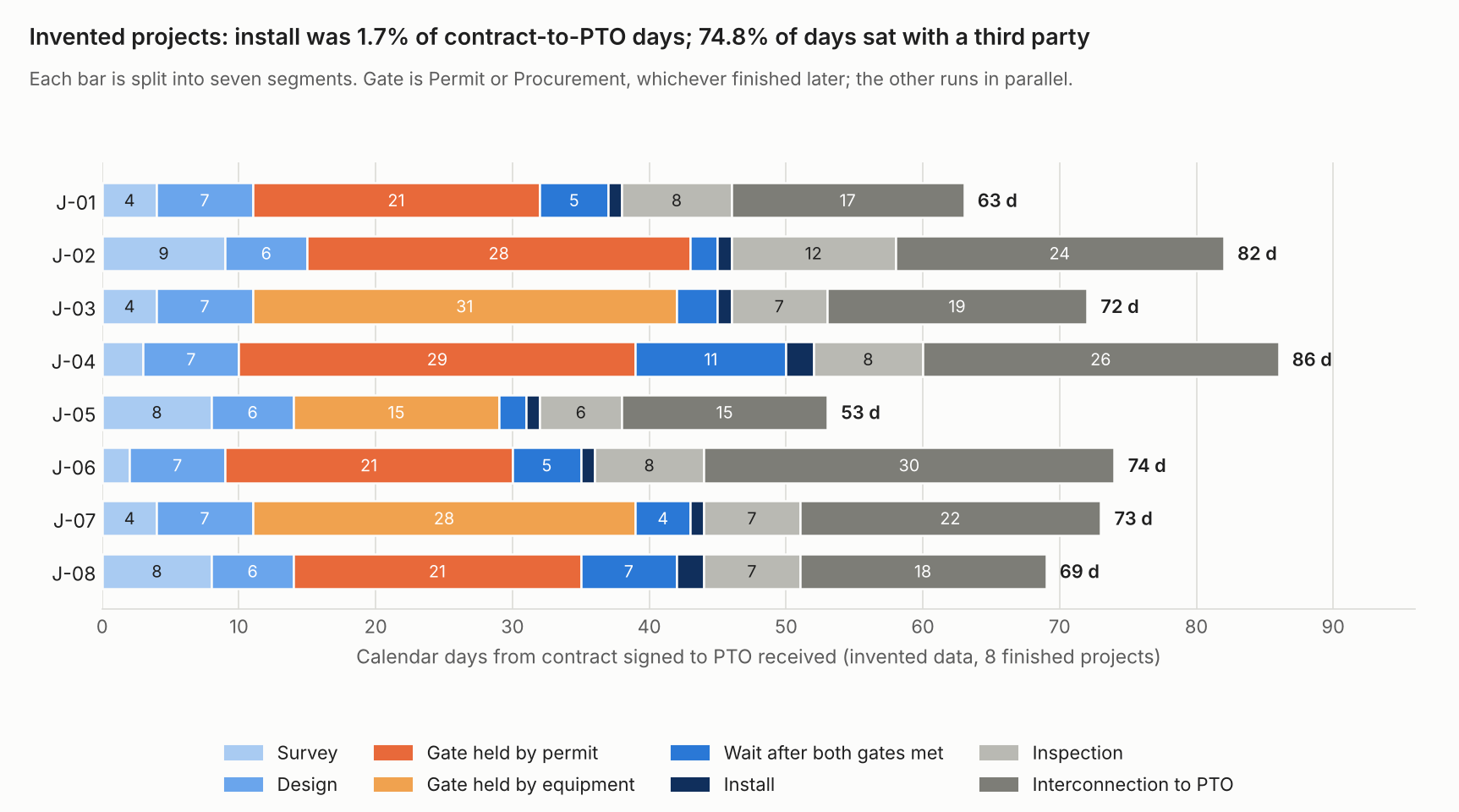
Figure 1. On 8 example projects, install (the dark-blue sliver, 10 of 572 days) was 1.7% of contract-to-PTO days, and 74.8% of days sat with the AHJ, a supplier or the utility.
The gate and the utility step take most days, and install takes the fewest. Table 1 covers the first three segments and the gate.
| Project (example) | Total days | Survey | Design | Gate (held by) |
|---|---|---|---|---|
| J-01 | 63 | 4 | 7 | 21 (permit) |
| J-02 | 82 | 9 | 6 | 28 (permit) |
| J-03 | 72 | 4 | 7 | 31 (equipment) |
| J-04 | 86 | 3 | 7 | 29 (permit) |
| J-05 | 53 | 8 | 6 | 15 (equipment) |
| J-06 | 74 | 2 | 7 | 21 (permit) |
| J-07 | 73 | 4 | 7 | 28 (equipment) |
| J-08 | 69 | 8 | 6 | 21 (permit) |
Table 2 covers the wait, install, inspection and PTO segments for the same projects.
| Project (example) | Wait after gates | Install | Inspection | PTO |
|---|---|---|---|---|
| J-01 | 5 | 1 | 8 | 17 |
| J-02 | 2 | 1 | 12 | 24 |
| J-03 | 3 | 1 | 7 | 19 |
| J-04 | 11 | 2 | 8 | 26 |
| J-05 | 2 | 1 | 6 | 15 |
| J-06 | 5 | 1 | 8 | 30 |
| J-07 | 4 | 1 | 7 | 22 |
| J-08 | 7 | 2 | 7 | 18 |
Mean days: total 71.5, survey 5.3, design 6.6, gate 24.3, wait after gates 4.9, install 1.3, inspection 7.9 and PTO 21.4.
The mean is 71.5 days and the median is 72.5. Shares of all 572 days: survey 7.3%, design 9.3%, gate 33.9%, wait after gates 6.8%, install 1.7%, inspection 11.0%, PTO 29.9%. Rounding makes them sum to 99.9%.
The permit held the gate in 5 projects (120 gate days) and equipment in 3 (74 gate days). Company or customer stages (survey, design, wait, install) hold 144 days (25.2%). The wait after gates is 27.1% of those. J-04 waited 11 days for a crew slot after both gates were met. That is a scheduling fix, not a permit fix. See scheduling and dispatch.
Eight example projects show a method, not a benchmark. Solar project management software covers ageing of open projects. This example splits finished ones.
Check your own cycle times
Paste one finished project per line with 10 milestone dates. The calculator returns days per stage, the third-party share and what held each install start. It loads the example first. If the box below does not load, open the cycle time calculator on its own page.
How solar software handles the install stage
Of the five tools read in October 2026, only Zuper documents a status that launches a checklist the job must finish before it moves on.
| Software | Stages or statuses | Checklist or form | Photos | Status triggers or blocks |
|---|---|---|---|---|
| Zuper | Yes | Yes | Yes | Yes |
| Praxedo | Partly | Yes | Yes | Partly |
| JobNimbus | Yes | Not stated | Not stated | Partly |
| Coperniq | Yes | Partly | Partly | Yes |
| Procore | Not stated | Partly | Partly | Not stated |
Not stated: the company page we cite does not say. Partly: the page describes part of the feature, as the notes below explain.
- Zuper: statuses are set per job category and can be dragged "to the right place". A "Restrict to Camera" option allows only "live photos captured directly from the mobile camera". Date, time and GPS stamps are on by default for image fields. A status "can be customized to launch a checklist which must be completed before the job moves on". Its checklist docs say "Technicians cannot submit the checklist until the required field is filled in."
- Praxedo: technicians can "change statuses" in the app, but a status list is not described. Forms have drop-down menus, check boxes and signature boxes. The camera module adds a GPS tag. Time is not described. The module "will block the work order report from being confirmed until the correct data is logged". That is form validation, not a status block.
- JobNimbus: a time-based work order automation can run "Create Task" and "Change Status" after "Date Status Changed". It does not block a stage. Its help page says "Each Workflow consists of Statuses and Stages that are unique to the Workflow’s Type."
- Coperniq: project workflows have stages and start after a proposal and contract are signed. The products page lists "Custom mobile forms for site surveys and installations". Its docs say "Work orders define the tasks, while forms collect all necessary information, such as contracts and utility bills."
- Coperniq photos and automations: the products page lists "Capture and upload site photos with GPS tagging", not tied to a stage or job status. Automations run on "Workorder completion or transitions to unblock the project stage" and "Stage completion or transition".
- Procore: the page cited is an equipment-inspection guide. Inspections tool: "Complete the status of each item by tapping the appropriate response". "Add a photo or an observation if required by your response selection." Stamps are not described.
Quotes are from each company’s own pages. Zuper, Coperniq and Procore pages print no page date (Procore: copyright 2026 only). Praxedo’s work order software page shows a modified time of 22 April 2025, and its product tour page no date. JobNimbus pages show a 2025 copyright. Zuper and Praxedo are general field service tools. Procore is a general construction tool. Companies may document more elsewhere. Ranked options are in our guides to the best solar project management software and the best solar EPC project management software.
Common mistakes with the install stage
FAQs
What is the install stage in a solar project?
It is the stage where the crew builds the system on site. It follows survey, design, permit and procurement. Inspection and the utility’s PTO come next. Stage names differ between companies and tools.
How long does the install stage take?
In our example, install took 1 or 2 calendar days per project. A real figure varies with system size, crew and site, and this page cites no dated source for a typical one. The calculator above measures your own.
Which photos should the crew take on install day?
The ones your AHJ or utility lists. Several lists ask for racking photos before modules cover them. See photo documentation for five opened lists and the evidence each asks for.
Who signs off the install stage?
In our map, the install lead signs the checklist and the coordinator moves the status. The AHJ’s sign-off comes later, at inspection. Your contract may name other signers.
Related terms
- Work order: the record of one job inside a stage.
- Commissioning: the checks that close the install stage.
- PTO: the utility approval that ends the last stage.
Next step: write down your own stages and exit checks, then compare the best solar project management software or the best solar EPC project management software.
Sources
- NLR (formerly NREL): Solar permitting, inspection and interconnection timelines, now shows last updated 7 May 2026 (was 21 January 2026 at last check, URL moved to the nlr.gov domain, re-verified November 2026).
- Palmetto Energy API: Statuses and stages, no page date (checked October 2026).
- Zuper docs: configuring job checklists and Zuper care: create and edit a job status, no dates (checked October 2026).
- Praxedo: work order software, modified 2025-04-22, and Praxedo product tour: work order reports, no date (checked October 2026).
- JobNimbus help: what is a workflow and automation to change a work order status, copyright 2025 only (checked October 2026).
- Coperniq support: request and project workflows and Coperniq products, no date, checked October 2026.
- Procore support: perform an inspection (iOS), copyright 2026 only (checked October 2026).
Last updated 30 October 2026. Next scheduled review: 30 January 2027.