Key takeaways
- Scheduling is a plan that can change. Dispatch is the moment the technician is told. Tools differ in wording.
- On our invented day (8 jobs, 2 technicians), ticket-order dispatch broke an HV rule twice. It ran 0.97 h over an 8 h shift.
- The best plan found by exact search fixed both and cut distance by only 7.5 km (4.9%, example inputs). Skill fit and shift length mattered more than kilometres.
- Only 6 of 256 possible job splits obeyed the HV rule and fitted the shift. Their distance ranged from 145.2 to 177.4 km (example inputs).
To test auto-assignment in software, see the best solar scheduling and dispatch software.
Scheduling and dispatch at a glance
Scheduling decides who does which job and when. Dispatch is the act of sending that decision to the technician. A work order is the record they both act on.
| Item | Detail |
|---|---|
| Scheduling | Gives a job a date, a time and, optionally, a crew. |
| Dispatch | Notifies the assigned technician. In Zoho FSM it needs an assigned resource first. |
| Main inputs | Job length, skills, location, shift length, parts, site access and customer window (our list). |
| Standard or rule | No standard defines it for solar. Each tool sets its own statuses. |
| In software | A scheduler or dispatch board in a field service tool, a CMMS or a project tool. |
Why scheduling and dispatch matter for installers
A plan that counts only on-site hours hides drive time. In the worked example below, driving was 20.3% of hours in Plan A and 19.5% in Plan B, about a fifth of the day. A job sent to the wrong person, or to a site that is not ready, becomes a repeat visit. Cost per job is on the work order page, and response times are on the O&M page.
How is scheduling different from dispatch?
Scheduling is a plan that can change. Dispatch is the moment the technician is told. Some tools separate them with a status, and some treat them as one action.
Zoho’s field service help is undated. It says schedule is "used to assign a date, time, and optionally a field agent or crew to a service appointment". The agent is not notified at that point. Dispatch "sends a push notification to the assigned field agent" and "can be done only after a resource is assigned". A Microsoft Dynamics 365 blog (9 September 2019) shows the same split, set up with a custom Dispatched status.
The split lets a planner build tomorrow without pinging crews until the plan is final. If a signal is poor, see mobile app offline mode.
What does a dispatcher check before sending a job?
A dispatcher checks that the right person can do the job, reach the site and finish inside the shift. Salesforce’s Trailhead module says a scheduling policy is built around work rules and service objectives. Each objective carries a weight.
In our reading, hard limits are rules and "shorter distance" is an objective. These checks are our list, not a standard:
- Skill or certification: can this person do the work and sign it off?
- Duration: how long is the job, and how long is the drive?
- Shift: does the whole day, depot to depot, fit?
- Readiness: are parts, access and any permit in place? A site survey or site photos often answer this.
- Customer window and urgency: an alarm-driven repair may outrank planned work. See alerts and alarms.
A remote check can sometimes remove the visit. See remote diagnostics. Crew skills and availability are covered on the crew management page.
Worked example: one day, 8 jobs, 2 technicians
All inputs are example. The depot is at 0, 0 km. Speed is 50 km/h, the road factor is 1.3 and the shift is 8 h, depot to depot. There are no breaks or parts delays. Jobs J2 and J6 need an HV-qualified technician under an example rule. T1 is HV-qualified. T2 is not.
| Job | Task | x, y (km) | On site (h) | Needs HV? |
|---|---|---|---|---|
| J1 | String fault | 8, 3 | 1.5 | No |
| J2 | Inverter swap | -7, 12 | 3.0 | Yes |
| J3 | Panel cleaning | 10, -4 | 1.0 | No |
| J4 | Annual inspection | -9, 10 | 1.5 | No |
| J5 | Gateway reset | 4, 15 | 1.0 | No |
| J6 | Isolator fault | -4, -9 | 2.0 | Yes |
| J7 | Vegetation | 12, 7 | 1.0 | No |
| J8 | Thermal check | -11, -5 | 1.0 | No |
For each technician’s route:
- Distance of each leg = 1.3 x the straight-line distance, from the depot, through the jobs in order and back.
- Drive time = distance divided by 50 km/h.
- Day = drive time plus on-site hours.
- Shift slack = 8 h minus the day.
Plan A hands jobs out in ticket order, alternately: T1 gets J1, J3, J5, J7 and T2 gets J2, J4, J6, J8. Plan B tests all 256 ways to split the jobs and every visit order. It keeps splits that obey the HV rule and fit 8 h, then picks the least distance. Plan B is our own search, not a company’s method.
Plan A runs one technician over the shift and breaks the HV rule twice. Plan B fixes both.
| Plan and technician | Visit order | Distance and drive | On site and day | Against 8 h. HV jobs missed |
|---|---|---|---|---|
| A, T1 | J1, J3, J5, J7 | 79.2 km, 1.58 h | 4.5 h on site, 6.08 h day | 1.92 h spare. 0 missed |
| A, T2 | J2, J4, J6, J8 | 73.5 km, 1.47 h | 7.5 h on site, 8.97 h day | 0.97 h over. 2 missed |
| B, T1 | J2, J8, J6 | 64.0 km, 1.28 h | 6.0 h on site, 7.28 h day | 0.72 h spare. 0 missed |
| B, T2 | J3, J1, J7, J5, J4 | 81.1 km, 1.62 h | 6.0 h on site, 7.62 h day | 0.38 h spare. 0 missed |
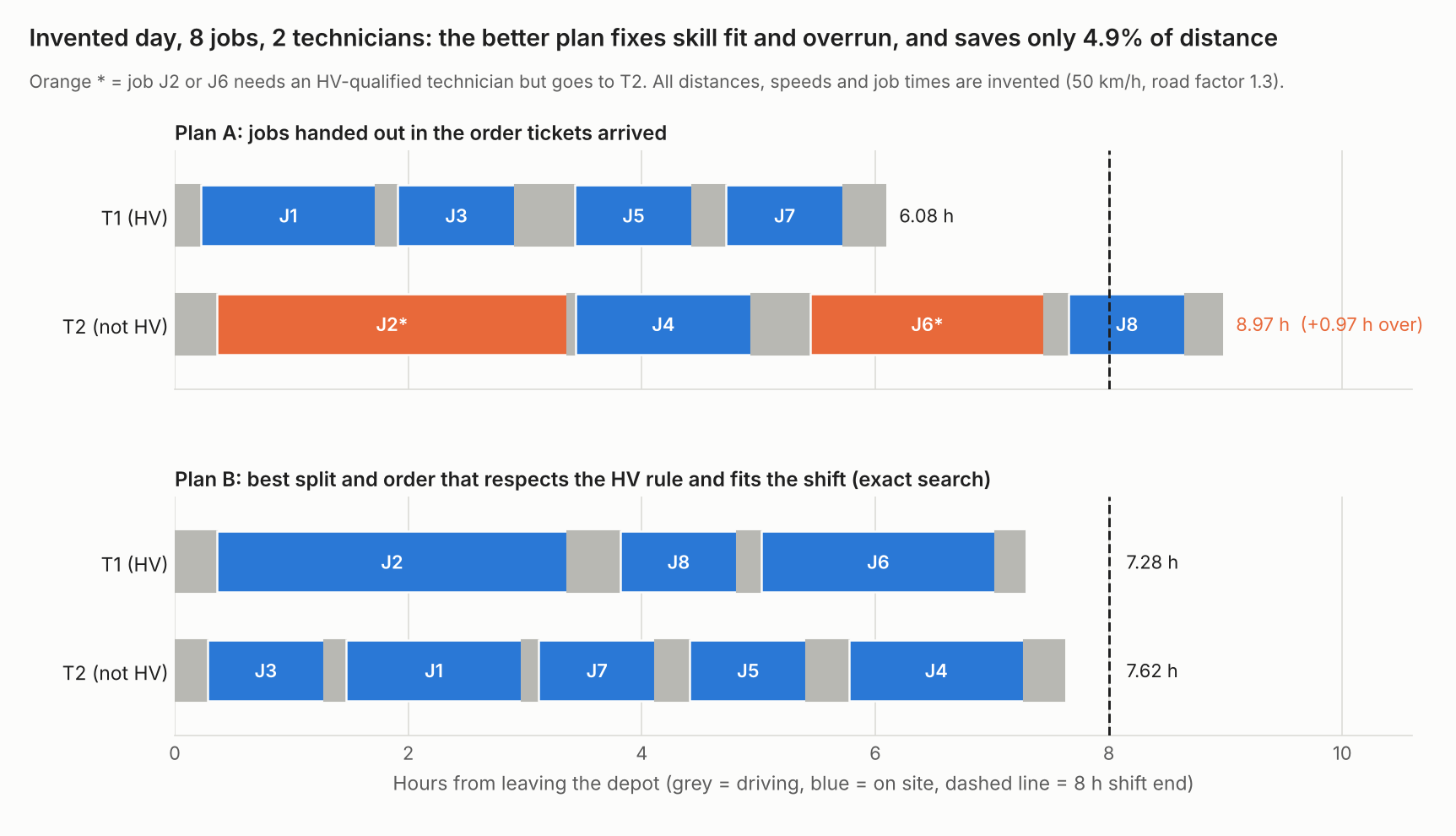
Figure 1. On an example day, ticket-order dispatch put both HV jobs on a non-HV technician and ran 0.97 h over. The best plan cut distance by only 4.9%.
Plan A totals 152.7 km and 3.05 h of driving. Plan B totals 145.2 km and 2.90 h, a saving of 7.5 km (4.9%) and about 9 minutes. The real gain is that both HV jobs go to T1 and nobody runs over.
Reordering alone does not fix this. Take Plan A’s T2 jobs and visit them in the shortest order (J2, J4, J8, J6). Distance falls from 73.5 to 64.7 km (11.9%), yet the day is still 8.79 h, 0.79 h over. J2 and J6 still sit with the wrong technician.
Of the 256 splits, 64 obey the HV rule, and only 6 of those also fit 8 h. Their total distance ranges from 145.2 to 177.4 km. The best is 18.2% shorter than the worst. Eight jobs is a toy case. With n jobs there are 2 to the power n splits, so exhaustive search grows fast. No company page read says how its engine searches. Real days add time windows, traffic and changes.
Check your own crew day
Enter one technician’s jobs in visit order. The calculator gives drive time, on-site time, shift slack, skill misses and the shortest order for up to 8 jobs. It loads Plan A’s T2 route first.
If the calculator does not load, open the crew day calculator on its own page.
How solar software handles scheduling and dispatch
Of the six tools we read in October 2026, only Salesforce and Praxedo document automatic assignment in full. Zuper, Simpro and Arrivy document it in part, and Coperniq’s page covers routes but not assignment.
| Software | Auto-assign by skills, rules or location | Drag-and-drop board | Map, route or live location |
|---|---|---|---|
| Salesforce Field Service | Yes | Not stated | Not stated |
| Praxedo | Yes | Not stated | Yes |
| Zuper | Partly | Yes | Partly |
| Coperniq | Not stated | Not stated | Yes |
| Simpro | Partly | Partly | Yes, with the add-on |
| Arrivy | Partly | Not stated | Partly |
- Salesforce Field Service: policies use work rules and weighted service objectives. The engine "evaluates thousands of possible combinations". Source: Trailhead module, undated.
- Praxedo: SmartScheduler works by "evaluating your team’s skills, time requirements, customer asset availability, and location". The page lists "Schedule via the map-based module". Routes are mentioned only for technician instructions. Source: solar industry page, modified 2026-10-06.
- Zuper: docs show a manual scheduler. The solar page claims auto-assignment (both undated).
- Docs, assignment: you "assign or reschedule jobs within the Scheduler by dragging and dropping job cards".
- Docs, location: you "Identify live technicians near a job site based on their skills and availability" and "Visualize job and technician locations" for location-based scheduling.
- Solar page: "AI Dispatch Assistant picks the best-fit crew by skill and location". This is a company claim, so auto-assign is rated Partly.
- Coperniq: "Route Optimization: Minimize travel time between jobs" and "Real-time Tracking: Monitor technician locations on a live map". Source: products page, undated.
- Simpro: preferred-technician assignment and Gantt views. Automatic assignment and drag-and-drop are not stated (solar industry page, undated).
- Assignment: "Designate preferred technicians to specific customers or sites based on their skill sets and asset types".
- Views: "Day, week, month, and Gantt Charts".
- Location: the Simtrac add-on’s GPS helps find the closest employee. "Maximize staff efficiency by tracking their real-time location."
- Arrivy: a company guide says it "automatically selects the right technician for each task and plans the route". Route planning is claimed in the same guide. Source: company blog guide, 15 September 2025.
Quotes are from each company’s own pages. Dates are in Sources. Not stated means the pages read do not say. Partly means only part is stated, or the claim comes from a company blog or marketing page. Salesforce is a general field service platform, and other pages from these companies may say more. Questions to put to each company:
- Is the plan a draft until I dispatch, or does assigning notify the crew at once?
- Can I set hard rules, such as a required certification, and weighted goals, such as shorter travel?
- When a job runs late, can the tool re-plan the rest of the day?
- Does a dispatched job create or update a work order, and can I export the history?
For the full field, see the best solar scheduling and dispatch software list.
Common mistakes with scheduling and dispatch
FAQs
What does a dispatcher do in solar?
A dispatcher turns open jobs into assigned visits. They match people to jobs by skill, place and hours, then send the job. Per Zoho’s help, sending notifies the assigned technician.
How many jobs can one technician do in a day?
Jobs per day equal shift hours minus drive time, divided by average on-site hours. No source gives a fixed number. In this example’s day, T1 did 3 jobs in 7.28 h and T2 did 5 in 7.62 h. Use the calculator on your own data.
Is a work order the same as a dispatch?
No. The work order is the record of the job. Dispatch is the act of sending it to a technician. Tools may use one status for both.
What is the difference between scheduling and dispatch?
Scheduling assigns a date, a time and a crew to a job. Dispatch notifies the technician. In Zoho FSM, dispatch can happen only after a resource is assigned.
Related terms
- Work order: the record of one job that dispatch sends out.
- Crew management: who is on the crew, with what skills and availability.
- CMMS: the system that holds assets, work orders and preventive schedules.
Next step: run your own crew day through the calculator. Then shortlist tools from the best solar scheduling and dispatch software list or the best solar field service management software.
Sources
- Zoho FSM help: What is the difference between schedule and dispatch?, no date printed (checked October 2026).
- Microsoft Dynamics 365 blog: Scheduling versus dispatching, Universal Resource Scheduling, 9 September 2019 (checked October 2026).
- Salesforce Trailhead: Customize a scheduling policy, no date printed (checked October 2026).
- Praxedo: solar industry page, modified 2026-10-06 per page metadata (checked October 2026).
- Zuper documentation: Dispatch overview and Zuper: Solar, no dates printed (checked October 2026).
- Coperniq: Products, no date printed (checked October 2026).
- Simpro: solar and renewable business software, no date printed (checked October 2026).
- Arrivy: The Ultimate Guide to Solar Project Management Software, byline 15 September 2025, metadata modified 2026-02-20 (checked October 2026, company blog).
Last updated 30 October 2026. Next scheduled review: 30 January 2027.