Key takeaways
- The US Bureau of Labor Statistics says solar PV installers "usually work as part of a team", so someone has to plan who is on it.
- Credentials lapse, so check each expiry against the job date, not today’s date.
- In an invented 48-hour install, a crew of 4 needs 1.875 days, so it books 2 and only 75.0% of its paid hours are productive.
- A crew of 6 needs 1.25 days, still books 2 days, and falls to 50.0%.
- None of the company pages we cite shows credential-expiry tracking.
To run crew rosters and schedules in software, see the best solar project management software list.
Crew management at a glance
Crew management answers one question. Which people can do this job, on this day, and what will it cost? It is a set of records plus the rules for using them.
| Item | Detail |
|---|---|
| Also called | "Field workforce management" is a loose synonym, not a standard term. |
| Records | Roster and roles, skills and credentials, availability, time and cost. |
| Unit | Crew-days and person-hours. Capacity is crews times available days. |
| Where it matters | Install margin, safety, programme eligibility and on-time handover. |
| Standard or rule | No standard defines it. Credential and safety rules come from each regulator, scheme and employer. |
| In software | Field service, project management and O&M tools. See the table below. |
Why does crew management matter for installers?
Crew time is a direct cost on every install. The people on site also carry safety and credential risk. A wrong-sized or unqualified crew costs you money on the day.
The BLS Occupational Outlook Handbook (page modified 27 August 2026) says solar PV installers usually work as part of a team. It lists a median wage of USD 53,140 (May 2025) and about 31,100 jobs (2025).
Safety is part of the plan. OSHA’s residential fall protection FAQ cites 29 CFR 1926.501(b)(13). It says residential construction workers six feet or more above lower levels must be protected. The three options are guardrail systems, safety net systems or personal fall arrest systems. The FAQ limits "residential construction" to homes built with traditional wood-frame methods. Under 1926.503 the employer must have exposed workers trained by a competent person. The employer must also keep a written certification record. The FAQ prints no renewal cycle. So expiry dates for training in this page’s example follow employer policy. This is a US federal rule, and the page is undated.
Credentials are another risk. NABCEP’s recertification page covers renewal. Its board certifications, for example PVIP, renew every 3 years with 30 hours of continuing education. The Associate credential needs 12 contact hours in its 3-year period. A crew lead whose certificate lapsed last week may not meet a programme or customer requirement. The scheduling and dispatch page covers placing crews on jobs. This page covers the people records behind that.
What does crew management cover?
It covers four records. Each one answers a different question. Each can go stale without anyone noticing.
| Record | Question it answers | Example fields |
|---|---|---|
| Roster and roles | Who is on each crew, and who leads? | Name, role, employer or subcontractor, crew, start date. |
| Skills and credentials | Who is allowed or able to do this task? | Licence, certificate, training, roof type, expiry date. |
| Availability | Who is free, and where are they? | Calendar, leave, sickness, training days, home base. |
| Time and cost | What did the job use? | Clock-in and clock-out, hours, travel, labour cost per job. |
One company page is Fieldproxy’s auto-assign page (marketing, undated). It says it matches projects with crews "based on certifications, availability, geographic proximity, and workload". Those are the same four ideas.
Time records often come from a phone app. See mobile app offline mode. The job record itself is a work order. For close-out evidence, see photo documentation.
How do you size a crew and count crews?
Divide the job’s hours by what a crew gets done in a day. Round up to whole days. Next, divide the monthly workload by the days each crew can work. The rounding step is where plans go wrong.
- Productive hours per person-day = paid hours per day x productive share.
- Exact days = job productive person-hours / (crew size x productive hours per person-day).
- Days booked = exact days rounded up to a whole day.
- Available days per crew = working days x (1 - share of days lost). Lost days come from leave, sickness and training.
- Crews needed = jobs x days / available days, rounded up. Use exact days for a lower bound and booked days for an upper bound.
- Cost per job = days booked x crew size x paid hours per day x cost per paid hour.
The model assumes one crew works one job at a time. It also assumes lost days leave crews at full strength. Real schedules fall between the bounds.
Worked example: crew size on a 48-hour install
All inputs are example, including the 48 productive person-hours. This page uses no standard figure for hours per job or per kW. Treat the job size as a placeholder.
| Input (example) | Value |
|---|---|
| Productive on-site person-hours per job | 48 |
| Paid hours per person per day | 8 |
| Productive share of paid time | 80%, so 6.4 productive hours a day |
| Cost per paid hour | 42 USD |
| Jobs to deliver per month | 20 |
| Working days per month, and crew days lost | 21, and 10%, so 18.9 available days |
Bigger crews do not always cost less, because whole-day rounding adds paid hours. The table compares five crew sizes.
| Crew size | Exact days / days booked | Paid hours per job / cost per job (USD) | Productive share of paid hours | Crews for 20 jobs a month (reuse leftover time / book whole days) |
|---|---|---|---|---|
| 2 | 3.750 / 4 | 64 / 2,688 | 75.0% | 4 / 5 |
| 3 | 2.500 / 3 | 72 / 3,024 | 66.7% | 3 / 4 |
| 4 | 1.875 / 2 | 64 / 2,688 | 75.0% | 2 / 3 |
| 5 | 1.500 / 2 | 80 / 3,360 | 60.0% | 2 / 3 |
| 6 | 1.250 / 2 | 96 / 4,032 | 50.0% | 2 / 3 |
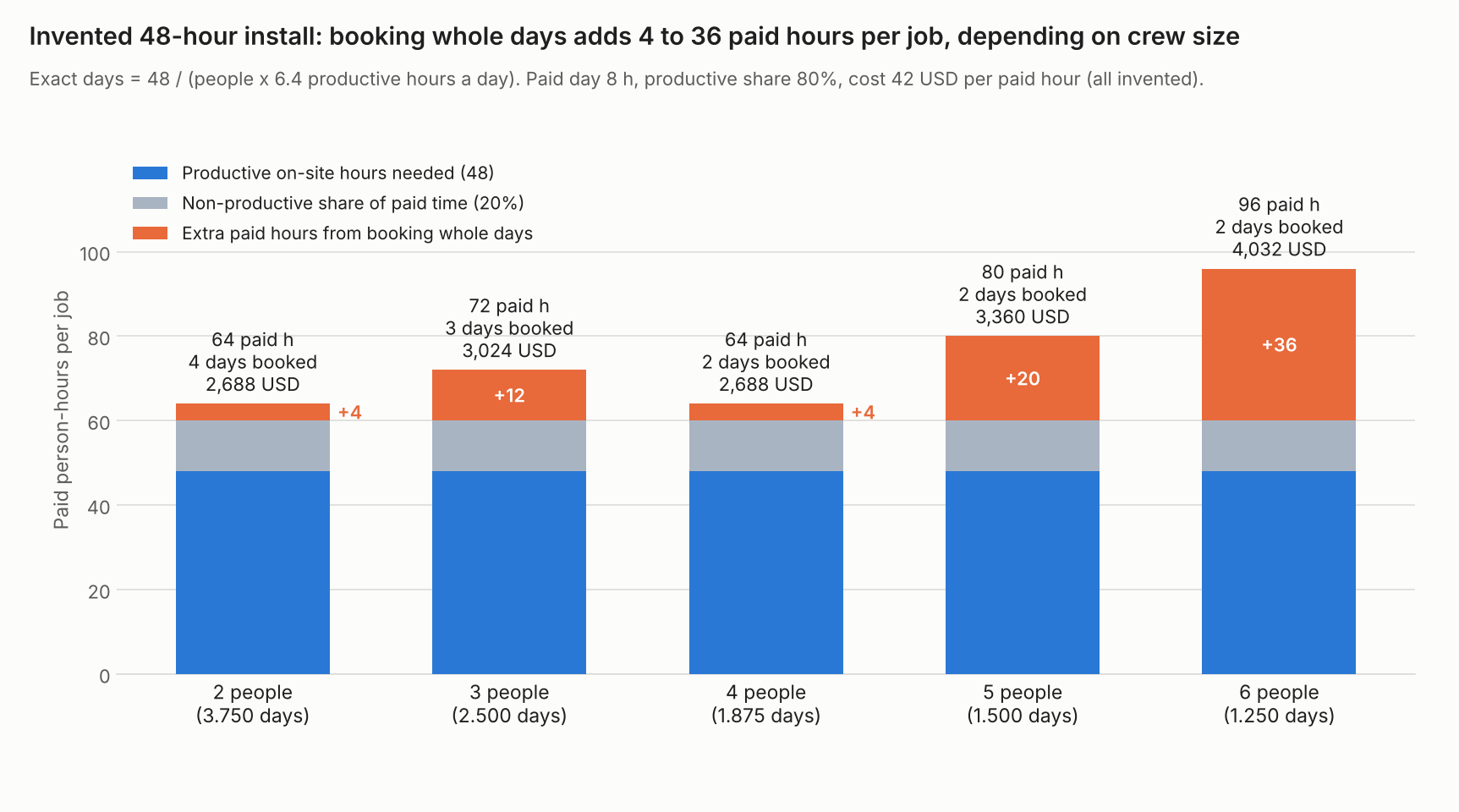
Figure 1. On an example 48-hour install, booking whole days adds 4 to 36 paid hours per job, depending on crew size.
Crews of 2 and 4 both book 64 paid hours at 2,688 USD (example). Their 3.75 and 1.875 days round up to 4 and 2. A crew of 6 needs 1.25 days but books 2 days. It costs 4,032 USD, which is 50% more. Productive share of paid hours is 48 divided by paid hours. It cannot pass 80% here, because the 20% non-productive share is an input.
Crews of 4 are the closest call. Twenty jobs at 1.875 days each, over 18.9 available days per crew, add up to 1.984 crews of work. So 2 crews would be busy 99.2% of their available days, with almost no slack. With whole-day booking you need 3. Crews of 4, 5 and 6 all need 3 crews that way. Headcount (crews times crew size) rises from 12 to 18 people, yet no more jobs get done.
A plan of 20 jobs a month with crews of 4 needs 2 crews if leftover time is reused, and 3 if you book whole days.
Worked example: which credentials are valid on the job date?
A credential only helps if it is valid on the day of the job. This example roster is checked against a job on 15 December 2026 with a warning window of 60 days. Our rule: an expiry on or after the job date counts as valid. The fall protection expiry dates are employer-set, because OSHA prints no renewal cycle. Your regulator or scheme may differ.
| Person | Credential (example) | Expiry | Days from job date | Status |
|---|---|---|---|---|
| Asha Rao | PV installer certificate | 2026-11-30 | -15 | Expired |
| Asha Rao | Fall protection training (employer-set) | 2027-03-31 | 106 | Valid |
| Ben Clarke | Electrician licence | 2027-06-30 | 197 | Valid |
| Ben Clarke | Fall protection training (employer-set) | 2026-12-31 | 16 | Expires soon |
| Chen Wu | PV installer certificate | 2028-02-15 | 427 | Valid |
| Chen Wu | Fall protection training (employer-set) | 2027-09-01 | 260 | Valid |
| Dev Patel | Electrician licence | 2026-12-15 | 0 | Expires soon |
| Eve Moore | Fall protection training (employer-set) | 2026-10-01 | -75 | Expired |
On the job date, 2 of the 8 records are expired and 2 more expire within 60 days. Dev Patel’s electrician licence expires on the job date itself. Each of the 3 required credentials has a valid holder on the job date. Ben Clarke covers the electrician licence. Chen Wu covers the PV installer certificate. Asha Rao covers fall protection training. Only Chen Wu holds a valid PV installer certificate, so one absence blocks that job type.
Check your own crews
Part 1 compares crew sizes and counts crews for your job hours. Part 2 checks a pasted roster against a job date. Both start with the examples.
If the calculator does not load, open the crew size and credential calculator on its own page.
How solar software handles crew management
Crew tools differ most on credentials and time. On the pages read, no tool states credential-expiry tracking, and only Coperniq documents live location and time clocks together. The table rates five tools on the other four points, checked October 2026.
Praxedo and Power Factors Unity state skill-based assignment, and Coperniq states live location and time clocks. Not stated means the company page we cite does not say. Partly means the page describes only part of the feature.
| Software | Skill-based assignment | Availability or time off | Live location | Time tracking |
|---|---|---|---|---|
| Zuper | Partly | Not stated | Partly | Not stated |
| Praxedo | Yes | Yes | Partly | Not stated |
| Power Factors Unity | Yes | Yes | Partly | Partly |
| Coperniq | Not stated | Not stated | Yes | Yes |
| Salesforce Field Service | Not stated | Yes | Not stated | Not stated |
- Zuper. Skill assignment is partial: zuper.co/solar says "AI Dispatch Assistant picks the best-fit crew by skill and location". Our scheduling page notes that Zuper’s docs show assignment as manual drag and drop. Availability is not stated on zuper.co/solar. Live location is partial: zuper.co/solar lists a dispatch board with "live crew locations", but how location is tracked is not described. Time tracking is not stated on zuper.co/solar.
- Praxedo. The praxedo.com solar page says SmartScheduler evaluates "your team’s skills, time requirements, customer asset availability, and location". That factor covers customer equipment, not staff. Elsewhere the page says Praxedo helps by "monitoring technician availability" alongside service call status. Technicians get appointments that match their current location, but live tracking is not described.
- Power Factors Unity. The page lists "Skill- and role-based technician assignment", and "technician availability" is an assignment factor. Location is an assignment factor, but live tracking is not described. Labor is logged from the field, but no time clock is described.
- Coperniq. Skill assignment is not stated. The products page that described route optimisation and a live technician map returned a 404 when re-checked in November 2026. Coperniq’s geolocation help article, last updated 5 August 2025, confirms automatic clock-in and clock-out by geofence. Confirm live-map tracking with Coperniq before relying on it.
- Salesforce Field Service. Skill assignment is not stated on the developer page cited. Our scheduling page rates auto-assign Yes from a Trailhead module. The developer page for the ResourceAbsence object covers "a time period in which a service resource is unavailable to work in Field Service". Live location and time tracking are not stated on the page cited.
Ratings come from one company page each. No page states credential-expiry tracking. Praxedo’s page was last modified 6 October 2026. Zuper, Power Factors and Coperniq pages carry no date. Salesforce’s page is a developer reference for Winter ’27 (API version 68.0). Salesforce is a general field service platform. Companies may document more elsewhere, so put these questions to each one:
- Can I store a credential with an expiry date and block assignment after it?
- Does leave or sickness remove a person from the schedule automatically?
- Can I export hours per job and crew for payroll and job costing?
To compare tools that schedule and track crews, see the best solar project management software list.
Common mistakes with crew management
FAQs
What is the difference between crew management and scheduling?
Crew management keeps the people records: roster, skills, credentials, availability and time. Scheduling and dispatch use those records to put crews on jobs by date and place. See scheduling and dispatch.
How big should a solar installation crew be?
There is no standard size, so size it from your job hours. BLS says installers usually work in teams. In an example 48-hour job, crews of 2 and 4 each added 4 paid hours from whole-day rounding, while a crew of 6 added 36.
How often must solar credentials be renewed?
NABCEP board certifications (for example PVIP) renew every 3 years. They need 30 hours of continuing education. The Associate credential needs 12 hours, per NABCEP’s recertification page (modified 25 June 2026). Licences and safety training have their own cycles, so confirm them with each issuer and store the expiry date.
How do I check a crew member’s credential on the job date?
Compare its expiry with the job date, not today’s date. In our rule, an expiry on or after the job date counts as valid. In the example roster above, 2 of 8 records are expired on 15 December 2026 and 2 more expire within 60 days. Link each job’s work order to its crew and you can cost it by crew hours.
Related terms
- Scheduling and dispatch: matching crews and jobs by date, place and skill.
- Work order: the record of one job, from request to close.
- Install stage: the steps a crew carries out on an install.
- Solar project management software: tools that track projects, tasks and crews together.
- Mobile app offline mode: how crew apps keep recording with no signal.
Next step: list every crew member’s credential expiry dates. If your crews work from a dispatch board, compare tools in the best solar field service management software list.
Sources
- US Bureau of Labor Statistics: Solar Photovoltaic Installers, Occupational Outlook Handbook, last modified 27 August 2026 (checked October 2026).
- NABCEP: Professional Recertification and Associate Renewal, page metadata modified 25 June 2026 (checked October 2026).
- OSHA: Fall Protection in Residential Construction, FAQ, no publication date printed (checked October 2026).
- Fieldproxy: Auto-Assign Solar Installation Crew, copyright 2026, no page date (checked October 2026, company marketing).
- Zuper: Solar, copyright 2026, no page date (checked October 2026).
- Praxedo: Solar industry page, last modified 6 October 2026 (checked October 2026).
- Power Factors: Unity field service management, copyright 2024-2026, no page date (checked October 2026).
- Coperniq: Products page, coperniq.io/products, returned a 404 when re-checked in November 2026, so its live-map claim could not be re-confirmed. Coperniq geolocation help article, last updated 5 August 2025 (checked November 2026), confirms clock-in and clock-out by geofence.
- Salesforce: ResourceAbsence, Field Service developer reference, Winter ’27 (API version 68.0), no date printed (checked October 2026).
Last updated 30 October 2026. Next scheduled review: 30 January 2027.