Key takeaways
- All five lists name photo subjects, from 6 (NHEC) to 31 (NYSERDA numbered items). A sixth document, the SolarAPP+ help article on its Carson checklist, counts 37.
- In the five lists, 3 say labels must be legible. Only 1 asks for geotagged location. None asks for a timestamp. None sets a file format or resolution.
- Los Angeles County and NYSERDA ask for photos of work before it is covered. One example is the racking without modules.
- In an invented job, 19 of 21 photos taken and 3 unusable leave 16 usable, which is 76.2% complete.
- An example firm taking 126 photos a job, plus 15% retakes, at 3.5 MB over 240 jobs needs 121.7 GB a year, or 852.0 GB over 7 years.
To capture and store these photos in an app, see the best solar site survey apps.
Photo documentation at a glance
Photo documentation is a record, not a gallery. Each photo should answer one question a reviewer might ask.
| Item | Detail |
|---|---|
| What it is | Photos tied to a job and a stage. Each has a subject, a label and ideally a time and place. |
| Range of list sizes | 6 to 31 photo subjects across the five documents. See Figure 1. |
| Evidence features asked for | Legible labels: 3 of 5 documents. Location: 1. Timestamp: 0. File format or resolution: 0. |
| Where it matters | Permit inspection, utility completion, programme quality checks and the owner’s handover pack. |
| In software | Mobile photo apps and project tools. Each documents its own features. See the table below. |
Why does photo documentation matter for installers?
A missing photo can stop a sign-off. For rooftop solar, Los Angeles County’s remote inspection guide says "an inspection will not take place without these pictures".
Photos also show what sat behind a cover or under an array once the work is closed up. NYSERDA’s sample says its Independent Standards and Quality Assurance team uses it "to evaluate the quality of the solar electric installation". For the permit side, read permit plan set and AHJ.
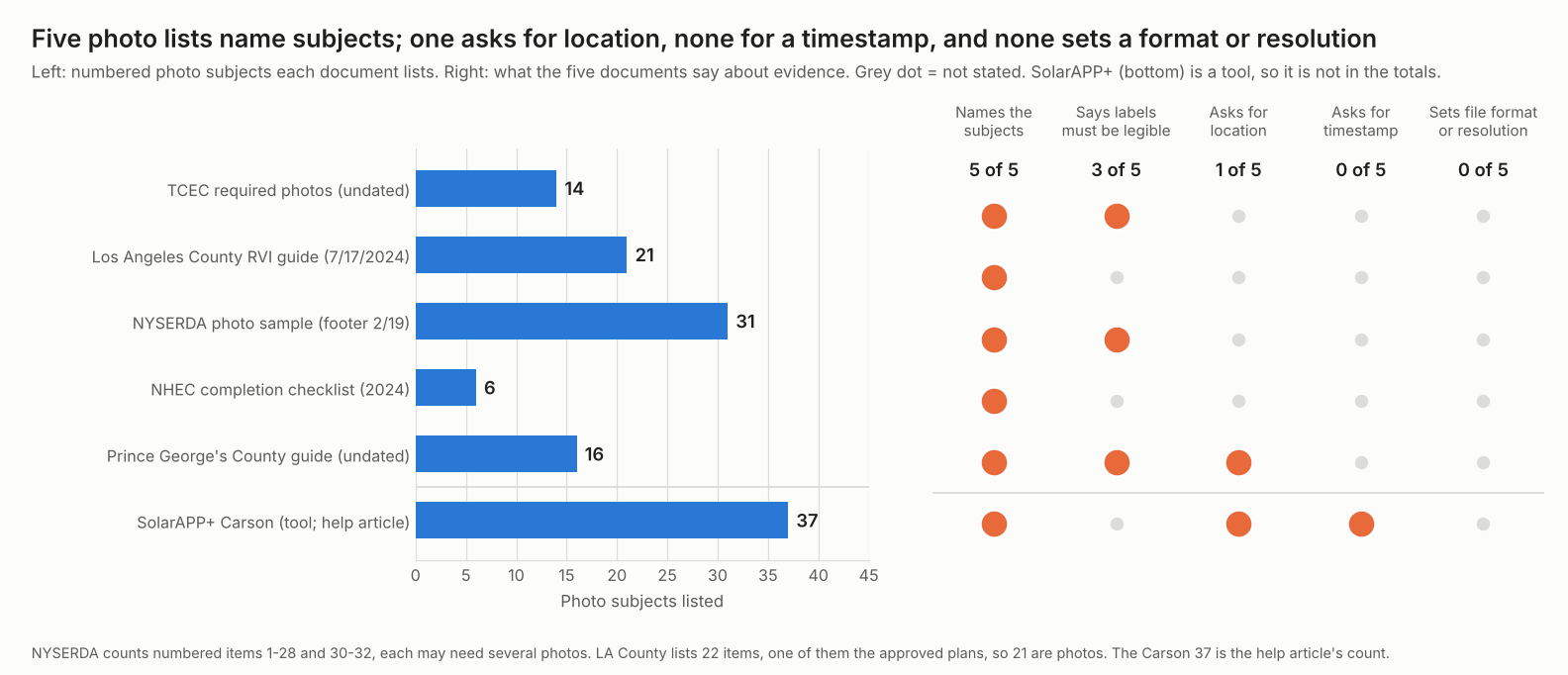
Figure 1. All five photo lists name subjects. Only 3 say labels must be legible, and 1 asks for location. None asks for a timestamp or sets a file format or resolution.
Which photos does a solar job need at each stage?
Reviewers differ, but the pattern holds. Photo the site. Then photo the work before it is covered, the finished system and the handover. The survey photo list sits on the site survey page. For capture tools, see the best solar site survey apps.
- Survey: Prince George’s County’s grant guide lists 7 pre-install subjects. They are the home exterior, utility meter, property access and ladder area, array locations with penetrations and obstructions, potential shading, main service panel and expected balance-of-system location. For remote jobs, see remote site assessment.
- Install (in progress): Los Angeles County asks for "The roof plane that supports the array(s) prior to placing the array(s)". It also asks to "Show the racking without the modules installed" and for "The space under the array(s)". NYSERDA’s sample says pictures "should be taken just before panels are installed to show all grounding and wire management".
- Inspection: TCEC lists 14 photos. They include the main breaker panel covered and uncovered, the meter face with the number legible and the AC disconnect within 6 feet of the meter. NHEC lists 6, including the production meter height from grade measured with a tape. Los Angeles County lists 21 photos plus a copy of the approved plans.
- Handover: Prince George’s County’s 9 post-install subjects end with the inspection sticker. NHEC’s checklist has the contractor confirm "The completion photos have been submitted to NHEC." The pack itself is on the handover pack page.
Thermal and drone images are a separate set. See thermal inspection and drone inspection. For commissioning test records, read commissioning.
What makes a photo usable as evidence?
A usable photo lets a stranger confirm what was installed, where and when. The lists ask for five things. Only some put them in writing.
- One subject, wide and close. NYSERDA’s sample asks for "both close up and pulled back shots". It also asks for photos with "cover on, cover off, door open, and door closed".
- A readable label. TCEC wants the meter number legible. NYSERDA wants module labels legible. Prince George’s County says "Label should be legible."
- Site context. Los Angeles County wants the front of the building showing the street address. NYSERDA says its first photo "Must show street number and be taken from a street view".
- Location and time. SolarAPP+ help (7 October 2026) says "GPS location and timestamps are locked in at the moment of capture in app". Prince George’s County asks that photos be geotagged. The other four lists say neither.
- Format and size. None of the five lists sets a file format or resolution. Keep originals. Ask the reviewer if the upload has a limit.
Metadata is a clue, not proof. IONOS’s EXIF guide (undated) says an EXIF block can hold date, time and GPS tags. It also says someone can change EXIF data later. Fast.io’s guide (reviewed 21 April 2026) says some messaging and social apps strip location data. The same guide says photos sent as a document in WhatsApp keep their metadata.
Los Angeles County lists required pictures and says "Do not substitute pictures with video". It also wants a live stream or recording from the street to the array.
Worked example: how complete is a photo set, and how much storage does it need?
Two checks matter for each job. Is the set complete and legible? Can you store and send it? All inputs below are example unless marked. The checklist counts come from the documents.
| Check 1: completeness | Value |
|---|---|
| Checklist | Los Angeles County: 21 photo subjects (the 22nd item is a copy of the approved plans) |
| Photos captured, one per subject (example) | 19, so 2 subjects not taken |
| Captured but blurry or unreadable label (example) | 3 |
| Usable photos | 19 - 3 = 16 of 21 = 76.2% |
| Still needed | 5: 2 not taken and 3 to retake |
The Los Angeles County guide says no inspection starts until the pictures arrive and get reviewed. So 5 gaps would hold up the inspection. A retake is easiest while the crew is still on site.
| Check 2: storage (all inputs example) | Value |
|---|---|
| Jobs a year | 240 |
| Photos a job by stage | 25 survey, 70 install, 21 inspection, 10 handover = 126 |
| Retakes kept | 15%, so 144.9 photos a job |
| Original file | 3.5 MB each, so 507.2 MB a job |
| A year | 240 x 507.15 MB = 121.7 GB (1 GB = 1,000 MB) |
| Kept 7 years, same jobs each year | 852.0 GB |
| Resized copy | 0.6 MB each, one copy of each of the 126 photos (no retakes) is 75.6 MB |
| Email attachment limit (example placeholder) | 25 MB |
The 21 inspection photos are 73.5 MB as originals and need 3 messages at that limit. Resized, they are 12.6 MB and fit in 1. The figures above are illustrative. TCEC’s list says to email photos to its distributed generation address. One workable split is a resized copy to send and an original to store. Prince George’s County accepts "emailed as attachments, zipped files, links etc."
Photo checklist and storage calculator
The calculator below checks how complete a photo set is and how much storage it needs.
The calculator also opens on its own page, which suits a phone.
How should site photos be stored and shared?
Store them against the job, not on a phone. A Timemark company blog (13 May 2026) warns about phones. It says photos kept on "personal phones, messaging apps, and shared drives" are "difficult to verify or retrieve later".
- Take photos on site. Hillsborough County’s virtual inspection page (last modified 9/24/2026) says contractors "submit photos and/or videos while still at the jobsite". It says this is for offline reports. SolarAPP+ says its Carson checklist can be captured offline and uploaded later.
- Keep the original. A resized copy may be easier to send. An original keeps the metadata the camera wrote.
- Name or tag by subject. Software tags help. Solo’s help (16 January 2026) ties each photo to a survey element.
- Link the job record. Tie photos to the job or work order. Then the O&M team can find them. See work order, CMMS and mobile app offline mode.
How solar software handles photo documentation
Of the five tools read, only SolarAPP+ documents time and location locked at capture. Ratings below come from the pages named, checked in October 2026.
| Software | Photo capture documented? | Time or location documented? |
|---|---|---|
| SolarAPP+ | Yes | Yes |
| Solo (SolarNexus) | Yes | Not stated |
| Scanifly | Partly | Not stated |
| SiteCapture | Partly | Not stated |
| Timemark (company blog only) | Partly | Partly |
Not stated means the company page we cite does not say. Partly means the page covers some of the feature, or the source is a company blog rather than product documentation. Page notes:
- SolarAPP+: Virtual inspection pilot help (7 October 2026): GPS and timestamps "locked in at the moment of capture in app". Precise location must be on. Carson checklist article (21 August 2026): 37 items, native camera with location services on.
- Solo (SolarNexus): Site surveys help (16 January 2026): photos taken or uploaded and attached to survey elements. Timestamps and GPS not mentioned. Video not supported.
- Scanifly: Mobile page (footer 2022): "Annotate photos to provide extra context". Albums for photos. Timestamps and GPS not mentioned.
- SiteCapture: its help centre describes AI Image Validation, which checks photos after a project is synced and flags any that need a retake. The company’s own help pages do not mention timestamps or GPS.
- Timemark: Company blog (13 May 2026) describes "timestamp, GPS geotag, and on-site notes". A blog, not product documentation.
To compare capture apps feature by feature, see the best solar site survey apps.
Common mistakes with photo documentation
FAQs
What photos does a solar installation inspection need?
Most lists ask for the meter, the main panel, equipment labels and the array. The five lists run from 6 subjects (NHEC) to 31 (NYSERDA), and the SolarAPP+ Carson article, a sixth document, counts 37. Ask your AHJ or utility for its current list.
Do solar inspection photos need a timestamp or GPS?
Not in most lists. Of the five, 1 asks for location. None asks for a timestamp. Some tools lock them in at capture, as SolarAPP+ says it does. If yours does, use that. Otherwise ask the reviewer.
Can I send video instead of photos?
Not always. Los Angeles County lists the pictures it needs before a live stream starts. It says not to substitute video. It also wants a stream or recording from the street to the array.
What resolution should site photos be?
None of the five lists sets one. A reviewer must read labels and numbers. Zoom in on each photo before you leave. Keep the original file in case a reviewer asks for it.
Can I send inspection photos through a messaging app?
Check first. Fast.io says some apps strip location data. It says WhatsApp keeps metadata only if you send a photo as a document. Prince George’s County accepts email attachments, zipped files and links.
Related terms
- Site survey: the pre-design capture list.
- Handover pack: the owner’s records.
- SolarAPP+: automated permitting.
Next step: get your AHJ or utility photo list and tick it off in the calculator above. Then compare capture apps in the best solar site survey apps list.
Sources
- TCEC: Required Solar Installation Photos, undated (checked 30 October 2026).
- Los Angeles County: remote virtual inspection general guide, header dated 7/17/2024 (checked 30 October 2026).
- NYSERDA: Construction Photo Documentation Sample, footer code 2/19 (checked 30 October 2026).
- NHEC: 2024 Solar Installer Completion Checklist (checked 30 October 2026).
- Prince George’s County: Solar PV Photo Documentation Guide, undated (checked 30 October 2026).
- SolarAPP+: virtual inspection pilot installer guide, updated 7 October 2026, and Carson photo checklist article, updated 21 August 2026 (checked October 2026).
- Hillsborough County: virtual inspections, last modified 9/24/2026 (checked October 2026).
- Solo SolarNexus help: Site Surveys, 16 January 2026 (checked October 2026).
- Scanifly mobile page, footer 2022 (checked October 2026).
- SiteCapture help centre: iOS App, Viewing AI Image Validations, undated (checked October 2026). A previously cited glitter.io guide on this topic no longer carries that content.
- Timemark: the solar installer’s photo documentation guide, 13 May 2026, a company blog (checked October 2026).
- IONOS: What is EXIF data?, undated, and Fast.io: how to remove EXIF data before sharing photos, reviewed 21 April 2026 (checked October 2026).
Last updated 30 October 2026. Next scheduled review: 30 January 2027.