Key takeaways
- A change order has 3 parts: what changes, the price change and the time change.
- Invented case: a panel upgrade costs 2,952.40 USD with 480 USD of delay cost and 10% overhead. At a 25% margin it sells for 3,937 USD.
- A 25% markup on the same cost gives 3,690.50 USD and a 20.0% margin. That is 246.50 USD below the 3,937 USD price (example).
- Once the 3 delay days are costed, a flat 3,000 USD catalogue price leaves 47.60 USD of profit, a 1.6% margin (example).
- OpenSolar, SubcontractorHub, Buildertrend and Enerflo create customer change orders (4 of 5 tools checked). Procore’s is a cost-side record.
To keep change orders in the project record after signing, see the best solar EPC project management software.
Change order at a glance
A change order turns a change after signing into a written record. It is not a quote, a work order or an adder. This page covers pricing and records, not contract law.
| Item | Detail |
|---|---|
| What it records | AIA’s help page for G701-2017 says it records the change, the contract sum and the contract time. |
| Who signs | On G701-2017: owner, architect and contractor. On G701S-2017, for subcontracts: contractor and subcontractor. |
| Core formulas | Price = total cost / (1 - target margin). Markup = margin / (1 - margin). |
| Standard or rule | The pages read name no solar-specific standard. AIA forms are construction forms. Your contract sets the rules. |
| In software | Proposal, project and construction tools. See the software table below. |
An adder is a priced extra inside the sale. A change order comes after signing. A work order tells the crew what to do, and it can follow a change order.
Why do change orders matter for installers?
An unpriced change order is free work. A slow one holds up the job. Both hit margin, and the second also hits cash and the crew plan.
OpenSolar’s blog (1 July 2024) says exceptions "tend to cause the most drag on the critical path". It is a company view, not a measurement. It also says each agreed change should get a signed and countersigned change order, kept with the original contract.
Financed jobs can add a step. Palmetto’s current help pages list utility, pricing, equipment and customer changes as change order triggers. The specific sales-member response deadline we noted before could not be reconfirmed, since the page we cited no longer loads. Check your financier’s current process.
For the effect of a change order on estimate-against-actual variance, see job costing. This page prices the change itself.
What causes change orders in solar?
The pages read name these causes. Some are found on site and others follow a utility or customer response. A thorough site survey before signing moves some of them earlier.
| Cause | What the page says | Source |
|---|---|---|
| 1. Roof findings | Serious roofing issues found after a PV system is in may need repair, forcing removal and reinstallation. The blog puts average removal and reinstallation at about 5,000 to 10,000 USD. | OpenSolar blog |
| 2. Electrical capacity or code | The main panel or point of connection may not support the planned system. Existing circuits may need moving. | OpenSolar blog |
| 3. Utility response | An interconnection rejection by the utility can trigger a change order. See interconnection application. | Palmetto help |
| 4. Design or scoping errors | The blog says sizing a system to the customer’s needs "can be tricky". Details missed at scoping. | OpenSolar blog |
| 5. Customer changes | A late change of mind, or a request to change the system or the financing details. | OpenSolar blog. Palmetto help |
| 6. External factors | A general contractor changes the roof shape without notice. Supply chain issues. Last-minute demands from an architect. | OpenSolar blog |
What is the field checklist for a change order?
Record the finding, cost it, state the days, get signatures, then update the records. The steps below are our working method. No source prescribes them.
- Record the finding. Take dated photos and measurements. See site photo documentation.
- Name the cause from the six groups above. A tally by cause shows what to fix at survey or in the proposal.
- List every cost line: materials, own hours, subcontractor cost, fees and delay.
- State the days added, and any new date the customer must agree. AIA’s G701S page has fields for days and a new substantial completion date.
- Get every named party to sign before the affected work starts, if your contract says so. OpenSolar’s blog suggests keeping the signed copy with the original.
- Update the records: the job cost code and the work order. Add any permit plan set change to the handover pack.
How do you price a change order?
Add all direct costs, including the cost of delay. Add overhead. Then divide by one minus your target margin. Dividing by a margin, not multiplying by a markup, keeps the profit you meant.
- Direct cost = materials + own labour + subcontractor + fees + delay.
- Total cost = direct cost x (1 + overhead rate).
- Price = total cost / (1 - target margin).
- Check: margin = (price - total cost) / price.
Margin divides profit by price. Markup divides profit by cost. A 25% margin equals a 33.3% markup. A 25% markup gives only a 20.0% margin. Name which one you quote.
Worked example: a main panel upgrade after signing
All inputs are example, not market prices. A signed job of 21,600 USD, with an expected cost of 16,416 USD, needs a main panel upgrade. Overhead is 10% of direct cost. Delay cost is 160 USD per working day for 3 days. The target margin is 25% of price. Overhead and margin are applied to the delay cost too. That is a method choice. You may price delay differently.
| Line (example) | Working | USD |
|---|---|---|
| Materials | Panel, breakers, labels | 1,150.00 |
| Own labour | 8 h x 38 | 304.00 |
| Electrician subcontractor | Quoted | 600.00 |
| Permit and utility fees | Quoted | 150.00 |
| Delay cost | 3 days x 160 | 480.00 |
| Direct cost | Sum | 2,684.00 |
| Overhead | 10% x 2,684.00 | 268.40 |
| Total cost | Direct + overhead | 2,952.40 |
| Price at 25% margin | 2,952.40 / 0.75 = 3,936.53, rounded up | 3,937.00 |
| Method (example) | Price (USD) | Profit (USD) | Margin |
|---|---|---|---|
| 25% margin on price | 3,937.00 | 984.60 | 25.0% |
| 25% markup on total cost | 3,690.50 | 738.10 | 20.0% |
| 25% markup on direct cost only | 3,355.00 | 402.60 | 12.0% |
| Flat catalogue price | 3,000.00 | 47.60 | 1.6% |
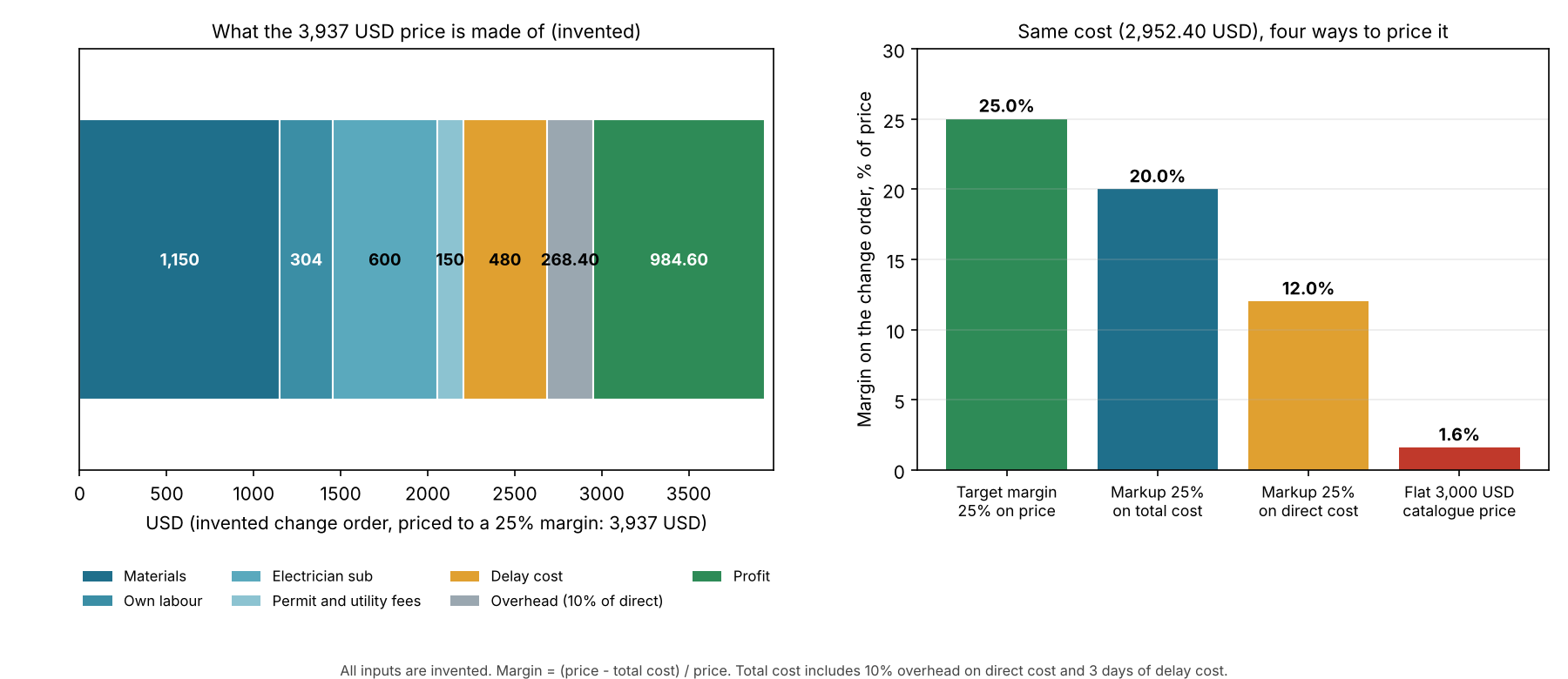
Figure 1. On an example panel upgrade, a markup or a flat price cuts the margin from 25.0% to between 20.0% and 1.6%.
The flat price fails because it ignores the 3 delay days. With no delay, the 25% price would be 3,233 USD and the 3,000 USD flat price would earn 19.2%. With 6 delay days, the same flat price loses money, at minus 16.0% (example).
| Case (example) | Revenue (USD) | Cost (USD) | Profit (USD) | Margin |
|---|---|---|---|---|
| Before the change | 21,600.00 | 16,416.00 | 5,184.00 | 24.0% |
| Change priced at 3,937 | 25,537.00 | 19,368.40 | 6,168.60 | 24.2% |
| Change at flat 3,000 | 24,600.00 | 19,368.40 | 5,231.60 | 21.3% |
| Cost absorbed, no extra revenue | 21,600.00 | 19,368.40 | 2,231.60 | 10.3% |
Pricing the change to a 25% margin keeps the job near its 24.0% start. The flat price gives up about 2.7 points. Absorbing the cost gives up about 13.7 points (example). One job is not a benchmark. For whole-job variance, see job costing.
Price your own change order
Enter your cost lines, delay days and target margin. It opens with the example case above and shows four prices and the whole-job margin.
If the calculator does not load, open the change order pricing calculator on its own page.
How solar software handles change orders
Of five tools, OpenSolar, SubcontractorHub, Buildertrend and Enerflo create customer change orders, and Procore’s is a cost-side record. We read one or two company pages each in October and November 2026. "Yes" means the page names the step. "Partly" means it names only part of it. "Not stated" means the company page we cite does not say, though the company may document more elsewhere.
| Software | Creates a change order | Price | Signature or approval | Schedule days |
|---|---|---|---|---|
| OpenSolar | Yes. Generates a Change Order document from a template. | Partly. It takes the original and the revised system and payment option. Price edits are not described. | Not stated | Not stated |
| SubcontractorHub | Yes. A change order button copies the current proposal into a new one. | Not stated. You edit the new proposal. | Yes. The proposal and contract are signed again. | Not stated |
| Buildertrend | Yes. Create one under Project Management. | Yes. Flat fee, or line items that can carry tax. | Yes. Client approval by email or portal, or approval on the client’s behalf with an e-signature. | Partly. An approval deadline only. No automatic schedule change is described. |
| Procore | Partly. A potential change order on a commitment, a cost-side record. | Partly. Schedule of values lines hold the costs. | If the DocuSign integration is enabled, signing sets the status to Approved. | Not stated |
| Enerflo | Yes. A signed change order addendum from the Install Tracker. | Partly. Users edit starting price per watt and panel count, with a live cost preview. | Yes, by default. An "Internal Only" option skips the customer signature. | Not stated |
Pages read for each tool:
- OpenSolar: Support article, "Create a Change Order document". No date shown.
- SubcontractorHub: Help article "Change Order Walkthrough". Updated 4 September 2026.
- Buildertrend: Help article "Change Order Overview". No date shown. General construction tool, not solar-specific.
- Procore: Support article "Create a Commitment Potential Change Order". Last modified 2 December 2025 per metadata. General construction tool.
- Enerflo: Help articles "Change Order Feature Overview" and "Change Order Feature FAQs". 23 June 2026 and 25 March 2026.
The job costing and ERP pages rate Jonas, Acumatica and FOUNDATION on change orders, so they are not repeated here. None of the pages read prints a margin check or a delay-cost field. For ranked tools, see the guide to solar EPC project management software.
Common mistakes with change orders
FAQs
What is the difference between a change order and an adder?
An adder is a priced extra inside the original sale. A change order changes a contract that is already signed. If a panel upgrade is found at survey and priced in the proposal, it is an adder. If it is found after signing, it needs a change order.
How do you price a change order?
Add direct costs and overhead, then divide by one minus your target margin. In our example case, 2,952.40 USD of cost at a 25% margin gives 3,937 USD. Include any days added as a cost.
Is a 25% markup the same as a 25% margin?
No. Markup is profit over cost and margin is profit over price. A 25% markup gives a 20.0% margin. A 25% margin needs a 33.3% markup.
Does a change order change the schedule?
It can. AIA’s G701S-2017 page records the change in days and the new substantial completion date. In our example case, 3 days add 480 USD of cost. The real delay depends on your utility, inspector and supplier.
Who has to sign a change order?
On AIA’s G701-2017 the owner, architect and contractor have signature spaces. On G701S-2017 the contractor and subcontractor do. Your contract decides who else signs, so ask your lawyer about anything beyond the form. Both are construction forms, not solar sales forms.
Related terms
- Scheduling and dispatch: giving jobs a date and a crew, which a change order can move.
- Adders: priced extras inside the sale, before signing. A change order covers the same kind of extra after signing.
- Job costing: tracks estimate against actual cost, so it shows what a change order did to margin.
- Customer portal: a secure login where a customer sees one project.
Next step: price your next change order in the calculator above. The first link on this page is for keeping the signed record. To re-issue the agreed price to the customer, use the best solar proposal software list.
Sources
- OpenSolar: Change Orders: a Fact of Life. Company blog, 1 July 2024. Checked 30 October 2026.
- OpenSolar support: Create a Change Order document. No date shown. Checked October 2026.
- SubcontractorHub: Change Order Walkthrough. Updated 4 September 2026. The helpscoutdocs.com address we cited before no longer loads. Checked November 2026.
- Buildertrend: Change Order Overview. No date shown. Checked October 2026.
- Procore: Create a Commitment Potential Change Order. Published 22 November 2021 and last modified 2 December 2025 per page metadata. Checked October 2026.
- Enerflo: Change Order Feature Overview (23 June 2026) and Change Order Feature FAQs (25 March 2026). Checked November 2026.
- Palmetto: Solar Energy Plan, Change Orders. Shown 14 July 2026. The help.palmetto.com page we cited before no longer loads. Checked November 2026.
- AIA Contracts help: Summary, G701-2017, Change Order and Instructions, G701S-2017, Change Order. Help-centre pages, no document date. Footer copyright 2026. The sources are help pages, not the form text. Checked 30 October 2026.
Last updated 30 October 2026. Next scheduled review: 30 January 2027.