Key takeaways
- Of five tools checked, company pages document automatic array placement for two (Aurora Solar and OpenSolar). No page in the table prints an accuracy rate.
- Auto design proposes a layout and a person approves it. The roof model, setbacks, shading, strings and documents all stay with the designer. The table under the "decides" heading lists them.
- In our example, running the tool takes 10 minutes against 90 by hand. With review, edits and redos, the expected time is 45.75 minutes.
- In that example the saving drops to zero when you redo 63.6% of designs by hand. It also drops to zero when review passes about 64 minutes. Both figures use example inputs.
- Time five of your own jobs and log each draft as kept, edited or discarded.
To try automatic placement in software, see the best AI solar design software list.
AI auto design at a glance
It is a draft generator. It places modules. In some tools it also finds obstructions or strings the array. A person accepts, edits or rejects the result.
| Item | Detail |
|---|---|
| What it does | Proposes module placement from roof planes, obstructions and a target, such as a kWh goal or a fill-the-roof rule. |
| Main inputs | Roof planes and pitch, obstruction positions, setback values, the chosen module and inverter, and a target. |
| Main outputs | A draft array layout. Some tools also make strings, keep-outs or a bill of materials. |
| Standard or rule | No standard defines the term, and companies use their own names and modes. The AHJ and code govern the design, not the tool. See AHJ and NEC 690 compliance. |
| Not the same as | The whole solar design software category, or proof that a layout meets code. |
Why does AI auto design matter for installers?
It moves the work from drawing to checking. The time you save depends on how long review takes and how often you throw a draft away.
Layout feeds the permit, the bill of materials and the yield estimate, so a wrong draft spreads. Speed claims on company blogs rarely include review time. The worked example below shows why run time alone misleads. To compare design errors with the built system, see design accuracy.
What does auto design decide, and what must a person check?
It decides where modules go and, in some tools, how they connect. It does not decide whether the roof, the setbacks, the shade or the code allow the layout.
| Decision | What the company pages say a tool may do | What a person checks | Read more |
|---|---|---|---|
| 1. Roof model and obstructions | Detect roof edges and vents from imagery. OpenSolar’s Ada obstruction detection is 3D only. | Edge lengths, pitch, azimuth, missed vents or trees, rafter positions and roof condition. | Roof measurement, site survey, structural loads |
| 2. Setbacks and AHJ rules | Scanifly: setback values are typed in for each roof edge. | Current setbacks and pathways against your AHJ’s rules. | Setbacks, keep-out zones |
| 3. Shading | OpenSolar: "Pitch, azimuth and shading calculated automatically". | Obstructions the model missed, tree growth, and the shade report against site photos. | Shading analysis, TSRF |
| 4. Strings and electrical | Aurora: AutoStringer. OpenSolar: "Recommended stringing lengths", with warnings the designer can override. | String voltage at the site’s lowest temperature against the inverter limit, and the DC/AC ratio. | String sizing, Voc and Isc, DC/AC ratio |
| 5. Documents and equipment data | OpenSolar: auto designs generate a bill of materials. | Library entries against current datasheets, the diagram and plan set against the AHJ checklist, and whether a stamp is needed. | Datasheets, single-line diagram, plan set |
Worked example: when is auto design faster than manual design?
It is faster while review and redo time stay small. In our example it saves 44.25 minutes a design. The saving ends if you redo 63.6% of designs by hand.
Formula: auto minutes = run + review + edit time + redo time. Edit time = share kept × share needing edits × edit minutes. Redo time = share redone × manual minutes. A redone design also keeps its run and review time.
Example inputs: 90 minutes by hand, 10 to run and 20 to review. A kept design that needs edits takes 25 to edit. 30% of kept designs need edits and 10% of all designs are redone. That gives 10 + 20 + (0.9 × 0.3 × 25) + (0.1 × 90) = 45.75 minutes.
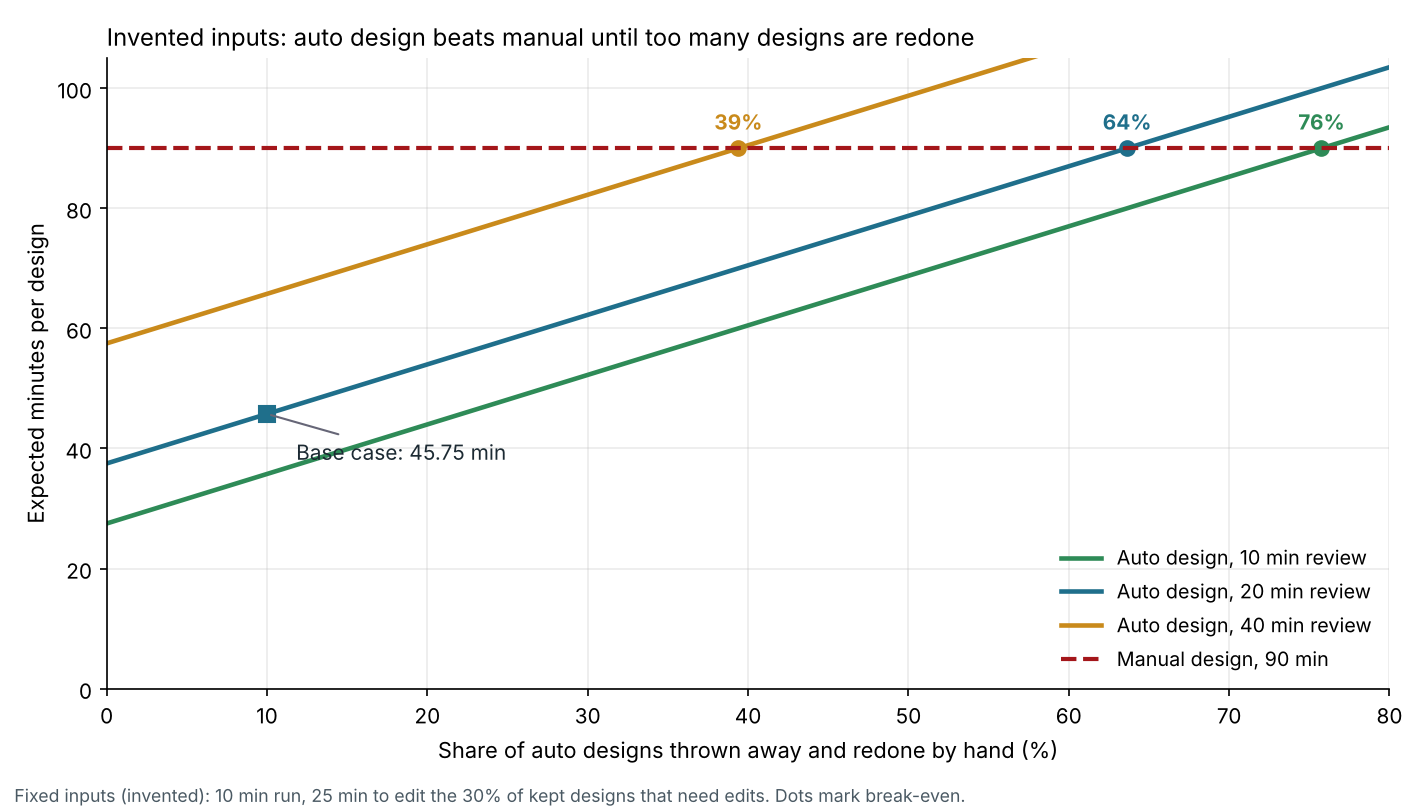
Figure 1. On example inputs, a 20 minute review keeps auto design faster until you redo 63.6% of designs by hand, and a 40 minute review cuts that to 39.4%.
| Review minutes | Auto minutes at 10% redone | Auto minutes at 30% redone | Break-even share redone |
|---|---|---|---|
| 10 | 35.75 | 52.25 | 75.8% |
| 20 | 45.75 | 62.25 | 63.6% |
| 40 | 65.75 | 82.25 | 39.4% |
Manual time is 90 minutes in every row. Run time alone is 10 minutes, a 9 to 1 gap. With review, edits and redos the gap is about 2 to 1. At 40 designs a month the base case frees 29.5 hours. That is worth 885 USD at an example 30 USD an hour. At a 10% redo share, review must pass about 64 minutes before the saving reaches zero. The sum counts design time only. It leaves out tool cost and training.
Auto design time-saving calculator
Enter your own times and redo share to see where auto design stops saving time.
How do you review an auto design before release?
Check the draft against the site, then the rules, then the equipment. These steps cover the risk. A tally turns them into your own numbers.
- Compare the roof model with the survey: edges, pitch, azimuth and any vent, skylight, chimney or tree the tool missed.
- Check setbacks and pathways against your AHJ’s current rules, not the tool’s default.
- Open the shade report and compare it with site photos or an on-site reading.
- Check strings: datasheet Voc and temperature coefficient, the inverter limits and the site’s low temperature.
- Check the documents: diagram, plan set and parts list, and whether a PE stamp is needed.
Log each draft as kept, edited or discarded. Those three counts give the redo and edit shares for the calculator.
How solar software handles AI auto design
Only Aurora and OpenSolar document automatic array placement. The others detect roofs or obstructions, or fill a segment you draw. The table is a documentation check, not a ranking.
| Software | Roof and obstruction detection | Array placed automatically | Strings made automatically |
|---|---|---|---|
| Aurora Solar | Not stated | Yes | Yes |
| OpenSolar | Yes, 3D only | Yes | Partly |
| HelioScope | Partly | Not stated | Not stated |
| Solargraf | Yes | Not stated | Not stated |
| Scanifly | Yes | Not stated | Not stated |
The notes below group each company’s wording by detection, placement, strings and limits.
- Aurora Solar
- Placement: "AutoDesigner automatically places panels". Modes are Energy and Max Fit.
- Strings: AutoStringer, and Energy mode "strings/connects the panels together". Max Fit "does not connect the panels".
- Limits: Target energy and panels must be set. Energy mode needs a string inverter or microinverter selected. No review step printed.
- OpenSolar
- Detection: "Ada obstruction detection is only available in 3D at this time."
- Placement: "automated solar array placement". Works instantly only on high quality 3D imagery.
- Strings: The stringing page lists "Recommended stringing lengths". The Auto Design page does not mention stringing.
- Limits: Added systems "operate like a normal, manual OpenSolar design". Page says accuracy is independently verified but prints no rate or method. "Auto Design is in beta and available worldwide."
- HelioScope
- Detection: Similar Obstruction Detection (menu item "Detect Similar Keepouts") matches a keepout you draw first, using what the page calls "computer vision technology". The page says it "is not automatic" and is not designed to find trees.
- Limits: Pro and Enterprise plans. If results are inaccurate, the page suggests switching map imagery.
- Solargraf
- Detection: Roof detection "uses computer vision". The 3D render "detects obstructions" and trees.
- Limits: "It is important to verify the accuracy of the site model." Accuracy depends on image quality.
- Scanifly
- Detection: "AI Detection" offers vent-like items, and you place or decline them.
- Placement: "Fill Modules" fills a segment you drew, then you adjust it.
- Limits: Check tilt and azimuth before generating keepouts. Review them before accepting.
"Yes" means the cited company page says it. "Not stated" means not found on the pages read in October 2026, not that the tool lacks it. Dates printed: Solargraf’s article says it was published on 24 May 2024, and OpenSolar’s Auto Design page metadata shows 3 March 2026. The other pages print no date. Only Solargraf and HelioScope say "computer vision" and Scanifly says "AI Detection". The Aurora and OpenSolar pages read do not say how their features work. Partly means only some of the need is documented. Test any speed or accuracy claim on your own jobs.
For tools that place arrays automatically, see the best AI solar design software list. The best solar design software guide covers the wider category.
Common mistakes with AI auto design
FAQs
Is AI auto design the same as solar design software?
No. Auto design is one layout function inside the full design category. It proposes where modules go, and a person still checks the roof, setbacks, shading, strings and documents. See solar design software and solar panel layout.
Does auto design replace a designer or an engineer’s stamp?
No. Your AHJ and state set the stamp or sign-off step, not the tool. OpenSolar’s stringing page says "Final design decisions remain in the hands of the solar designer". See PE stamp.
How accurate is AI auto design?
No accuracy rate is printed on the pages in the table, so this page gives none. OpenSolar’s Auto Design page says its accuracy is independently verified but prints no rate or method. Solargraf says roof detection accuracy depends on the quality of the aerial image. Measure the tool yourself by comparing drafts with built systems. See design accuracy.
What do I need before I run auto design?
Good site data, the right equipment entries and your setback values. Aurora needs a target energy and solar panels set before it runs. OpenSolar says Auto Design works instantly only on high quality 3D imagery. So a poor site may need manual mode.
Related terms
- Solar design software: the full design category that auto design sits inside.
- Solar panel layout: where each module sits on the roof.
- Shading analysis: how trees and roofs reduce the sun on the array.
- String sizing: how modules are grouped to suit the inverter.
Next step: time one auto design against your manual process, then compare tools in the best AI solar design software.
Sources
All pages were read in October 2026. Dates are those the page printed.
- Aurora Solar help: Solar Panel Placement in Design Mode. Step-by-step guide for designing a PV system.
- OpenSolar: Auto Design (page metadata modified 3 March 2026). Support: Designing using Ada Auto Design. Inverter sizing and stringing recommendations.
- HelioScope help: Similar Obstruction Detection.
- Solargraf help: Roof Design (published 24 May 2024).
- Scanifly help: Scanifly remote design tool. Creating Keepouts.
Last updated 30 October 2026. Next scheduled review: 30 January 2027.