Key takeaways
- The category has 5 stages. Each stage has an input, an output and a page on this site.
- All 4 tools checked document shading, electrical sizing and yield simulation.
- Coverage differs at the ends: 3 tools are rated Yes for layout and for a plan set, and only PVsyst has no documented single-line diagram.
- In the example, saving 45 minutes on each of 40 designs a month is worth 900 USD, and a 300 USD tool breaks even at 14 designs.
- The payback sum counts time only. It leaves out training, rework and whether the saved hours are used for other work.
To pick a design tool by job type, region and price, see the best solar design software.
Solar design software at a glance
It is the tool that fixes what you sell, what you order and what a reviewer sees. It is not the proposal, the CRM or the monitoring system.
| Item | Detail |
|---|---|
| What it does | Places modules, checks shade, sizes strings and inverters, simulates yield and produces design documents. |
| Main inputs | Site imagery or survey data, the equipment library, weather data and local setback rules. |
| Main outputs | Module count and kW, a shade report, a string plan, kWh a year, a single-line diagram, a plan set and a parts list. |
| Standard or rule | No standard defines the category. Code and the AHJ govern the design, not the tool. See NEC 690 compliance. |
| Not the same as | Proposal software (price, savings, finance: see solar proposal software) or a CAD drawing package. |
Why does solar design software matter for installers?
The design file feeds four later jobs, so one error spreads to all of them. Those jobs are the proposal, the permit, the order and the energy promise.
A wrong module count changes the kW you quote and the bill of materials. It also changes the kWh in the yield simulation. A drawing the reviewer rejects costs a revision cycle. Our design accuracy page shows how to measure the gap between design and as-built.
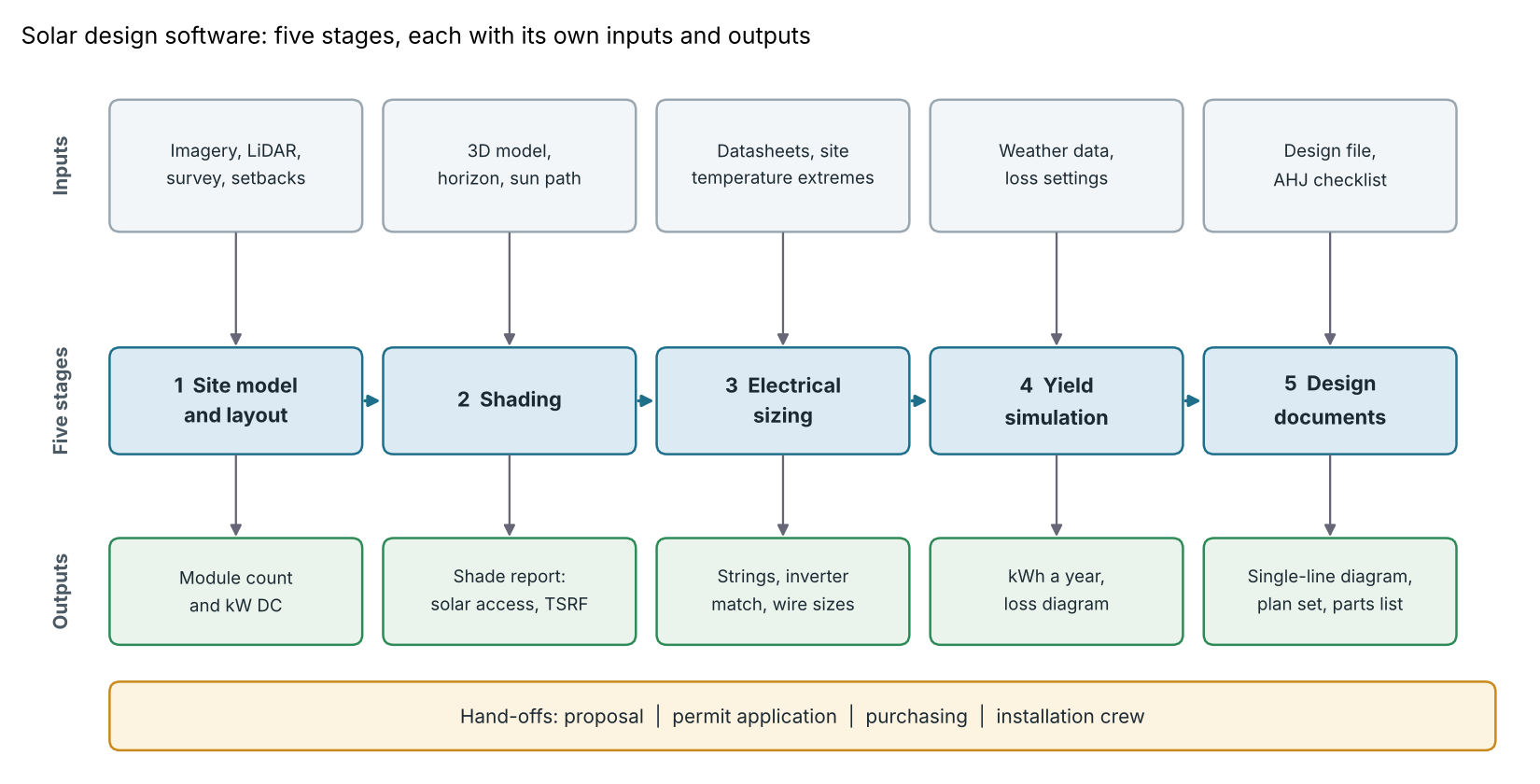
Figure 1. Each stage takes its own inputs and makes its own output, so a tool can be strong at one stage and thin at another.
What are the five stages of solar design software?
The five stages are layout, shading, electrical sizing, yield simulation and design documents. Each answers one question and has a detail page here.
| Stage | Question it answers | Detail pages |
|---|---|---|
| 1. Site model and layout | Where do the modules fit, after setbacks and obstructions? | Site survey, solar panel layout, setbacks |
| 2. Shading | How much sunlight do trees, roofs and the horizon take? | Shading analysis, shade report |
| 3. Electrical sizing | Do the strings suit the inverter at the site’s temperature extremes? | String sizing, DC/AC ratio, voltage drop |
| 4. Yield simulation | How many kWh will it make in a year, after losses? | Energy yield simulation, PVsyst report |
| 5. Design documents | What does the reviewer, buyer and crew receive? | Single-line diagram, permit plan set |
Two shared inputs run through several stages. The equipment library, which feeds electrical sizing, needs checking against the maker’s current print (see equipment datasheets). The weather file, which feeds the yield stage, sets the kWh (see weather and solar resource data).
What should you require for each job type?
Insist on the stages that carry the most risk for the jobs you sell. A roof needs setbacks and shade by roof face. A ground mount needs terrain and spacing.
| Job type | Check first in a tool | Pages that explain the check |
|---|---|---|
| Pitched residential roof | Layout around setbacks and keep-outs. Shade per roof face. A diagram or plan set your AHJ accepts. | Keep-out zone, TSRF, AHJ |
| Commercial flat roof | Row spacing, attachments and roof loads. Inverter loading and clipping. | Racking design, row spacing, inverter clipping |
| Ground mount or utility scale | Terrain, cable routes and ground cover. Yield with P50 and P90. | Ground-mount design, layout optimisation, P50, P90, P99 |
Our lists compare tools by job: residential, commercial and utility-scale.
Worked example: what is a design hour worth?
A design tool pays back when the time it saves, valued at your loaded rate, exceeds its monthly cost. All inputs below are example.
- Time saved a month = designs × (minutes now − minutes with the tool) ÷ 60.
- Value = hours saved × loaded cost an hour.
- Net = value − tool cost a month.
- Break-even designs = tool cost × 60 ÷ ((minutes now − minutes with the tool) × loaded cost an hour).
Example inputs: 90 minutes a design now and 45 with the tool. The loaded rate is 30 USD an hour. The tool costs 300 USD a month.
| Designs a month | Hours saved | Value (USD a month) | Net of tool (USD a month) |
|---|---|---|---|
| 20 | 15 | 450 | +150 |
| 40 | 30 | 900 | +600 |
| 100 | 75 | 2,250 | +1,950 |
The break-even is 13.3 designs, so 14 whole designs. At 13 designs the net is −7.5 USD. At 14 it is +15 USD. The sum counts time only. It leaves out training, rework and whether the hours are used for other work. Time five of your own jobs before you trust it.
Design-hour payback calculator
Enter your own designs a month, minutes saved and tool cost to see the net value and break-even. If it does not load, open the calculator on its own page.
How do you test a solar design tool before you buy?
Run your own finished jobs through it and compare the outputs with what was built and approved.
- Design one finished job of each type you sell. Compare module count and kW with the as-built system.
- Compare three library entries with the current datasheets. Voc and the temperature coefficient set string length.
- Open the documents your AHJ and customers receive. Compare them with your AHJ’s plan set checklist.
- Find out where imagery and weather data come from, and whether they are billed per project.
- Test exports and delivery: file formats (DWG and DXF), data export, and cloud or desktop use.
How solar software handles the design stages
Aurora Solar, OpenSolar and HelioScope document all five stages on the pages we read. PVsyst is thinner on layout and states no plan set. The table is not a ranking.
| Software | 1. Layout | 2. Shading | 3 and 4. Electrical sizing and yield | 5. Diagram or plan set |
|---|---|---|---|---|
| Aurora Solar | Yes | Yes | Yes | Yes (US pitched-roof homes to 25 kW AC) |
| OpenSolar | Yes | Yes | Yes | Yes |
| HelioScope | Yes | Yes | Yes | Yes |
| PVsyst | Partly | Yes | Yes | Not stated |
"Yes" means a company help or product page says the tool does it. Partly means the page covers only part of the stage. Not stated: the company page we cite does not say. What each tool’s pages say:
- Aurora Solar: "Designing a PV System in Aurora" lists manual placement, AutoDesigner and AutoStringer. The panel-placement page says "Max Fit mode will fill the entire roof and does not connect the panels". The shade report lists annual TOF, solar access and TSRF but is "not available for Basic license users". The Simulation Engine page says it counts shade from buildings, trees and obstructions with the Shading Engine on. Instant Plan Sets offers single-line, three-line or both for "pitched roof, grid-tied, residential-scale PV systems within the United States", up to 25 kW AC.
- OpenSolar: The 3D design article says "Click and drag to draw panel arrays on the roof" after you press + Panel. Ada "will create new systems that match the Auto Design template", instantly only with high-quality 3D imagery. The shading report needs a 3D design with raytracing. The stringing page lists "Recommended stringing lengths" and voltage limit warnings. Yield uses PVWatts Version 6 at hourly resolution and SAM with hourly shading, and its SLD page says it "automatically populates an SLD".
- HelioScope: The residential design guide covers layout in 15 steps, including setbacks and keep-outs. The TSRF article covers shade values. Stringing uses ASHRAE temperature data. The hourly CSV has "8760 rows". The Single Line Diagram article (updated 8 July 2025) says it "automatically creates an electrical schematic" and exports DXF.
- PVsyst: Layout is Partly: the product page says "Model your 3D scene directly or import it from another CAD tool". Near shadings need a detailed 3D description of the complete PV system and its surroundings. The system definition page proposes string counts and flags red warnings when a simulation cannot run. The simulation page gives a 1-hour step or shorter. Its help documents no single-line diagram or plan set.
To see how more tools compare, read the best solar design software list. For no-cost options see the best free solar design software.
Common mistakes with solar design software
FAQs
What is the difference between solar design software and solar proposal software?
Design software builds and checks the system. Proposal software presents price, savings and finance to the buyer. Many suites do both, so test each side. See solar proposal software and the best solar design and proposal software.
Is PVsyst solar design software?
Yes, for the shading, string-sizing and yield stages, and it is simulation-led. It is thinner on layout, and its help documents no single-line diagram. PVsyst’s product page says it helps you "design grid-connected, standalone, or pumping photovoltaic systems". See the PVsyst report.
Is there free solar design software?
Some companies say so. OpenSolar’s free page says it has "made our software free for solar professionals" and that partners pay to take part. It lists no modules or limits, so check the terms. See the free design list.
Does design software replace an engineer’s stamp?
Not by itself. A tool makes drawings and calculations. Whether a stamp is needed, and who may sign, depends on your AHJ and state. Aurora’s Instant Plan Sets article says you can request stamps from its Plan Set Service. It adds that the plan sets cover US pitched-roof homes only. See PE stamp.
Which solar design software is best?
Pick by job type: the residential, commercial and utility-scale lists rank tools separately. Then weigh the stage that hurts most for your jobs. This page does not rank tools.
Related terms
- Shade report: the document that records shade on a roof or array.
- Solar panel layout: where each module sits on the roof.
- Energy yield simulation: software that predicts annual kWh.
- Equipment datasheets: the maker’s rated values that fill a tool’s library.
- AI auto design: software that drafts an array layout for you to review.
- BIM and Revit: 3D building models and how solar designers use them.
Next step: design one finished job in two tools, then compare the best solar design software for the job types you sell.
Sources
All checked October 2026 unless a date is given. Most help pages print no date.
- Aurora Solar help: Designing a PV System in Aurora (1 June 2025). Solar Panel Placement in Design Mode. Shade report. Aurora Simulation Engine (3 September 2026). Instant Plan Sets.
- OpenSolar support: Designing in 3D. Designing using Ada Auto Design. Shading report. Inverter sizing and stringing recommendations. Energy Production Calculators. Single Line Diagrams. Free software page.
- HelioScope help: Step by Step Residential Design. TSRF. Stringing. Hourly Production Report CSV. Single Line Diagram (updated 8 July 2025).
- PVsyst: product page. Help: Shadings, Grid-connected system definition, Simulation.
Last updated 30 October 2026. Next scheduled review: 30 January 2027.