Key takeaways
- The software does four jobs: collect, compare, alert and report. A fifth step, a person acting, is where many faults wait.
- In our invented 150 kWp case, one of six inverters off loses 100 kWh a day: 4,500 kWh if known after 45 days, 100 kWh after 1.
- A silent site and a low-output site need different rules. Victron’s manual lists communication monitoring as its own category.
- Of five tools, two name other makers’ data loggers. Four document a data export or an API, and three of those document an API. Confirm this before you buy.
- On a trial site, test the no-data rule, the site record, data export and the alert owner. Features on a sales page are not enough.
To compare platforms that alert on silent and low-output sites, see the best solar monitoring software.
Solar monitoring software at a glance
Monitoring software turns raw device readings into one decision: which site needs attention today.
| Item | Detail |
|---|---|
| Four jobs | Collect readings, compare them with expected output, alert on rules, report results. |
| Inputs | Readings from inverters, meters or sensors, and a correct site record: kWp, tilt, azimuth and location. |
| Outputs | Alerts, performance reports, a customer view, and an export or API. |
| Standard or rule | IEC 61724-1 (2021 edition) covers PV performance monitoring systems. The pages checked name no standard for the software product itself. Alert limits are set by the operator or the contract. |
| In software | Inverter-maker portals and multi-brand platforms. See the table below. |
Why does monitoring software matter for installers?
A fault costs energy every day it stays unknown. Monitoring shortens that time.
It also backs the service promise. An O&M contract sets response times. You cannot respond to a fault you cannot see. Good data also cuts site visits. See remote diagnostics.
What does solar monitoring software do?
It does four jobs in order: collect, compare, alert and report. Figure 1, left, shows the path and where each stage can fail.
- Collect. Readings arrive from a data logger, a gateway or a device’s own internet link. SCADA goes further. It also stores history and sends commands.
- Compare. The platform matches readings to the site record and an expected-output figure. Common measures are performance ratio and availability. Module-level monitoring reads below the inverter.
- Alert. Rules turn a gap into a message. A no-data rule and a low-output rule are different. Settings are on alerts and alarms.
- Report. Output goes to people as reports, a KPI dashboard, an export or an API. Ranking many sites is covered on fleet monitoring.
What should you check before you choose it?
Six checks decide a monitoring purchase, and each is a question for the company or a test on a trial site. This is our own checklist, not a standard.
| Check | Ask or test | Why it matters |
|---|---|---|
| 1. Hardware | Which inverters, meters and loggers does it accept? Does the company name other brands? | A mixed fleet needs one view. |
| 2. Site record | Can you enter kWp, tilt, azimuth and location, and correct them later? | Expected output is only as good as the record. |
| 3. No-data rule | What happens when a site stops reporting? How long before an alert? | A silent site looks like a quiet site. |
| 4. Low-output rule | Can you set how many days a gap must last, and skip low-sun days? | It cuts false alarms. |
| 5. Reports and data out | Which figures does it report? Can you export data or call an API? | Owners and contracts ask for them. |
| 6. Hand-off | Does an alert reach a named person? Does it become a ticket? See CMMS. | An alert nobody owns costs the same as none. |
What can monitoring software not do?
It reports what the data shows. It can only see what is wired to it. It has three limits.
- It does not fix anything. An alert starts a repair. It does not make one.
- It depends on the site record. A wrong tilt or kWp makes expected output wrong. Then a healthy site can look faulty.
- It cannot judge what it does not read. A portal that reads the inverter may not show one weak module. See module-level monitoring.
Worked example: what does an unnoticed fault cost?
Energy lost equals kWp, times daily yield, times the share of output lost, times the days the fault is unknown. We example every input.
Assumptions, example: 4.0 kWh per kWp per day as a flat average, and 0.15 USD per kWh. Each case has one equal-sized unit off. The 1, 7 and 45 day delays are example routes, not measured. A weekly check would wait 3.5 days on average if faults start at random times.
| Example case | Lost per day | Known after 1 day (alert), example | After 7 days (weekly check, worst case) | After 45 days (owner notices) |
|---|---|---|---|---|
| A: 8 kWp home, 1 of 3 strings off | 10.7 kWh | 10.7 kWh, 1.60 USD | 74.7 kWh, 11.20 USD | 480 kWh, 72 USD |
| B: 150 kWp roof, 1 of 6 inverters off | 100 kWh | 100 kWh, 15 USD | 700 kWh, 105 USD | 4,500 kWh, 675 USD |
| C: 2,000 kWp ground-mount, 1 of 20 inverters off | 400 kWh | 400 kWh, 60 USD | 2,800 kWh, 420 USD | 18,000 kWh, 2,700 USD |
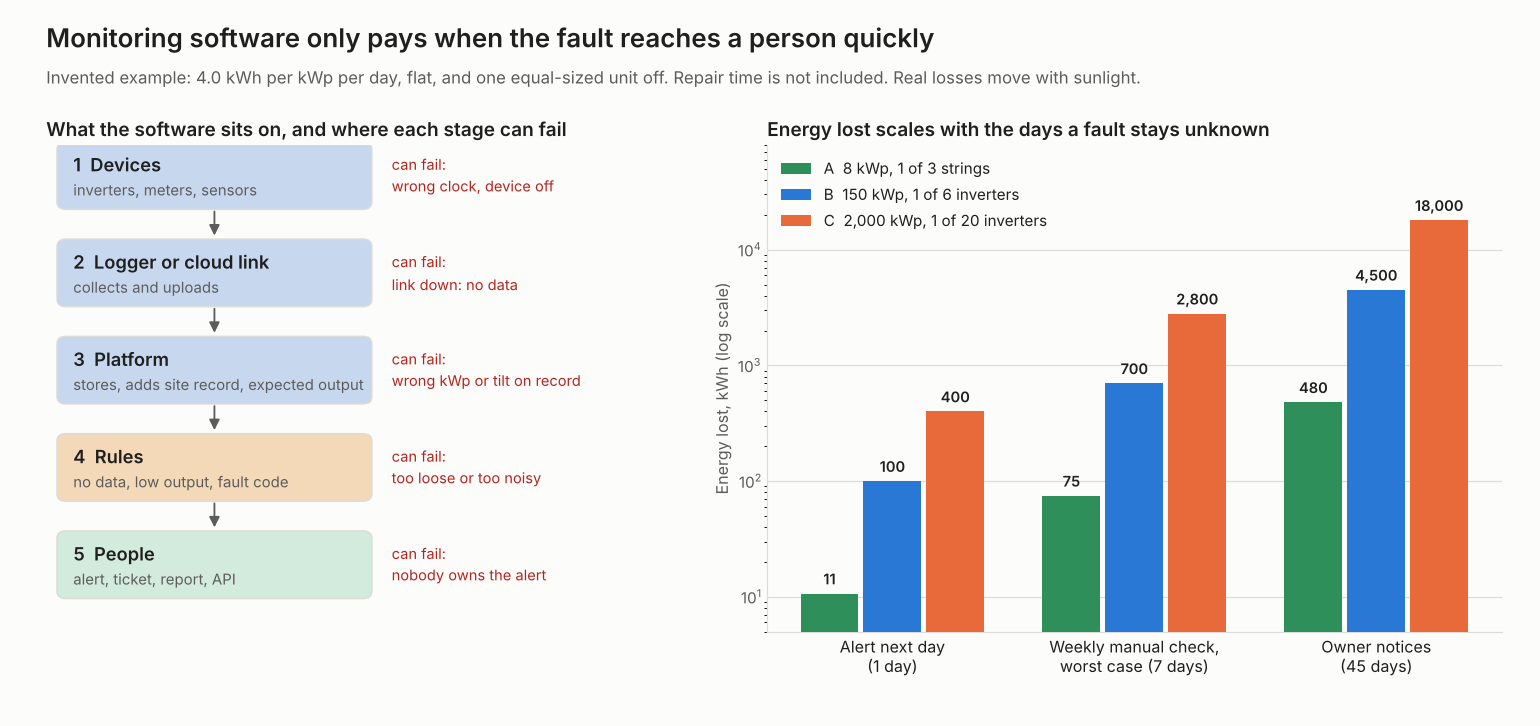
Figure 1. In an example 150 kWp case, a fault known after 45 days loses 45 times the energy of one known after 1 day. The chart’s log scale makes each gridline 10 times the one below.
For the 8 kWp home, the 45-day loss is only 72 USD. The cost there is more likely the visit and the owner’s trust. Repair time, truck rolls and part costs are not included. A real fault may be partial, or change with the weather.
Try your own numbers
Enter your own size, yield, share lost and price. The table repeats the 1, 7 and 45 day rows.
How solar software handles monitoring
Only Solar-Log and VCOM name other makers’ loggers. The Victron, SMA and Enphase pages name no other makers’ hardware. A cell says Yes only if the company page says it, as checked in October 2026. The table is not a ranking, and the list under it gives details and page dates.
| Software | Other brands’ hardware? | Alerts documented? | Data out: export or API? |
|---|---|---|---|
| Victron VRM | Not stated | Yes | Not stated |
| SMA Sunny Portal powered by ennexOS | Not stated | Yes | Partly |
| Solar-Log WEB Enerest 4 | Yes, for loggers | Yes | Yes |
| meteocontrol VCOM Cloud | Yes, for loggers | Yes | Yes |
| Enphase Enlighten | Not stated | Yes | Yes |
- Victron VRM names no other makers’ hardware. The page says VRM "is free and works with a GX device". Alerts come by email, app and web push, and communication (no-data) monitoring is a separate category. The API documentation page shows only a title. Pages read: VRM manual introduction. VRM manual, alarms and monitoring (no date printed, copyright 2026).
- SMA Sunny Portal lists an alert for communication faults, automatic inverter comparison with alerting and a performance ratio alert. It also lists data export of chart and list presentations, but no API appears on the page. Pages read: SMA feature table for Sunny Portal with Data Manager EDMM-20 (no date printed).
- Solar-Log names a Huawei logger and a meteocontrol logger. The datasheet says third-party loggers need an FTP or MQTT interface. The meteocontrol logger also needs an FTP licence from meteocontrol. Inverter brands are not named. It lists unlimited monitoring rules, converting alarms to tasks, data download and an API for developers. Pages read: Datasheet EN 04.2026, version 6.0.
- meteocontrol VCOM lists compatibility with loggers from various manufacturers, but names no inverter brands. It lists individual configuration of alarm criteria, though notification channels are not described. Data out covers CSV export of all measurement data and the VCOM API for external applications. Pages read: VCOM monitoring page (no date printed, copyright 2026).
- Enphase Enlighten pages name no other makers’ hardware. Owners and hosts may opt in to email notices of production issues. A Monitoring API gives system-level data, and device-level production data on the Kilowatt plan or higher, with OAuth 2.0. Pages read: Enphase API quickstart and docs pages (no date printed, copyright 2026). Enphase Australia support FAQ (no date printed).
Not stated: the company page we cite does not say. Partly means the page covers only part of the question. The Solar-Log and VCOM rows rate loggers, not inverters. The best solar monitoring software list covers more tools.
Common mistakes with monitoring software
FAQs
Is monitoring software the same as SCADA?
No. SCADA polls devices, stores history and sends commands inside one plant. Monitoring software mostly compares and alerts. Some products do both, so read the company page. See SCADA.
Is the inverter maker’s portal enough?
It can be, if every site uses that brand and you need output and fault alerts. Solar-Log and VCOM are logger-based platforms and list other makers’ loggers. The SMA, Victron and Enphase pages do not document other brands. A mixed fleet should check this first.
Is solar monitoring software free?
Some is. Victron’s manual says VRM "is free and works with a GX device". The pages read for the other four tools state no price, so confirm cost with each company. For more free options, see the best free solar monitoring software.
How soon will I know a site has stopped reporting?
How soon depends on the tool, and only Victron documents it. Victron’s manual ties the no-data alert to the log interval set in the GX device’s VRM settings, and a "Notify after" option lengthens it. The pages read for the other four tools give no timing, so ask each company for its default and test it on a trial site.
Can monitoring software change settings on a system?
Some can. Victron’s manual lists remote firmware updates and Remote VE.Configure for its own products. Reading and writing carry different risks. See remote diagnostics and configuration.
Related terms
- Alerts and alarms: the rules that turn data into messages.
- Fleet monitoring: ranking many sites on comparable numbers.
- Data logger: the on-site device that collects and uploads.
Next step: test the no-data rule on a trial site from the best solar monitoring software shortlist. For a phone view, see the best solar monitoring apps.
Sources
- Victron, VRM Portal manual, introduction (publication date blank, copyright 2026, checked October 2026).
- Victron, VRM Portal manual, alarms and monitoring (no date printed, copyright 2026, checked October 2026).
- Victron, VRM API documentation page (title only, checked October 2026).
- SMA, Sunny Portal powered by ennexOS feature table (no date printed, checked October 2026).
- Solar-Log, WEB Enerest 4 datasheet, EN 04.2026, version 6.0 (checked October 2026).
- meteocontrol, VCOM monitoring (no date printed, copyright 2026, checked October 2026).
- Enphase, Monitoring API quickstart and API docs (no date printed, copyright 2026, checked October 2026).
- Enphase Australia, support FAQ on alert emails (no date printed, checked October 2026).
- IEC webstore, IEC 61724-1:2021, second edition, published 2021-07-21 (catalogue page, the standard text is not quoted here, checked October 2026).
- Worked example: example inputs, computed with our own model.
Last updated 30 October 2026. Next scheduled review: 30 January 2027.