Free solar software is software you can use at no cost for a solar job. It may be free at the core, free up to a limit, or free with the maker’s hardware. OpenSolar is our first pick, for free design and proposals. HubSpot Sales Hub gives 2 users a free CRM (customer relationship management tool). SAM is free for yield (how much power the panels will make) and finance models.
Three more picks cover narrower jobs. SalesRabbit Lite suits a solo door-knocker. Victron’s calculator sizes off-grid charge controllers (devices that manage how panels charge a battery), and the Enphase App covers monitoring on Enphase systems.
The numbers below show the order of jobs, from design to monitoring, not a ranking. For design-only picks, see free solar design software. For our full directory, see the free solar software hub.
What does "free" mean on this page?
- Free core platform: The core product costs nothing today. Add-ons may be paid (OpenSolar, Easy PV Basic, PVGIS).
- Free tier with limits: Free up to a cap on size, users, designs or leads (such as SalesRabbit Lite and HubSpot).
- Free with hardware: Free because it sells the maker’s inverters, optimisers or MLPE (module-level power electronics). The designs and data focus on that brand (such as Enphase, Victron and Tigo EI).
- Open source: Free to use, change and share under a licence such as BSD 3-Clause (SAM, pvlib python).
- Freeware: Free to download and use, but the code is not open (INSEL).
- Free trial: Not free software. PVsyst, HelioScope and Pylon’s 5 free project credits let you test before you pay, so they are not picks here.
Quick picks
# | Job | Pick | Type of free | Starting price (company page, checked October 2026) | Score /100 (and where it comes from) |
|---|---|---|---|---|---|
1 | Design and proposals | Free core platform | Free. API and connectors paid (rates unpublished) | 70.5 (free design ranking) | |
2 | Door-to-door canvassing | SalesRabbit (general) | Free tier (1 user) | Free Lite. Team USD 59 per user per month | 82.6 (canvassing apps ranking) |
3 | CRM | Free tier (2 users) | Free. Starter USD 7-20 per seat per month | 73.7 (free solar CRM ranking) | |
4 | Off-grid charge-controller sizing | Free, Victron products only | Free | 76.5 (free calculators ranking) | |
5 | Yield and financial modelling | Open source | Free | 80.0 (financial modelling ranking) | |
6 | Monitoring | Free with hardware | Free with Enphase hardware | 70.3 (free monitoring ranking) |
How did we choose these free solar software picks?
How the score is weighted
- Use-case fit 35%
- User reviews 20%
- Pricing 15%
- Ease of use 10%
- Support 10%
- Momentum 10%
We scored 15 tools with a free plan, free tier or free licence for this page from 22 to 25 October 2026. Only OpenSolar reached our minimum match score (4 out of 10), and a ranking of one is not useful.
So each pick is the top free product, above that bar, on our own ranking for its job. Its "job-ranking score" comes from that page, so picks are not scored against each other. Scores depend on the job: OpenSolar scores 70.5/100 for free design but 76.0/100 on our free solar proposal software ranking. Tools further down show their scores from this page.
Every score uses the same six criteria. We worked from company documents, pricing pages, licence files and public reviews. We did not run projects in any tool.
- Use-case fit (35%): How well it does the job its ranking covers.
- User reviews (20%): G2, Capterra and app-store ratings. A few reviews count for less, and no reviews gets a neutral 5.0.
- Pricing (15%): Fully free with no lock-in scores highest. Free with hardware, capped tiers and per-permit fees score lower.
- Ease of use, support and product momentum (10% each): Review sub-scores, docs and dated releases. These are neutral without evidence.
We never use third-party ratings in rating markup. Read the full method: how we score software.
1. OpenSolar: best for free design and proposals
Best for: Installers who want design, proposals, e-signature and payments with no subscription. Job-ranking score: 70.5/100.
What it is: OpenSolar Inc builds this design, proposal and sales platform. Hardware and finance partners pay for it, not user subscriptions. Residential and small commercial installers use it, and the company cites use in more than 160 countries.
Why we picked it: It was the only one of the 15 tools we scored for this page to pass our fit bar. It also tops our free design ranking, and the core platform has no seat fees.
Key features:
- 3D and 2D rooftop design with shading.
- AI design (OS 3.0, September 2025).
- Interactive web proposals with e-signature and payment collection.
- Finance options, lead capture and a hardware shop.
- Permitting link to SolarAPP+ (an online permit tool), plus AI lead generation (June 2026) and sales tools (August 2026).
- A premium imagery marketplace.
Pricing: The core platform is free, with unlimited users per the company. OpenSolar says it "will always be free for you to use". Since 16 April 2026, it charges for two things at unpublished rates. API (application programming interface) access is usage-based through the OpenSolar Wallet, with a 30-day free trial. The Xero and QuickBooks connectors cost a monthly fee per company. Premium imagery is optional and paid. Checked October 2026 on the OpenSolar pricing notice.
Pros (from G2 reviews and our research):
- You can add, remove and move panels quickly when a layout changes.
- The app is easy to use and gives your crew job details in the field.
- Your whole team can use the core platform with no seat fees.
Cons (from G2 reviews and our research):
- Layouts are not customised automatically, so an engineer still needs to review them.
- The interface looks dated, though it works.
- It is not completely free. The API and the Xero and QuickBooks connectors cost extra, at rates OpenSolar does not publish.
Reviews: G2 4.8/5 (3 reviews), checked October 2026. That is too few to rely on.
Read our full OpenSolar review or our OpenSolar alternatives.

Want to see OpenSolar working? Book a demo with the SolarSoftwares team.
Book a demoYour request goes by email to the SolarSoftwares team. A time is set only after we reply. It does not change any score or ranking.
2. SalesRabbit (general canvassing app): best for free door-to-door canvassing
Best for: A solo solar rep who knocks doors and wants maps and lead tracking at no cost. Job-ranking score: 82.6/100.
What it is: SalesRabbit, Inc. builds this app for door-to-door selling in many trades. It has no solar features, but solar teams use it for territory maps, leads and rep management.
Why we picked it: It tops our canvassing apps ranking and has a free plan on its own pricing page. It also has hundreds of reviews, unlike solar-built SolarHub CRM.
Key features:
- Map-based canvassing and lead tracking.
- Territory management and route planning.
- Live rep GPS tracking on team plans.
- Appointment scheduling for setters and closers.
- An API with more than 60 native integrations on Pro.
Pricing: SalesRabbit Lite is free for a single user, with limited features and no team tools. Team costs USD 59 per user per month, billed monthly. Pro costs USD 49 per user per month billed annually, or USD 75 monthly. Enterprise is quote only, so you ask the company for a price. Paid plans need a one- to three-year contract and an implementation package with no published price. Checked October 2026 on the SalesRabbit pricing page.
Pros (from user reviews on G2, Capterra and the App Store):
- New reps pick it up fast. Ease of use is the most-mentioned theme on G2.
- On team plans, managers see reps live on a map and split territories cleanly.
- Reps keep every lead and follow-up in one place, so fewer doors get missed.
Cons (from user reviews):
- It can freeze or crash, mostly with large datasets.
- Some users find support slow.
- One reviewer reports quarterly billing and a contract that was hard to cancel.
Reviews: G2 4.5/5 (433 reviews), Capterra 4.2/5 (191 reviews) and App Store 4.5/5 (1,200 ratings), checked October 2026.
Read our full SalesRabbit review.
Want to see SalesRabbit (general canvassing app) working? Book a demo with the SolarSoftwares team.
Book a demoYour request goes by email to the SolarSoftwares team. A time is set only after we reply. It does not change any score or ranking.
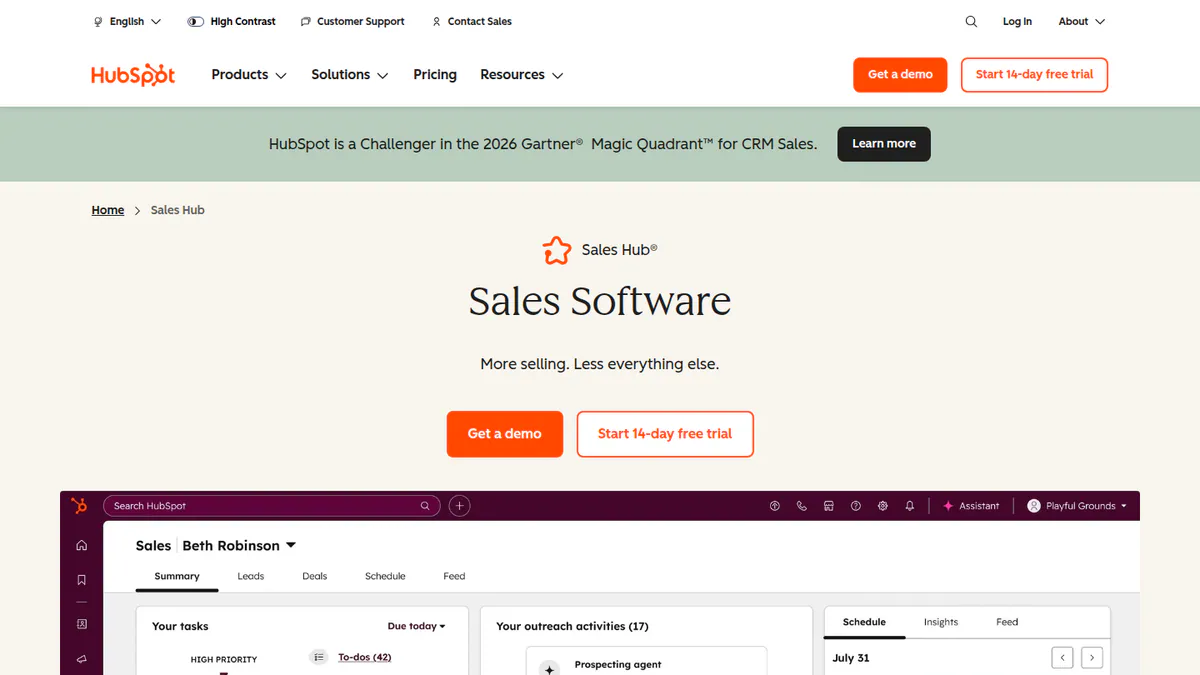
3. HubSpot Sales Hub (general CRM): best for a free sales pipeline
Best for: A two-person solar sales team that wants a real pipeline at no cost. Job-ranking score: 73.7/100.
What it is: HubSpot, Inc. sells Sales Hub as a general CRM to sales teams of every size. It is not built for solar. Some installers link it to OpenSolar or Aurora through third-party apps.
Why we picked it: It scored highest of the free CRM plans we ranked. Its free plan gives two users a full pipeline, backed by more than 500 Capterra reviews.
Key features:
- Contact, deal and pipeline management.
- Email tracking, templates and meeting links.
- Dashboards and reporting (10 dashboards on the free plan).
- Sequences and sales automation on paid plans.
- Marketplace apps, including a third-party OpenSolar two-way sync.
Pricing: Free for up to 2 users, with HubSpot branding, 3 templates and no sequences or sales automation. Starter is USD 7 or USD 20 per seat per month, and the page does not label which is annual. Professional is USD 90 or USD 100 per seat, plus USD 1,500 required onboarding. Enterprise starts at USD 150 per seat, plus USD 3,500 onboarding. Checked October 2026 on the HubSpot pricing page.
Pros (from user reviews on Capterra):
- Your whole sales process sits in one pipeline, which helps close deals faster.
- Most users find it easy, and it links tightly to HubSpot’s marketing tools.
- You can track each prospect in detail and share it across teams.
Cons (from user reviews):
- Costs climb fast as you add seats, and key features sit in higher tiers.
- Some tools, such as calling, are buggy.
- Advanced features take time to learn, and some users struggle to get support.
Reviews: Capterra 4.5/5 (506 reviews), checked October 2026.
Want to see HubSpot Sales Hub (general CRM) working? Book a demo with the SolarSoftwares team.
Book a demoYour request goes by email to the SolarSoftwares team. A time is set only after we reply. It does not change any score or ranking.
4. Victron MPPT Sizing Calculator: best for free off-grid charge-controller sizing
Best for: Installers who specify Victron charge controllers for off-grid and hybrid jobs. Job-ranking score: 76.5/100.
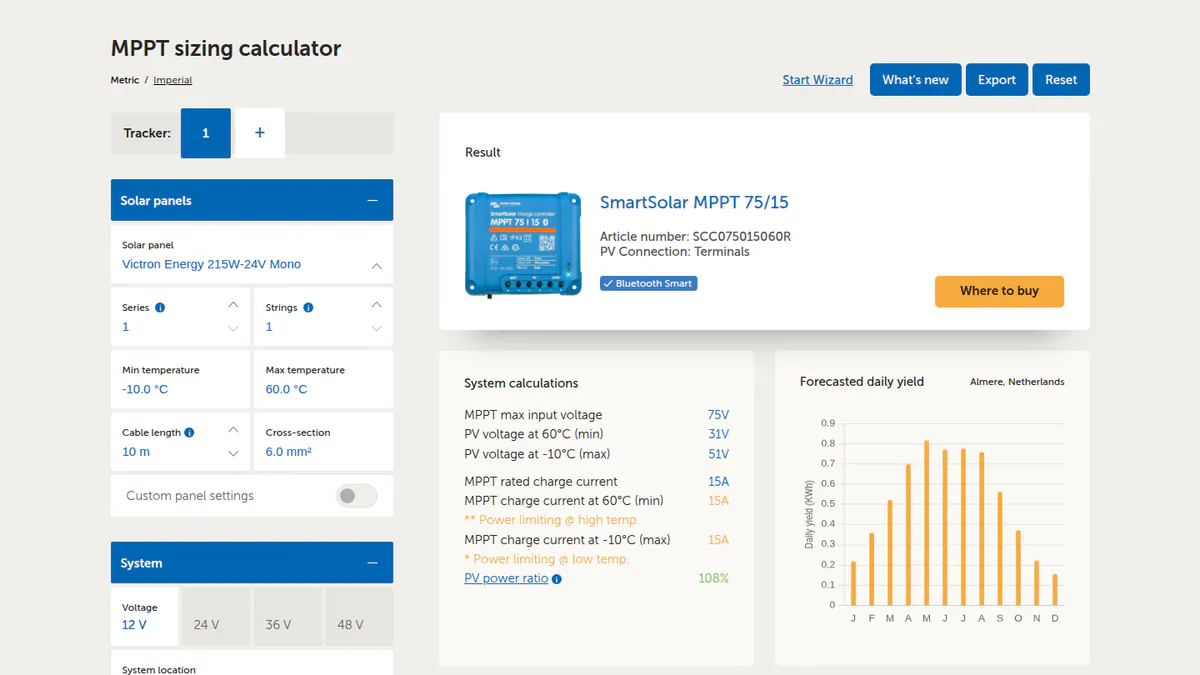
What it is: Victron Energy makes this free web calculator. It matches a PV array (a group of solar panels) to a Victron MPPT (maximum power point tracking) charge controller. It also matches arrays to an EasySolar or RS unit. Off-grid, marine, RV and hybrid installers use it.
Why we picked it: It tops our free calculators ranking. Its large module database and local temperature checks make controller sizing quick and cost nothing.
Key features:
- A wizard that matches modules to Victron MPPT controllers.
- A database of more than 164,000 PV modules.
- Custom panel entry behind an "advanced" switch (restored September 2024).
- Voltage checks based on local temperatures, with the cheapest suitable controller shown first.
- Session memory, setup export and 13 languages.
- An Excel version for offline or custom use.
Pricing: Free. Results are limited to Victron controllers. Checked October 2026 on Victron Professional’s release note.
Pros (from user posts on the Victron Community and our research):
- You can pick the right Victron controller in minutes.
- Printouts make a clean record for the customer file. One installer and dealer uses it on most jobs this way (August 2024).
- Victron listens: staff answered users and brought back custom panels within a month of the redesign.
Cons (from user posts and our research):
- It only sizes Victron controllers, so it is no help for other brands.
- The database misses small flexible marine and RV panels and some older modules, so you may need to type in specs by hand.
- Users asked for stricter oversizing limits after some controllers failed at 125% of rating.
Reviews: No user reviews found as of October 2026. The web tool has no G2, Capterra or app-store listing.
What we could not confirm: whether Victron added the stricter oversizing option.
Want to see Victron MPPT Sizing Calculator working? Book a demo with the SolarSoftwares team.
Book a demoYour request goes by email to the SolarSoftwares team. A time is set only after we reply. It does not change any score or ranking.
5. SAM: best for free yield and financial modelling
Best for: Anyone who needs a detailed PV and battery cash-flow model at no cost. Job-ranking score: 80.0/100.
What it is: The System Advisor Model is a free, open-source desktop simulator. It comes from the US national lab formerly called NREL, now listed as the National Laboratory of the Rockies. Engineers, analysts and developers use it, and it also tops our open-source libraries list.
Why we picked it: It tops our financial modelling ranking, paid tools included. The open licence lets you use it on paid client work.
Key features:
- PV modelling from rooftop to utility scale.
- Battery storage in front of or behind the meter.
- Financial models, including PPA (power purchase agreement) and third-party ownership.
- PySAM and an SDK (software development kit) for scripted runs.
- Published checks of the PV model against measured data.
Pricing: Free for commercial, academic or personal use. You get a free key by email on first launch. The code is under BSD 3-Clause, an open-source licence that allows commercial use. Checked October 2026 on the SAM README.
Pros (from our research):
- You can use it on paid client work at no cost.
- One engineering firm, Pure Power, calls it the most capable free tool for grid-tied PV with storage.
- You can get help on a forum, by email or at open round tables every two weeks.
Cons (from our research):
- Pure Power notes that most financiers do not accept SAM output in place of PVsyst reports.
- It is a simulator, not a layout, SLD (single-line diagram) or proposal tool.
- Tariff and incentive data is US-centric.
Reviews: No user reviews found as of October 2026. We found no G2 or Capterra listing.
Read our full SAM review.
Want to see SAM working? Book a demo with the SolarSoftwares team.
Book a demoYour request goes by email to the SolarSoftwares team. A time is set only after we reply. It does not change any score or ranking.
6. Enlighten / Enphase App: best for free monitoring
Best for: Residential installers who fit Enphase microinverters (small inverters on each panel) and batteries. Job-ranking score: 70.3/100.
What it is: Enphase Energy’s free monitoring stack has two parts. Owners get the Enphase App, formerly Enlighten. Installers get the Installer Portal and Installer App to manage Enphase microinverter and battery fleets.
Why we picked it: It tops our free monitoring ranking. It gives per-panel data and a fleet view at no cost, and its owner app has a very large rating base.
Key features:
- Per-microinverter array view.
- A power-flow view for solar, battery and grid (users say it lags about 15 minutes).
- An installer fleet dashboard with site filtering (per a July 2023 installer newsletter).
- Remote commissioning (first start-up and testing), CT (current transformer) checks and grid profile selection.
- Weekly, monthly and yearly energy reports.
Pricing: Free with Enphase hardware, for owners and registered installers. Enphase has no pricing page, but the app pages we checked list no paid features. Earlier third-party reports of paid tiers could not be confirmed. Checked October 2026 on Enphase’s app announcement.
Pros (from user reviews and SolarQuotes):
- Per-panel data lets you find a failed module before you roll a truck.
- Owners find the layout easy, which means fewer support calls for you.
- You can compare output with past weather and pull 12 months of raw data.
Cons (from user reviews and SolarQuotes):
- Consumption figures can disagree with the utility meter.
- Notifications often fail, so you may miss a fault.
- The Installer Toolkit app can crash during commissioning.
Reviews: App Store 4.6/5 (93,000 ratings) and Google Play 3.8/5 (28,700 ratings, via a third-party tracker), checked October 2026.
Want to see Enlighten / Enphase App working? Book a demo with the SolarSoftwares team.
Book a demoYour request goes by email to the SolarSoftwares team. A time is set only after we reply. It does not change any score or ranking.
Which free design tools suit specific installers?
These tools suit one market or system size, or come free from a hardware maker. Their scores come from this page. All design tools sit in the design and simulation category.
Easy PV: free design for UK domestic installers (48.9/100)
Easy PV is a browser-based UK design tool from the distributor Midsummer. It handles MCS (Microgeneration Certification Scheme) sums and DNO (distribution network operator) forms.
Free: The Basic plan, with no stated limits. It covers 2D and 3D roof design, yield, self-consumption, and wind and snow checks. It also gives an automatic schematic, financial projections, pricing, a proposal and automated DNO forms.
Paid: Pro costs GBP 35 + VAT per user per month, with no contract. It adds unlimited "Magic" auto-design, team management, CRM links, e-signing, pre-install survey, photo records and automatic DNO applications. Enterprise is on request. Checked October 2026 on the Easy PV site and help centre.
No design lock-in, though it links to a Midsummer trade account for live stock and prices. We found no G2, Capterra or Trustpilot listing. The last dated update we found is the February 2023 3D design release. Not for installers outside the UK, or teams that need multi-user tools without Pro. See also solar design software in the UK.
Archelios Pro Free: free tool for small European projects (46.3/100)
Archelios Pro, from Trace Software, is French software for 3D PV design, yield, self-consumption and financial simulation, with SketchUp and Revit plug-ins.
Free: archelios PRO Free, for projects up to 9 kWp (kilowatts peak), per the product page. The company says it is not a trial. It covers 3D modelling of surroundings and automatic layout. It also covers string setup (how panels wire into inverters), near and far shading, self-consumption with storage and financial outputs.
Paid: Silver costs EUR 990 per year (up to 100 kWp per project). Gold costs EUR 1,490 (up to 1 MWp, P75/P90), and Platinum EUR 1,990 (no power limit), all excluding VAT. Full electrical design is in archelios CALC, sold separately. Checked October 2026 on the Trace Software shop.
No hardware lock-in is documented, and G2 shows 0 reviews (October 2026). It is not for designs above 9 kWp on the free tier. Installers outside France may also struggle. It is built around French grid data such as the Enedis/Linky link (France’s grid operator and its smart meter).
Inverter-maker design tools: free, but built around one brand
- SolarEdge Designer (42.4/100): Web layout on satellite images, 3D site models and one-click stringing to SolarEdge rules. It also simulates energy with shading and commercial load profiles, and gives a BOM (bill of materials). Our facts come from a 2018 SolarEdge press release and a 2020 trade article. We could not confirm its current free status on the company’s page.
- Sunny Design (39.2/100): SMA’s free tool for string sizing against SMA inverters. It covers yield and self-consumption with shading, plus battery, off-grid and hybrid design, a schematic and a device list. Sunny Design PRO costs EUR 600 a year net, with a 1-month free trial. SMA does not say whether it models non-SMA inverters.
- Fronius Solar.creator (39.2/100): Free with a Fronius account, with unlimited projects. It suggests Fronius inverters and batteries, takes any module from its database, and gives yield and economic reports. No 3D roof layout or shading is described.
- KACO blueplanet PV-designer (36.6/100): Runs on the PV*SOL premium engine. KACO says it is free when you design with KACO inverters. Whether non-KACO designs are free is not confirmed.
Who should not buy them: Installers who mix inverter brands or need a proposal and CRM workflow, since each tool helps sell one maker’s kit. See SolarEdge Designer alternatives for other options.
Skelion: free design inside SketchUp, with a tight cap (41.2/100)
Skelion is a SketchUp plug-in that places PV and solar thermal panels on 3D models, with shading and energy estimates. A SketchUp forum user reports that the free version stops at 10 panels. We could not confirm this, as the company’s pages did not load.
Skelion Pro costs USD 200 per year per licence, plus a SketchUp subscription. Checked October 2026 on the Skelion Pro page. It is not for installers outside SketchUp, or anyone who needs quick support. A user’s support request on the SketchUp forum got no reply from the company.
More free CRM options
SolarHub CRM: the only solar-specific free CRM tier we found (40.5/100)
SolarHub CRM is a low-cost Australian solar CRM. It has lead capture, automatic lead assignment, proposal templates with e-signature and simple design sketches.
Free: A free tier, but sources conflict on its limits. Capterra lists 5 designs a month, up to 3 users and 500 leads. An earlier check of the company site recorded 25 quotes a month for up to 3 users.
Capterra lists paid plans from USD 29 a month. An earlier check suggested AUD prices. We could not re-check any of this on the company site in October 2026. Source: Capterra, which shows 0 reviews. Not for installers outside Australia, or anyone who needs confirmed limits before moving leads.
Other general CRMs with free plans (not scored on this page): Zoho CRM is free for up to 3 users. Zoho Bigin is free for 1 user, 1 pipeline and 500 records (company pages, checked October 2026). Our free solar CRM section compares them with HubSpot.
More free monitoring
Tigo EI: free installer portal for Tigo systems (45.5/100)
Tigo EI is the web and mobile platform for monitoring, commissioning and fleets on systems with Tigo TS4 MLPE and Cloud Connect hardware. It is free only because of that hardware.
Free: EI Basic, for the life of Tigo-monitored hardware. It gives module-level power and energy, 15-minute data, limited history, monthly reports and basic alerts. Installers also get a multi-site map view, equipment control and support for third-party inverters, meters and batteries.
Paid: Premium costs USD 20 per site per year (up to 35 modules). It adds 1-minute data, unlimited history, custom alerts and API access. Professional costs USD 199 per company account per year, with a portfolio dashboard, commissioning tracking and support tickets for unlimited seats. Checked October 2026 on the Tigo EI pricing page.
App Store rating: 4.0/5 (127 ratings), checked October 2026. Many reviewers are homeowners or DIY users. If you do not fit Tigo MLPE, use your inverter maker’s own portal instead.
More free yield checks
PVGIS: free quick yield check (42.5/100)
PVGIS is a web tool and API from the European Commission’s Joint Research Centre. It gives solar radiation data and PV yield estimates anywhere except the poles.
Free: All tools, with no login. You get grid-connected and tracking yield, off-grid with battery, and hourly, daily and monthly radiation. It also gives horizon profiles, TMY (typical meteorological year) files and a non-interactive API.
You must credit the data to PVGIS and the European Communities. The download page does not address commercial use directly. PVGIS 5.3 has run since September 2024, and PVGIS 6 is in public beta. Checked October 2026 on the JRC PVGIS page.
Limits: No layout, 3D near shading or detailed electrical modelling, so it will not give a roof shade report or proposal. Hourly data is in UTC (world standard time), so shift it to local time to match tariffs (Buildhub forum). Watch out for commercial sites that use "PVGIS" in their name. The official tool is on europa.eu.
More free and open-source code
pvlib python: open-source library for engineers (40.0/100)
pvlib python is a BSD 3-Clause Python library of PV performance functions. It started at Sandia National Laboratories and is now a NumFOCUS Affiliated Project.
It covers solar position, irradiance data (including PVGIS and NSRDB, the US solar radiation database), transposition and temperature. It also has single-diode and PVWatts power models, losses, tracking, bifacial and battery functions.
Free: Everything, including commercial use, changes and sharing with notice. There is no paid tier. Source: the pvlib documentation, checked October 2026. It has no user interface, so it is not for installers without Python skills.
Also free for engineers: INSEL (37.5/100) is freeware, not open source. It is a block-diagram simulation tool for PV, solar thermal, storage and building energy, aimed at engineers and researchers.
What does each free solar tool cost?
Tool | Job | Type of free | Free limit | Hardware lock-in | Paid upgrade |
|---|---|---|---|---|---|
Design and proposals | Free core platform | Core unlimited. API and connectors paid | No | Unpublished connector fees | |
SalesRabbit Lite | Canvassing | Free tier | 1 user, limited features | No | Team USD 59/user/month |
CRM | Free tier | 2 users, 3 templates, 10 dashboards | No | Starter USD 7-20/seat/month | |
Off-grid charge-controller sizing | Free, one brand | None stated | Victron | None | |
Yield and finance | Open source | None | No | None | |
Monitoring | Free with hardware | None found | Enphase | None found | |
UK design | Free core platform | No stated limits on Basic | No (Midsummer trade link) | Pro GBP 35 + VAT/user/month | |
Archelios Pro | Design and simulation | Free tier | 9 kWp per project | No | From EUR 990/year |
Brand design | Free with hardware | Not stated | SolarEdge | None | |
Brand design | Free with hardware | Some features need registration | SMA | PRO EUR 600/year | |
Fronius Solar.creator | Brand design | Free with hardware | Unlimited projects | Fronius | None |
Skelion | SketchUp design | Free tier | 10 panels (user report) | No. Needs SketchUp | USD 200/year |
CRM | Free tier | Conflicting (5 designs or 25 quotes a month, 3 users) | No | From USD 29/month (Capterra) | |
Tigo EI | Monitoring | Free with hardware | 15-minute data, limited history | Tigo | Premium USD 20/site/year |
Quick yield | Free core platform | None. Attribution required | No | None | |
pvlib python | Code library | Open source | None | No | None |
Also considered
- SolarAPP+ (not free for installers, scored 35.5/100): often called free, but it is free only for local authorities. Installers pay USD 35 per solar permit and USD 30 for storage, per the SolarAPP+ help centre (updated July 2026).
- PVsyst: Not free. A fresh install runs a 30-day evaluation with generic components and watermarked reports, then a demo mode. Prices are in the FAQs below. See PVsyst alternatives.
- HelioScope: Not free. It has a free trial of unstated length, then Basic costs USD 159 a month. See HelioScope alternatives.
How do you choose the best free solar software for your job?
- UK MCS installers should add or compare Easy PV for MCS sums and DNO forms.
- If you only install one inverter or MLPE brand, use that maker’s free design and monitoring tools. Accept that the designs focus on their equipment.
- In Australia, SolarHub CRM’s free tier is worth a look next to HubSpot.
- A solo door-knocker can start on SalesRabbit Lite and move to Team when the crew grows.
- For a yield check in minutes, use PVGIS rather than SAM.
- If your team writes Python, build on pvlib python.
- If a lender needs a bankable report, budget for PVsyst. No free tool here replaces it. See our solar simulation software ranking.
- If free tools cost you more time than they save, compare paid options in solar software for small business or the best solar software hub.
Free solar software FAQs
Is there free solar design software?
Yes. As of October 2026, OpenSolar’s core design and proposal platform is free with unlimited users. Easy PV’s Basic plan is free for UK installers, and Archelios Pro Free covers projects up to 9 kWp. SMA, Fronius and SolarEdge also have free design tools built around their own kit.
Is PVsyst free?
No. In October 2026, PVsyst 8 Professional costs CHF 700 a year per seat. Student and classroom licences cost CHF 25 a year with marked reports. A fresh install gives a 30-day evaluation, then drops to a demo mode with most features removed.
Is there a free alternative to PVsyst or HelioScope?
For yield and finance models, SAM is free and open source, and PVGIS gives free quick yield estimates. Neither replaces a PVsyst report for lenders. One engineering firm says most financiers do not accept SAM output. Free layout work stops at 9 kWp with Archelios Pro Free (checked October 2026).
Is OpenSolar completely free?
The core is free. Its design, proposal, e-signature and payment features cost nothing, because hardware and finance partners fund them. Since 16 April 2026, API access and the Xero and QuickBooks connectors are paid at unpublished rates, and premium imagery is optional and paid.
Is there free solar software for installers?
Yes, for most jobs, as of October 2026. Use OpenSolar for design and proposals, HubSpot’s free plan for a CRM, your hardware maker’s portal for monitoring, and PVGIS or SAM for yield checks. Permitting is the gap, since SolarAPP+ charges installers USD 35 a permit.
Are inverter-maker design tools free to use with any panels?
Mostly for modules (panels), not inverters. Fronius Solar.creator accepts any module from its database or one you add, but suggests Fronius inverters and batteries. SMA does not say whether Sunny Design models non-SMA inverters. KACO says its tool is free with KACO inverters (all checked October 2026).
Sources
All checked 22 to 25 October 2026.
- OpenSolar: pricing notice, free features, news, G2
- SalesRabbit: pricing, G2, Capterra, App Store
- HubSpot Sales Hub: pricing, Capterra
- Victron MPPT Sizing Calculator: release note, Victron Community thread
- Enphase: app announcement, App Store, SolarQuotes
- Easy PV: plans and features, Pro pricing FAQ, 3D design update
- Archelios Pro: shop, product page
- Inverter-maker tools: SolarEdge Designer press release, Sunny Design, Fronius Solar.creator, KACO blueplanet PV-designer
- Skelion: Pro pricing, SketchUp forum thread
- CRM: SolarHub CRM on Capterra, Bigin pricing, Zoho CRM editions
- Tigo EI: pricing, monitoring, App Store
- SAM: README and licence, Pure Power
- PVGIS: JRC PVGIS, Buildhub forum
- pvlib python and INSEL: pvlib documentation, INSEL
- Not free: SolarAPP+ installer fees, PVsyst shop, HelioScope pricing
Last updated 28 October 2026. Next scheduled review: 23 January 2027.